
1. Introduction
Thank you for choosing the SKRT Large 4-Wheel Mobility Scooter, model XW-E08. This electric heavy-duty wheelchair device is designed to provide reliable and comfortable mobility for seniors and adults, supporting a capacity of up to 400 lbs. It features adjustable speed control, a rear trunk for storage, and a comfortable seat with extension capabilities. This manual provides essential information for the safe and effective use, maintenance, and troubleshooting of your new mobility scooter.
The SKRT XW-E08 scooter is delivered fully assembled, having undergone quality control and assembly in a US warehouse, ensuring it is ready for immediate use upon receipt.

Image: The SKRT Large 4-Wheel Mobility Scooter (XW-E08) in black, showcasing its robust design and four wheels.
2. Safety Information
Your safety is paramount. Please read and understand all safety instructions before operating the scooter. Failure to do so may result in injury or damage to the scooter.
- Weight Capacity: Do not exceed the maximum weight capacity of 400 lbs.
- Speed Control: For seniors, it is suggested to use a mid-speed setting to ensure safe operation. The variable speed control allows adjustment from 7.5 mph to 15 mph.
- Anti-Tippers: The scooter is equipped with rear wheel anti-tippers to provide extra stability and prevent tipping backward, especially on inclines.
- Lighting System: Utilize the full lighting system, including headlights, taillights, and turn signals, for visibility and signaling, especially in low-light conditions or when turning.
- Environmental Conditions: Avoid operating the scooter in extreme weather conditions, on excessively steep inclines, or on uneven terrain that could compromise stability.
- Pre-Operation Check: Always perform a quick check of the brakes, tires, and battery level before each use.

Image: Close-up views highlighting the anti-tipper wheels for stability and the comprehensive LED lighting package, including headlights, taillights, and turn signals.
3. Components and Features
Familiarize yourself with the main components of your SKRT Mobility Scooter:
- Handlebars: Equipped with controls for lights, horn, and speed adjustment.
- Control Panel: Digital display showing speed, battery indicator, and range.
- Seating: Adjustable seat with a comfortable backrest and armrests, designed for user comfort.
- Rear Trunk: A storage basket located at the rear for personal items.
- Wheels: Four robust wheels for stability and smooth operation. Rear wheels include anti-tippers.
- Lighting System: Integrated headlights, taillights, and turn signals for enhanced visibility.
- Motor: Powerful 500-watt brushless motor.
- Battery: 48-volt 20-ah lead-acid battery pack.
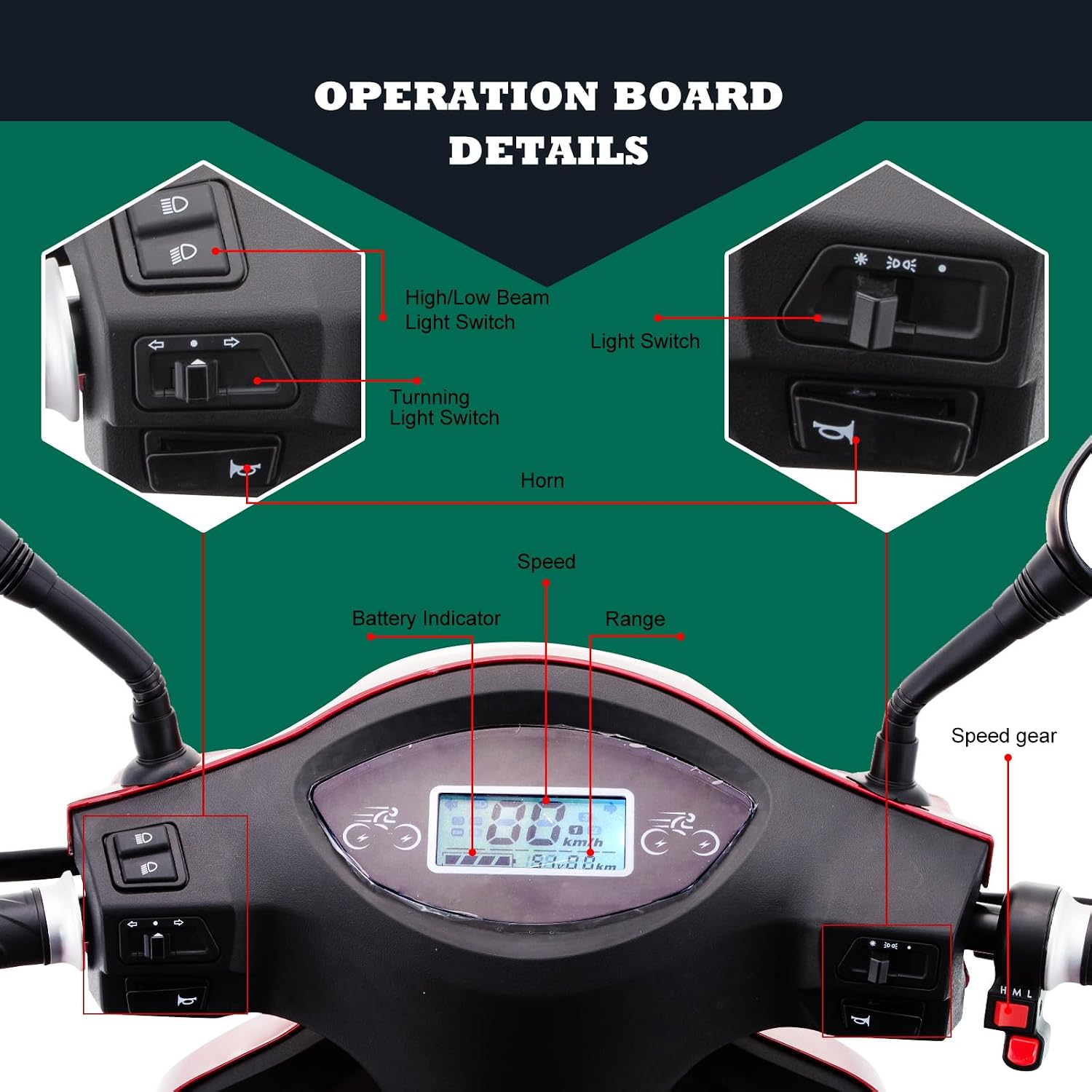
Image: Detailed view of the scooter's operation board, showing the High/Low Light Switch, Turning Light Switch, Horn, Light Switch, Speed display, Battery Indicator, Range display, and Speed gear controls.
4. Setup
The SKRT XW-E08 Mobility Scooter is designed for immediate use upon delivery. It requires no assembly, as it is fully assembled and quality-checked in a US warehouse.
Initial Charging
Before your first ride, ensure the battery is fully charged. Connect the charger to the scooter's charging port and then to a standard electrical outlet. The charging time is approximately 6-7 hours for a full charge. Refer to the battery indicator on the control panel to monitor the charging status.
5. Operating Instructions
Operating your SKRT Mobility Scooter is straightforward. Follow these steps for a safe and enjoyable ride:
- Power On: Turn the key to the 'ON' position to power on the scooter. The control panel will illuminate.
- Adjust Speed: Use the variable speed control dial to set your desired speed. Speeds can be adjusted from 7.5 mph for slower, more controlled movement up to 15 mph for faster travel.
- Engage Drive: Gently twist the throttle on the handlebar to begin moving. Release the throttle to slow down.
- Braking: Apply the brake levers on the handlebars to stop the scooter.
- Lights and Horn:
- Use the High/Low Light Switch to toggle between headlight settings.
- Activate the Turning Light Switch for left or right turn signals.
- Press the Horn button to alert others.
- Monitoring: Keep an eye on the Battery Indicator and Range display on the control panel to manage your ride duration.

Image: The scooter shown with key performance metrics: 500W 48V motor, 15 mph maximum speed, 6-7 hours charging time, 25 miles drive mileage, and 9° max climbing degree.
6. Maintenance
Regular maintenance will ensure the longevity and optimal performance of your SKRT Mobility Scooter.
- Battery Care:
- Charge the 48-volt 20-ah lead-acid battery regularly, even if the scooter is not in frequent use, to maintain battery health.
- Avoid completely draining the battery before recharging.
- Store the scooter in a cool, dry place when not in use, especially during long periods of inactivity.
- Cleaning: Wipe down the scooter with a damp cloth. Avoid using harsh chemicals or direct water spray, which could damage electronic components.
- Tire Inspection: Periodically check tire pressure and for any signs of wear or damage. Ensure tires are properly inflated for optimal performance and safety.
- General Inspection: Regularly check all nuts, bolts, and fasteners to ensure they are tight. Inspect brake cables and lights for proper function.
7. Troubleshooting
If you encounter issues with your SKRT Mobility Scooter, consider the following common solutions:
| Problem | Possible Cause | Solution |
|---|---|---|
| Scooter does not power on. | Battery is low or depleted; Key is not fully inserted or turned. | Charge the battery fully; Ensure the key is correctly inserted and turned to 'ON'. |
| Scooter moves slowly or lacks power. | Low battery charge; Speed setting is too low. | Recharge the battery; Adjust the speed control dial to a higher setting. |
| Lights are not working. | Light switch is off; Electrical connection issue. | Check the light switch position; If problem persists, contact support. |
| Unusual noises during operation. | Loose components; Obstruction in wheels. | Inspect for loose parts and tighten; Check wheels for debris. If noise continues, seek professional assistance. |
For issues not listed here or if solutions do not resolve the problem, please refer to the Warranty & Support section for assistance.
8. Specifications
Key technical specifications for the SKRT Large 4-Wheel Mobility Scooter (Model XW-E08):
- Model Number: XW-E08
- Product Dimensions (L x W x H): 66.9" x 26.4" x 47.6"
- Item Weight: 250 Pounds
- Maximum Weight Capacity: 400 LBS
- Motor: 500-watt brushless motor
- Battery: 48-volt 20-ah lead-acid battery (4pc a pack)
- Top Speed: Up to 15 mph (variable speed control from 7.5 mph)
- Maximum Range: Approximately 25 miles on a single charge
- Charging Time: 6-7 hours
- Max Climbing Degree: 9°
- Color: Black (as per this variant)
- Manufacturer: DOUBLE GLOBAL INC

Image: Diagram illustrating the overall dimensions of the SKRT Mobility Scooter: 66.9 inches length, 26.4 inches width, and 47.6 inches height.
9. Warranty and Support
SKRT provides the following warranty coverage for your mobility scooter:
- Frame: Lifetime warranty
- Battery and Motor: 12-month warranty
- Electronic Components: 6-month warranty
- Limited warranty for other parts.
For any questions or warranty claims, please contact the manufacturer or seller directly. The company is located in California, USA, for support inquiries.
Please Note:
If the mobility scooter is ridden or used, returns for a refund may be subject to restocking fees.