
FELEMAN B0D83HG5KX
FELEMAN Portable CD Player & Bluetooth Speaker User Manual
Model: B0D83HG5KX | Brand: FELEMAN
Introduction
This manual provides detailed instructions for the operation and maintenance of your FELEMAN Portable CD Player & Bluetooth Speaker. Please read this manual thoroughly before use to ensure proper functionality and to maximize your listening experience.

Image: The FELEMAN Portable CD Player and Bluetooth Speaker, showcasing its wooden finish, integrated speakers, digital display, and included remote control. Two battery icons indicate its rechargeable nature.
Package Contents
Verify that all items listed below are included in your package:
- CD Player x1
- Remote Control x1
- AC Adapter x1
- USB to Type-C Charging Cable x1
- User Manual x1

Image: The FELEMAN Portable CD Player, its retail box, remote control, AC adapter, USB-C charging cable, and the user manual, laid out on a surface.
Product Overview
Familiarize yourself with the various parts and controls of your CD player.
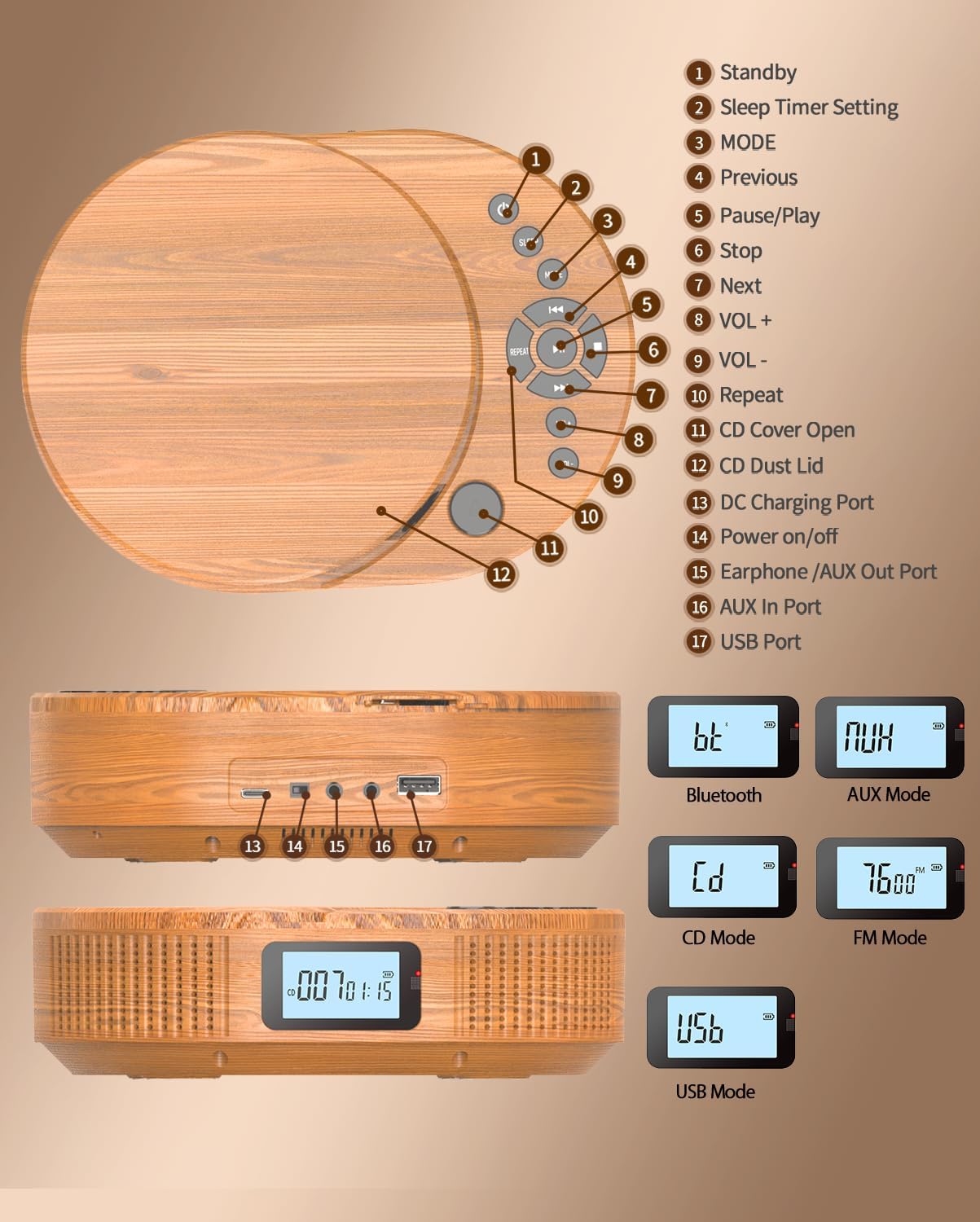
Image: A detailed diagram of the FELEMAN Portable CD Player, highlighting its various components and control buttons with numerical labels for easy identification. The display modes for Bluetooth, AUX, CD, FM, and USB are also shown.
- Standby
- Sleep Timer Setting
- MODE (Function Selection)
- Previous Track
- Pause/Play
- Stop
- Next Track
- Volume Up (VOL+)
- Volume Down (VOL-)
- Repeat Function
- CD Cover Open
- CD Dust Lid
- DC Charging Port
- Power On/Off
- Earphone/AUX Out Port
- AUX In Port
- USB Port
Setup
Charging the Device
The FELEMAN Portable CD Player has a built-in 2000mAh rechargeable battery. Before first use, or when the battery is low, charge the device using the provided AC adapter and USB to Type-C charging cable.
- Connect the USB to Type-C charging cable to the DC Charging Port (13) on the device.
- Connect the other end of the USB cable to the AC adapter.
- Plug the AC adapter into a standard wall outlet.
- The display will indicate charging status. A full charge typically takes several hours.

Image: The FELEMAN Portable CD Player connected to a wall charger via its USB-C cable, illustrating the charging process and the battery level indicator on its display.
Powering On/Off
Press and hold the Power On/Off button (14) to turn the device on or off.
Operating Modes
The device supports multiple playback modes. Use the MODE button (3) to switch between them.
1. CD Mode
This mode allows playback of audio CDs (CD, CD-R, HDCD, MP3, WMA formats).
- Press the CD Cover Open button (11) to open the CD Dust Lid (12).
- Carefully place a CD onto the spindle with the label side facing up.
- Close the CD Dust Lid (12) until it clicks.
- Press the MODE button (3) until "CD" appears on the display.
- The CD will begin playing automatically. If not, press the Play/Pause button (5).
- Use Previous Track (4) and Next Track (7) buttons to navigate tracks.
- Press the Repeat button (10) to cycle through repeat options (e.g., repeat one, repeat all).

Image: The FELEMAN Portable CD Player in CD mode, with icons indicating compatibility with CD, CD-R, HDCD, WMA, and MP3 formats, emphasizing its HiFi stereo sound capabilities.
2. Bluetooth Speaker Mode
Connect your Bluetooth-enabled devices (e.g., smartphone, tablet) to the CD player to use it as a wireless speaker.
- Press the MODE button (3) until "bt" (Bluetooth) appears on the display. The device will enter pairing mode, indicated by a flashing "bt".
- On your external device, enable Bluetooth and search for available devices.
- Select "FELEMAN CD Player" from the list.
- Once paired, the "bt" on the display will stop flashing. You can now play audio from your external device through the CD player.
- Note: This device acts as a Bluetooth receiver only and cannot connect to other Bluetooth speakers or headphones.

Image: The FELEMAN Portable CD Player displaying "bt" for Bluetooth mode, with a smartphone in the foreground indicating a wireless connection, highlighting its function as a Bluetooth speaker.
3. FM Radio Mode
Listen to FM radio stations.
- Press the MODE button (3) until the FM frequency (e.g., "76.00") appears on the display.
- To auto-scan and save stations, press and hold the Play/Pause button (5). The device will scan for available stations and store them.
- Use the Previous Track (4) and Next Track (7) buttons to navigate through saved stations.

Image: The FELEMAN Portable CD Player displaying an FM radio frequency, illustrating its FM radio capability. Below, the player is shown next to a sleeping child, demonstrating the sleep timer function.
4. USB Playback Mode
Play audio files directly from a USB flash drive.
- Insert a USB flash drive into the USB Port (17).
- Press the MODE button (3) until "USB" appears on the display.
- The device will automatically detect and play audio files from the USB drive.
- Use Previous Track (4) and Next Track (7) buttons to navigate files.
5. AUX-in Mode
Connect external audio devices via a 3.5mm AUX cable.
- Connect one end of a 3.5mm AUX cable (not included) to the AUX In Port (16) on the CD player.
- Connect the other end to the audio output of your external device (e.g., car stereo, MP3 player).
- Press the MODE button (3) until "AUX" appears on the display.
- Audio from the external device will now play through the CD player's speakers. Control playback from the external device.
- Note: The Earphone/AUX Out Port (15) is for connecting headphones or outputting audio to another speaker system.
Basic Operations
- Volume Control: Use the Volume Up (8) and Volume Down (9) buttons to adjust the playback volume.
- Play/Pause: Press the Play/Pause button (5) to start or temporarily stop playback.
- Stop: Press the Stop button (6) to end playback.
- Skip Tracks: Use the Previous Track (4) and Next Track (7) buttons to skip to the desired track or station.
- Repeat Function: In CD or USB mode, press the Repeat button (10) to cycle through repeat options (e.g., repeat current track, repeat all tracks, random play).
- Sleep Timer: Press the Sleep Timer Setting button (2) to set a sleep timer (e.g., 30, 60, 90, 120 minutes). The device will automatically power off after the set time.
Maintenance
Cleaning
- Ensure the device is powered off and unplugged before cleaning.
- Use a soft, dry cloth to wipe the exterior of the unit.
- For stubborn marks, lightly dampen the cloth with water; avoid harsh chemicals or abrasive cleaners.
- To clean the CD lens, use a specialized CD lens cleaning kit. Do not touch the lens directly.
Battery Care
- To prolong battery life, avoid fully discharging the battery frequently.
- If the device will not be used for an extended period, charge it to approximately 50% before storage.
- Store the device in a cool, dry place away from direct sunlight and extreme temperatures.
General Care
- Avoid exposing the device to water, moisture, or excessive dust.
- Do not drop or subject the device to strong impacts.
- Keep the CD Dust Lid (12) closed when not in use to protect the CD mechanism from dust and debris.
Troubleshooting
If you encounter issues with your device, refer to the following common problems and solutions:
| Problem | Possible Cause | Solution |
|---|---|---|
| Device does not power on. | Battery is discharged. | Connect the device to power using the AC adapter and charge it. |
| No sound from speakers. | Volume is too low or muted. Incorrect mode selected. | Increase volume using VOL+ button. Ensure the correct playback mode (CD, Bluetooth, FM, USB, AUX) is selected. |
| CD does not play or skips. | CD is dirty, scratched, or inserted incorrectly. CD format not supported. | Clean the CD with a soft cloth. Ensure the CD is placed correctly. Try a different CD. Verify CD format compatibility. |
| Bluetooth pairing fails. | Device is not in pairing mode. External device Bluetooth is off. | Ensure the CD player is in "bt" mode and flashing. Check Bluetooth settings on your external device. Move devices closer. |
| Poor FM radio reception. | Weak signal. Interference. | Relocate the device to an area with better reception. Extend the antenna if available (not explicitly mentioned but common). |
| USB drive not recognized. | USB drive format incompatible. Corrupted files. | Ensure USB drive is formatted to FAT32. Check for compatible audio file types (MP3, WMA). Try a different USB drive. |
Specifications
Key technical specifications for the FELEMAN Portable CD Player & Bluetooth Speaker:
- Model: B0D83HG5KX
- Brand: FELEMAN
- Connectivity Technology: Bluetooth
- Color: Brown
- Speaker Type: Stereo
- Power Source: Battery Powered (Built-in 2000mAh Lithium Ion battery)
- Package Dimensions: 11.18 x 7.2 x 2.99 inches
- Item Weight: 1.72 pounds
- Supported CD Formats: CD, CD-R, HDCD, MP3, WMA
- FM Radio Frequency: 76MHz-108MHz
- Ports: DC Charging, Earphone/AUX Out, AUX In, USB
Warranty and Support
FELEMAN provides lifetime professional customer service and technical support for this product. If you encounter any issues or have questions, please contact FELEMAN customer service for assistance. Refer to the contact information provided with your purchase or on the official FELEMAN website.
Related documentsB0D83HG5KX

Ask a question about this manual
Ask about setup, troubleshooting, compatibility, parts, safety, or missing instructions. Manuals+ will review the question and use this page’s manual context to help answer it.