
Lamshaw For EarlySincere T13, T12 Watch 2 Pack-Black+Black
Lamshaw Magnetic USB Smart Watch Charger Instruction Manual
Model: For EarlySincere T13, T12 Smart Watches
Introduction
This manual provides essential information for the proper use and maintenance of your Lamshaw Magnetic USB Replacement Charger, designed specifically for EarlySincere T13 and T12 Smart Watches. Please read this manual thoroughly before use to ensure optimal performance and longevity of your charger.
Product Overview
The Lamshaw Magnetic USB Replacement Charger is a convenient and portable charging solution for your EarlySincere T13 and T12 Smart Watches. It features a magnetic interface for secure connection and a standard USB Type-A connector for power input.

Image 1: Two Lamshaw magnetic USB charging cables. These cables are designed for convenient and reliable charging of compatible smartwatches, featuring a magnetic connector on one end and a standard USB-A plug on the other.

Image 2: A smartwatch being charged by the magnetic cable. This image highlights the magnetic connection mechanism, ensuring a secure and stable charging experience for your device.
What's in the Box
Your package should contain the following items:
- Lamshaw Magnetic USB Replacement Charger (2 Pack-Black+Black)
Setup Instructions
- Connect to Power Source: Insert the USB Type-A end of the charging cable into a compatible USB power adapter (not included), a computer's USB port, or a power bank. Ensure the power source provides stable 5V output.
- Align with Smart Watch: Locate the charging contacts on the back of your EarlySincere T13 or T12 Smart Watch.
- Magnetic Connection: Bring the magnetic charging head of the cable close to the charging contacts on your smartwatch. The magnetic force will automatically align and secure the connection. Ensure the polarity is correct; if the magnets repel, flip the charging head 180 degrees. The watch will not charge if the magnets repel.
- Verify Charging: Once connected, your smartwatch display should indicate that it is charging.

Image 3: Illustration of the magnetic charging interface. This diagram demonstrates the correct way to connect the charger to the smartwatch, emphasizing that the device will not charge if the magnetic polarity is incorrect and repels.
Operating Instructions
The Lamshaw Magnetic USB Replacement Charger is designed for simple plug-and-play operation. Once connected to a power source and your smartwatch, it will begin charging automatically.
- Charging Indicator: Monitor your smartwatch screen for the charging icon or battery percentage to confirm active charging.
- Charging Time: Charging time may vary depending on the smartwatch's battery level and the power output of the USB source.
- Portability: The lightweight and flexible design makes it easy to carry for charging at home, in the office, in a car, or during travel.
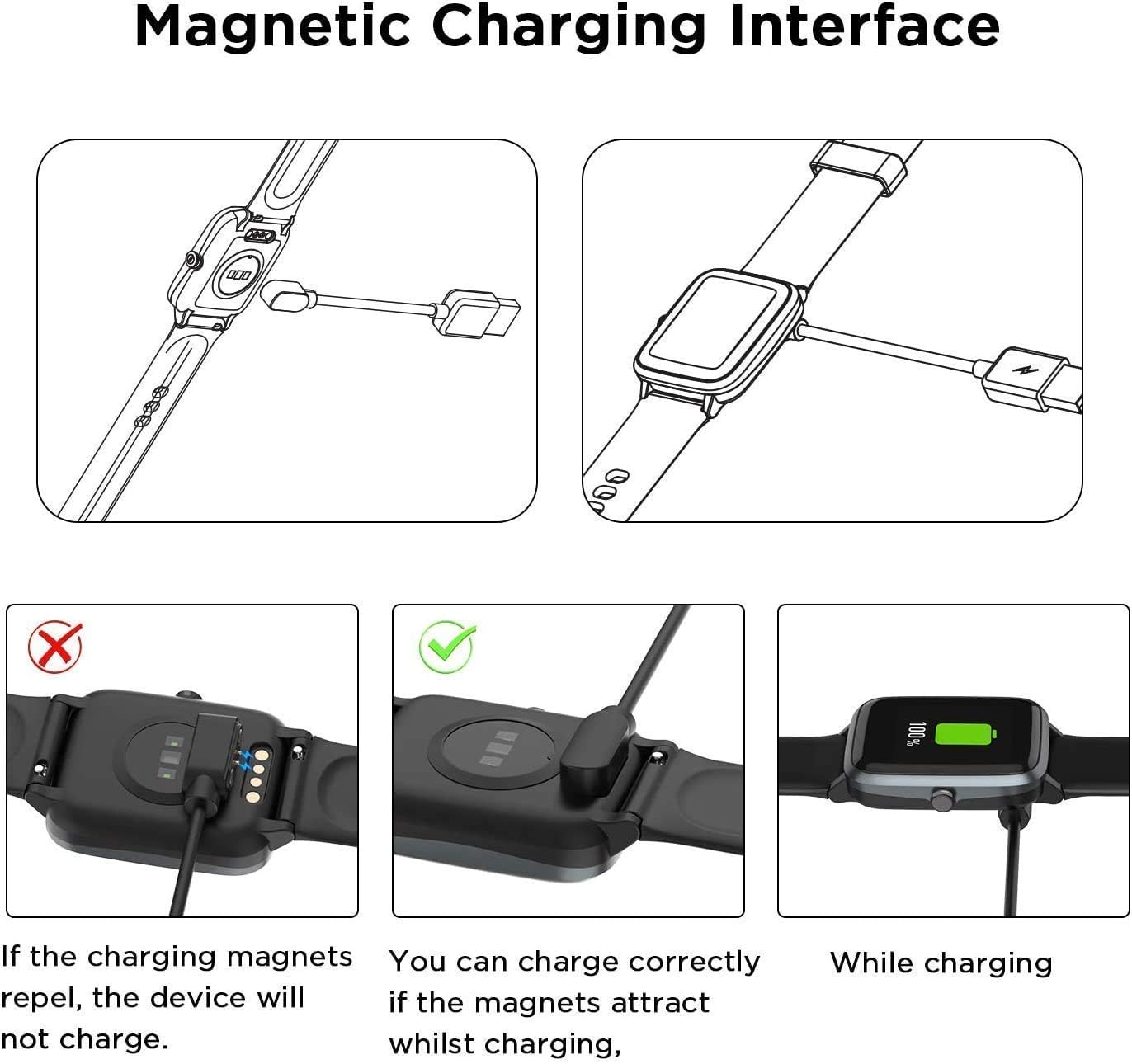
Image 4: A smartwatch connected to the charger, which is plugged into a power strip. This illustrates a common scenario for charging the device, highlighting its convenience for everyday use.
Maintenance and Care
- Cleaning: Gently wipe the charging contacts on both the cable and your smartwatch with a dry, soft cloth to remove dust or debris. Do not use liquid cleaners.
- Storage: Store the charger in a cool, dry place away from direct sunlight and extreme temperatures. The flexible PVC cable allows for easy coiling and storage.
- Handling: Avoid bending the cable sharply or applying excessive force to the connectors, as this can damage the internal wiring.
- Safety: Do not expose the charger to water or other liquids. Disconnect the charger from the power source when not in use.
Troubleshooting
| Problem | Possible Cause | Solution |
|---|---|---|
| Smartwatch not charging. | Incorrect magnetic polarity. | Flip the magnetic charging head 180 degrees and re-attach. The magnets should attract, not repel. |
| Smartwatch not charging. | Loose connection or dirty contacts. | Ensure the magnetic head is firmly attached. Clean the charging contacts on both the cable and the smartwatch with a dry, soft cloth. |
| Smartwatch not charging. | Faulty USB power source or cable. | Try a different USB port or power adapter. Test the charger with another compatible smartwatch if available. |
| Slow charging. | Low power output from USB source. | Use a USB power adapter with a higher current output (e.g., 1A or 2A) if your smartwatch supports it. Avoid charging from low-power USB ports on older computers. |
Specifications
- Brand: Lamshaw
- Compatible Devices: EarlySincere T13, T12 Smart Watches
- Connector Type: USB Type A (input), Magnetic (output)
- Cable Type: USB
- Special Feature: Lightweight, Magnetic Connection
- Color: Black
- Number of Pins: 5 (on magnetic connector)
- Cable Length: Approximately 3.3 feet / 1 meter
- Material: ABS+PC, Flexible PVC Cable, Pure Copper Probes
- Item Weight: 1.6 ounces

Image 5: Detailed breakdown of the charger cable's construction, highlighting its durable ABS+PC material, pure copper probes for efficient conduction, and flexible PVC cable for ease of use and storage. The cable length is approximately 3.3 feet (1 meter).

Image 6: A close-up view of the magnetic charging pins and the USB-A connector, illustrating the robust design of the charger.
Warranty and Support
For any questions, concerns, or support regarding your Lamshaw Magnetic USB Replacement Charger, please refer to the seller's information on the product purchase page or contact Lamshaw customer service directly. Please retain your proof of purchase for warranty claims.
The product's return policy is typically 30 days for refund/replacement, as per standard Amazon policy. Specific warranty details may vary; please consult the seller for precise warranty terms.
Seller: lamshaw
Ask a question about this manual
Ask about setup, troubleshooting, compatibility, parts, safety, or missing instructions. Manuals+ will review the question and use this page’s manual context to help answer it.