
Introduction
This manual provides detailed instructions for the safe and effective operation, maintenance, and troubleshooting of your GoAssemb 801 1/32 2.4G RC Mini Electric Drift Off-Road Vehicle Model. Please read this manual thoroughly before using the product to ensure optimal performance and longevity.
Package Contents
Verify that all items listed below are included in your package:
- RC Car (Model 801) x 1
- Remote Controller x 1
- USB Charger x 1
- 3.7V 100mAh Li-po Battery (pre-installed in car) x 1
- Instruction Manual x 1
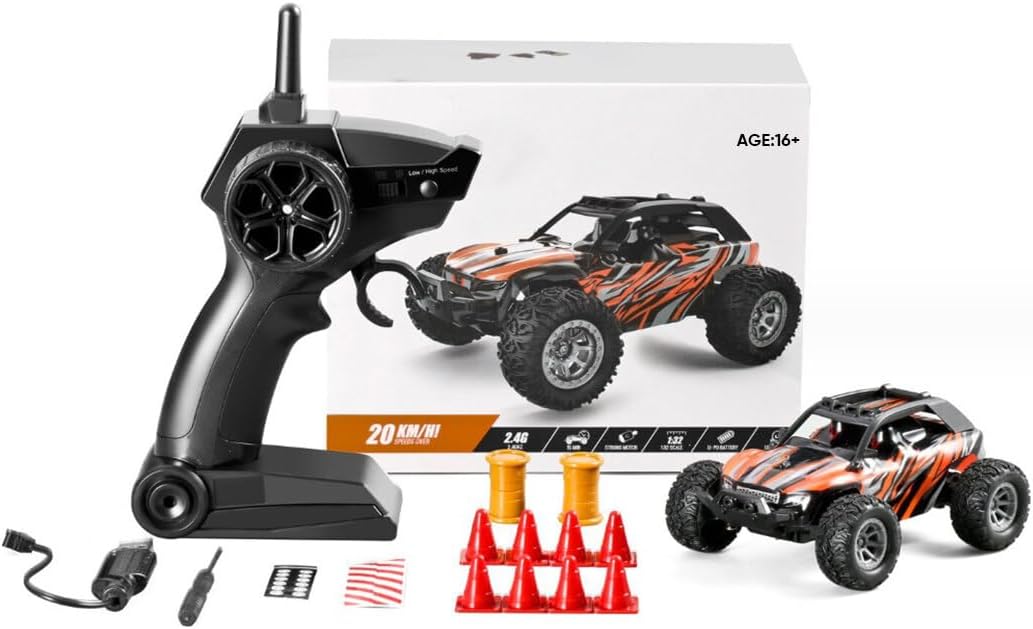
Figure 1: Contents of the GoAssemb 801 RC Car package, including the car, remote controller, USB charger, and other small accessories.
Safety Information
Please observe the following safety guidelines to prevent injury or damage to the product:
- Battery Safety: The vehicle's internal electronic components are protected by battery overcharge and overcurrent protection. Always use the provided USB charger and avoid charging unattended.
- Operating Environment: Operate the RC car in open areas, away from people, pets, and obstacles. Avoid operating near water or in wet conditions.
- Age Recommendation: This product is recommended for users aged 16 and above. Adult supervision is advised for younger users.
- Avoid Collisions: While the car features an anti-vibration body design and crashproof frame, repeated high-impact collisions can cause damage.
Setup
1. Battery Installation
Vehicle Battery: The 3.7V 100mAh Li-po battery is pre-installed in the RC car. Ensure it is securely connected before first use.
Remote Controller Batteries:
- Locate the battery compartment on the back of the remote controller.
- Open the battery cover.
- Insert two (2) AA batteries (not included), ensuring correct polarity (+/-).
- Close the battery cover securely.
2. Charging the Vehicle Battery
Use only the provided USB charger for the vehicle's Li-po battery.
- Connect the USB charger to a standard USB power source (e.g., computer USB port, USB wall adapter).
- Connect the other end of the USB charger to the charging port on the RC car.
- The charging indicator light on the USB charger will illuminate (color may vary) to indicate charging is in progress.
- Charging typically takes approximately 3.5 hours. The indicator light will change or turn off when charging is complete.
- Disconnect the charger once charging is complete. Do not overcharge.
Operating Instructions
1. Power On/Off
- Turn on the RC car using the "ON/OFF" switch located on the vehicle.
- Turn on the remote controller. The indicator light on the remote will flash.
- The remote controller and car will automatically pair. The remote's indicator light will become solid when paired.
- To power off, turn off the car first, then the remote controller.

Figure 2: Detailed view of the RC car's power switch, integrated LED lamp for low-light visibility, high-speed hollow cup motor, and the steering fine adjustment device located under the chassis.
2. Remote Control Functions
The 2.4G full-scale synchronous remote control system provides precise control:
- Throttle Trigger: Pull to move forward, push to brake/reverse.
- Steering Wheel: Turn left or right to steer the vehicle.
- Steering Fine Adjustment: A dial or trim switch on the remote allows for minor adjustments to ensure the car drives straight when the steering wheel is centered. Adjust if the car veers left or right.

Figure 3: The 2.4G remote controller, illustrating the steering wheel for directional control and the trigger for throttle and brake functions.
3. Driving Modes and Performance
The GoAssemb 801 features a dual gear mode for varied driving experiences:
- Indoor Mode (Low Speed): Ideal for smaller spaces and learning, providing easier control.
- Professional Mode (High Speed): For experienced users and open areas, reaching speeds of over 20 km/h.
The car's 4-wheel drive and independent suspension system contribute to its off-road capabilities and stability. The hollow cup motor provides strong power for drifting and high-speed maneuvers.

Figure 4: The GoAssemb 801 RC Car in motion, highlighting its speed and agility suitable for various terrains.

Figure 5: Detailed view of the RC car's chassis, showcasing the independent suspension system and durable construction designed for off-road stability.
Maintenance
Regular maintenance ensures the longevity and performance of your RC car.
- Cleaning: After each use, especially after off-road driving, gently clean the car to remove dirt, dust, and debris. Use a soft brush or cloth. Avoid using water directly on electronic components.
- Battery Care: Always fully charge the battery before storage if not used for an extended period. Store the battery in a cool, dry place.
- Storage: Store the RC car and remote controller in a dry, cool environment, away from direct sunlight and extreme temperatures.
- Inspection: Periodically inspect the wheels, suspension, and steering components for any signs of wear or damage.
Troubleshooting
If you encounter issues with your GoAssemb 801 RC car, refer to the following common problems and solutions:
| Problem | Possible Cause | Solution |
|---|---|---|
| Car does not respond to remote. |
|
|
| Short operating time. |
|
|
| Car pulls to one side. |
|
|
Specifications
| Feature | Detail |
|---|---|
| Model No. | 801 |
| Scale | 1:32 |
| Speed | >20km/h |
| Motor | Brushed Motor (Hollow Cup Motor) |
| Frequency | 2.4GHz |
| RC Distance | ≥35m |
| RC Type | Full Scale Synchronous Remote Control |
| RC Time | 15 minutes (Full Speed) |
| Charging Time | 3.5 hours |
| Remote Controller Battery | 2 x AA Batteries (Not Included) |
| Car Model Battery | 3.7V 100mAh Li-po Battery (Included) |
| Charger | USB Charger |
| Product Dimensions | 12 × 8.5 × 4cm (4.72 x 3.35 x 1.57 inches) |
| Product Weight | 160g (5.6 ounces) |
| Material | Plastic + Metal + Electronic Components (ABS, PVC shell) |
| Recommended Age | 16+ (Manufacturer recommended age: 12 months - 17 years, but product description states 16+) |
Warranty and Support
GoAssemb products are manufactured with quality and performance in mind. For any questions, technical support, or warranty inquiries, please contact GoAssemb customer service through the retailer where the product was purchased or visit the official GoAssemb store online.
GoAssemb Store: GoAssemb Official Store