
1. Product Overview
The FLEXISPOT Classic Ergonomic Office Chair is designed to provide optimal comfort and support for prolonged sitting. Its ergonomic features, including adjustable lumbar support, a 2D headrest, and a lockable tilt mechanism, ensure a customizable seating experience. The chair is constructed with a breathable mesh back and a high-density foam seat cushion for durability and comfort.
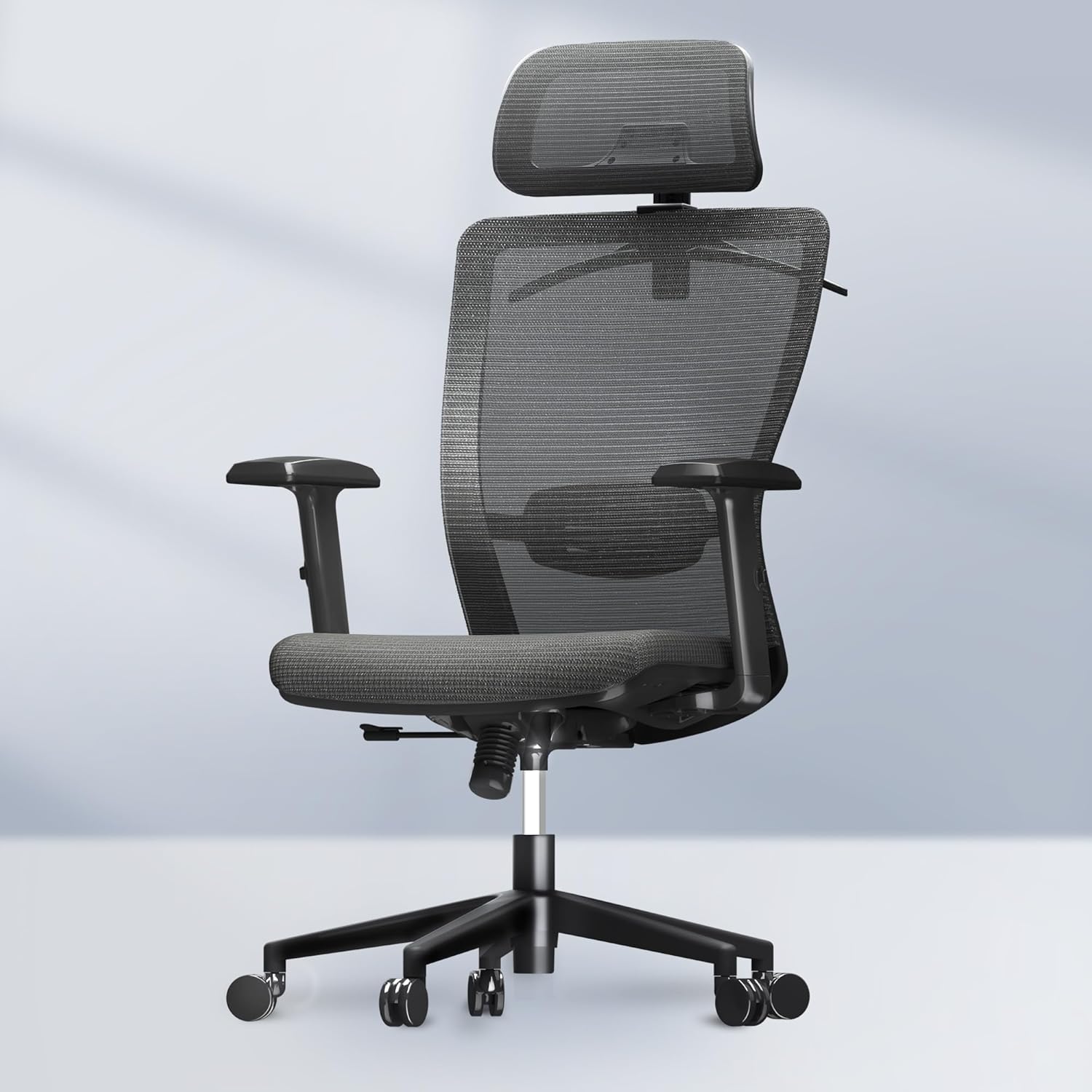
Figure 1.1: Front view of the FLEXISPOT Classic Ergonomic Office Chair.
Key Features:
- Ergonomic Design: Provides reliable back support and alleviates body pressure.
- Multi-use Functionality: Suitable for office, computer, gaming, reading, and living room environments.
- Robust Construction: Sturdy base structure supports up to 300 pounds.
- Breathable Mesh Back: High-density mesh ensures airflow and resists wear.
- Adjustable Components: Seat height, headrest, backrest, and armrests are easily adjustable.
- Integrated Coat Hanger: Conveniently located on the headrest for clothing storage.

Figure 1.2: Detailed dimensions of the FLEXISPOT Classic Ergonomic Office Chair.
2. Setup and Assembly
This section provides general guidelines for assembling your FLEXISPOT office chair. For detailed, step-by-step instructions, please refer to the assembly guide included in your product packaging. Ensure all components are present before beginning assembly.
Required Tools (Not Included):
- Phillips head screwdriver (if not provided)
- Allen wrench (usually included)
Assembly Steps (General):
- Unpack Components: Carefully remove all parts from the packaging and lay them out on a clean, flat surface. Verify all parts are present against the packing list.
- Attach Casters to Base: Insert the casters into the holes at the end of each leg of the chair base. Push firmly until they click into place.
- Insert Gas Lift: Place the larger end of the gas lift cylinder into the center hole of the chair base.
- Attach Mechanism to Seat: Secure the control mechanism to the underside of the seat cushion using the provided screws. Ensure the front of the mechanism aligns with the front of the seat.
- Attach Backrest to Seat: Connect the backrest to the seat assembly. This may involve sliding a bracket into a slot or securing with screws.
- Attach Armrests: Secure the armrests to the seat or backrest assembly using the designated screws.
- Connect Seat Assembly to Gas Lift: Carefully place the assembled seat and backrest onto the gas lift cylinder, ensuring it is centered. Apply gentle downward pressure to secure.
- Install Headrest: Slide the headrest into its designated slot at the top of the backrest. Adjust as needed.
After assembly, test all adjustable functions to ensure proper operation and stability before regular use.
3. Operating Instructions
Your FLEXISPOT office chair offers multiple adjustment options to customize your seating experience for optimal comfort and ergonomic support.
3.1. Seat Height Adjustment
To adjust the seat height, locate the lever on the right side, beneath the seat. While seated, pull the lever up to lower the seat. To raise the seat, stand up and pull the lever up. Release the lever at your desired height.
3.2. Backrest Tilt and Lock Function
The chair features a lockable tilt function, allowing you to recline and lock the backrest at various angles (90-130 degrees).
- To Recline: Lean back into the chair.
- To Lock Tilt: Once at your desired angle, push the tilt lever (usually on the left side, or a knob under the seat) inwards or downwards to lock the position.
- To Unlock Tilt: Pull the tilt lever outwards or upwards. The backrest will return to its upright position or allow free reclining.

Figure 3.1: Illustration of the chair's tilt angles (90°, 110°, 130°).
3.3. Lumbar Support Adjustment
The lumbar support can be adjusted vertically to align with the natural curve of your lower back. Locate the adjustment mechanism on the backrest. Gently push the lumbar support up or down to find your preferred position.
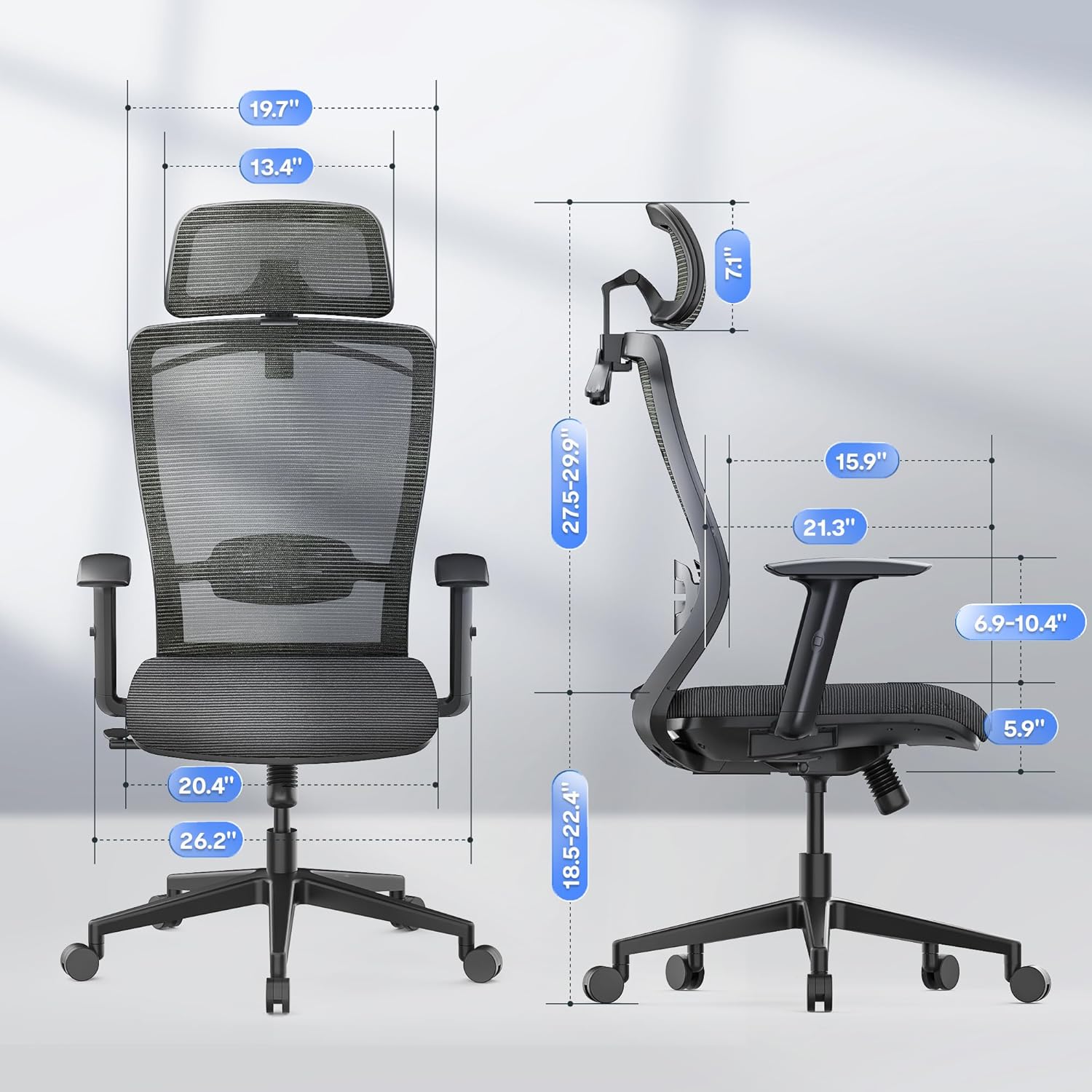
Figure 3.2: Adjusting the lumbar support for precise waist support.
3.4. Headrest Adjustment
The 2D headrest can be adjusted in multiple dimensions to provide precise support for your head and neck. It can be moved up and down, and also rotated to achieve the optimal angle.

Figure 3.3: Adjustments for the 2D headrest, including vertical and rotational movement.
3.5. Armrest Adjustment
The armrests are adjustable to provide comfortable support for your arms and shoulders. Typically, they can be moved up and down. Locate the button or lever on the side of each armrest to unlock and adjust its height. Release the button/lever to lock it in place.

Figure 3.4: Adjustable armrests for personalized comfort.
3.6. Integrated Coat Hanger
The headrest features a built-in coat hanger for convenient storage of jackets or other clothing items, keeping them wrinkle-free and within reach.

Figure 3.5: The integrated coat hanger on the headrest.
4. Maintenance and Care
Regular maintenance helps prolong the life and appearance of your FLEXISPOT office chair.
- Cleaning Mesh and Fabric: For general cleaning, use a soft cloth dampened with mild soap and water. Gently wipe the mesh backrest and foam seat cushion. Avoid abrasive cleaners or harsh chemicals, as they may damage the material. Allow to air dry completely.
- Cleaning Base and Casters: Wipe the chair base and casters with a damp cloth. For casters, periodically remove any accumulated dust, hair, or debris to ensure smooth rolling.
- Hardware Check: Periodically check all screws and bolts to ensure they are tight. Retighten if necessary to maintain stability and prevent squeaking.
- Gas Lift: The gas lift is a sealed unit and requires no maintenance. Do not attempt to disassemble it.
5. Troubleshooting
This section addresses common issues you might encounter with your office chair.
| Problem | Possible Cause | Solution |
|---|---|---|
| Chair Squeaks or Wobbles | Loose hardware; friction between components. | Check and tighten all screws and bolts. Apply a small amount of silicone lubricant to moving parts if necessary. |
| Difficulty Adjusting Height | Gas lift malfunction; obstruction. | Ensure the height adjustment lever is fully engaged. Check for any obstructions around the gas lift. If the issue persists, contact customer support. |
| Casters Not Rolling Smoothly | Debris caught in casters; worn casters. | Remove any hair, dust, or debris from the caster wheels. Clean the wheels thoroughly. If casters are worn, replacement may be necessary. |
| Backrest Does Not Lock in Position | Tilt mechanism issue; lever not fully engaged. | Ensure the tilt lock lever is fully engaged. Check for any obstructions preventing the mechanism from locking. |
6. Specifications
Detailed specifications for the FLEXISPOT Classic Ergonomic Office Chair (Model: OC3 CLOUD).
| Attribute | Detail |
|---|---|
| Brand | FLEXISPOT |
| Model Name | Office Chair OC3 FOAM |
| Color | Grey |
| Product Dimensions (D x W x H) | 21.3"D x 26.2"W x 52.3"H |
| Item Weight | 51 pounds |
| Back Style | Mesh Back |
| Seat Material | Foam |
| Recommended Weight Capacity | Up to 300 pounds |
| Tilt Function | Yes, 90-130 degrees lockable |
| Headrest | 2D Adjustable |
| Arm Style | Adjustable, Rounded |
| Casters | Silent and Smooth |
| UPC | 810072869159 |
| ASIN | B0D83B8Y25 |
7. Safety Information
Please read and adhere to the following safety guidelines to ensure safe operation and prevent injury.
- Ensure the chair is used for individuals within the recommended weight limit of 300 lbs.
- Be cautious when operating adjustable components, such as the backrest angle, to prevent injury.
- Do not stand on the chair or use it as a step stool.
- Avoid placing heavy objects on the chair that exceed its weight capacity.
- Keep fingers and clothing clear of moving parts during adjustment.
- Use the chair on a flat, stable surface to prevent tipping.
- Do not expose the chair to extreme temperatures or direct sunlight for prolonged periods, as this may damage materials.
8. Warranty and Customer Support
FLEXISPOT is committed to providing high-quality products. For information regarding product warranty, please refer to the warranty card included with your purchase or visit the official FLEXISPOT website.
If you encounter any issues or have questions about your FLEXISPOT Classic Ergonomic Office Chair, please contact FLEXISPOT customer support. Contact details can typically be found on the manufacturer's website or in your product documentation.
For additional resources and product information, you may visit the FLEXISPOT Store on Amazon.
