
1. Introduction
Thank you for choosing the TABYIK 101oz Dehumidifier. This high-efficiency unit is designed to effectively reduce humidity in your living spaces, creating a more comfortable environment. Featuring dual semiconductor modules and high-efficiency fans, it offers powerful moisture removal. This manual provides essential information for the safe and efficient operation, maintenance, and troubleshooting of your dehumidifier.
Key features include:
- Dual Semiconductor Modules: Enhanced dehumidifying efficiency.
- Four Operating Modes: Standard, Strong, Sleep, and Defrost for various conditions.
- 101oz (3L) Water Tank: Large capacity with automatic shutoff to prevent overflow.
- Whisper Quiet Operation: Sleep Mode reduces noise to below 30dB.
- 24-Hour Timer: Programmable shutoff for 6, 12, or 24 hours.
- Two Rechargeable Dehumidifying Boxes: For small, enclosed spaces, renewable using the main unit's DRY mode.
2. Safety Information
Please read all safety instructions carefully before using the appliance. Failure to follow these instructions may result in electric shock, fire, or injury.
- Always place the dehumidifier on a stable, level surface.
- Ensure the power cord is not damaged, pinched, or placed under heavy objects.
- Do not operate the unit with a damaged power cord or plug.
- Keep the dehumidifier at least 20 cm (8 inches) away from walls and other objects to ensure proper airflow.
- Do not block the air inlet or outlet.
- Never immerse the unit, power cord, or plug in water or other liquids.
- Unplug the dehumidifier before cleaning, maintenance, or when not in use.
- Do not allow children to play with the appliance. Supervise children when the unit is in operation.
- This dehumidifier is not suitable for basement use.
- WARNING: Never heat or microwave the rechargeable dehumidifying boxes.
3. Package Contents
Upon unpacking, please ensure all items listed below are present and in good condition:
- TABYIK 101oz Dehumidifier Unit
- User Manual
- Rechargeable Dehumidifying Box (x2)
4. Product Overview
Familiarize yourself with the main components of your TABYIK Dehumidifier and the accompanying rechargeable boxes.

Image: The TABYIK 101oz Dehumidifier unit shown alongside one of its rechargeable dehumidifying boxes.

Image: This illustration provides the dimensions of the TABYIK Dehumidifier (12" H x 9.8" W x 5.5" D) and the two reusable dehumidifier boxes (8.5" H x 2.7" W). It also highlights the concealed handle on the main unit and the hanging loop on the boxes.
5. Setup
Follow these steps for initial setup:
- Unpack: Carefully remove the dehumidifier and all accessories from the packaging. Retain packaging for future storage or transport.
- Placement: Place the dehumidifier on a firm, level surface in the desired room. Ensure there is at least 20 cm (8 inches) of clear space around all sides for optimal airflow. Avoid placing it in basements or areas with extreme temperatures.
- Power Connection: Plug the power cord into a grounded electrical outlet. Ensure the voltage matches the specifications of the unit.
- Water Tank: Ensure the water tank is correctly inserted into the unit. The unit will not operate if the tank is not properly seated or is full.
6. Operating Instructions
Control Panel
The control panel is located on the top of the unit and typically includes a Power button, Mode selection, and Timer settings. Indicator lights will show the current operating status.
Operating Modes
Your TABYIK Dehumidifier offers four distinct operating modes:
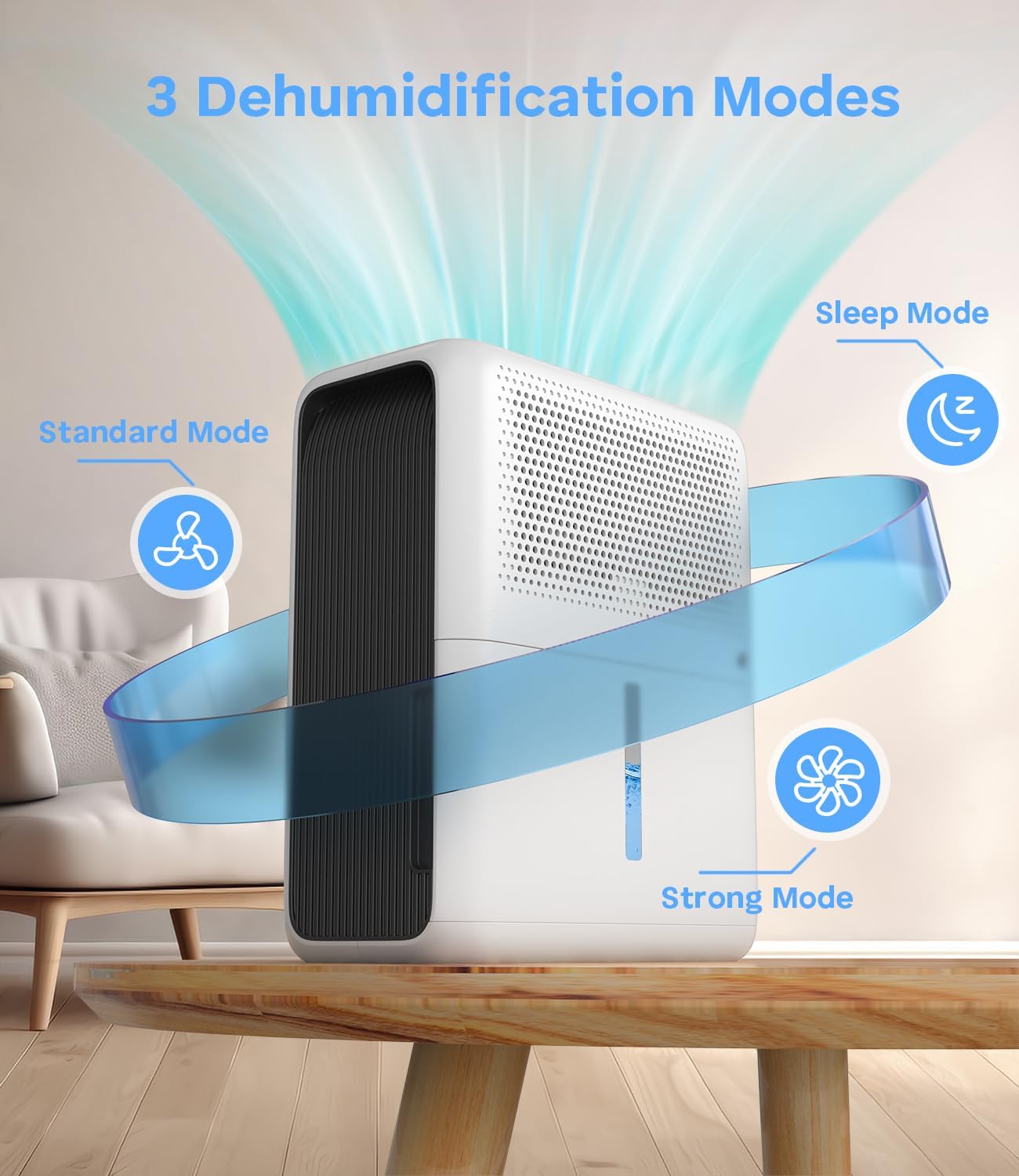
Image: A visual representation of the three primary dehumidification modes: Standard Mode (indicated by a fan icon), Strong Mode (indicated by a snowflake/strong fan icon), and Sleep Mode (indicated by a crescent moon icon). Airflow is depicted moving through the unit.
- Standard Mode: Provides normal dehumidification for everyday use. Suitable for maintaining a comfortable humidity level.
- Strong Mode: Operates at full power for rapid dehumidification. Use this mode when humidity levels are very high and quick moisture removal is needed.
- Sleep Mode: Designed for quiet operation, ideal for nighttime use. In this mode, indicator lights are turned off, and the fan speed is reduced to ensure minimal disturbance while still dehumidifying.
- Defrost Mode: Automatically activates in low-temperature environments (e.g., winter) to prevent frost buildup on the internal components, ensuring continuous and effective dehumidification.
Timer Function
The convenient timer function allows you to set the dehumidifier to automatically shut off after a specified period.

Image: The TABYIK Dehumidifier is shown in a bedroom setting, illustrating its 24-hour timer function with options for 6H, 12H, and 24H timing. The image also highlights its whisper-quiet operation, maintaining a noise level below 30dB, suitable for undisturbed sleep.
- Press the Timer button to cycle through available settings: 6 hours, 12 hours, or 24 hours.
- The unit will operate for the selected duration and then automatically power off.
Automatic Shutoff
The dehumidifier is equipped with an automatic shutoff feature for safety and convenience.

Image: The TABYIK Dehumidifier with its water tank partially pulled out, illustrating the auto shutoff feature that prevents water overflow or spillage when the tank is full or dislodged. A large exclamation mark symbolizes the safety warning.
- The unit will automatically power off when the water tank is full.
- It will also shut off if the water tank is removed or not properly seated, preventing spills.
- An indicator light will typically illuminate to signal that the tank is full and needs to be emptied.
Using Rechargeable Dehumidifying Boxes
The two included rechargeable dehumidifying boxes are ideal for small, enclosed spaces.

Image: This diagram illustrates the versatility of the two rechargeable dehumidifier boxes, showing them effectively used in various small, enclosed spaces such as closets, drawers, kitchens, tool cabinets, and suitcases. The image also depicts the silica gel changing color from orange (dry) to dark green (saturated).
- Placement: Place the boxes in areas like wardrobes, drawers, safes, or suitcases. The 360-degree grille allows for effective moisture absorption.
- Moisture Absorption: The silica gel particles inside the boxes absorb moisture. The orange desiccant granules will turn dark green when saturated, indicating they need renewal.
- Renewal (DRY Mode): To renew the boxes, place them on top of the main dehumidifier unit. Activate the DRY mode on the dehumidifier. This process will dry out the silica gel, returning the granules to their original orange color, making them ready for reuse.
- Important: NEVER heat or microwave the dehumidifying boxes. This can cause damage or be a fire hazard.
7. Maintenance
Regular maintenance ensures optimal performance and longevity of your dehumidifier.
Emptying and Cleaning the Water Tank
- When the water tank is full, the unit will automatically shut off, and an indicator light will illuminate.
- Carefully slide out the water tank from the unit.
- Empty the collected water into a sink or drain.
- Rinse the water tank with clean water. For thorough cleaning, use a mild detergent and a soft cloth, then rinse thoroughly.
- Ensure the tank is completely dry before reinserting it into the dehumidifier.
Cleaning the Dehumidifier Unit
- Before cleaning, always unplug the unit from the power outlet.
- Wipe the exterior of the dehumidifier with a soft, damp cloth. Do not use abrasive cleaners or solvents.
- Gently clean the air inlet and outlet grilles with a soft brush or vacuum cleaner attachment to remove dust and debris.
Recharging Dehumidifying Boxes
Refer to the "Using Rechargeable Dehumidifying Boxes" section (6.3) for detailed instructions on how to renew the silica gel boxes using the main dehumidifier unit's DRY mode.
8. Troubleshooting
If you encounter issues with your dehumidifier, please consult the following table before contacting customer support.
| Problem | Possible Cause | Solution |
|---|---|---|
| Dehumidifier does not turn on. | No power supply. Water tank is full or incorrectly inserted. | Ensure the power cord is securely plugged in. Empty the water tank and reinsert it correctly. |
| Unit is running but not collecting water. | Room humidity is already low. Temperature is too low (below 5°C/41°F). Air inlet/outlet blocked. | Dehumidification may not be necessary. The unit may be in Defrost Mode or operating less efficiently in cold conditions. Ensure clear space around the unit. |
| Unit is noisy. | Unit not on a level surface. Fan obstruction. | Place the unit on a flat, stable surface. Check for any foreign objects near the fan. Consider using Sleep Mode for quieter operation. |
| Water tank full indicator remains on after emptying. | Water tank not properly reinserted. Float sensor malfunction. | Remove and firmly reinsert the water tank. Contact customer support if the issue persists. |
| Rechargeable boxes not changing color or renewing. | Not placed correctly on the dehumidifier. DRY mode not activated or insufficient time. | Ensure boxes are correctly positioned on the unit. Confirm DRY mode is active and allow sufficient time for renewal (several hours). |
9. Specifications
Technical details for the TABYIK 101oz Dehumidifier:
| Feature | Specification |
|---|---|
| Brand | TABYIK |
| Model | 101oz Dehumidifier |
| Item Weight | 2.27 kg |
| Water Tank Capacity | 101 oz (3 Liters) |
| Dehumidification Rate | Up to 35 oz/day (at 86℉ & 80% RH) |
| Recommended Floor Area | Up to 990 Square Feet |
| Noise Level | Below 30dB (in Sleep Mode) |
| Special Feature | Automatic Shutoff |
| Colour | White |
| Included Components | Dehumidifier, User Manual, 2 Rechargeable Dehumidifying Boxes |
10. Warranty and Support
TABYIK products are manufactured to high-quality standards. For warranty information, technical support, or any questions regarding your product, please refer to the warranty card included in your package or contact TABYIK customer service through the retailer where the product was purchased.

