
Introduction
This manual provides instructions for the Yoidesu MMDVM Hotspot Digital Voice Modem. This device enables nationwide interconnectivity for digital radios, overcoming distance limitations in digital communication. It is designed for ease of use with the Pi-Star system and supports various digital modes including DMR, D-Star, YSF (C4FM), P25, NXDN, and POCSAG.
Product Overview

Image 1: Front view of the Yoidesu MMDVM Hotspot Digital Voice Modem, showing the 0.96-inch OLED display and internal components housed within a clear acrylic case.
The MMDVM Hotspot features a compact design with a 0.96-inch organic LED screen for status display. It includes a 16GB memory card and is compatible with Raspberry Pi Zero W boards. The duplex hotspot board utilizes imported components and temperature-compensated crystal oscillators for stable performance and low error rates.
- Frequency: U band (420.000 to 434.900 MHz, 438.100 to 470.000 MHz)
- Supported Modes: DMR, D-Star, YSF (C4FM), P25, NXDN, POCSAG
- Power Output: 20mW
- Display: 0.96 inch organic LED
- Memory: 16GB memory card included
- Dimensions: Approximately 86mm x 38mm x 33mm (3.39in x 1.50in x 1.30in)
Setup Instructions
- Unpacking: Carefully remove all components from the packaging. Ensure the MMDVM Duplex Hotspot Board and 16GB memory card are present.
- Memory Card Insertion: The 16GB memory card is pre-installed. If not, insert it into the designated slot on the Raspberry Pi Zero W board.
- Power Connection: Connect a 5V 2A power supply (not included) to either the MINI (for Android) port or the Type C port on the device. The device will power on automatically.
- Initial Configuration (Pi-Star): The device is designed to work with the Pi-Star system. Access the Pi-Star web interface via a web browser on a computer connected to the same network as the hotspot. Follow the on-screen prompts for initial network and radio configuration.
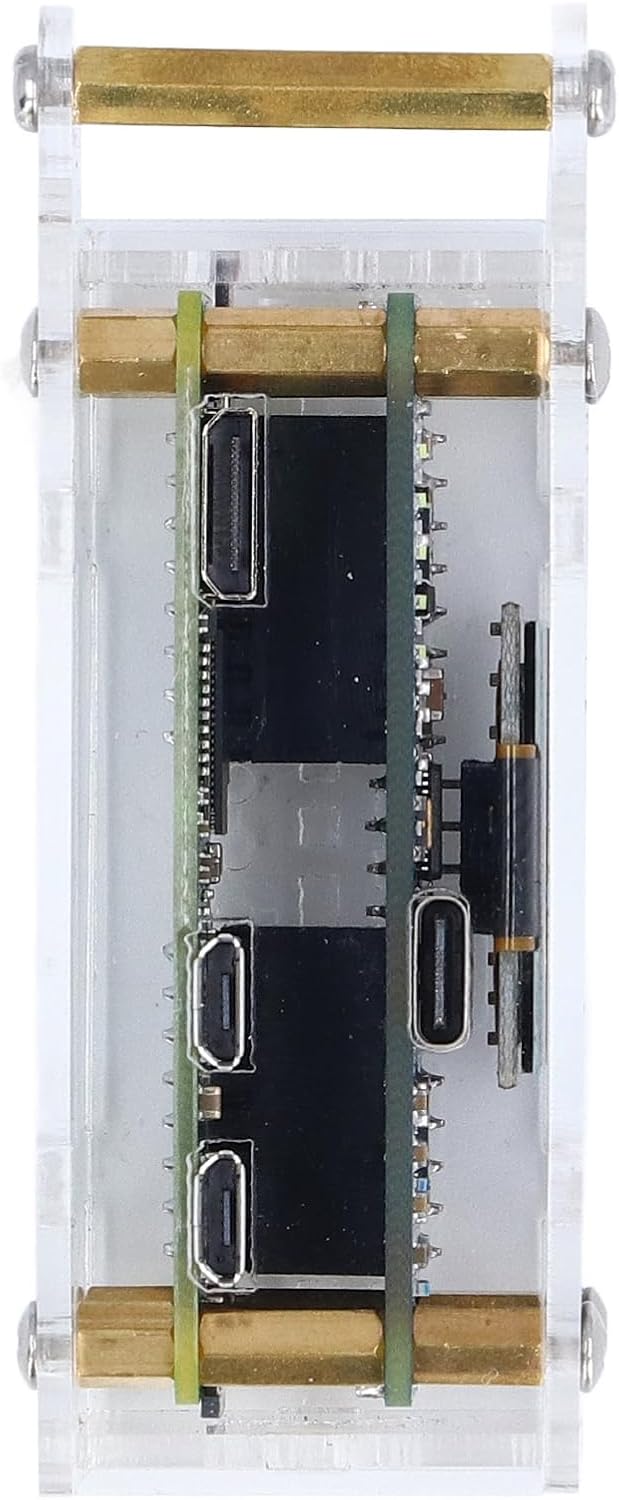
Image 2: Side view of the MMDVM Hotspot showing the Type C and Micro USB power supply ports.
Operating Instructions
Once powered on and configured with Pi-Star, the MMDVM Hotspot is ready for operation. The 0.96-inch OLED display will show operational status and information.

Image 3: Screenshot of the Pi-Star web interface, illustrating the various settings for MMDVMHost configuration, including DMR, D-Star, YSF, P25, NXDN, and POCSAG modes.
- Mode Selection: Use the Pi-Star interface to select your desired digital mode (DMR, D-Star, YSF, P25, NXDN, POCSAG).
- Frequency Configuration: Set the appropriate U band frequencies within the Pi-Star software for your operation.
- DMR Calibration: The board is factory-calibrated with DMR as the reference standard for optimal audio quality and stability across all supported modes.
- Interconnectivity: Connect your digital radio to the hotspot to achieve nationwide communication via the internet.
Maintenance
The Yoidesu MMDVM Hotspot is designed for continuous operation with minimal maintenance. Keep the device in a clean, dry environment. Avoid exposing it to extreme temperatures or humidity. Periodically check for firmware updates for the Pi-Star system to ensure optimal performance and access to new features.
Troubleshooting
| Problem | Possible Cause | Solution |
|---|---|---|
| Device does not power on. | Incorrect power supply or connection. | Ensure a 5V 2A power supply is connected correctly to either the Type C or MINI USB port. Verify the power adapter is functional. |
| Cannot access Pi-Star web interface. | Network connectivity issues or incorrect IP address. | Verify the hotspot is connected to your network. Check your router's connected devices list for the hotspot's IP address. Ensure your computer is on the same network. |
| Poor audio quality or unstable connection. | Incorrect frequency settings or interference. | Review your frequency settings in Pi-Star. Ensure your radio is properly tuned. Check for local interference sources. |
Specifications
- Item Type: MMDVM Duplex Hotspot Board
- Material: Acrylic, PCB
- Frequency: U band (420.000 to 434.900 MHz, 438.100 to 470.000 MHz)
- Supported Modes: DMR, D-Star, YSF (C4FM), P25, NXDN, POCSAG
- Power Output: 20mW
- Shell Material: Acrylic
- Size: Approx. 86mm x 38mm x 33mm / 3.39in x 1.50in x 1.30in
- Screen: 0.96 inch organic LED
- External Power Supply: MINI (for Android) Port, Type C Port 5V 2A (power supply not included)
- Memory Card: 16GB memory card (shipped with memory card)
- Compatible Pi Board: For Raspberry Pi Zero W
- Hotspot Board Type: Duplex
- Package Dimensions: 6.69 x 4.72 x 3.94 inches
- Item Weight: 3.41 pounds
- Manufacturer: Yoidesu
- Model Number: Yoidesuakytbdei2q
Warranty and Support
For warranty information and technical support, please refer to the official Yoidesu website or contact your retailer. You can also visit the Yoidesu Store on Amazon for additional product information and support resources.