
1. Introduction
Thank you for choosing the Fossil BQ2816 Privateer Chronograph Men's Watch. This manual provides essential information for the proper setup, operation, and maintenance of your timepiece. Please read it carefully to ensure optimal performance and longevity of your watch.
2. Safety Information
- Water Resistance: Your Fossil BQ2816 watch is water-resistant up to 50 meters (5 ATM). This means it is suitable for short periods of recreational swimming, showering, or washing hands. It is not suitable for diving, snorkeling, or high-impact water sports. Avoid operating the crown or pushers when the watch is wet to prevent water ingress.
- Battery: The watch is powered by a quartz movement and contains a battery. Do not attempt to open the watch case or replace the battery yourself, as this may damage the watch and void the warranty. Battery replacement should be performed by a qualified watch technician.
- Temperature: Avoid exposing your watch to extreme temperatures (above 60°C / 140°F or below 0°C / 32°F) or sudden temperature changes, as this can affect its accuracy and lifespan.
- Magnetic Fields: Keep the watch away from strong magnetic fields, such as those produced by speakers, refrigerators, or mobile phones, as they can interfere with the quartz movement's accuracy.
3. Setup
3.1 Setting the Time
- Pull the crown out to position 2. The second hand will stop.
- Turn the crown to set the hour and minute hands to the correct time.
- Push the crown back into position 1. The second hand will resume movement.
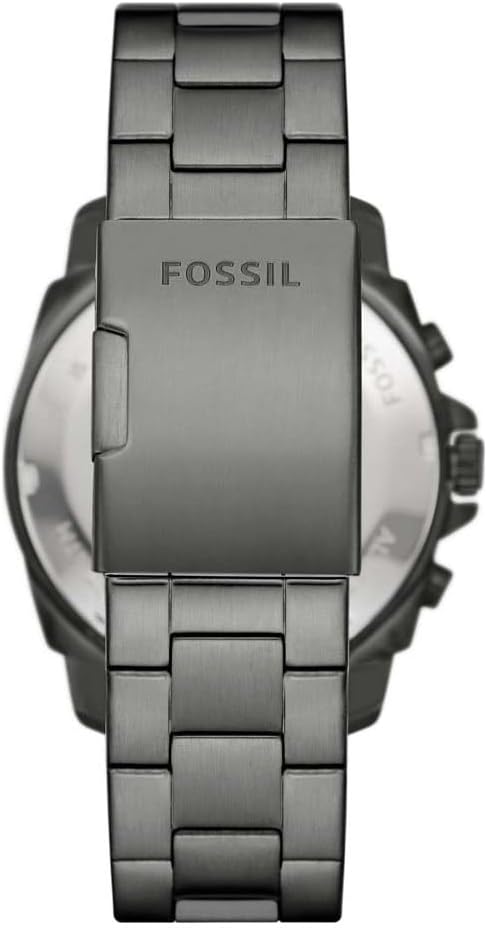
Image: Side view of the Fossil BQ2816 watch, illustrating the crown and chronograph pushers on the right side of the watch case.
3.2 Using the Chronograph Function
Your Fossil BQ2816 watch features a chronograph (stopwatch) function.
- Start/Stop: Press the upper pusher to start the chronograph. Press it again to stop the chronograph.
- Reset: While the chronograph is stopped, press the lower pusher to reset all chronograph hands to their zero positions.
3.3 Bracelet Adjustment
The stainless steel bracelet of your watch may need to be adjusted for a comfortable fit. It is recommended to have this adjustment performed by a professional jeweler or watch technician to avoid damaging the bracelet or clasp mechanism.

Image: Back view of the Fossil BQ2816 watch, showing the stainless steel bracelet and the deployment clasp with the Fossil logo engraved.
4. Operating
Once set up, your Fossil BQ2816 watch is ready for daily wear. Ensure the crown is fully pushed in to maintain water resistance. The watch operates continuously, powered by its quartz movement.
5. Maintenance
- Cleaning: To clean your watch, wipe the case and bracelet with a soft, damp cloth. For stainless steel, a mild soap solution can be used, followed by rinsing with clean water and drying thoroughly. Avoid using harsh chemicals or abrasive materials.
- Water Resistance Check: It is recommended to have the water resistance of your watch checked annually by a professional, especially if the watch has been exposed to impacts or extreme temperature changes.
- Battery Life: The battery life typically ranges from 2 to 3 years. When the battery is low, the second hand may jump in 2-second intervals (End-of-Life indicator). Replace the battery promptly to prevent leakage and damage to the movement.
- Storage: When not wearing your watch for extended periods, store it in a cool, dry place, away from direct sunlight and extreme temperatures.
6. Troubleshooting
| Problem | Possible Cause | Solution |
|---|---|---|
| Watch not running | Crown pulled out; depleted battery | Push crown fully in; replace battery (professional service recommended) |
| Incorrect time | Time not set correctly; impact | Reset the time as per Section 3.1; if problem persists, seek professional service |
| Condensation inside crystal | Water ingress; sudden temperature change | Seek professional service immediately to prevent damage |
| Chronograph hands not resetting to zero | Requires calibration | Refer to specific chronograph module instructions or seek professional service for calibration. |
7. Specifications
- Model Number: BQ2816
- Brand: Fossil
- Movement Type: Quartz
- Display Type: Analog
- Case Diameter: 45 Millimeters
- Case Thickness: 11 Millimeters
- Band Width: 24 Millimeters
- Case Material: Stainless Steel
- Band Material: Stainless Steel
- Dial Window Material: Mineral Glass
- Water Resistance Depth: 50 Meters (5 ATM)
- Item Weight: 70 Grams
- Product Dimensions (L x W x H): 7 x 9 x 9 cm
- Battery: 1 (Type Unknown) - Included
- Dial Color: Blue
- Band Color: Grey
8. Warranty and Support
For information regarding your product's warranty, please refer to the warranty card included with your purchase or visit the official Fossil website. For further support or service inquiries, please contact Fossil customer service or visit an authorized Fossil service center.
You can find more information on the official Fossil store: Fossil Official Store
