
1. Product Overview
The Bestier 63 Inch LED TV Stand is designed to accommodate televisions up to 70 inches, offering both open and concealed storage solutions. It features integrated LED lighting and sliding fluted acrylic doors, providing a functional and aesthetically pleasing media console for living rooms or bedrooms.

Image 1.1: The Bestier 63 Inch LED TV Stand, showcasing its walnut finish and overall design.
Key Features:
- Spacious & Versatile Storage: Features both open shelves for display and closed compartments with sliding doors for discreet storage of media devices, game consoles, and other items.
- Integrated LED Lighting: Includes colorful LED lights with 22 dynamic modes and 7 main colors, enhancing the ambiance of your space.
- Sliding Fluted Acrylic Doors: Provides convenient access to stored items without requiring extra clearance, ideal for various room layouts. The fluted design allows for better light transmission while maintaining privacy.
- Robust Solid Wood Legs: Ensures stability and durability, contributing to a mid-century modern aesthetic.
- Durable, Easy-Clean Surfaces: Constructed from high-quality melamine board, resistant to scratches, heat, and water stains for effortless maintenance.
- Cable Management: Multiple cable management holes are integrated to help organize and conceal wires.
2. Setup and Assembly
Assembly of the Bestier 63 Inch LED TV Stand requires careful attention to the provided instructions. All necessary hardware and tools are typically included. It is recommended to assemble the unit on a soft, clean surface to prevent scratches.
Assembly Instructions:
- Unpack all components and verify against the parts list in the included manual.
- Follow the step-by-step diagrams and written instructions provided in the detailed assembly guide.
- Attach the solid wood legs securely to the base of the TV stand.
- Assemble the main frame, ensuring all connections are tight.
- Install the shelves and back panels, utilizing the cable management holes as needed.
- Insert the fluted acrylic doors into their sliding tracks.
- Install the LED light strips according to the instructions, ensuring proper connection to the power source.
For visual guidance, a detailed installation video is available. Please refer to the QR code or link provided in your physical manual for access.
Video 2.1: Official product video demonstrating the Bestier 63 inch LED Entertainment Center with Sliding Doors, including assembly and feature highlights.

Image 2.2: Detailed view of the sliding fluted acrylic doors, cable management holes, high-quality particle board construction, and solid wood support legs, illustrating key components for assembly and function.
3. Operating Instructions
LED Lighting System:
The integrated LED lighting system offers customizable illumination for your entertainment area. Use the included remote control to adjust settings.
- Power On/Off: Press the power button on the remote to turn the lights on or off.
- Color Selection: Choose from 7 main colors using the dedicated color buttons.
- Dynamic Modes: Select from 22 dynamic modes to create various lighting effects.
- Brightness Adjustment: Use the brightness controls to increase or decrease light intensity.

Image 3.1: The TV stand with its LED lights illuminated in different colors, alongside the remote control used to operate the lighting system's 22 dynamic modes and 7 main colors.
Sliding Doors:
The fluted acrylic doors are designed to slide smoothly along their tracks, allowing easy access to the storage compartments. Gently push or pull the doors to open or close them. Avoid forcing the doors to prevent damage to the tracks or the doors themselves.

Image 3.2: The TV stand's interior, highlighting the 2-tier open storage shelves and two large storage compartments, accessible via the sliding doors.
4. Maintenance
To ensure the longevity and appearance of your Bestier LED TV Stand, follow these simple maintenance guidelines:
- Cleaning Surfaces: Wipe the melamine board surfaces with a soft, damp cloth. Avoid abrasive cleaners or harsh chemicals, as these can damage the finish.
- Dusting: Regularly dust the unit with a dry, soft cloth to prevent buildup.
- Spills: Immediately clean up any spills to prevent staining or water damage. The material is water-resistant but prolonged exposure can cause issues.
- LED Lights: If the LED lights become dusty, gently wipe them with a dry, soft cloth. Do not use liquids directly on the LED strips.
- Hardware Check: Periodically check all screws and fasteners to ensure they remain tight. Retighten if necessary to maintain structural integrity.
- Door Tracks: Keep the sliding door tracks free of debris to ensure smooth operation.
5. Troubleshooting
If you encounter any issues with your Bestier LED TV Stand, refer to the following common troubleshooting steps:
| Problem | Possible Cause | Solution |
|---|---|---|
| LED lights not working | Power connection loose; Remote battery dead; LED strip damaged. | Check power adapter connection; Replace remote battery; Contact customer support if LED strip is damaged. |
| Sliding doors stick or are difficult to move | Debris in track; Door misaligned; Damaged track. | Clean tracks thoroughly; Gently adjust door alignment; Contact customer support if track is damaged. |
| Unit feels unstable or wobbly | Loose fasteners; Uneven floor. | Retighten all assembly screws; Use furniture levelers if your floor is uneven. |
| Scratches or minor surface damage | Accidental impact; Abrasive cleaning. | Use a furniture repair kit for minor scratches; Avoid abrasive materials for cleaning. |
6. Specifications
Detailed specifications for the Bestier 63 Inch LED TV Stand:
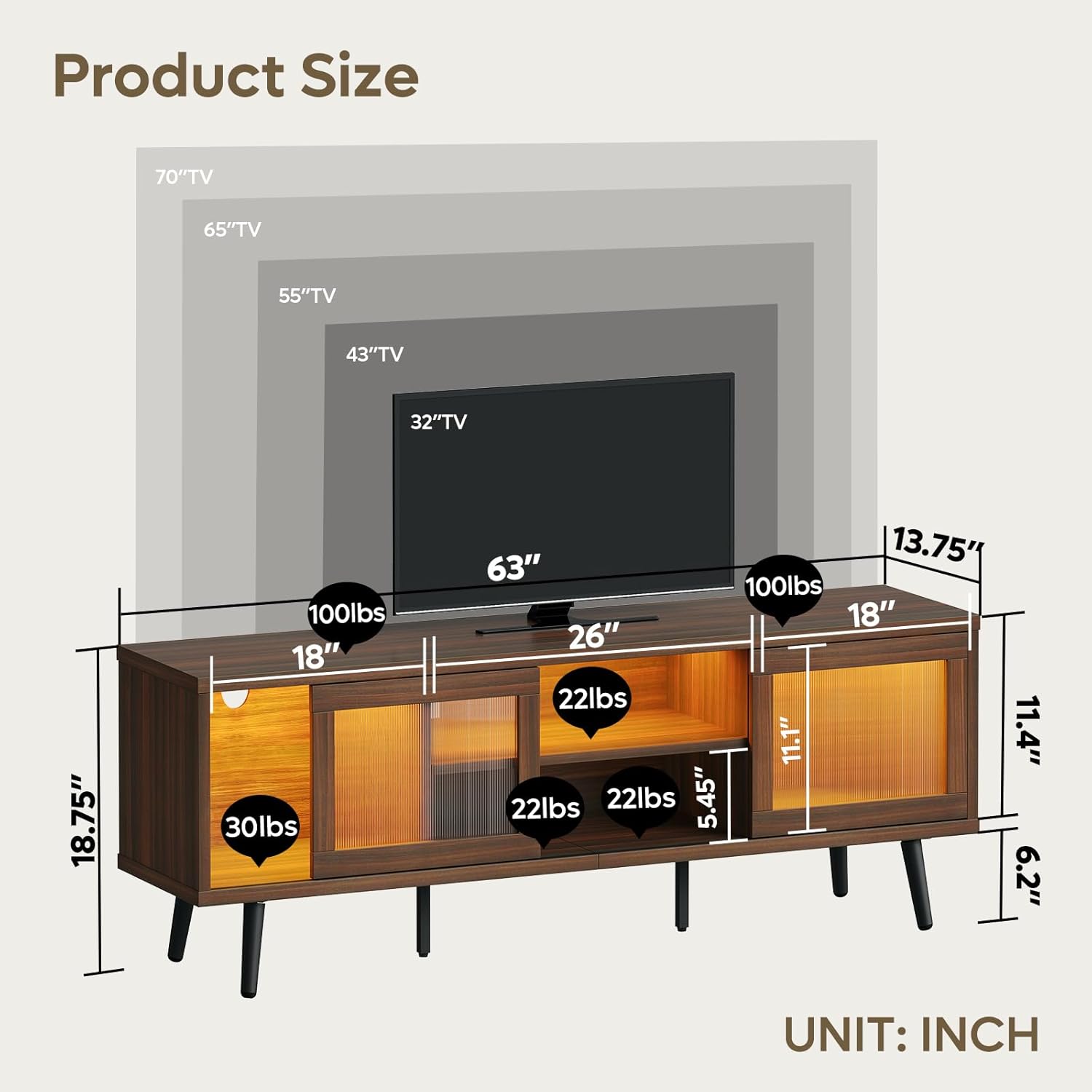
Image 6.1: Product dimensions and weight capacities for various sections of the TV stand, including overall width, height, and depth.
- Brand: Bestier
- Model Number: L103016M-CRY
- ASIN: B0D81DY4Q9
- Product Dimensions: 62.99 x 13.78 x 18.74 inches (W x D x H)
- Item Weight: 44.3 pounds (20.15 Kilograms)
- Material: Engineered Wood, Robust Solid Wood Legs, Colorful LED lights
- Color: Walnut
- Number of Shelves: 1 (adjustable)
- Special Features: Colorful LED lights, Durable, Easy-Clean Surfaces, Sliding Door
- Maximum Weight Capacity: 75kg (165 lbs)
- Recommended TV Size: Up to 70 inches
- Style: Modern
- UPC: 840408608688
7. Warranty and Support
Bestier products are designed for quality and durability. For specific warranty information, please refer to the documentation included with your purchase or visit the official Bestier website. If you require assistance with assembly, parts, or have any questions regarding your product, please contact Bestier customer support.
Customer Support: Refer to the contact information provided in your product packaging or on the Bestier official website.


