
HelloBaby HB6081
HelloBaby HB6081 5.5-inch HD Video Baby Monitor User Manual
Model: HB6081
1. Introduction
This manual provides detailed instructions for the setup, operation, and maintenance of your HelloBaby HB6081 5.5-inch HD Video Baby Monitor. This system offers a secure, non-WiFi connection for monitoring your baby with features such as remote pan, tilt, zoom, night vision, and two-way audio communication.
2. What's in the Box
- 1080P Plug-In Baby Camera (not battery-powered for safety)
- 720P 5.5'' HD Baby Monitor with Split Screen Function (4000mAh Battery Included)
- AC Charger x 2
- Mounting Screw
- User Manual x 1

Image: The HelloBaby HB6081 baby monitor system, showing the camera unit and the 5.5-inch monitor.
3. Product Overview
The HelloBaby HB6081 system consists of a camera unit and a parent monitor unit. The camera captures 1080P video, displayed on the 5.5-inch 720P HD IPS screen of the monitor. The system operates on a secure 2.4 GHz FHSS closed-circuit system, ensuring privacy without requiring WiFi or an app.
Key Features:
- 5.5-inch 720P HD IPS Display: Provides clear video with reduced latency.
- 1080P Camera: High-definition video capture.
- No WiFi, Hack-Proof Connection: Secure 2.4 GHz FHSS technology.
- Remote Pan, Tilt, Zoom (PTZ): Control camera view from the monitor (330° pan, 120° tilt).
- Infrared Night Vision: Automatic activation for clear viewing in low light.
- Two-Way Audio: Communicate with your baby.
- VOX (Voice Operated Exchange) Mode: Screen activates upon detecting sound.
- Lullabies: Built-in melodies to soothe your baby.
- Temperature Sensor: Monitors room temperature.
- Feeding Timer: Reminders for feeding schedules.
- Night Light: Integrated warm night light on the camera.
- Long Range: Up to 1000ft outdoor range.
- Expandable: Supports up to 4 cameras (additional cameras sold separately).

Image: Close-up of the monitor displaying a clear image, highlighting the 720P vivid view and 1080P Full HD camera capabilities.

Image: Visual representation of the monitor's features, including display size, battery life, range, and various functions.
4. Setup Instructions
- Charge the Monitor: Before first use, fully charge the parent unit (monitor) using one of the provided AC chargers. The monitor has a 4000mAh battery for portable use.
- Power the Camera: Connect the camera unit to a power outlet using the other AC charger. The camera is designed for continuous power and does not contain a battery.
- Placement:
- Place the camera in a location that provides a clear view of your baby, ensuring it is out of reach of children.
- Mounting options include tabletop, wall mount, or ceiling mount using the included screw.
- Ensure the camera is at least 3 feet (1 meter) away from your baby to avoid potential cord hazards.
- Power On: Turn on both the camera and the monitor. They should automatically pair. If pairing does not occur, refer to the "Pairing Camera and Monitor" section in Operating Instructions.

Image: Illustrates the secure, non-WiFi connection and long-range capability of the system, showing the camera and monitor units in a home setting.
5. Operating Instructions
5.1 Monitor Controls
The monitor features a directional pad and dedicated buttons for various functions. Refer to the on-screen icons for guidance.
- Power Button: Press and hold to turn on/off. Short press to turn screen on/off.
- Volume Buttons: Adjust the audio level.
- Brightness Buttons: Adjust screen brightness.
- Menu Button: Access settings for VOX, lullabies, feeding timer, temperature alerts, and camera management.
- Talk Button: Press and hold to speak through the camera to your baby.
- Zoom Button: Magnify the image on the screen.
5.2 Remote Pan, Tilt, and Zoom (PTZ)
Use the directional pad on the monitor to remotely adjust the camera's viewing angle.
- Pan: Move the camera horizontally up to 330 degrees.
- Tilt: Move the camera vertically up to 120 degrees.
- Zoom: Press the dedicated zoom button to magnify the image.
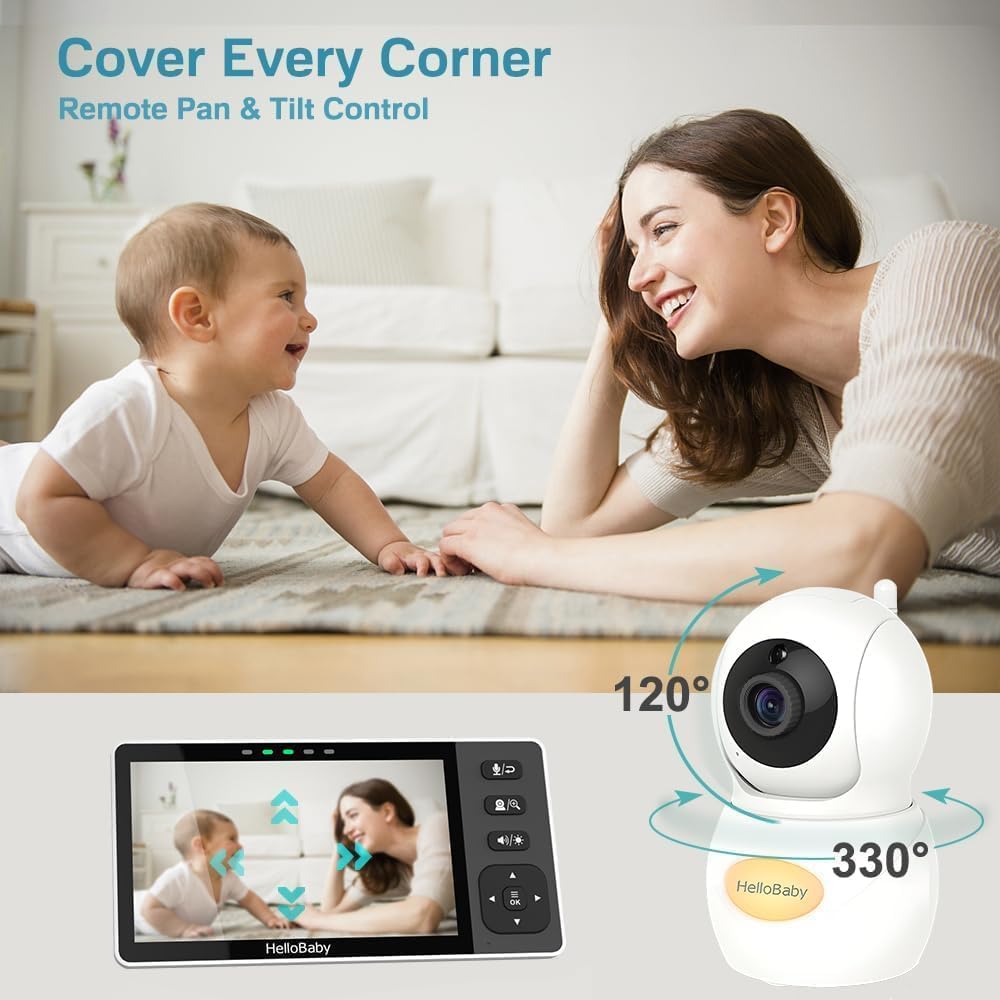
Image: Demonstrates the remote pan and tilt functionality of the camera, allowing comprehensive room coverage.
5.3 Night Vision
The camera automatically activates infrared night vision in low-light conditions, providing a clear black-and-white image of your baby.
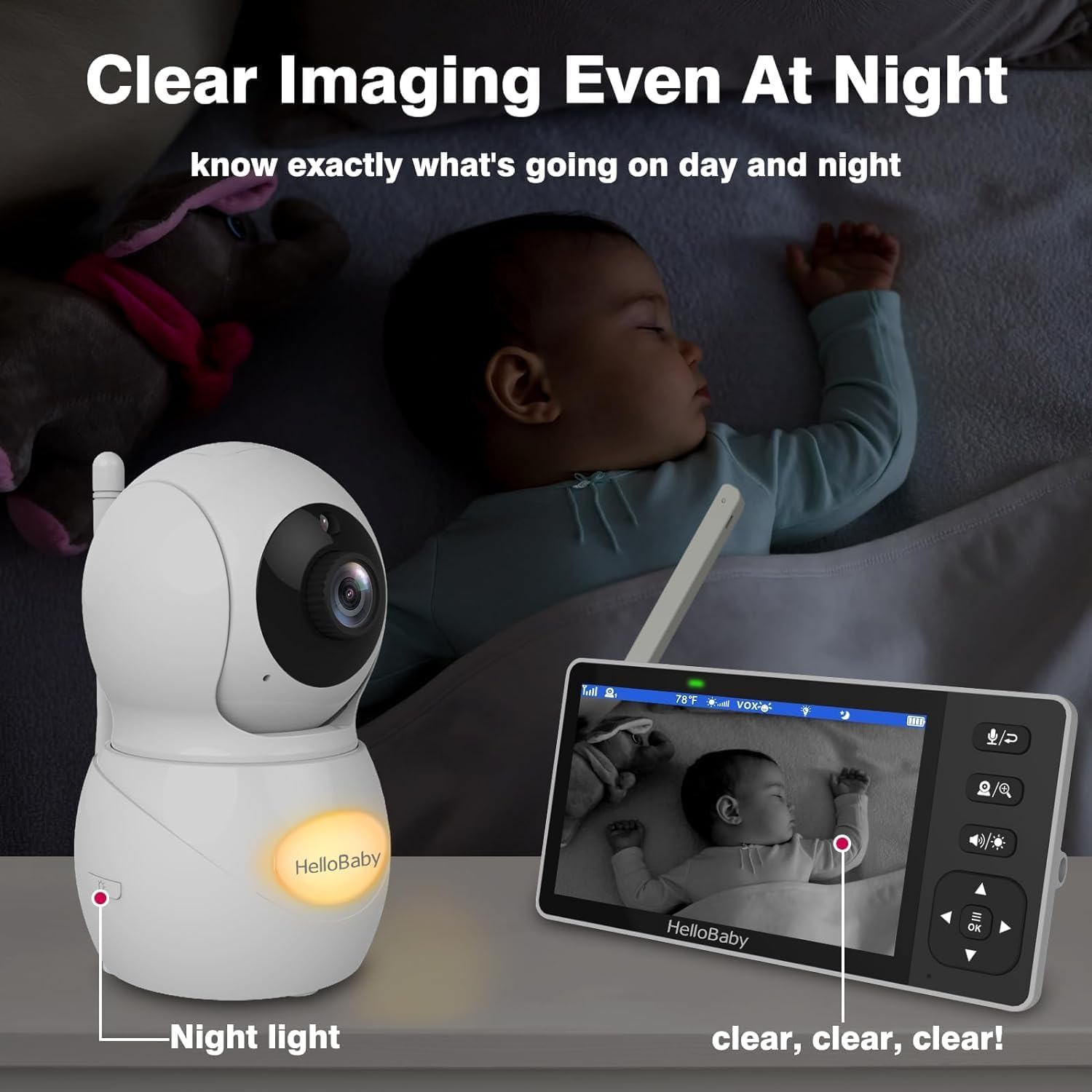
Image: Shows the clear night vision capability of the monitor, allowing parents to see their baby in the dark.
5.4 Two-Way Audio
Press and hold the "Talk" button on the monitor to speak to your baby through the camera's speaker. Release the button to hear your baby's sounds.
5.5 VOX Mode (Voice Operated Exchange)
In VOX mode, the monitor screen will automatically turn on when sound is detected from the baby's room. You can adjust the sensitivity level in the menu settings.
5.6 Lullabies
Access the menu to select and play built-in lullabies to help soothe your baby. You can control playback and volume from the monitor.
5.7 Feeding Timer
Set reminders for feeding times through the monitor's menu. This feature helps parents maintain a consistent feeding schedule.
5.8 Temperature Alerts
The camera includes a temperature sensor. You can set high and low temperature alerts in the monitor's menu to ensure your baby's room is comfortable.
5.9 Night Light
The camera unit features a warm night light. This can be controlled via the monitor's menu or a dedicated button, if available, to provide a gentle glow in the nursery.
5.10 Pairing Camera and Monitor (for additional cameras or re-pairing)
If you need to pair an additional camera or re-pair an existing one:
- Access the "Camera Management" or "Add Camera" option in the monitor's menu.
- Follow the on-screen prompts to initiate pairing.
- Press the pairing button on the back or bottom of the camera unit within the specified time frame.
- The monitor will confirm successful pairing.
6. Maintenance
- Cleaning: Use a soft, dry cloth to clean the monitor and camera units. Do not use abrasive cleaners or solvents.
- Battery Care: For optimal battery life, avoid fully discharging the monitor's battery frequently. Charge it regularly.
- Storage: If storing the unit for an extended period, ensure the monitor battery is partially charged (around 50%) and store in a cool, dry place.
- Environmental Conditions: Avoid exposing the units to extreme temperatures, direct sunlight, or moisture.
7. Troubleshooting
| Problem | Possible Solution |
|---|---|
| No image/sound on monitor |
|
| Poor image quality |
|
| Monitor battery drains quickly |
|
| Interference/Static |
|
| Two-way talk not working |
|
8. Specifications
| Feature | Detail |
|---|---|
| Model Number | HB6081 |
| Screen Size | 5.5 inches |
| Monitor Resolution | 720P HD |
| Camera Resolution | 1080P |
| Connectivity | 2.4GHz FHSS (No WiFi) |
| Monitor Battery Capacity | 4000mAh |
| Battery Life (Monitor) | 9 to 11 hours (standby) |
| Wireless Range | Up to 1000ft (outdoor, line of sight) |
| Pan Angle | 330 degrees |
| Tilt Angle | 120 degrees |
| Night Vision Range | 10 feet |
| Power Source (Camera) | Plug-in AC power |
| Power Source (Monitor) | Battery Powered (4000mAh) |
| Included Components | Camera, Monitor, 2x AC Chargers, Mounting Screw, User Manual |
| Material | Plastic |
| Product Dimensions (Camera) | 2.3 x 2.3 x 4.7 inches |
| Item Weight (Package) | 1.5 pounds |
9. Warranty and Support
9.1 12-Month Warranty
The HelloBaby HB6081 baby monitor comes with a 1-year full warranty from the date of purchase. This warranty covers free replacements for any defective units within this period.
Please note: This product is not compatible with other HelloBaby models.
9.2 Customer Support
For technical support, troubleshooting assistance, or any questions regarding your HelloBaby HB6081 monitor, please contact the HelloBaby professional after-sales team. They offer 24/7 technical support and guided assistance.
Contact information for support is typically found on the product packaging or the official HelloBaby website.
Related documentsHB6081


Ask a question about this manual
Ask about setup, troubleshooting, compatibility, parts, safety, or missing instructions. Manuals+ will review the question and use this page’s manual context to help answer it.