
1. Important Safety Information
Please read all instructions carefully before assembly and use. Keep this manual for future reference.
- WARNING: Do not exceed the maximum weight capacity of 386 lb (175 kg) per shelf or 1930 lb (875 kg) total for the entire unit. Overloading can cause structural failure and injury.
- Always use a rubber mallet for assembly to avoid injury and damage to components. A rubber mallet is not included.
- Ensure the shelf is stable and properly assembled before placing items on it. Improper assembly can lead to tipping or collapse.
- Distribute weight evenly across shelves. Avoid concentrating heavy items in one area.
- Do not climb on the shelving unit.
- Keep children and pets away from the assembly area.
- Wear appropriate safety gear, such as gloves, during assembly to prevent cuts or pinches.
2. Package Contents
Verify that all components are present before beginning assembly. If any parts are missing or damaged, contact customer support.
- Upright Posts (Vertical supports)
- Horizontal Beams (Long and short supports for shelves)
- MDF Boards (Shelf surfaces)
- Rubber Foot Pads (For stability and floor protection)
- Connectors (For joining upright posts if building a taller unit)
- Gloves (For protection during assembly)
3. Assembly Instructions
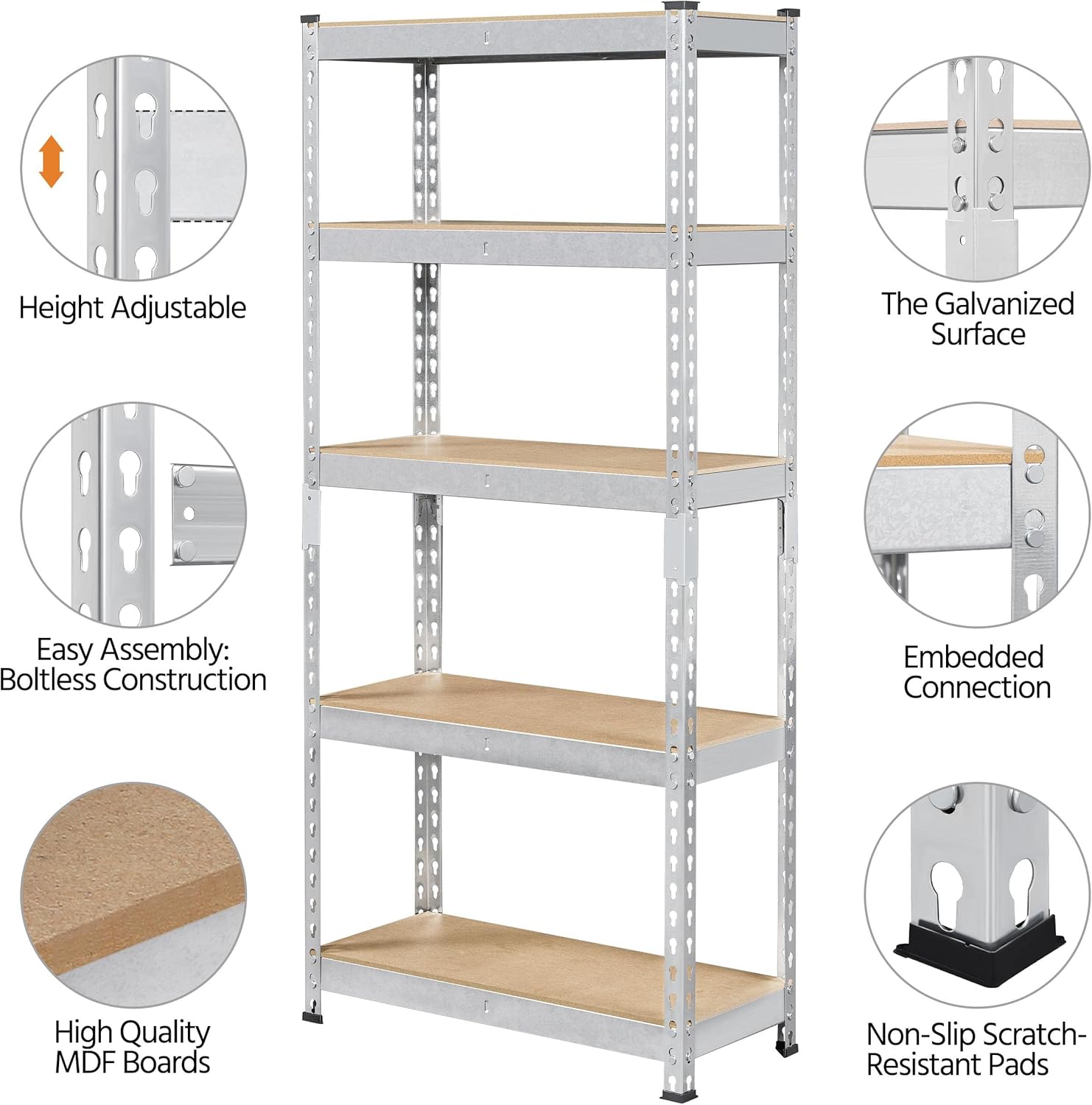
This shelving unit features a boltless design for easy assembly. A rubber mallet is recommended for securing components.
3.1. Preparation
- Clear a spacious and level area for assembly.
- Unpack all components and lay them out. Check against the package contents list.
- Put on the provided gloves to protect your hands.
3.2. Assembling the Frame
- Attach the rubber foot pads to the bottom of the upright posts.
- Connect two short horizontal beams to two upright posts at the desired height for the bottom shelf. Ensure the tabs on the beams align with the slots on the posts. Use a rubber mallet to gently tap them into place until secure.
- Repeat step 2 for the other side, creating two rectangular frames.
- Connect these two frames using the long horizontal beams. This forms the base of the shelving unit. Ensure all connections are tight and secure.
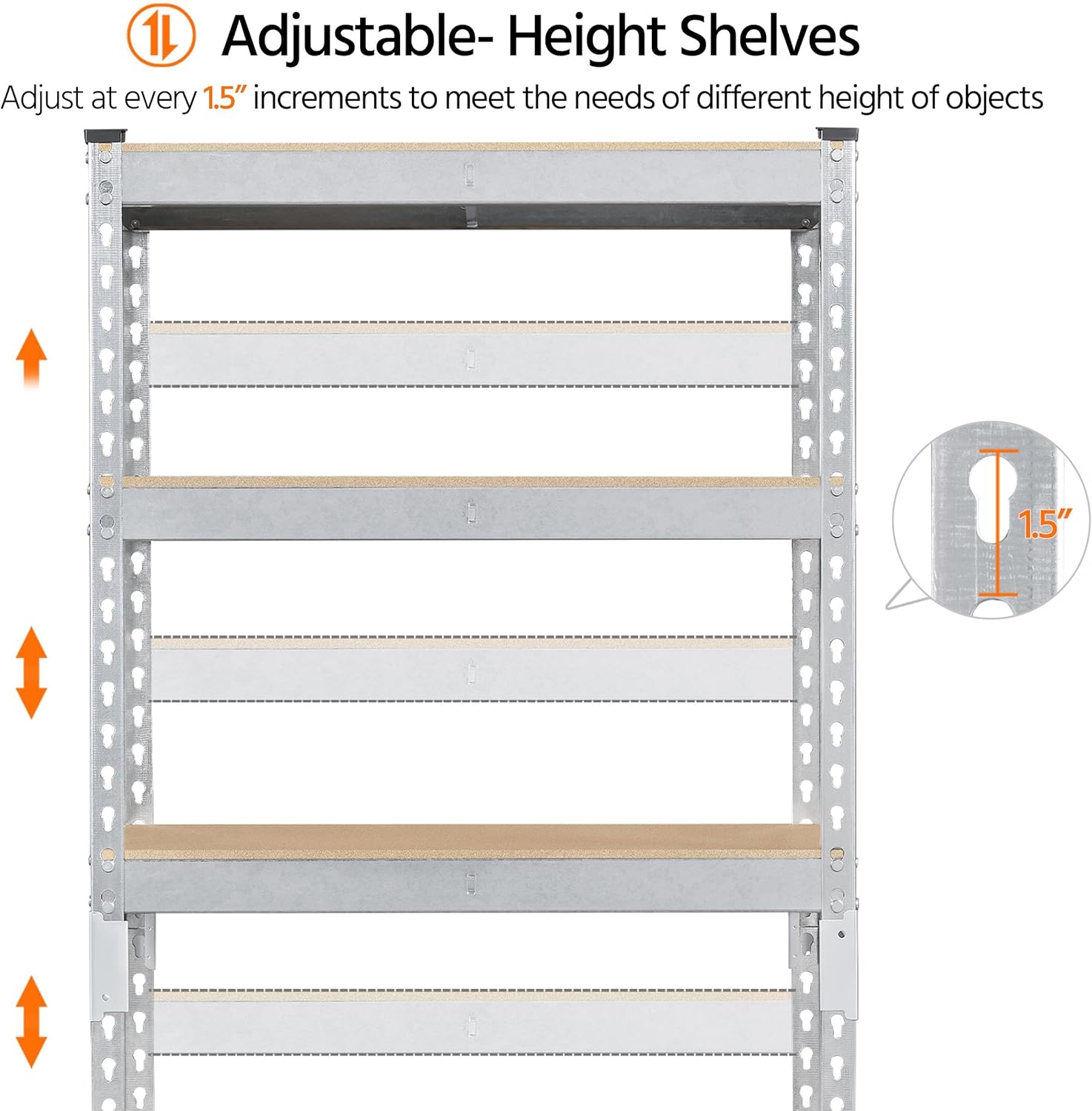
- Continue adding horizontal beams for the remaining shelves at your desired intervals. The shelves are adjustable in 1.5-inch increments.
3.3. Installing MDF Boards
- Once the frame is fully assembled, carefully place the MDF boards onto the horizontal beams for each shelf. Ensure they sit flush and are stable.
3.4. Configuration Options
The unit can be assembled as a single tall 5-tier shelf or reconfigured into two shorter units (e.g., a 3-tier and a 2-tier workbench style) using the provided connectors for the upright posts.

3.5. Assembly Video Reference
The following video provides a visual overview of the assembled shelving unit in a garage setting, demonstrating its stability and capacity.
4. Operating Instructions
4.1. Adjusting Shelf Height
The shelves can be adjusted to different heights to accommodate various items. Each upright post has slots allowing for adjustments in 1.5-inch increments.
- Empty the shelf you wish to adjust.
- Gently tap the horizontal beams upwards with a rubber mallet to disengage them from the slots.
- Relocate the horizontal beams to the desired height slots.
- Tap the beams downwards with a rubber mallet until they are securely seated in the new slots.
- Replace the MDF board.
4.2. Loading the Shelves
Ensure items are placed evenly on the shelves. Do not exceed the maximum weight capacity per shelf (386 lb) or the total unit capacity (1930 lb).

4.3. Product Application Examples
The shelving unit is suitable for various environments, including garages, kitchens, living rooms, workshops, and warehouses.

4.4. Additional Product Views
These videos provide further visual context of the shelving unit in different storage scenarios.
5. Maintenance
Regular maintenance ensures the longevity and safe operation of your shelving unit.
- Cleaning: Wipe with a dry cloth to remove dust and debris. Avoid abrasive cleaners or harsh chemicals that could damage the finish.
- Inspection: Periodically check all connections to ensure they remain secure. If any beams feel loose, gently tap them back into place with a rubber mallet.
- Stability: Ensure the unit remains on a level surface. If the unit becomes wobbly, check the foot pads and connections.
6. Troubleshooting
If you encounter issues with your shelving unit, refer to the following common solutions:
- Unit is wobbly: Ensure all horizontal beams are fully seated in the upright post slots. Use a rubber mallet to secure any loose connections. Verify the unit is on a flat, level surface.
- Difficulty assembling components: Ensure the tabs on the beams are correctly aligned with the slots on the posts. Apply firm, even pressure and use a rubber mallet to tap components into place. Do not force parts.
- MDF boards do not fit: Ensure the frame is correctly assembled and square. The boards should sit flush within the frame.
7. Specifications
| Brand | Yaheetech |
| Model | B0D816S52X |
| Material | Engineered Wood (MDF), Metal |
| Finish Type | Powder Coated |
| Number of Shelves | 5 |
| Overall Dimensions (per unit) | 27.36" W x 11.61" D x 60.04" H (69.5 cm W x 29.5 cm D x 152.5 cm H) |
| Shelf Thickness | 11.5 Inches (29.2 cm) |
| Max. Weight Capacity (per shelf) | 386 lb (175 kg) |
| Total Weight Capacity (per unit) | 1930 lb (875 kg) |
| Item Weight (per unit) | 20.8 pounds (9.4 kg) |
| Assembly Required | Yes (Boltless Assembly) |
| Special Feature | Adjustable, Heavy Duty |
8. Warranty and Support
For warranty information, product support, or to purchase replacement parts, please contact Yaheetech customer service through the retailer where the product was purchased or visit the official Yaheetech website. Please have your model number (B0D816S52X) available when contacting support.