
1. Introduction
Thank you for choosing the Tilswall Mini Cordless Rotary Tool Kit. This versatile tool is designed for a wide range of DIY and craft projects, offering portability and precision for tasks such as sanding, polishing, drilling, cutting, and carving. Please read this manual thoroughly before use to ensure safe and optimal operation.
2. Safety Instructions
- Always wear appropriate personal protective equipment (PPE), including safety glasses, during operation.
- Ensure the tool is switched off and disconnected from the power source (if charging) before changing accessories or performing maintenance.
- Keep hands and loose clothing away from rotating parts.
- Do not operate the tool in damp or wet conditions.
- Store the tool and accessories in a dry, secure place, out of reach of children.
- Use only accessories designed for this rotary tool.
- Avoid applying excessive pressure, which can cause the motor to stall or damage the accessory.
3. Package Contents
Your Tilswall Mini Cordless Rotary Tool Kit includes:
- Tilswall Mini Cordless Rotary Tool
- USB Charging Cable
- Various Rotary Tool Accessories (e.g., sanding bands, polishing wheels, drill bits, cutting discs, grinding stones, screwdriver bits)
- User Manual

Image: The Tilswall Mini Cordless Rotary Tool Kit showing the tool and a wide array of included accessories for diverse applications.
4. Setup
4.1 Charging the Tool
Before first use, fully charge the rotary tool. Connect the provided USB charging cable to the tool's charging port and to a compatible USB power source. The indicator lights will show charging status. A full charge typically takes approximately 60 minutes, providing extended use thanks to its 2200 mAh battery.

Image: The Tilswall Mini Cordless Rotary Tool highlighting its 2200 mAh battery and approximately 60 minutes of runtime.

Image: The Tilswall Mini Cordless Rotary Tool in use, illustrating its automatic power-off protection feature.
4.2 Attaching Accessories
- Ensure the tool is off.
- Press and hold the spindle lock button to prevent the shaft from rotating.
- Unscrew the collet nut.
- Insert the desired accessory shank into the collet. Ensure it is fully seated.
- While still holding the spindle lock button, tighten the collet nut securely. Do not overtighten.
- Release the spindle lock button.
Video: Demonstration of how to change accessories on a mini cordless rotary tool, including pressing the lock button and tightening the collet.
5. Operating Instructions
5.1 Power On/Off and Speed Adjustment
- To turn the tool on or off, press the power button.
- The tool features 5 adjustable speed settings, ranging from 5000 to 25000 RPM. Use the '+' and '-' buttons to select the appropriate speed for your task. Lower speeds are suitable for polishing and delicate work, while higher speeds are for cutting and grinding.

Image: The Tilswall Mini Cordless Rotary Tool illustrating its 5-speed adjustment feature, ranging from 5000 to 25000 RPM.
5.2 General Usage Tips
- Always test on a scrap piece of material first.
- Let the tool do the work; avoid forcing it, which can lead to motor strain or damage to the workpiece.
- Maintain a firm grip on the tool. Its lightweight design (0.55 lbs) enhances control.
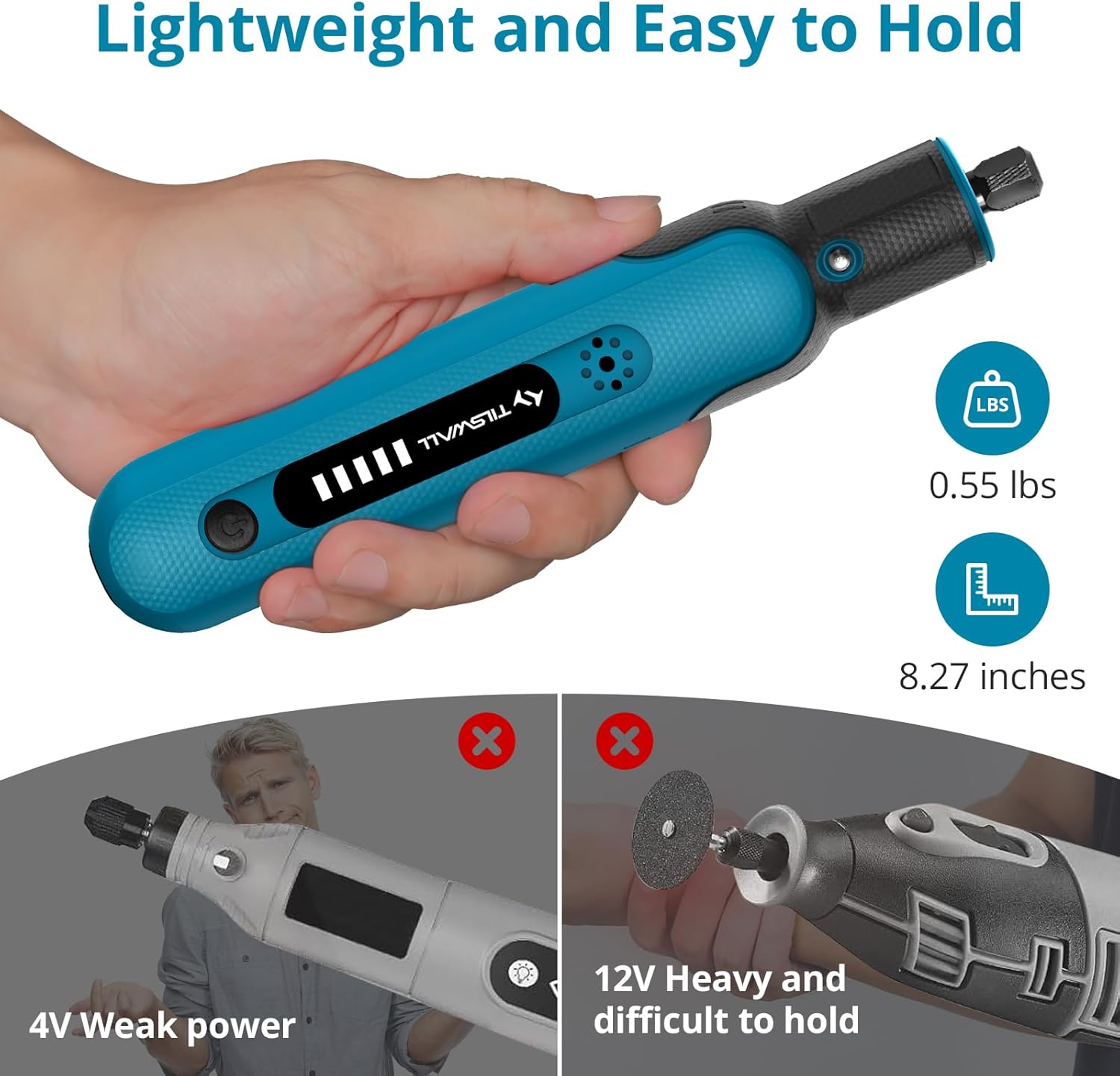
Image: The Tilswall Mini Cordless Rotary Tool being held, emphasizing its lightweight and ergonomic design for comfortable use.
5.3 Specific Applications
The Tilswall Mini Cordless Rotary Tool is suitable for:
- Drilling: Use appropriate drill bits for wood, plastic, or soft metals.
- Sanding: Attach sanding bands or discs for smoothing surfaces.
- Polishing: Use felt wheels with polishing compound for a high-gloss finish.
- Cutting: Employ cutting discs for thin materials like plastic, wood, or soft metals.
- Carving/Engraving: Utilize engraving bits for detailed work on various materials.
- Screwdriving: Attach screwdriver bits for light assembly tasks.

Image: A collage showing the Tilswall Mini Cordless Rotary Tool performing various tasks including carving, cutting, drilling, grinding, sanding, and polishing.

Image: The Tilswall Mini Cordless Rotary Tool in action, cutting a piece of metal, demonstrating its 8V high-power motor.
Video: A demonstration of the 4-in-1 Multi-Function Cordless Rotary Tool, showcasing its capabilities for drilling, polishing, sanding, cutting, cleaning, and as an electric screwdriver.
Video: A comprehensive overview of the Mini Cordless Rotary Tool Kit, demonstrating its use for drilling, polishing, sanding, and cutting various materials.
6. Maintenance
- Cleaning: After each use, wipe the tool clean with a dry cloth. Use a soft brush to remove dust and debris from vents and the collet area.
- Storage: Store the tool and accessories in their original packaging or a suitable case in a dry, cool place.
- Battery Care: For optimal battery life, avoid fully discharging the battery frequently. Recharge the tool periodically if not used for extended periods.
7. Troubleshooting
- Tool not turning on: Ensure the battery is charged. Check the power button.
- Tool stops during operation: The tool may have activated its automatic power-off protection due to motor stall. Reduce pressure or use a different accessory. Allow the tool to cool if it feels hot.
- Poor performance: Ensure the accessory is correctly installed and not worn out. Adjust the speed setting for the material and task.
8. Specifications
| Feature | Detail |
|---|---|
| Model Number | ZYY-8VDM-US |
| Voltage | 8 Volts |
| Power Source | Battery Powered (Lithium) |
| Maximum Rotational Speed | 25000 RPM |
| Speed Settings | 5 (5000-25000 RPM) |
| Item Weight | 249 g (0.55 lbs) |
| Special Features | Lightweight, Variable Speed, Automatic Power-off Protection |
| Included Components | Rotary Tool, USB Charging Cable, 105 x Screwdriver Bit, various rotary tool accessories |
9. Warranty and Support
For warranty information and customer support, please refer to the product packaging or contact Tilswall customer service directly. Keep your purchase receipt as proof of purchase.
