
Important Safety Information
Please read and understand all safety instructions before using this product. Failure to follow these instructions may result in electric shock, fire, or serious injury.
- This charger is designed for use with NEMA 6-20 and NEMA 5-15 sockets only. Do not attempt to connect it to NEMA 14-30, NEMA 10-30, or any other incompatible sockets.
- Ensure the charging plug is fully inserted into the vehicle's charging port until a 'click' sound is heard to ensure a secure connection.
- The charger incorporates triple protection functions: Leakage Protection, Overcharge Protection, and Under Voltage Protection. Do not attempt to bypass or modify these safety features.
- Always inspect the charger, cable, and plugs for any damage before each use. Do not use if any damage is observed.
- Keep the charger and cables away from water, excessive heat, and sharp objects.
- Do not immerse the control box or charging handle in water. While the unit is IP65 rated for water resistance, proper care should be taken.
Package Contents
Verify that all items listed below are included in your package:
- 1x bokman Tesla Charger (25ft cable)
- 1x Charger Holder
- 1x Control Box Holder
- 1x Storage Bag
- 1x Towel
- 1x NEMA 6-20 to 5-15 Adapter

Figure 1: Included Package Contents
Product Overview
The bokman BKTS1625 is a portable Level 2 EV charger designed for Tesla vehicles. It offers flexible charging options with both NEMA 6-20 (240V) and NEMA 5-15 (120V) compatibility via an included adapter. The 25-foot cable provides ample reach for various charging scenarios.

Figure 2: bokman EV Charger in use with a Tesla

Figure 3: Charging Specifications (16 Amps, 3.84 kW)
Setup and Installation
Compatibility
This charger is compatible with all Tesla electric vehicles, including:
- Tesla Model 3
- Tesla Model Y
- Tesla Model S
- Tesla Model X
- Tesla Cybertruck

Figure 4: Compatible Tesla Models
Connecting the Charger
The charger supports both Level 2 (240V) and Level 1 (120V) charging. Use the appropriate plug for your electrical outlet.
- For Level 2 Charging (240V): Plug the NEMA 6-20 plug directly into a compatible 240V wall receptacle.
- For Level 1 Charging (120V): Attach the included NEMA 6-20 to 5-15 adapter to the charger's NEMA 6-20 plug, then plug the 5-15 adapter into a standard 120V household socket.

Figure 5: NEMA 6-20 Plug and NEMA 5-15 Adapter

Figure 6: Connection Steps
Operating Instructions
Charging Process
- Connect the charger to the appropriate wall socket (NEMA 6-20 or NEMA 5-15 with adapter). The control box LED will illuminate solid green, indicating power is on.
- Open your Tesla's charging port.
- Insert the bokman charging handle firmly into the Tesla's charging port until it clicks into place. Ensure a secure connection.
- The LED indicator on the control box will begin flashing blue, signifying that charging is in progress. The Tesla's charging port light will also indicate charging status.
- Once charging is complete, the LED indicator on the control box will turn solid blue.
- To disconnect, unlock the charging port via your Tesla's app or touchscreen, then firmly pull the charging handle out of the port.
LED Indicator Meanings
The LED indicator on the control box provides visual feedback on the charger's status:
- Solid Green: Power On / Ready to charge.
- Flashing Blue: Charging in progress.
- Solid Blue: Charging completed.
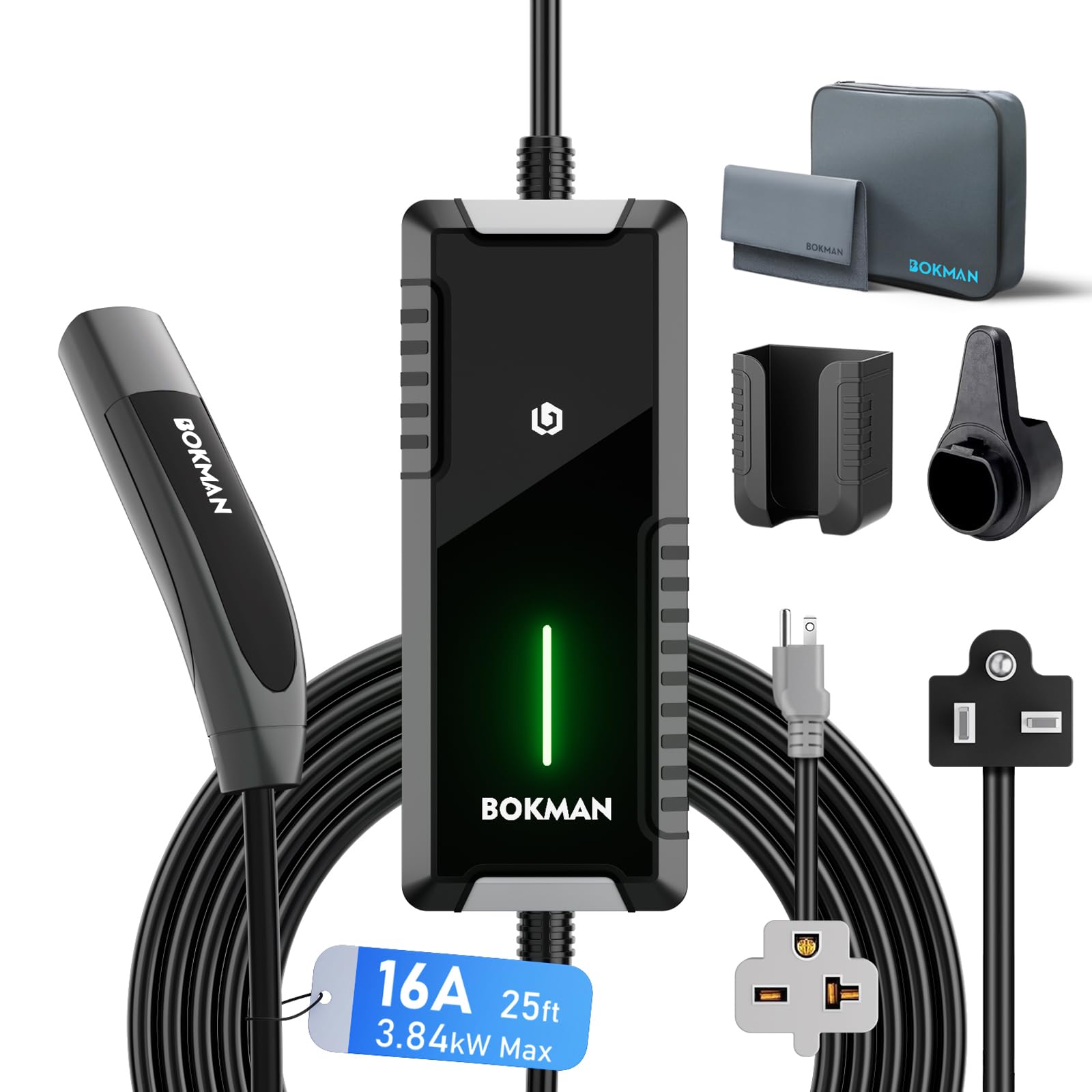
Figure 7: LED Indicator Status

Figure 8: Charger LED Indicator in context
Maintenance
To ensure the longevity and optimal performance of your bokman EV charger, follow these maintenance guidelines:
- Regularly clean the exterior of the control box and charging handle with a soft, dry cloth. Avoid abrasive cleaners or solvents.
- Inspect the charging cable for any cuts, fraying, or damage before each use.
- Ensure the plugs and connectors are free from dirt, moisture, or debris.
- Store the charger in a dry, cool place when not in use, preferably using the provided storage bag and holders.
Environmental Considerations
The bokman charger is designed to withstand various environmental conditions:
- Water Resistance: The charger has an IP65 rating, meaning it is protected against dust ingress and low-pressure water jets from any direction. It can be used outdoors in light rain.
- Temperature Range: The charger is designed to operate effectively across a range of temperatures.

Figure 9: Environmental Durability
Troubleshooting
If you encounter issues with your bokman EV charger, refer to the following common problems and solutions:
| Problem | Possible Cause | Solution |
|---|---|---|
| Charger not powering on (LED off) | No power from the outlet; faulty outlet; damaged cable/plug. | Check the wall outlet with another device. Ensure the plug is fully inserted. Inspect the cable for damage. Try a different compatible outlet. |
| Charger not initiating charge (Solid Green LED, but car not charging) | Charging handle not fully inserted; vehicle not ready to charge; communication error. | Ensure the charging handle is securely clicked into the Tesla's port. Check your Tesla's settings for scheduled charging or other interruptions. Disconnect and reconnect the charger. |
| Cannot remove charging handle from vehicle | Charging port locked by vehicle. | Unlock the charging port using your Tesla's mobile app or the vehicle's touchscreen interface. The bokman charger does not have a physical release button on the handle. |
| Charging is intermittent or stops unexpectedly | Loose connection; power fluctuation; internal fault. | Ensure all connections are secure. Check for stable power supply. If the issue persists, contact customer support. |
If the problem persists after attempting these solutions, please contact bokman customer support for further assistance.
Specifications
| Feature | Specification |
|---|---|
| Model Number | BKTS1625 |
| Input Voltage | 240V (NEMA 6-20) / 120V (NEMA 5-15 with adapter) |
| Current | 16 Amps |
| Power Output | 3.84 kW (Max) |
| Cable Length | 25 feet |
| Compatibility | All Tesla Models (3, Y, S, X, Cybertruck) |
| Protection Functions | Leakage Protection, Overcharge Protection, Under Voltage Protection |
| Water Resistance Rating | IP65 |
| Item Weight | 8.8 pounds |
| Package Dimensions | 14.53 x 13.35 x 5.55 inches |
Warranty and Support
bokman products are manufactured to high-quality standards. For information regarding warranty coverage, please refer to the warranty card included with your product or visit the official bokman website. If you require technical assistance, troubleshooting, or have questions about your charger, please contact bokman customer support through the retailer where the product was purchased or via the contact information provided on the bokman brand store page.
For additional resources and product information, you may visit the bokman Store on Amazon.