
1. Introduction
Thank you for choosing the ONEVAN Cordless Impact Wrench. This manual provides essential information for the safe and effective operation, maintenance, and troubleshooting of your new tool. Please read this manual thoroughly before first use and retain it for future reference.
The ONEVAN Cordless Impact Wrench is designed for various fastening and loosening tasks, including automotive repairs, construction, and general home maintenance. It features a powerful brushless motor, a 1/2 inch square drive, and adjustable speed settings for versatile applications.
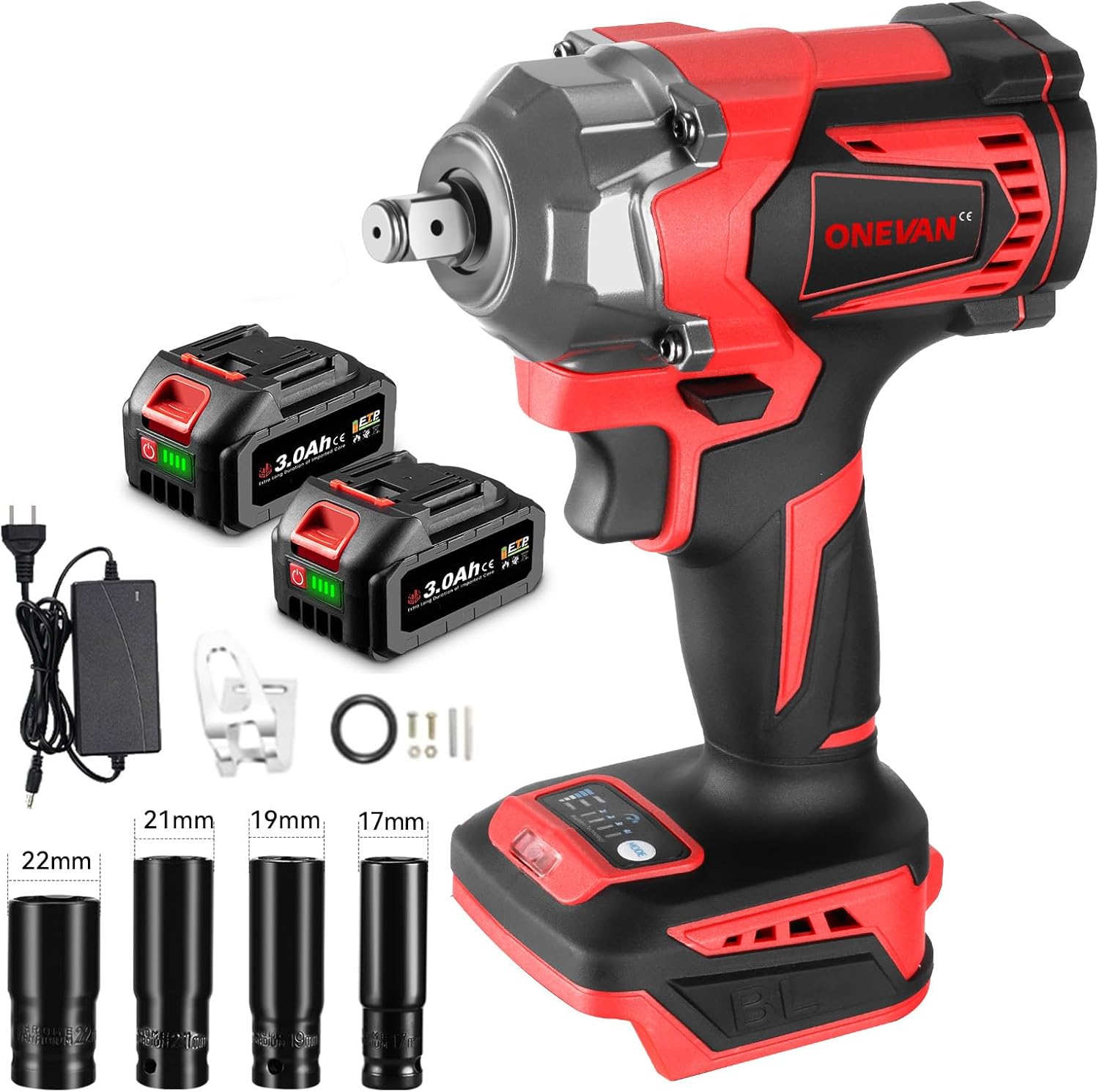
Image 1.1: The ONEVAN Cordless Impact Wrench kit, including the wrench, two 3.0Ah batteries, a fast charger, and various impact wrench sockets.
2. Safety Instructions
Always observe basic safety precautions when using electric tools to reduce the risk of fire, electric shock, and personal injury.
General Power Tool Safety
- Work Area Safety: Keep the work area clean and well-lit. Cluttered or dark areas invite accidents. Do not operate power tools in explosive atmospheres, such as in the presence of flammable liquids, gases, or dust.
- Electrical Safety: Avoid body contact with earthed or grounded surfaces. Do not expose power tools to rain or wet conditions.
- Personal Safety: Always wear eye protection. Use hearing protection when operating the tool for extended periods. Dress properly; avoid loose clothing or jewelry. Secure long hair.
- Tool Use and Care: Do not force the power tool. Use the correct power tool for your application. Disconnect the battery pack from the power tool before making any adjustments, changing accessories, or storing power tools.
- Maintenance: Maintain power tools. Check for misalignment or binding of moving parts, breakage of parts, and any other condition that may affect the power tool’s operation.
Battery Safety
- Only use the charger specified by the manufacturer. A charger that is suitable for one type of battery pack may create a risk of fire when used with another battery pack.
- Use power tools only with specifically designated battery packs. Use of any other battery packs may create a risk of injury and fire.
- When battery pack is not in use, keep it away from other metal objects, like paper clips, coins, keys, nails, screws or other small metal objects, that can make a connection from one terminal to another. Shorting the battery terminals together may cause burns or a fire.
- Under abusive conditions, liquid may be ejected from the battery; avoid contact. If contact accidentally occurs, flush with water. If liquid contacts eyes, additionally seek medical help. Liquid ejected from the battery may cause irritation or burns.
3. Package Contents
Verify that all items listed below are present and in good condition upon opening the package. If any items are missing or damaged, please contact your retailer.
- 1 x ONEVAN 1/2 Inch Cordless Impact Wrench
- 2 x 3.0Ah Lithium-Ion Batteries
- 1 x Fast Charger
- 1 x Impact Wrench Socket (typically 22mm, 21mm, 19mm, 17mm are included)
- 1 x User Manual (this document)
4. Product Features
The ONEVAN Cordless Impact Wrench incorporates several features designed for performance and user convenience.
- High Torque Output: Delivers up to 700N.m (525Ft-lbs) of maximum torque for demanding applications.
- Brushless Motor: An upgraded brushless motor provides increased efficiency, longer tool life, and reduced noise compared to brushed motors.
- Variable Speed Control: Offers 4 forward gears and 4 reverse gears, including a reverse auto-stop function, with a maximum rotational speed of 2300 RPM.
- Dual 3.0Ah Batteries: Includes two high-capacity 20V 3.0Ah lithium-ion batteries for extended operation.
- Fast Charger: Equipped with a fast charger to minimize downtime.
- Compact and Ergonomic Design: Designed for comfortable handling and reduced user fatigue during prolonged use.
- Built-in LED Light: Illuminates the work area for improved visibility in low-light conditions.
Detailed Features

Image 4.1: The upgraded brushless motor offers enhanced performance and durability.

Image 4.2: High-capacity 3.0Ah batteries provide extended operational time.

Image 4.3: The integrated LED light enhances visibility in dark work environments.
5. Setup and Assembly
5.1 Charging the Battery
- Ensure the battery is clean and dry before charging.
- Connect the fast charger to a standard power outlet.
- Slide the battery pack onto the charger until it clicks into place.
- The charger indicator light will show the charging status. A full charge typically takes approximately 3 hours.
- Once fully charged, disconnect the battery from the charger and unplug the charger from the outlet.
5.2 Installing/Removing the Battery
- To Install: Align the battery pack with the base of the impact wrench and slide it in until it locks securely.
- To Remove: Press the battery release button (usually located on the side of the battery) and slide the battery pack out.
5.3 Attaching/Removing Sockets
- To Attach: Push the desired 1/2 inch impact socket onto the square drive anvil until it snaps into place. Ensure it is firmly seated.
- To Remove: Pull the socket firmly off the square drive anvil.
6. Operating Instructions
Before operation, ensure the battery is fully charged and securely installed, and the correct socket is attached.
6.1 Powering On/Off
- To turn on the tool, press the trigger switch. The speed is variable depending on how far the trigger is pressed.
- To turn off the tool, release the trigger switch.
6.2 Forward/Reverse Rotation
The forward/reverse switch is located above the trigger. This switch controls the direction of rotation.
- Push the switch to the left for forward rotation (tightening).
- Push the switch to the right for reverse rotation (loosening).
- When the switch is in the center position, the trigger is locked, preventing accidental startup.

Image 6.1: The forward/reverse switch controls the direction of the tool's rotation.
6.3 Speed and Torque Adjustment
The impact wrench features 4 gear settings to adjust speed and torque, allowing for precise control depending on the application. The current gear setting is displayed on the tool's digital panel.
- Press the "MODE" button on the base of the tool to cycle through the 4 available gear settings.
- Each gear setting corresponds to a different maximum speed and torque output. Select a lower gear for delicate tasks requiring less torque, and a higher gear for heavy-duty applications.
- The tool also includes a reverse auto-stop function, which helps prevent over-loosening of fasteners.

Image 6.2: The digital display indicates battery status and selected gear setting.

Image 6.3: The impact wrench provides substantial torque for demanding applications.
6.4 Using the Built-in LED Light
The LED light automatically activates when the trigger is pressed, illuminating the work surface. It will turn off shortly after the trigger is released.
7. Maintenance
Regular maintenance ensures the longevity and optimal performance of your impact wrench.
- Cleaning: Keep the tool's ventilation openings clean and free of dust. Use a soft, damp cloth to clean the exterior. Do not use harsh chemicals or abrasive cleaners.
- Battery Care: Store batteries in a cool, dry place away from direct sunlight. Do not store fully discharged batteries for extended periods. Charge them periodically if not in use.
- Storage: When not in use, store the impact wrench, batteries, and charger in a secure, dry location, out of reach of children.
- Inspection: Periodically inspect the tool for any signs of damage, loose screws, or worn parts. If any issues are found, discontinue use and seek professional repair if necessary.
8. Troubleshooting
This section addresses common issues you might encounter with your ONEVAN Cordless Impact Wrench.
| Problem | Possible Cause | Solution |
|---|---|---|
| Tool does not start. | Battery not charged or improperly installed. Forward/reverse switch in center (locked) position. | Ensure battery is fully charged and correctly inserted. Move the forward/reverse switch to either forward or reverse position. |
| Reduced power or torque. | Low battery charge. Incorrect gear setting for the task. Worn or damaged socket. | Recharge the battery. Select a higher gear setting. Replace the socket if damaged. |
| Tool overheats. | Prolonged heavy use. Blocked ventilation openings. | Allow the tool to cool down. Ensure ventilation openings are clear of debris. Avoid continuous heavy-duty operation. |
| Battery not charging. | Charger not plugged in. Faulty battery or charger. | Check power connection. Try another outlet. If problem persists, contact customer support. |
9. Specifications
Technical specifications for the ONEVAN Cordless Impact Wrench 700NM.
| Feature | Specification |
|---|---|
| Model | Cordless Impact Wrench |
| Brand | ONEVAN |
| Power Source | Battery Powered |
| Battery Voltage | 20 Volts |
| Battery Capacity | 2 x 3.0Ah Lithium-Ion |
| Maximum Torque | 700 N.m (525 Ft-lbs) |
| Maximum Rotational Speed | 2300 RPM |
| Impact Frequency | 0-2900 IPM |
| Square Drive Size | 1/2 Inch |
| Gear Settings | 4 Forward, 4 Reverse (with auto-stop) |
| Motor Type | Brushless |
| Item Weight | 2.6 Kilograms (5.72 pounds) |
| Dimensions (Package) | 14.76 x 9.17 x 5.08 inches |
10. Warranty and Support
For warranty information, technical support, or service inquiries, please refer to the warranty card included with your product or contact ONEVAN customer service directly. Keep your purchase receipt as proof of purchase.
You can often find contact details on the manufacturer's official website or through the retailer where the product was purchased.
