
1. Introduction
Thank you for choosing the HTRC C35A Smart Battery Charger. This advanced charger is designed to provide safe and efficient charging for a wide range of 6V, 12V, and 24V batteries, including LiFePO4, Lithium, and Lead-Acid types (AGM, Calcium, GEL, MF, EFB, SLA, VRLA, WET). It is suitable for various vehicles such as cars, motorcycles, boats, SUVs, and lawnmowers. This manual provides essential information for the proper setup, operation, and maintenance of your charger.

Image 1.1: HTRC C35A Smart Battery Charger with various compatible battery types.

Image 1.2: The HTRC C35A charger is compatible with a wide range of vehicles.
2. Safety Instructions
Please read and understand all safety instructions before using the charger. Failure to follow these instructions may result in electric shock, fire, or serious injury.
- Read the Manual: Always read the entire instruction manual before operating the charger.
- Ventilation: Use the charger in a well-ventilated area. Do not cover the charger during operation.
- Avoid Sparks: Do not operate the charger near flammable materials, gases, or vapors. Avoid creating sparks.
- Eye Protection: Always wear appropriate eye protection and protective clothing when working with batteries.
- Disconnect Power: Disconnect the AC power supply before making or breaking connections to the battery.
- Battery Condition: Do not attempt to charge frozen, damaged, or non-rechargeable batteries.
- Children: Keep the charger and batteries out of reach of children.
- Proper Use: Use the charger only for its intended purpose as described in this manual.
- Damage: Do not operate the charger if it has been dropped, damaged, or if the power cord or clips are compromised.
Integrated Safety Protections:
The HTRC C35A charger incorporates multiple safety features to ensure secure operation:
- Spark Protection: Prevents sparks during connection.
- Short-Circuit Protection: Guards against short circuits.
- Reverse Current Protection: Prevents current flow back to the charger.
- Under-Voltage Protection: Protects against charging batteries with extremely low voltage.
- Over-Current Protection: Prevents excessive current draw.
- Over-Temperature Protection: Shuts down if internal temperature becomes too high.
- High-Voltage Protection: Safeguards against over-voltage conditions.
- Overcharge Protection: Prevents battery overcharging.

Image 2.1: The charger features intelligent multiple protection for safe operation.
3. Product Overview and What's in the Box
The HTRC C35A charger is designed for user-friendly operation with an intuitive LCD screen and robust construction. Before starting, please ensure all components are present.
Package Contents:
- 1 x HTRC C35A Smart Battery Charger
- 1 x AC Power Cable (2m length)
- 1 x Alligator Clamp Cable (1m length)
- 1 x User Instruction Manual

Image 3.1: What's included in the HTRC C35A product box.
4. Setup Instructions
Follow these steps to properly connect your HTRC C35A battery charger:
- Prepare the Battery: Ensure the battery terminals are clean and free of corrosion.
- Connect Alligator Clips to Charger: Plug the alligator clamp cable securely into the output port of the charger.
- Connect to Battery:
- Connect the RED positive (+) alligator clip to the positive (+) battery terminal.
- Connect the BLACK negative (-) alligator clip to the negative (-) battery terminal.
Ensure a secure connection. The charger will automatically detect the battery voltage (6V, 12V, or 24V).
- Connect to AC Power: Plug the AC power cable into a standard wall outlet (100-240V~50/60Hz). The charger will power on and begin its diagnostic process.
5. Operating Instructions
The HTRC C35A features an intelligent charging process and an easy-to-read LCD display.
LCD Display Information:
The LCD screen provides real-time information:
- Battery Voltage (V): Current voltage of the connected battery.
- Charging Current (A): The current flowing into the battery.
- Charging Temperature (°C/°F): Ambient temperature, which the charger uses to adjust charging power.
- Battery Full Indicator: Shows when the battery is fully charged.
- Charging Mode: Indicates the selected charging mode (LOW, MEDIUM, HIGH, REPAIR).
- Battery Type: Displays the detected battery type.

Image 5.1: Detailed view of the charger's LCD display.
One-Button Mode Selection:
After connecting the charger, press the mode button to cycle through the available charging modes:
- LOW Mode: 6V-2A / 12V-5A / 24V-5A (Suitable for smaller batteries or maintenance charging).
- MEDIUM Mode: 6V-5A / 12V-20A / 24V-10A (Standard charging for most applications).
- HIGH Mode: 6V-10A / 12V-35A / 24V-18A (Fast charging for larger batteries).
- REPAIR Mode: Used to repair and activate old or weak lead-acid batteries. Note: This mode is only for lead-acid batteries.

Image 5.2: Current regulation and repair modes selection.
9-Stage Smart Charging Process:
The charger employs a fully automatic 9-stage charging process to optimize battery health and efficiency:
- Battery Desulfation: Breaks down lead sulfate crystals that can form on discharged batteries.
- Soft Start Charging: Gently introduces current to the battery.
- Bulk Charging: Charges the battery at its maximum rate until it reaches approximately 80% capacity.
- Absorption Charging: Charges at a decreasing rate to bring the battery to 100% capacity.
- Trickle Charging: Maintains the battery at full charge with a small current.
- Battery Test: Checks the battery's ability to hold a charge.
- Recondition Charging: Recovers deeply discharged batteries (if applicable).
- Float & Maintenance Charging: Keeps the battery at optimal voltage without overcharging.
- Small Current to Maintain Charging: Ensures the battery remains fully charged over time.

Image 5.3: The 9-stage smart charging process for efficient and safe charging.
6. Maintenance
Proper maintenance ensures the longevity and optimal performance of your HTRC C35A charger.
- Cleaning: Disconnect the charger from power and wipe the exterior with a soft, dry cloth. Do not use harsh chemicals or abrasives.
- Storage: Store the charger in a cool, dry place when not in use. Avoid extreme temperatures and direct sunlight.
- Cable and Clip Inspection: Regularly inspect the AC power cable and alligator clamp cable for any signs of damage, fraying, or corrosion. Replace if necessary.
- Portable Storage Design: The charger features a convenient design that allows you to wrap and store the power cords and clip the alligator clamps on both sides for tidy storage and portability.

Image 6.1: Portable storage design with integrated cable management.
7. Troubleshooting
If you encounter issues with your HTRC C35A charger, refer to the following common problems and solutions:
| Problem | Possible Cause | Solution |
|---|---|---|
| Charger does not turn on / LCD is blank. | No AC power; Faulty power cable; Charger malfunction. | Check AC power outlet. Ensure power cable is securely plugged in. Try a different outlet. If problem persists, contact support. |
| Charger not charging the battery. | Incorrect battery connection; Battery is severely discharged or damaged; Incorrect mode selected. | Verify positive (+) and negative (-) connections are correct and secure. Ensure battery is not frozen or severely damaged. Select an appropriate charging mode. For lead-acid batteries, try REPAIR mode if applicable. |
| Charger displays an error code or warning. | Reverse polarity; Short circuit; Over-temperature; Battery fault. | Disconnect charger from AC power and battery. Recheck connections for correct polarity. Allow charger to cool down if it's hot. If the battery is faulty, it may need replacement. |
| Charging process is very slow. | LOW mode selected; Battery capacity is very large; Battery is old or sulfated. | Select MEDIUM or HIGH mode for faster charging. For old lead-acid batteries, consider using REPAIR mode. |
If you experience any issues not covered here or if troubleshooting steps do not resolve the problem, please contact HTRC customer support for assistance.
8. Specifications
Detailed technical specifications for the HTRC C35A Smart Battery Charger:
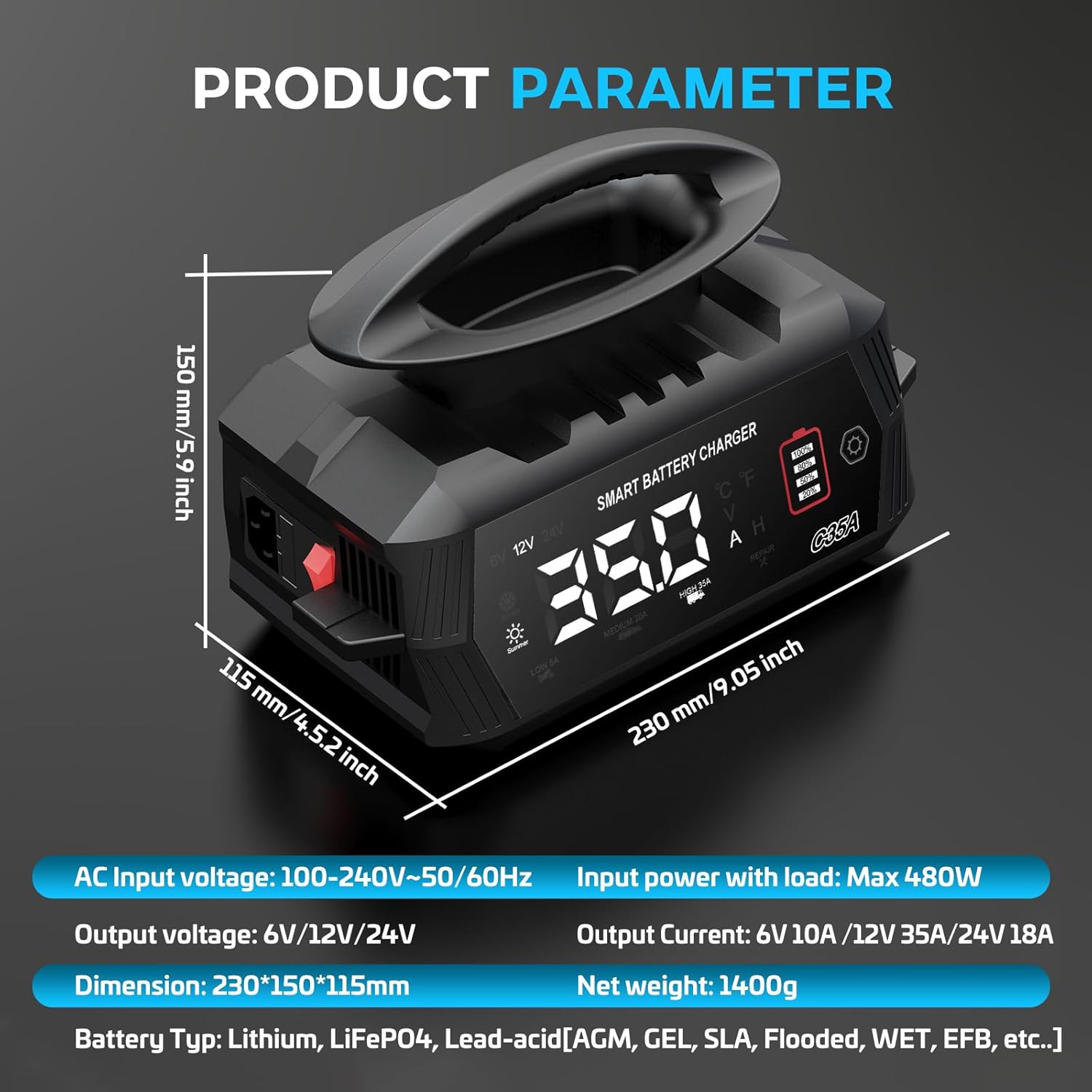
Image 8.1: HTRC C35A Product Parameters.
| Feature | Specification |
|---|---|
| Brand | HTRC |
| Model Number | C35A |
| AC Input Voltage | 100-240V~50/60Hz |
| Max Input Power with Load | 480W |
| Output Voltage | 6V / 12V / 24V (Automatic Detection) |
| Output Current (6V) | Max 10A |
| Output Current (12V) | Max 35A |
| Output Current (24V) | Max 18A |
| Compatible Battery Types | Lithium, LiFePO4, Lead-acid (AGM, GEL, MF, EFB, SLA, VRLA, WET, Calcium) |
| Dimensions (L x W x H) | 230 x 160 x 135 mm (approx. 9.05 x 6.3 x 5.3 inches) |
| Net Weight | 1.4 kg (approx. 3.08 lbs) |
| Number of Ports | 1 |
9. Warranty and Support
HTRC is committed to providing high-quality products and customer satisfaction. For any questions, concerns, or technical support regarding your HTRC C35A battery charger, please do not hesitate to contact our customer service team. We are here to assist you.
Please refer to your purchase documentation for specific warranty terms and contact information.


