
1. Introduction
This manual provides detailed instructions for the safe and effective use of your Mcbazel 3-in-1 Handheld Digital Anemometer Wind Meter. This device is designed for accurate measurement of wind speed, wind temperature, and wind level (Beaufort scale). It is suitable for various applications including HVAC system testing, sailing, fishing, drone operation, and other indoor or outdoor activities requiring precise wind data.
Please read this manual thoroughly before operating the device and retain it for future reference.

Figure 1: Mcbazel 3-in-1 Handheld Digital Anemometer Wind Meter.
2. Key Features
- 3-in-1 Measurement: Measures wind speed, wind temperature, and wind level (Beaufort scale).
- Multiple Wind Speed Units: Switchable units including m/s, km/h, kts, ft/s, and mph.
- Comprehensive Data Display: Double-line LCD shows wind speed and temperature simultaneously.
- Backlight Feature: Ensures readability in low-light conditions.
- User-Friendly Functions: Includes MAX/MIN/AVG functions and data hold capability.
- Portable Design: Compact, lightweight, and powered by AAA batteries for easy carrying and use.
- Energy Saving: Features an auto power-off function to conserve battery life.
- Low-Battery Indicator: Provides timely alerts for battery replacement.

Figure 2: Overview of the anemometer's professional and multifunctional features, including temperature, MAX/MIN/AVG, data hold, backlight, auto power off, and low-battery indicator.

Figure 3: Illustration of the 3-in-1 design, showing capabilities for wind speed, wind temperature, and wind level testing.
3. Package Contents
Verify that all items are present and in good condition upon opening the package:
- 1 x Mcbazel 3-in-1 Handheld Anemometer
- 1 x User Manual
Note: AAA batteries are not included and must be purchased separately.

Figure 4: The package includes one 3-in-1 handheld anemometer and one user manual.
4. Setup
4.1 Battery Installation
- Locate the battery compartment cover on the back of the anemometer.
- Slide or unclip the cover to open the compartment.
- Insert three (3) AAA batteries, ensuring correct polarity (+/-) as indicated inside the compartment.
- Replace the battery compartment cover securely.

Figure 5: The back of the anemometer showing the battery compartment for three AAA batteries. The device also features an anti-slip design.
5. Operating Instructions
5.1 Power On/Off
- To power on, press the red POWER button.
- To power off, press and hold the red POWER button for a few seconds until the display turns off.
- The device features an auto power-off function to save battery life if inactive for a period.
5.2 Changing Wind Speed Units
Press the UNIT button to cycle through the available wind speed units: meters per second (m/s), kilometers per hour (km/h), knots (kts), feet per second (ft/s), and miles per hour (mph).

Figure 6: The anemometer display showing various wind speed units (m/s, km/h, kts, ft/s, mph) selectable via the UNIT button.
5.3 Changing Temperature Units
Press the °C/°F button to switch between Celsius and Fahrenheit temperature readings.
5.4 Backlight Control
Press the Backlight button (often indicated by a light bulb icon) to turn the LCD backlight on or off. This improves visibility in dark environments.
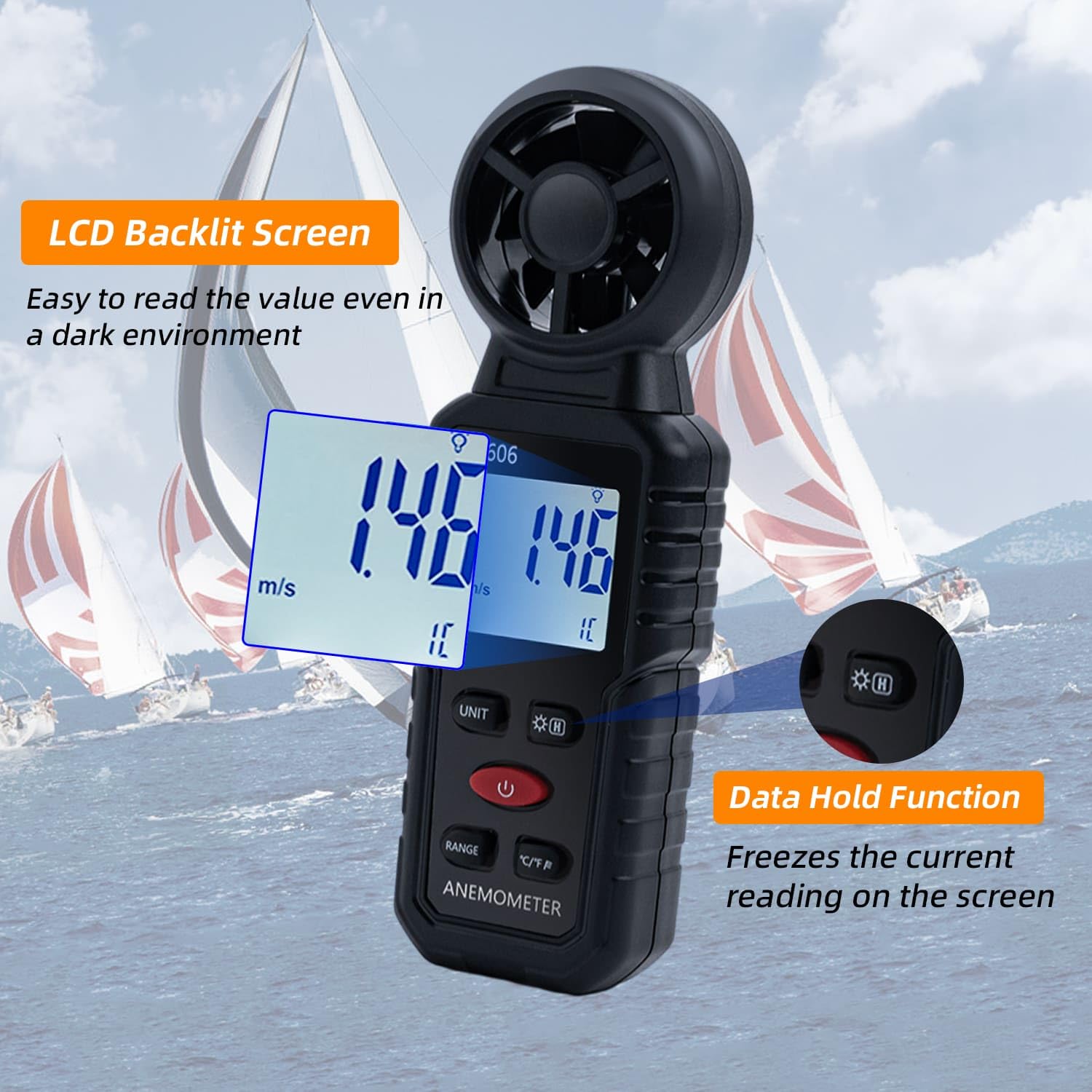
Figure 7: The anemometer display with the backlight activated for clear reading, and an indicator for the data hold function.
5.5 MAX/MIN/AVG Functions
Press the RANGE button to cycle through maximum (MAX), minimum (MIN), and average (AVG) wind speed readings. This allows you to track fluctuations over time.
5.6 Data Hold
Press the HOLD button (often indicated by an 'H' or a lock icon) to freeze the current reading on the display. Press it again to release and resume live measurements.
5.7 Taking a Measurement
Hold the anemometer upright, ensuring the fan impeller is facing directly into the wind direction. The display will show real-time wind speed and temperature readings. For accurate wind level (Beaufort scale) assessment, observe the wind speed reading and refer to a standard Beaufort scale chart.
5.8 Low Battery Indicator
A low battery icon will appear on the display when the battery level is critically low. Replace the AAA batteries promptly to ensure continued accurate operation.
5.9 Video Demonstration
Video 1: A detailed demonstration of the Mcbazel 3-in-1 Handheld Digital Anemometer, covering its features, battery installation, unit changes, and measurement process. This video is provided by the seller, US TransChased.
Video 2: A concise demonstration of the Handheld Digital Anemometer, highlighting its ease of use and various measurement capabilities. This video is provided by the seller, US TransChased.
6. Maintenance
- Cleaning: Wipe the device with a soft, dry cloth. Do not use abrasive cleaners or solvents.
- Storage: Store the anemometer in a cool, dry place away from direct sunlight and extreme temperatures. If storing for extended periods, remove the batteries to prevent leakage.
- Impeller Care: Ensure the fan impeller is free from dust, debris, or obstructions for accurate readings. Do not attempt to lubricate the impeller.
7. Troubleshooting
| Problem | Possible Cause | Solution |
|---|---|---|
| Device does not power on. | Dead or incorrectly installed batteries. | Check battery polarity. Replace with fresh AAA batteries. |
| Inaccurate readings. | Obstructed impeller, low battery, or incorrect unit setting. | Clear any obstructions from the impeller. Replace batteries. Verify the correct unit (m/s, mph, etc.) is selected. |
| Display is dim or unreadable. | Backlight off or low battery. | Press the backlight button. Replace batteries. |
8. Specifications
- Model Number: US-gf-020620
- Brand: Mcbazel
- Material: Acrylonitrile Butadiene Styrene (ABS)
- Product Dimensions: 6.5 x 2.17 x 1.54 inches (16.5 x 5.5 x 3.9 cm)
- Item Weight: 3.53 ounces (100 Grams)
- Power Source: 3 x AAA Batteries (not included)
- Measurement Functions: Wind Speed, Wind Temperature, Beaufort Scale
- Wind Speed Units: m/s, km/h, kts, ft/s, mph
- Temperature Units: °C, °F
- Display: LCD with Backlight
- Additional Features: MAX/MIN/AVG, Data Hold, Auto Power-Off, Low-Battery Indicator

Figure 8: The compact size of the anemometer, measuring approximately 16cm (6.2in) in length and 5cm (1.9in) in width, designed for easy one-handed operation and portability.

Figure 9: Examples of wide applications for the anemometer, including construction, golf, sailing, HVAC, and general outdoor use.
9. Warranty and Support
For warranty information or technical support, please refer to the product packaging or contact Mcbazel customer service directly. Keep your purchase receipt as proof of purchase.
You can visit the Mcbazel Store on Amazon for more information.
