
Beyution RH18A
Beyution RH18A Universal Remote Control User Manual
Model: RH18A
Introduction
This manual provides instructions for the Beyution RH18A Replacement Universal Remote Control, designed for various Mitsubishi Electric Air Conditioner models. This remote control is a direct replacement and does not require programming or pairing.
Key Features:
- Remote Control Model: RH18A
- Maximum Distance: 10 Meters
- Material: ABS Plastic
- Connectivity: Infrared
- Color: White
- Setup: No programming or pairing required.
- Ergonomics: Lightweight and ergonomic design for easy grip.
- Button Response: Buttons have good elasticity, requiring light pressure for operation.
Setup
The Beyution RH18A remote control is designed for immediate use without any complex setup procedures. It functions as a direct replacement for your original Mitsubishi Electric Air Conditioner remote.
Battery Installation
To begin using your remote control, you will need to install two AAA batteries (not included).
- Locate the battery compartment on the back of the remote control.
- Slide the battery compartment cover downwards to open it.
- Insert two AAA batteries, ensuring the positive (+) and negative (-) terminals align correctly with the markings inside the compartment.
- Slide the battery compartment cover back into place until it clicks securely.

Image: Back view of the RH18A remote control with the battery compartment open, illustrating the correct orientation for inserting two AAA batteries.

Image: Back view of the RH18A remote control with the battery compartment securely closed after battery installation.
Important: If the remote control will not be used for an extended period, remove the batteries to prevent leakage and damage.
Operating Instructions
The Beyution RH18A remote control is designed to mimic the functionality of your original Mitsubishi Electric Air Conditioner remote. Point the remote control directly at the air conditioner unit's receiver when operating.

Image: Front view of the RH18A remote control, displaying its layout and various function buttons.
Button Functions
| Button | Function |
|---|---|
| OFF/ON | Powers the air conditioner unit on or off. |
| TOO WARM / TOO COOL | Adjusts the temperature setting up or down. |
| COOL / DRY / FAN / HEAT / MODE | Cycles through different operating modes (Cool, Dry, Fan, Heat). |
| FAN | Adjusts the fan speed. |
| VANE | Controls the direction of the air vanes. |
| ECONO COOL | Activates or deactivates the energy-saving cooling mode. |
| SELECT | Used for selecting options within certain settings. |
| TIME (Clock icons) | Used for setting timer functions (e.g., On/Off timer). |
| RESET | Resets certain settings or the remote itself. |
For specific functions and advanced settings, refer to your Mitsubishi Electric Air Conditioner's original user manual, as this remote replicates its functions.
Maintenance
Proper maintenance ensures the longevity and optimal performance of your remote control.
- Cleaning: Wipe the remote control with a soft, dry cloth. Do not use liquid cleaners, sprays, or abrasive materials, as these can damage the surface or internal components.
- Battery Replacement: Replace batteries when the remote's response becomes sluggish or the display fades. Always replace both batteries at the same time with new ones of the same type (AAA).
- Storage: Store the remote control in a cool, dry place away from direct sunlight and extreme temperatures. If storing for an extended period, remove the batteries.
- Avoid Drops: Protect the remote from physical impact, as drops can damage internal circuitry.
Troubleshooting
If you experience issues with your Beyution RH18A remote control, try the following troubleshooting steps:
- Remote Not Responding:
- Check if the batteries are inserted correctly with the correct polarity (+/-).
- Replace old batteries with new AAA batteries.
- Ensure there are no obstructions between the remote control and the air conditioner unit's receiver.
- Confirm you are within the maximum operating distance (up to 10 meters).
- Air Conditioner Not Responding:
- Verify that the air conditioner unit is powered on and plugged into a working electrical outlet.
- Ensure the remote control is pointed directly at the air conditioner's infrared receiver.
- Buttons Not Working:
- Press the buttons firmly. If some buttons are unresponsive, it might indicate low battery power or a need for battery replacement.
If the issue persists after trying these steps, please refer to the "Support" section for further assistance.
Specifications
| Feature | Detail |
|---|---|
| Model Number | RH18A |
| Brand | Beyution |
| Compatible Devices | Mitsubishi Electric Air Conditioners (various models including MSZ-HR series) |
| Connectivity Technology | Infrared |
| Maximum Operating Distance | 10 Meters (approx. 33 feet) |
| Power Source | 2 x AAA Batteries (not included) |
| Material | ABS Plastic |
| Color | White |
| Product Dimensions | 7 x 1.5 x 0.7 inches (17.8 x 3.8 x 1.8 cm) |
| Item Weight | 1.9 ounces (53.9 grams) |
| Special Features | Ergonomic, No Programming Required |
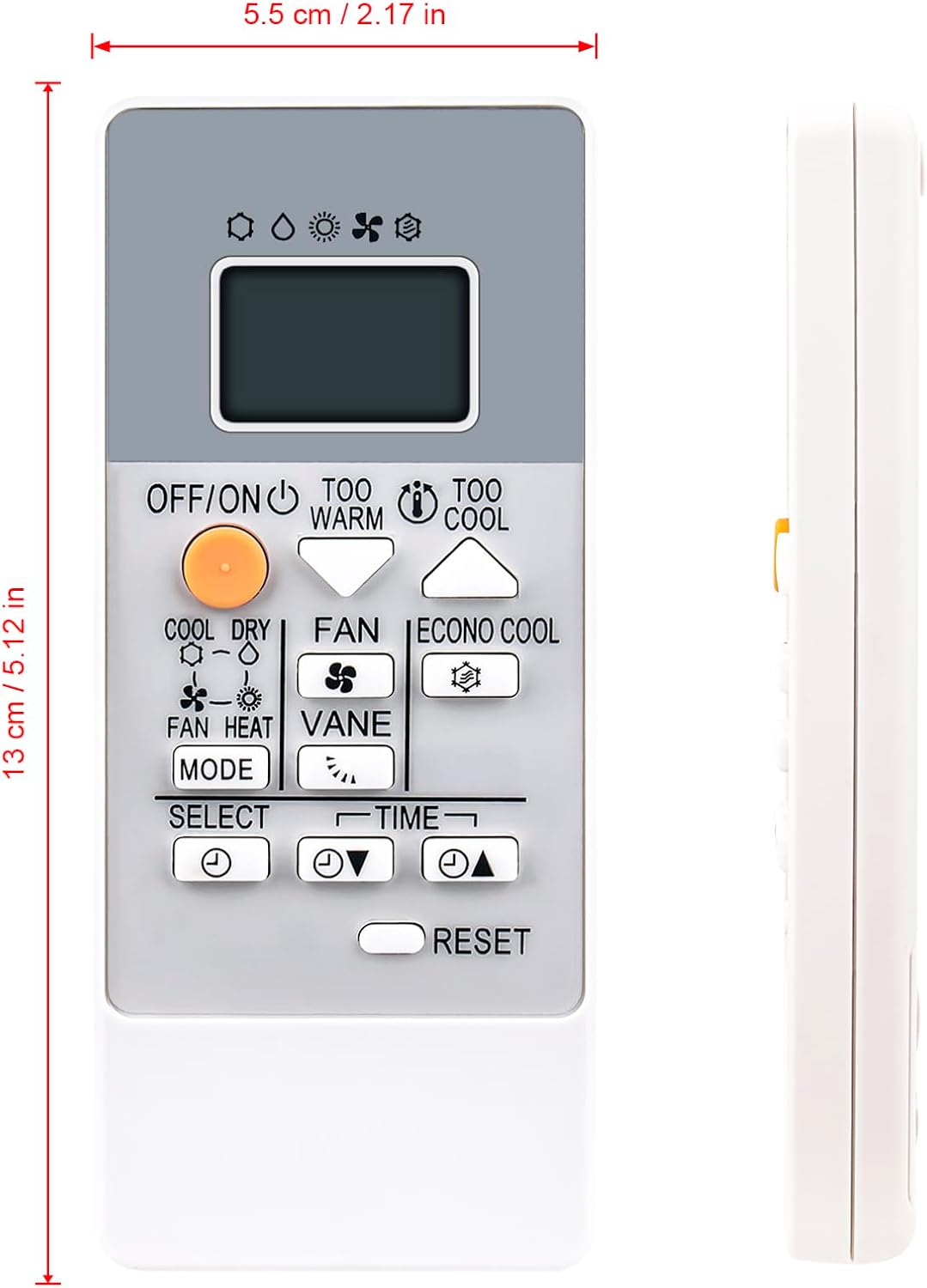
Image: Front view of the RH18A remote control with approximate dimensions (5.5 cm width, 13 cm length) indicated.
Compatible Models (Partial List)
This remote control is compatible with a wide range of Mitsubishi Electric Air Conditioner models, including but not limited to:
- MSZ-HR25VF, MSZ-HR35VF, MSZ-HR42VF, MSZ-HR50VF
- MUZ-HR25VF, MUZ-HR35VF, MUZ-HR42VF, MUZ-HR50VF
- MSZ-HR25VFK-E1, MSZ-HR35VF-E1, MSZ-HR35VFK-E1, MSZ-HR42VF-E1, MSZ-HR42VFK-E1, MSZ-HR50VF-E1, MSZ-HR50VFK-E1
- MSZ-HR60VF-E1, MSZ-HR60VFK-E1, MSZ-HR71VF-E1, MSZ-HR71VFK-E1
- MSZ-HR25VF-ER1, MSZ-HR25VF-E1, MSZ-HR35VF-ER1, MSZ-HR35VFK-ER1, MSZ-HR42VF-ER1, MSZ-HR42VFK-ER1, MSZ-HR50VF-ER1, MSZ-HR50VFK-ER1
- MSZ-HR60VF-ER1, MSZ-HR60VFK-ER1, MSZ-HR71VF-ER1, MSZ-HR71VFK-ER1
- MSZ-HR25VF-ET1, MSZ-HR25VFK-ET1, MSZ-HR35VF-ET1, MSZ-HR35VFK-ET1, MSZ-HR42VF-ET1, MSZ-HR42VFK-ET1, MSZ-HR50VF-ET1, MSZ-HR50VFK-ET1
- MSZ-HR60VF-ET1, MSZ-HR60VFK-ET1, MSZ-HR71VF-ET1, MSZ-HR71VFK-ET1
- MSZ-HR25VF-E2, MSZ-HR35VF-E2, MSZ-HR42VF-E2, MSZ-HR50VF-E2, MSZ-HR60VF-E2, MSZ-HR71VF-E2
- MSZ-HR25VF-ER2, MSZ-HR35VF-ER2, MSZ-HR42VF-ER2, MSZ-HR50VF-ER2, MSZ-HR60VF-ER2, MSZ-HR71VF-ER2
- MSZ-HR25VF-ET2, MSZ-HR35VF-ET2, MSZ-HR42VF-ET2, MSZ-HR50VF-ET2, MSZ-HR60VF-ET2, MSZ-HR71VF-ET2
- MSZ-HR25VF-E3, MSZ-HR35VF-E3, MSZ-HR42VF-E3, MSZ-HR50VF-E3, MSZ-HR60VF-E3
Warranty Information
This Beyution RH18A remote control comes with a 3-month warranty period from the date of purchase. This warranty covers manufacturing defects and ensures the product functions as described under normal use.
Please retain your proof of purchase for any warranty claims.
Customer Support
For further assistance, questions, or if you encounter an issue not covered in this manual, please contact our customer support team.
If you cannot find your specific air conditioner model in the compatibility list or if the remote control does not function as expected, please reach out to us via email for verification and support.
Contact: Please refer to the seller's contact information on the platform where you purchased this product.
Ask a question about this manual
Ask about setup, troubleshooting, compatibility, parts, safety, or missing instructions. Manuals+ will review the question and use this page’s manual context to help answer it.