
Introduction
This manual provides detailed instructions for the installation, operation, and maintenance of your TESHA 9-inch Android Car Stereo, Model TS9-K2401. This advanced car stereo system features a capacitive touch screen, Android operating system, GPS navigation, Wireless CarPlay, and Android Auto for an enhanced in-car entertainment and connectivity experience.
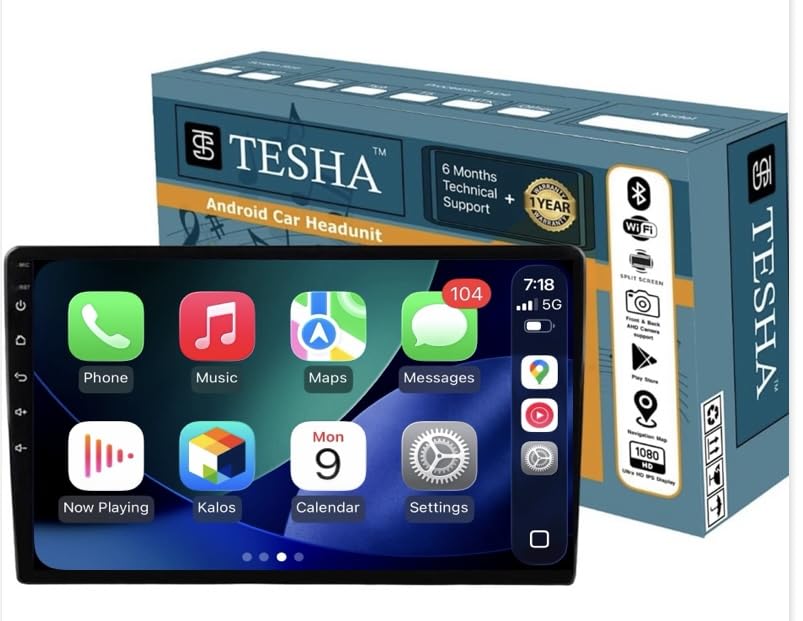
Image: TESHA 9-inch Android Car Stereo main unit.
Key features include:
- 9-inch HD Capacitive Touch Screen with QLED Brighter Display
- Android Operating System with 32 GB Internal Storage
- Wireless Apple CarPlay & Android Auto
- Integrated GPS Navigation
- Steering Wheel Control Support
- Split-Screen Multitasking
- DSP for Enhanced Audio Quality with 5.1 surround sound output
- Support for popular streaming apps like YouTube and Google Maps

Image: Display comparison highlighting the TESHA unit's smaller bezels for a larger screen area.
Setup and Installation
Before proceeding with installation, ensure your vehicle's power is off. Professional installation is recommended.
Package Contents:
- 9 Inch Car Stereo Unit
- RCA Cable
- Microphone (Mic)
- GPS Antenna
- USB Cables (2)
- Camera Input Cable and Camera Wiring
Note: A power cable is not included as it varies by car model. Using a universal power cable may void your vehicle's warranty.
Initial Setup Steps:
- Physical Installation: Carefully install the TESHA car stereo into your vehicle's dashboard. Connect all necessary cables including power, speakers, GPS antenna, USB cables, and camera input cable.
- Power On: Turn on your vehicle's ignition to power on the stereo.
- Wireless CarPlay & Android Auto Activation: To activate Wireless CarPlay and Android Auto, adjust the date and time settings on the device and connect it to a Wi-Fi network. The features will activate automatically.
- Enabling Picture-in-Picture (PIP) for Maps/Videos:
To enable the Picture-in-Picture feature for maps and videos on the home screen:

Image: Maps, YouTube, and video integration on the home screen.
Navigate to: Car Settings > Factory > 8888 > Setting PIP > Open. After changing this setting, restart the device.
Operating Instructions
User Interface and Navigation:
The TESHA car stereo features a responsive capacitive touch screen. Navigate through applications and settings by tapping and swiping.

Image: Main user interface with various application icons.
Wireless CarPlay & Android Auto:
Connect your smartphone wirelessly to access Apple CarPlay or Android Auto. This allows for seamless integration of your phone's features, including navigation, music, messages, and calls, directly on the stereo display.

Image: Wireless connection setup for Apple CarPlay and Android Auto.

Image: Features including Wireless CarPlay/Android Auto, Steering Wheel Learning, and Bluetooth calling.
YouTube Playback via Kalos App:
The Kalos app enables YouTube video playback within the CarPlay environment. Ensure the app is installed and configured.

Image: Kalos app interface for YouTube playback in CarPlay.
Steering Wheel Control Learning:
The unit supports steering wheel controls. Refer to the "Steering Wheel Learning" section in the settings menu to configure your vehicle's steering wheel buttons for controlling the stereo functions.
Split-Screen Mode:
Utilize the split-screen feature to run two applications simultaneously, such as navigation and music playback, for enhanced multitasking.
Audio Settings (DSP):
The integrated Digital Sound Processor (DSP) allows for advanced audio adjustments, including 5.1 surround sound output, to customize your listening experience.
Customizable Themes:
The stereo offers over 20 integrated hardware themes to personalize the user interface appearance.
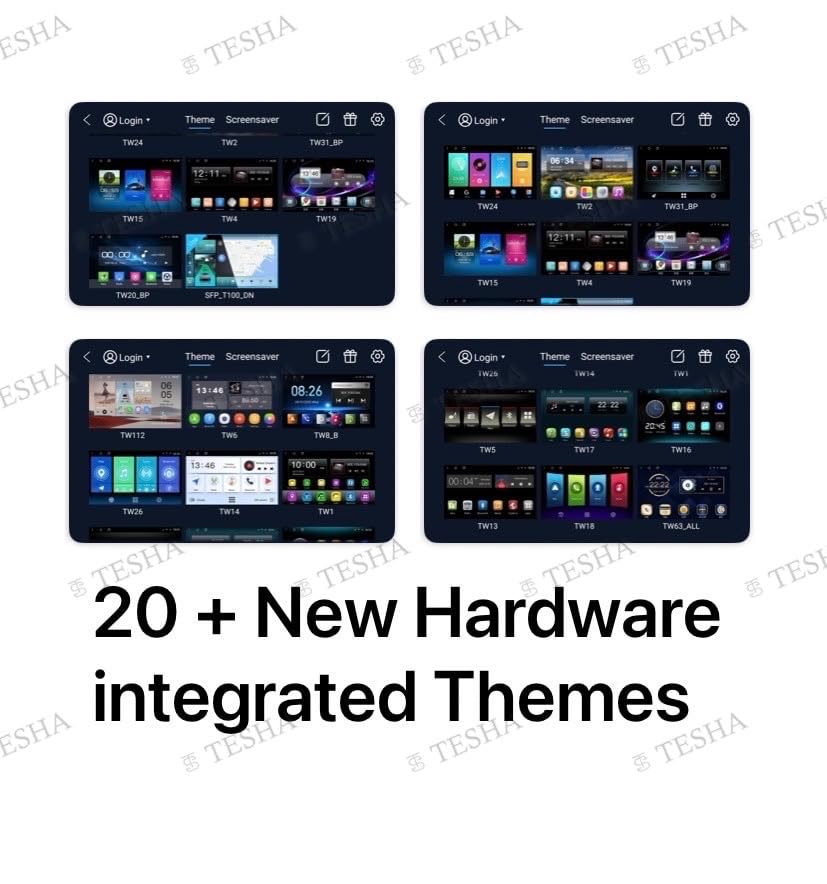
Image: Examples of 20+ integrated hardware themes.
Maintenance
To ensure optimal performance and longevity of your TESHA car stereo:
- Keep the screen clean using a soft, dry cloth. Avoid abrasive cleaners.
- Ensure proper ventilation around the unit to prevent overheating.
- Regularly check for software updates to benefit from new features and improvements.
Troubleshooting
If you encounter issues with your TESHA car stereo, please refer to the following common solutions:
- No Power: Check all power connections. Ensure the vehicle's ignition is on.
- No Sound: Verify speaker connections and audio settings. Check volume levels.
- GPS Signal Issues: Ensure the GPS antenna is properly installed and has a clear view of the sky.
- Wireless CarPlay/Android Auto Connection Problems: Confirm Wi-Fi and Bluetooth are enabled on both the stereo and your smartphone. Ensure date and time are correctly set on the stereo. Restart both devices if necessary.
- Touch Screen Unresponsive: Try restarting the unit. If the issue persists, contact customer support.
For further assistance, please contact TESHA customer support.
Specifications
| Feature | Detail |
|---|---|
| Brand | TESHA |
| Model Name | TESHA K 2401 SM BAZEL |
| Screen Size | 9 Inches |
| Display Type | LCD (QLED Brighter Display) |
| Resolution | 1080 x 2160 |
| Touch Screen Type | Capacitive |
| Operating System | Android |
| Memory Storage Capacity | 32 GB |
| Connectivity Technology | Bluetooth, Wi-Fi |
| Special Features | Wireless CarPlay & Android Auto, GPS, Split Screen Mode, DSP, Steering Wheel Control, YouTube playback via Kalos app |
| Audio Output Mode | Stereo (5.1 surround sound output) |
| Compatible Devices | Smartphone |
| Control Method | Touchscreen |
| Item Dimensions (L x W x H) | 26L x 10W x 8H Centimeters |
| Item Weight | 1.2 Kilograms |
| Country of Origin | China |
Warranty Information
The TESHA 9-inch Android Car Stereo comes with a 1-year warranty against manufacturing defects from the date of purchase.
Extended warranty options may be available through third-party providers, such as the 1 Year Extended Warranty by Onsitego.
Note: Using a universal power cable not designed for your specific vehicle may void the product warranty.
Customer Support
For technical assistance, inquiries, or support regarding your TESHA car stereo, please contact our customer support team:
- WhatsApp Support: 8607172728
- Manufacturer: Tesha
- Marketed by: TESHA
Please have your model number (TS9-K2401) and purchase details ready when contacting support.