
Creative EF1210
Creative Outlier Go Wireless Open-Ear Headphones User Manual
Model: EF1210
Introduction
This manual provides detailed instructions for the setup, operation, and maintenance of your Creative Outlier Go Wireless Open-Ear Headphones. Please read this manual thoroughly before using your headphones to ensure optimal performance and longevity.
Package Contents
- Creative Outlier Go Wireless Open-Ear Headphones (Left and Right earbuds)
- Charging Case
- USB-C Charging Cable
- User Manual (this document)
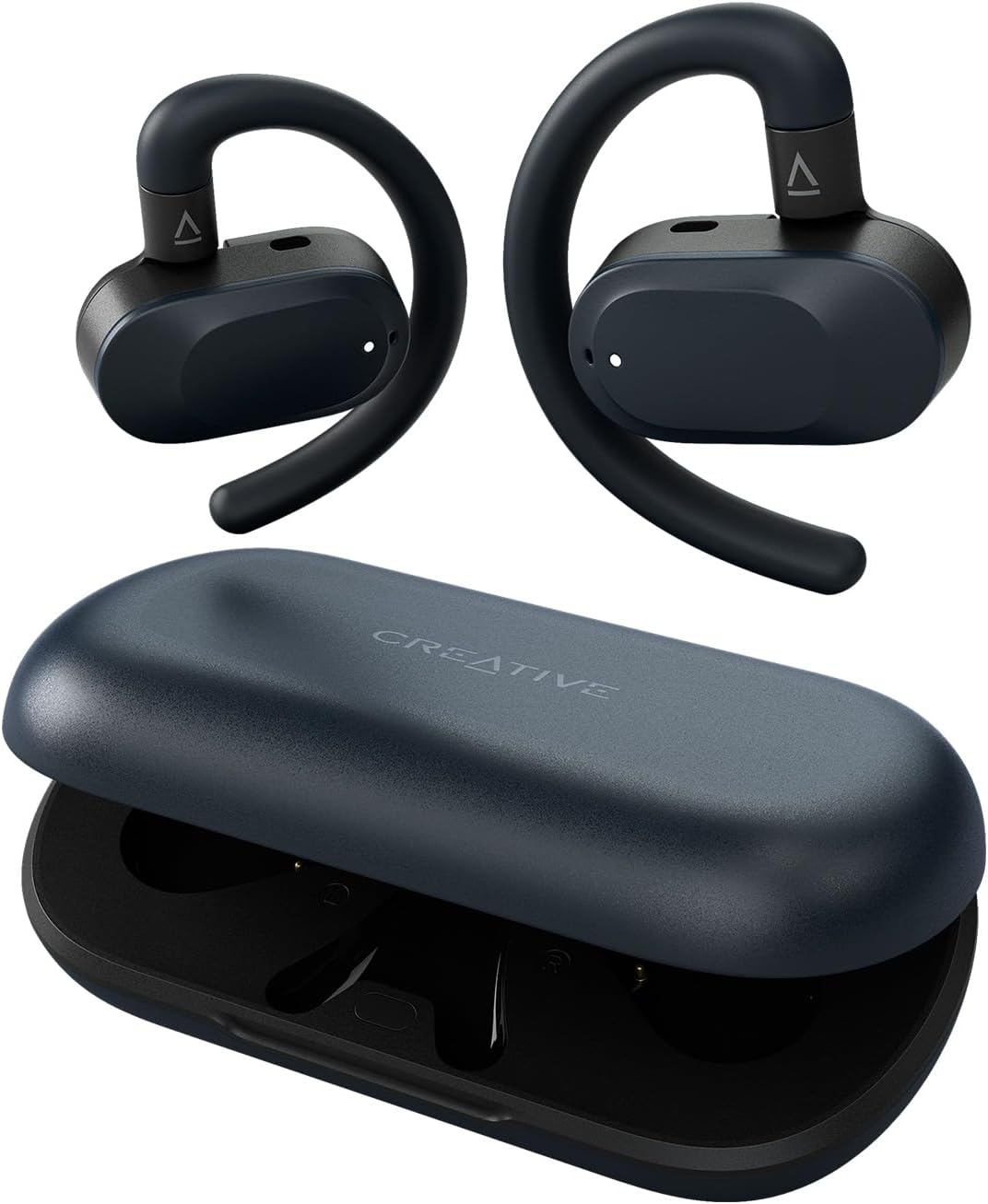
Image: Creative Outlier Go headphones and their charging case. The headphones are dark blue with ear hooks, and the case is a matching dark blue with the Creative logo.
Setup
1. Charging the Headphones and Case
Before first use, fully charge the Creative Outlier Go headphones and their charging case. Place the earbuds into the charging case. Connect the USB-C charging cable to the charging case and a power source. The LED indicators on the case will show charging status.
- Headphone Playtime: Up to 6 hours per charge.
- Total Playtime with Case: Up to 26 hours.

Image: The Creative Outlier Go charging case open, with both earbuds inside. The image highlights the total playtime of 26 hours with the case and 6 hours per single charge.
2. Bluetooth Pairing
- Ensure the headphones are charged.
- Open the charging case. The earbuds will automatically enter pairing mode.
- On your device (smartphone, tablet, laptop), enable Bluetooth and search for available devices.
- Select "Creative Outlier Go" from the list of devices to connect.
- Once connected, a voice prompt will confirm successful pairing.
The Creative Outlier Go supports Bluetooth 5.4 for stable and efficient wireless connectivity.
3. Multipoint Connectivity
The headphones support multipoint connectivity, allowing simultaneous connection to two devices. For example, you can connect to your smartphone and laptop at the same time. Audio playback or call functions can be accessed by either paired device at any given time.

Image: An icon representing multipoint connectivity, showing headphones connected to two devices.
4. Creative App Installation
For enhanced customization and control, download the Creative app from your device's app store. The app allows you to:
- Customize touch controls.
- Adjust equalizer (EQ) settings.
- Update firmware.

Image: A smartphone displaying the Creative app interface, specifically the "Custom Buttons" section, allowing users to configure touch controls for the left and right earbuds.
Operating Instructions
1. Wearing the Headphones and Adjustable Fit
The Creative Outlier Go features an open-ear design with adjustable ear hooks for a secure and comfortable fit. The ear hooks mimic the natural curvature of your ears. Adjust the earbuds up, down, left, or right to find the optimal position for sound delivery and comfort.

Image: A four-panel diagram illustrating the precise up-down-left-right adjustments of the Creative Outlier Go ear hooks to fit various ear shapes.
The open-ear design allows you to remain aware of your surroundings while enjoying audio.
2. Touch Controls
The earbuds feature intuitive touch controls for managing music, volume, and calls. Specific functions can be customized via the Creative app.
| Action | Left Earbud | Right Earbud |
|---|---|---|
| Single Tap | Play/Pause | Play/Pause |
| Double Tap | Ambient Control | Play/Pause |
| Triple Tap | Voice Assistant | Next Track |
| Long Tap (while playing music) | Volume Down | Volume Up |
| Incoming Call | Single Tap to Answer/End | Single Tap to Answer/End |
| Reject Call | Long Tap | Long Tap |
3. Making and Receiving Calls
The Creative Outlier Go headphones are equipped with dual built-in microphones for clear call quality. Refer to the touch control table above for call management.

Image: A microphone icon, indicating the headphones' capability for crisp, clear calls.
Maintenance
1. Water Resistance (IPX4)
The Creative Outlier Go headphones are rated IPX4 water resistant, meaning they are protected against splashing water from any direction. This makes them suitable for workouts and outdoor activities where they might be exposed to sweat or light rain. Do not submerge the headphones in water.

Image: An icon depicting water droplets, signifying the IPX4 water resistance rating of the headphones.
2. Cleaning
Wipe the headphones and charging case with a soft, dry, lint-free cloth. Avoid using abrasive cleaners or solvents.
3. Battery Care
To maximize battery life, avoid fully discharging the headphones frequently. Store them in a cool, dry place when not in use.
Troubleshooting
If you encounter issues with your Creative Outlier Go headphones, refer to the following common solutions:
- No Sound/Connection Issues:
- Ensure both earbuds are charged.
- Verify Bluetooth is enabled on your device and the headphones are selected.
- Try unpairing and re-pairing the headphones with your device.
- Restart your audio source device.
- One Earbud Not Working:
- Place both earbuds back into the charging case, close the lid, and then open it again to reset the connection.
- Ensure both earbuds are charged.
- Perform a factory reset (refer to the Creative app or Creative support website for specific instructions).
- Touch Controls Unresponsive:
- Ensure your fingers are clean and dry.
- Check the Creative app for customized control settings that might differ from default.
- Restart the headphones by placing them in the case and taking them out.
- Poor Call Quality:
- Ensure the microphones are not obstructed.
- Move closer to your connected device to improve Bluetooth signal strength.
- Test in a quieter environment.
For further assistance, please visit the Creative Support Page.
Specifications
| Feature | Detail |
|---|---|
| Model Name | Creative Outlier Go |
| Model Number | EF1210 |
| Connectivity Technology | Wireless (Bluetooth 5.4) |
| Bluetooth Version | 5.4 |
| Ear Placement | Open Ear |
| Earpiece Shape | Ear Hook |
| Audio Driver Type | Dynamic Driver |
| Audio Driver Size | 14.2 mm Neodymium drivers |
| Control Type | Touch Control |
| Water Resistance Level | IPX4 (Water Resistant) |
| Battery Life (Earbuds) | Up to 6 hours per charge |
| Total Battery Life (with Case) | Up to 26 hours |
| Charging Time | Up to 6 hours playtime per charge (full charge time not specified) |
| Microphones | Dual built-in microphones |
| Compatible Devices | Cellphones, Tablets, Laptops, Desktops, Smart Speakers |
| Material | Plastic |
| Item Weight | 7 ounces (approx. 198g) |
| Product Dimensions | 5.35 x 4.41 x 1.54 inches |
Warranty and Support
Your Creative Outlier Go headphones come with a standard manufacturer's warranty. For detailed warranty information, product registration, and technical support, please visit the official Creative website or contact Creative customer service.
Included in the package is this User Manual, which contains essential information for operating your device.
Online Support: For FAQs, troubleshooting guides, and software downloads, visit the Creative Store on Amazon or the official Creative website.
Related documentsEF1210


Ask a question about this manual
Ask about setup, troubleshooting, compatibility, parts, safety, or missing instructions. Manuals+ will review the question and use this page’s manual context to help answer it.