
1. Introduction
Thank you for choosing the Generico Maxtech Pedestal Fan FS40-275W-BLCK. This powerful 75W fan is designed to provide refreshing airflow in any indoor environment. Featuring 5 durable metal blades, 3 adjustable speed settings, and an oscillating function, it offers flexibility and comfort tailored to your personal and environmental needs. This manual provides important information for the safe assembly, operation, and maintenance of your new fan.
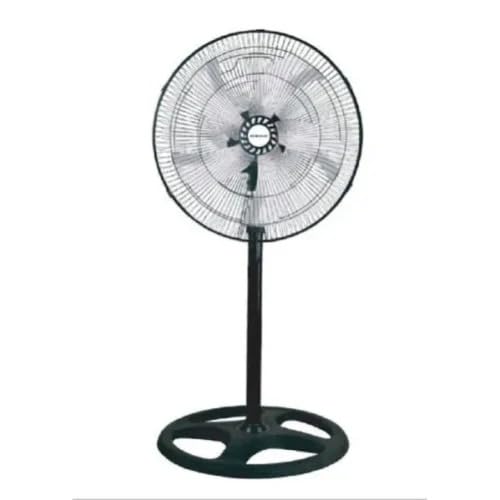
Image 1.1: Fully assembled Generico Maxtech Pedestal Fan. This image shows the fan with its circular base, adjustable stand, and the fan head with its protective grille and five metal blades.
2. Important Safety Instructions
Please read all safety instructions carefully before using this fan. Failure to follow these instructions may result in electric shock, fire, or personal injury.
- Always unplug the fan from the power outlet before cleaning, servicing, or moving it.
- Do not insert fingers or any other objects through the grille when the fan is operating.
- Ensure the fan is placed on a stable, level surface to prevent it from tipping over.
- Do not use the fan near water or in excessively humid environments (e.g., bathrooms, laundry rooms).
- Keep the power cord away from heated surfaces.
- Do not operate the fan with a damaged cord or plug. If the cord or plug is damaged, contact qualified service personnel.
- This appliance is for indoor use only. Do not use outdoors.
- Supervise children when the fan is in use. This appliance is not intended for use by persons (including children) with reduced physical, sensory or mental capabilities, or lack of experience and knowledge, unless they have been given supervision or instruction concerning use of the appliance by a person responsible for their safety.
- Do not block air openings.
- Do not use the fan in areas where flammable liquids or gases are stored.
3. Package Contents
Carefully unpack your fan and check that all items are present and in good condition. If any items are missing or damaged, please contact your retailer.
- Fan Head (with 5 metal blades and grilles)
- Adjustable Stand Pole
- Round Base
- Mounting Hardware (screws, washers, nuts)
- User Manual

Image 3.1: Packaging of the Generico Maxtech Pedestal Fan. The image shows the fan box with product details and an illustration of the assembled fan.
4. Setup and Assembly
Follow these steps to assemble your pedestal fan:
- Attach the Base: Place the adjustable stand pole into the center hole of the round base. Secure it from underneath the base using the provided washer and screw/nut. Ensure it is tightened firmly for stability.
- Adjust Height: Loosen the height adjustment knob on the stand pole to extend or retract the pole to your desired height. Tighten the knob securely once the desired height is reached. The height is adjustable from 60 cm to 130 cm.
- Mount the Fan Head: Carefully place the fan head onto the top of the stand pole. Align the mounting holes and secure the fan head using the provided screws. Ensure the fan head is stable and does not wobble.
- Connect to Power: Plug the power cord into a standard electrical outlet (Type A or Type B connector). Ensure the voltage matches your local power supply.
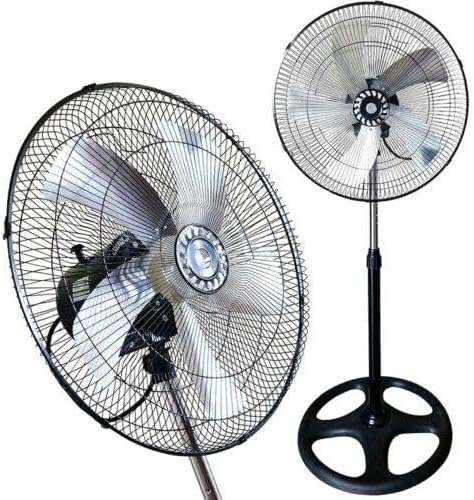
Image 4.1: Side view of the Generico Maxtech Pedestal Fan. This image highlights the fan's profile, showing the depth of the fan head and the sturdy base.
5. Operating Instructions
Your Generico Maxtech Pedestal Fan is equipped with simple controls for ease of use.
- Power On/Off: Locate the power button on the control panel (touchpad control). Press once to turn the fan on, and press again to turn it off.
- Speed Settings: The fan offers 3 speed levels. Press the speed control button (if separate) or cycle through the power button presses to adjust the fan speed from low to medium to high.
- Oscillation Function: To activate the oscillation, press the oscillation button on the control panel. The fan head will begin to sweep from side to side, distributing air across a wider area. Press the button again to stop oscillation at your desired direction.
- Adjusting Fan Head Angle: The fan head can be tilted vertically to direct airflow up or down. Gently push or pull the fan head to adjust its angle.
6. Maintenance and Cleaning
Regular cleaning and maintenance will ensure your fan operates efficiently and safely for years to come.
- Always unplug the fan before cleaning.
- Cleaning the Exterior: Use a soft, damp cloth to wipe the exterior surfaces of the fan. Do not use abrasive cleaners or solvents, as these may damage the finish.
- Cleaning the Grilles and Blades: Dust can accumulate on the grilles and blades, reducing airflow. Use a vacuum cleaner with a brush attachment or a soft brush to remove dust from the grilles. For thorough cleaning of the blades, you may need to carefully remove the front grille (refer to assembly instructions in reverse, if applicable) and wipe the blades with a damp cloth. Ensure all parts are completely dry before reassembling and operating the fan.
- Storage: When not in use for extended periods, store the fan in a cool, dry place, preferably in its original packaging, to protect it from dust and damage.
7. Troubleshooting
If you encounter any issues with your fan, please refer to the following common problems and solutions:
- Fan does not turn on:
- Ensure the power cord is securely plugged into a working electrical outlet.
- Check if the outlet is receiving power (test with another appliance).
- Verify that the power button on the fan is pressed.
- Weak airflow:
- Check if the fan speed is set to a higher level.
- Clean the fan blades and grilles to remove any dust buildup that might be obstructing airflow.
- Ensure the fan is not placed too close to a wall or other obstruction.
- Fan makes unusual noise:
- Ensure the fan is placed on a stable, level surface.
- Check for any loose parts or foreign objects caught in the blades or grilles.
- If the noise persists, discontinue use and contact customer support.
- Oscillation not working:
- Ensure the oscillation button is pressed.
- Check for any obstructions preventing the fan head from rotating.
If the problem persists after trying these solutions, please contact customer support for further assistance.
8. Specifications
| Brand: | Generico |
| Model Number: | FS40-275W-BLCK |
| Type: | Pedestal Fan |
| Power Consumption: | 75 Watts |
| Number of Blades: | 5 |
| Blade Material: | Metal |
| Speed Settings: | 3 |
| Oscillation: | Yes |
| Adjustable Height: | 60 cm to 130 cm |
| Fan Diameter: | 46 cm |
| Product Dimensions (D x W x H): | 25P x 48l x 55H cm (Note: This dimension typically refers to the fan head or packaged size, not the full assembled height) |
| Power Source: | Wired Electric |
| Control Type: | Touchpad / Touch Control |
| Color: | Black |
| Cable Length: | 1.5 m |
| Indoor/Outdoor Use: | Indoor |