
1. Introduction
Thank you for choosing the DEWENWILS Motion Sensor Light Switch, Model BAG-001. This device is designed to enhance convenience and energy efficiency in your home by automatically controlling lighting based on motion detection. Please read this manual thoroughly before installation and operation to ensure proper use and safety.

Image 1: Two DEWENWILS Motion Sensor Light Switches, white in color, ready for installation.
2. Product Overview
Key Features:
- Automatic Motion Detection: Automatically turns lights on or off based on detected heat sources, such as people entering a room.
- Flexible Operation Modes: Offers both Occupancy (Auto ON/OFF) and Manual control modes.
- Wide Detection Range: Features a 180° detection range with a maximum distance of 26 feet.
- Adjustable Settings: Customizable delay time (5 seconds to 10 minutes), sensitivity, and ambient light detection.
- Energy Efficient: Ultra-low standby power consumption for reduced energy use.
- UL Certified: Ensures reliable safety and performance, meeting strict UL standards.
- Single Pole Installation: Designed for single pole setups, requiring a neutral wire.
What's in the Box:
- Motion-Activated Wall Switches (quantity as purchased)
- Plate Mounting Screws
- Wire Connectors
- Wall Plate
3. Safety Information
WARNING: RISK OF ELECTRIC SHOCK. Improper installation can lead to serious injury or death. Always consult a qualified electrician if you are unsure about any part of the installation process.
- Turn off power at the circuit breaker or fuse box before installation.
- Ensure the switch is rated for your electrical load (Max 1/4 HP, 5A).
- This switch requires a neutral wire for operation. Do not attempt to install without a neutral wire.
- For indoor use only.
- Do not use with dimmable fixtures unless explicitly stated as compatible.
4. Installation
The DEWENWILS Motion Sensor Light Switch is designed for single-pole installations and requires a neutral wire. Follow these steps carefully:
- Turn Off Power: Locate your circuit breaker panel and turn off the power to the switch box you are working on. Verify power is off using a voltage tester.
- Remove Old Switch: Carefully remove the existing wall plate and unscrew the old switch from the wall box. Disconnect the wires from the old switch, noting which wire was connected to which terminal.
- Identify Wires: You should identify the following wires in your wall box:
- Live Wire (Black): Carries power from the circuit breaker.
- Load Wire (Red/Black): Connects to the light fixture.
- Neutral Wire (White): Essential for the motion sensor switch to function.
- Ground Wire (Green/Bare Copper): For safety.
- Connect New Switch: Using the provided wire connectors, connect the wires from the wall box to the corresponding wires on the DEWENWILS Motion Sensor Light Switch:
- Connect the Live Wire from the wall box to the Live Wire (Black) on the switch.
- Connect the Load Wire from the wall box to the Control Wire (Red) on the switch.
- Connect the Neutral Wire from the wall box to the Neutral Wire (White) on the switch.
- Connect the Ground Wire from the wall box to the Ground Wire (Green) on the switch.
- Mount Switch: Carefully push the wired switch into the wall box. Secure it with the provided mounting screws.
- Install Wall Plate: Attach the decorative wall plate over the switch.
- Restore Power: Turn the power back on at the circuit breaker.
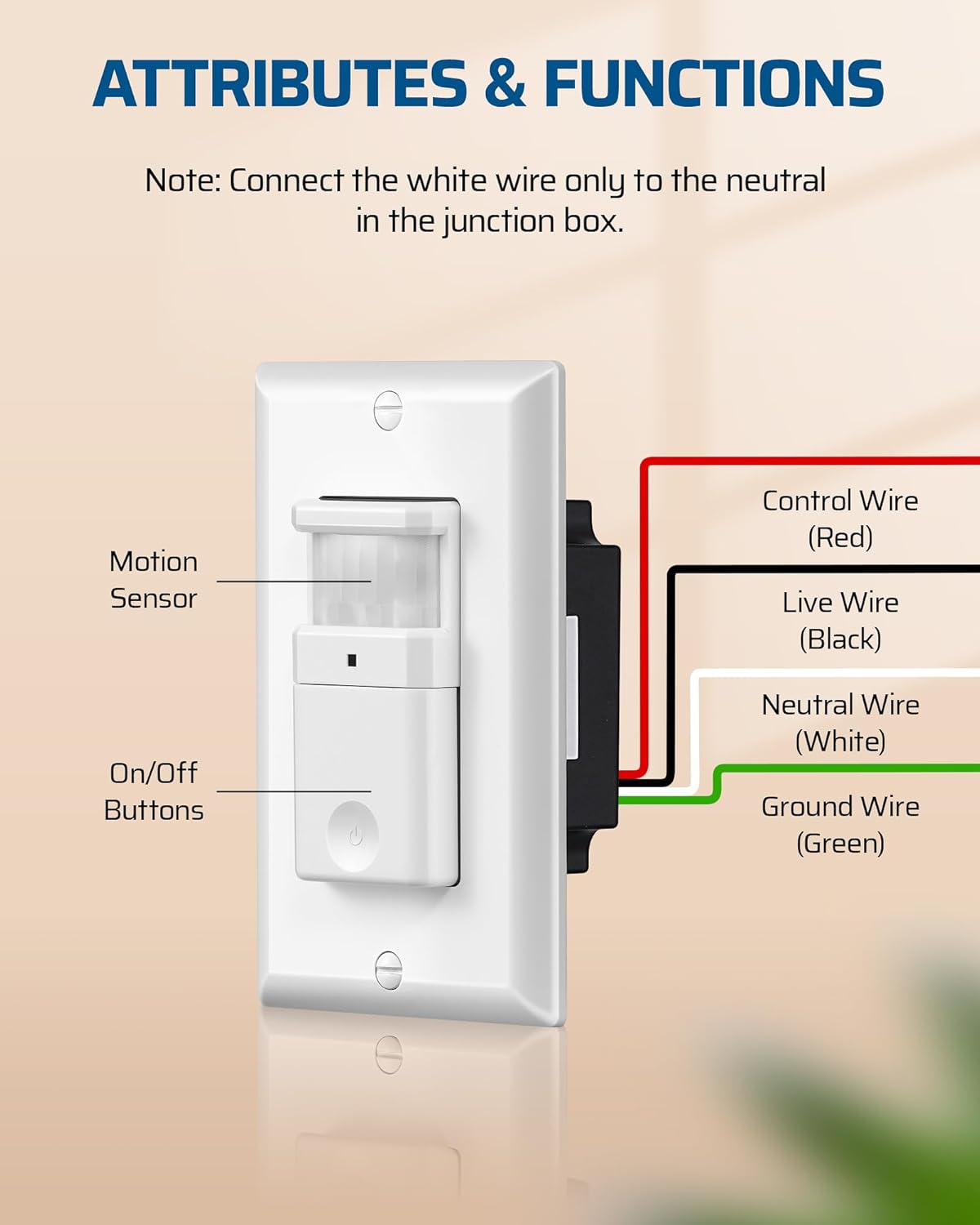
Image 2: Wiring diagram showing connections for Live, Load, Neutral, and Ground wires to the motion sensor switch.
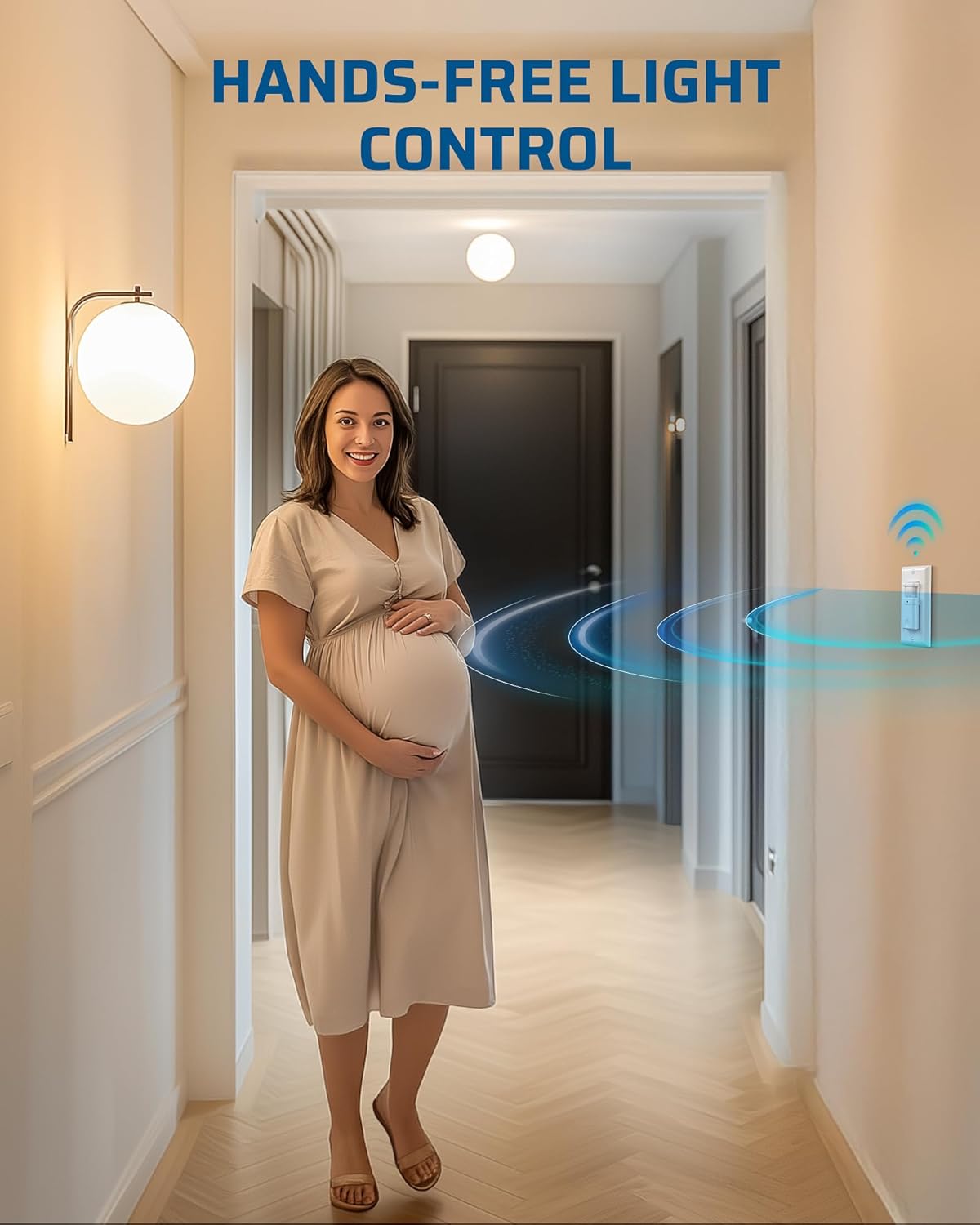
Image 3: Illustrates the hands-free convenience of the motion sensor switch in a hallway.
5. Operation
The DEWENWILS Motion Sensor Light Switch offers two primary operating modes:
Occupancy (OCC) Mode:
In OCC Mode, the lights automatically turn on when motion is detected and switch off when the area is vacant and the preset time delay expires. This mode is ideal for high-traffic areas where hands-free operation is desired.
Manual Mode:
In Manual Mode, the lights can only be controlled manually using the ON/OFF buttons on the switch. This mode provides greater flexibility for scenarios where automatic activation is not preferred.
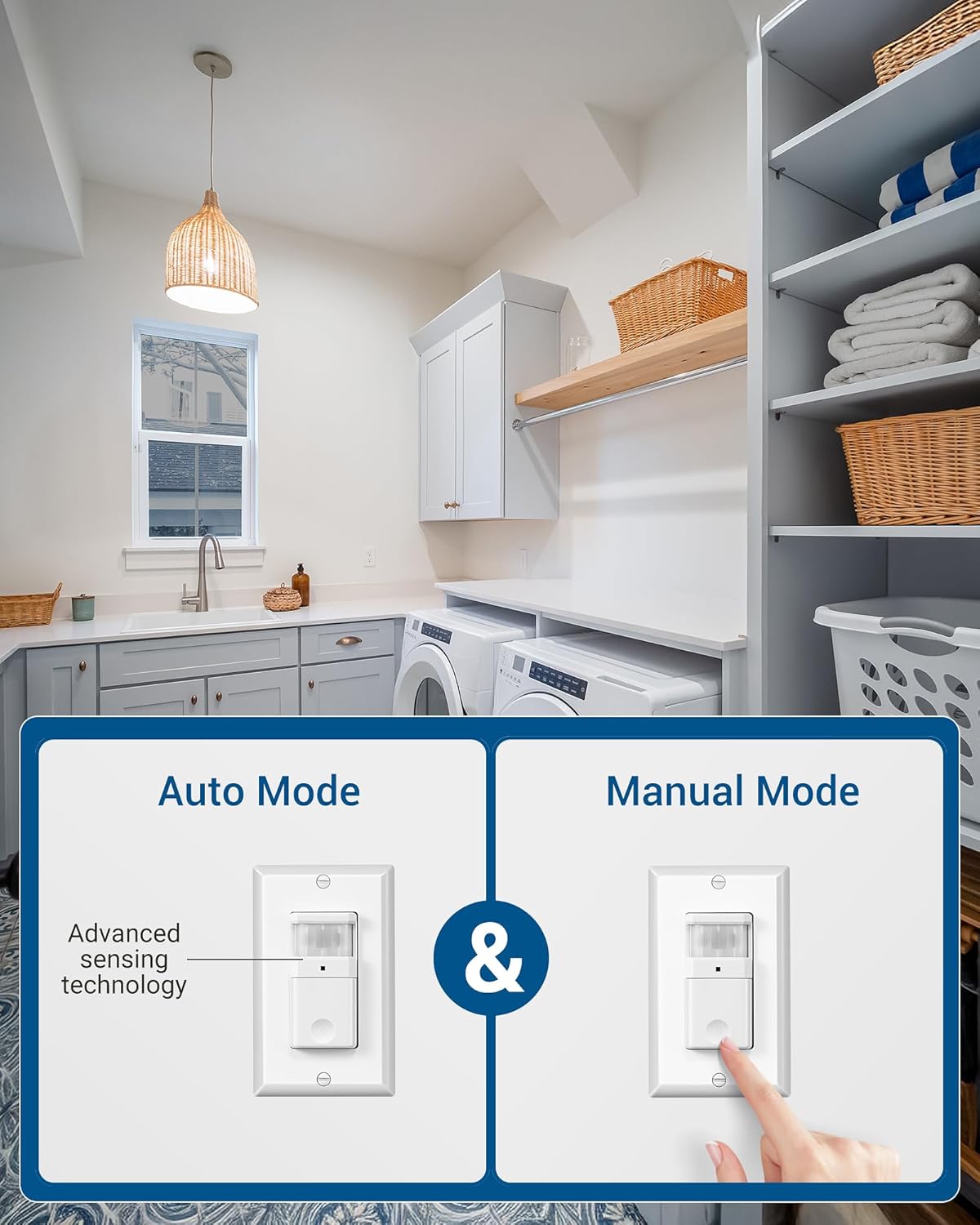
Image 4: Visual representation of the Auto Mode (Occupancy) and Manual Mode operation.
Detection Range:
The sensor provides a wide 180° detection angle with a maximum detection distance of 26 feet. Ensure the sensor is not obstructed for optimal performance.

Image 5: Diagram showing the 180° motion detection range and maximum distance of 26ft.
Video: Motion Sensor Switch in Action
Video 1: This video demonstrates the DEWENWILS Motion Sensor Light Switch automatically turning on lights when motion is detected, highlighting its convenience in a home setting.
6. Settings Adjustment
The motion sensor switch features adjustable dials for sensitivity, ambient light level, and time delay. To access these settings, gently remove the front cover of the switch.
LED Indicator:
The LED indicator light provides feedback on the switch's status. When the load is OFF, the LED is OFF. When the load is ON, the LED is ON. If manually turned off in auto mode, it will blink for 30 seconds and then disable auto-on.
Image 6: Close-up view of the switch, pointing out the LED indicator.
Sensor Sensitivity Range Knob:
This dial adjusts the detection range. The default position is typically centered at 65%. It is adjustable from 30% (Position 1) to 100% (Position 4). Use a greater setting for larger coverage areas.
Image 7: Close-up view of the switch, highlighting the Sensor Sensitivity Range Knob.
Ambient Light Level (LUX) Knob:
The "LUX" setting detects if ambient light, like sunlight, is sufficient. Turn the knob counter-clockwise to use ambient light detection. For the sensor to override ambient light and always activate, leave it at the maximum setting (+).

Image 8: Close-up view of the switch, highlighting the Ambient Light Level Knob.
Time Delay Knob:
This knob adjusts how long the lights remain on after motion is no longer detected. Turn the adjustment fully counter-clockwise for the minimum setting (5 seconds) and fully clockwise for the maximum setting (10 minutes).

Image 9: Close-up view of the switch, highlighting the Time Delay Knob.
Video: Adjusting Motion Sensor Switch Settings
Video 2: This video demonstrates how to access and adjust the sensitivity, ambient light, and time delay settings on the DEWENWILS Motion Sensor Light Switch.
7. Applications
The DEWENWILS Motion Sensor Light Switch is versatile and suitable for various indoor locations, providing hands-free lighting control:
- Hallways
- Bathrooms
- Closets
- Garages
- Laundry Rooms
- Basements
- Storage Rooms

Image 10: Examples of ideal locations for the motion sensor switch, including entrance halls, cloakrooms, garages, and storage rooms.
8. Specifications
| Specification | Detail |
|---|---|
| Product Dimensions | 2.62 x 1.89 x 4.24 inches; 8.47 ounces |
| Item Model Number | BAG-001 |
| Manufacturer | DEWENWILS |
| Operation Mode | ON-OFF |
| Current Rating | 2 Amps |
| Operating Voltage | 120 Volts |
| Contact Type | Normally Closed |
| Connector Type | Plug In |
| Terminal | Screw |
| Circuit Type | 1-way (Single Pole) |
| Contact Material | Plastic |
| Max Load (Tungsten Bulb) | 1000W |
| Max Load (Energy-Saving Bulb) | 1000W |
| Max Load (LED Bulb) | 600W |
| Delay Time | 5 seconds to 10 minutes |
| Wiring | Neutral Wire Required |
| Certifications | UL Listed |
| Operating Temperature | 32°F to 104°F (0°C to 40°C) |

Image 11: Maximum electrical load capacities for LED, CFL, and Tungsten light bulbs.
9. Troubleshooting
If you encounter issues with your DEWENWILS Motion Sensor Light Switch, please refer to the following common troubleshooting steps:
- Lights not turning on: Check if the power is on at the circuit breaker. Verify all wiring connections are secure. Ensure the switch is not in Manual Mode if automatic operation is desired. Adjust the LUX setting to allow activation in low light conditions.
- Lights staying on too long/short: Adjust the Time Delay knob to your preferred duration.
- Lights not detecting motion: Ensure the sensor lens is clean and unobstructed. Adjust the Sensitivity Range knob to a higher setting. Verify the detection area is within the 180° and 26ft range.
- Lights turning on unexpectedly: Reduce the Sensitivity Range setting. Ensure there are no heat sources (e.g., HVAC vents, pets) within the detection zone that could trigger the sensor.
- Intermittent operation: Recheck all wiring connections for looseness. Ensure the neutral wire is properly connected.
If problems persist after attempting these steps, please contact DEWENWILS customer support for further assistance.
10. Maintenance
The DEWENWILS Motion Sensor Light Switch requires minimal maintenance. To ensure optimal performance and longevity:
- Cleaning: Periodically wipe the sensor lens and switch surface with a soft, dry cloth. Do not use abrasive cleaners or solvents.
- Inspection: Occasionally check the switch for any visible damage or loose connections.
Always turn off power at the circuit breaker before performing any cleaning or inspection that involves touching the internal components of the switch.
11. Warranty and Support
DEWENWILS products are manufactured to high-quality standards. For specific warranty information, please refer to the documentation included with your purchase or visit the official DEWENWILS website. If you require technical support or have questions not covered in this manual, please contact DEWENWILS customer service.