
Active Pixel AP-4G-SY4.0MP-DUAL CAM-V-4MM-BW1
Active Pixel 4G SIM PTZ Security Camera User Manual
Model: AP-4G-SY4.0MP-DUAL CAM-V-4MM-BW1
1. Product Overview
The Active Pixel 4G SIM PTZ Security Camera is an outdoor surveillance device designed for locations without traditional Wi-Fi or wired internet access. It operates using a 4G SIM card, providing remote monitoring capabilities. The camera features a dual-lens system for comprehensive coverage and detailed imaging, pan-tilt-zoom functionality, motion tracking, color night vision, and two-way audio communication.
1.1 Key Features
- 4G SIM Connectivity: Operates independently using a 4G SIM card (Vi & Airtel Sim Supported), suitable for remote areas without Wi-Fi.
- Dual Lens (4MP + 4MP = 8MP Total): Provides both a wide-angle view and a detailed close-up view simultaneously for enhanced monitoring.
- 360° Pan-Tilt-Zoom (PTZ): Allows remote control of camera direction and zoom, with automatic human motion tracking.
- Color Night Vision: Equipped with bright spotlight LEDs and IR lights for clear, full-color footage in low-light conditions.
- Two-Way Audio: Enables real-time communication through the camera via a mobile application.
- Outdoor Ready (IP65): Weatherproof design ensures durability against rain and dust for outdoor installation.
- Smart Motion Tracking: Automatically follows detected human movement.
1.2 Package Contents
Verify that all items are present in the package:
- 1x Active Pixel 4G SIM PTZ Security Camera
- 1x Mounting Stand
- 1x Power Adapter
- 1x User Manual (this document)
- 1x Screw Kit for installation
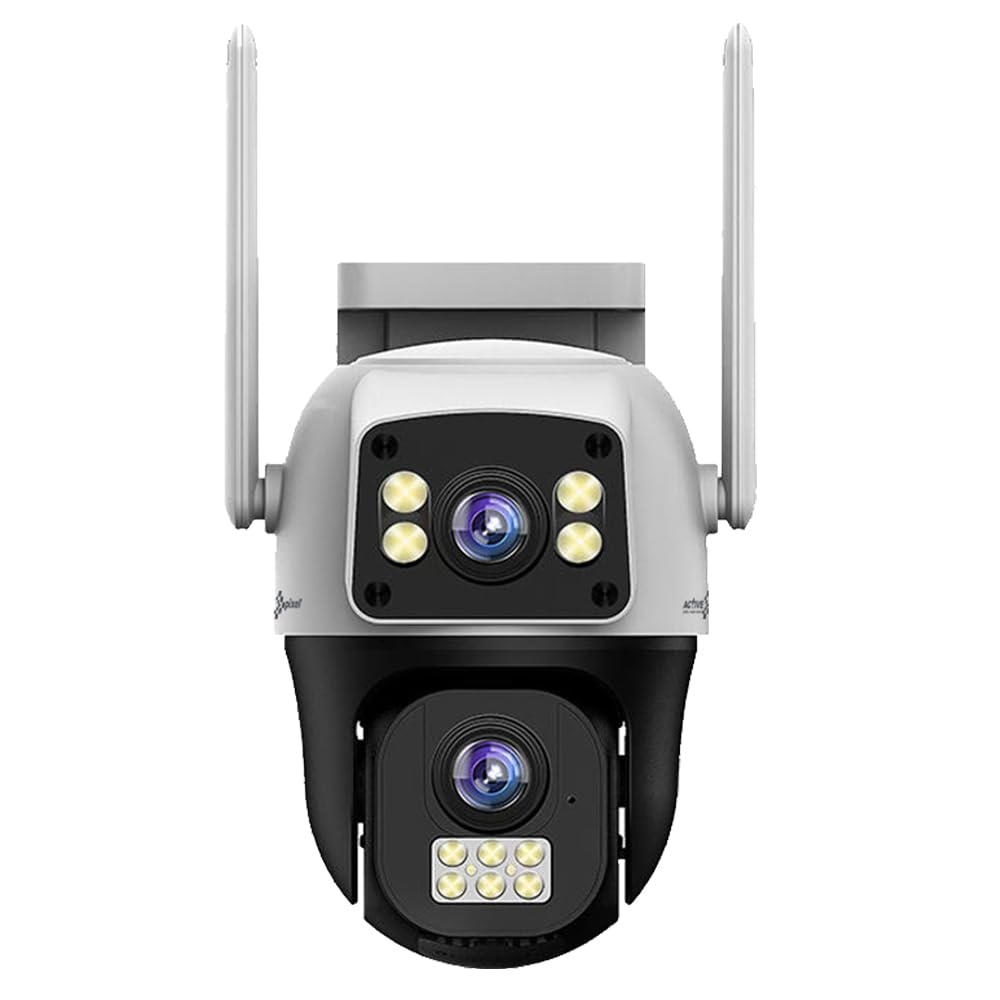
Figure 1: Active Pixel 4G SIM PTZ Security Camera (Front View)
2. Safety Information
- Ensure the camera is installed in a stable location to prevent falls.
- Use only the provided power adapter to avoid damage or fire hazards.
- Do not expose the camera to extreme temperatures outside its operating range.
- Keep the camera away from strong magnetic fields.
- Avoid direct exposure of the lens to strong light sources for extended periods.
- Do not attempt to disassemble or repair the camera yourself. Contact support for assistance.
- Ensure proper sealing of all connections to maintain the IP65 water resistance rating.
3. Setup
3.1 SIM Card Insertion
- Locate the SIM card slot on the camera. This is typically protected by a waterproof cover.
- Carefully open the cover using a small screwdriver if necessary.
- Insert a activated 4G SIM card (Vi or Airtel recommended) into the slot with the metal contacts facing down and the notched corner aligned correctly.
- Ensure the SIM card clicks into place.
- Securely close the waterproof cover to prevent water ingress.
Note: The camera does not require Wi-Fi. Ensure the 4G SIM card has an active data plan.
3.2 Power Connection
- Connect the provided power adapter to the camera's power input port.
- Plug the power adapter into a suitable electrical outlet.
- The camera will power on and initiate its self-test sequence.
3.3 App Installation and Pairing
- Download the official Active Pixel security camera application from your mobile device's app store (e.g., Google Play Store for Android).
- Register for a new account or log in if you already have one.
- Follow the in-app instructions to add a new device. This typically involves scanning a QR code on the camera or manually entering its device ID.
- Once paired, you will be able to view the live feed and control the camera.
3.4 Mounting the Camera
The camera is designed for wall-mounted installation.
- Choose a suitable outdoor location that provides the desired viewing angle and is within reach of a power source.
- Use the included mounting stand as a template to mark drilling points on the wall.
- Drill pilot holes and insert wall anchors if necessary.
- Secure the mounting stand to the wall using the provided screws.
- Attach the camera to the mounting stand, ensuring it is firmly secured.
- Adjust the camera's initial angle as needed before final tightening.
Figure 2: Example of camera mounting (Image not available, refer to physical manual for illustration).
4. Operating Instructions
4.1 Live View and PTZ Control
- Open the Active Pixel app on your smartphone.
- Select your camera from the device list to access the live video feed.
- Use the on-screen controls to pan (move horizontally), tilt (move vertically), and zoom the camera.
4.2 Motion Detection and Tracking
- Navigate to the camera settings within the app.
- Enable "Motion Detection" and configure sensitivity levels as desired.
- Activate "Smart Motion Tracking" to allow the camera to automatically follow detected human movement.
- You will receive instant alerts on your mobile device when motion is detected.
4.3 Two-Way Audio
- While in live view, tap the microphone icon in the app to speak through the camera's speaker.
- Tap the speaker icon to listen to audio from the camera's microphone.
4.4 Night Vision
The camera automatically switches to night vision mode in low-light conditions. The powerful LEDs provide full-color night vision, while IR lights assist in darker environments.
4.5 Recording and Storage
The camera supports local storage via a MicroSD card (not included) and may offer cloud storage options (check app for details). Recordings are triggered by motion detection or can be initiated manually.
- Insert a MicroSD card (up to 128GB, Class 10 recommended) into the designated slot (usually near the SIM card slot).
- Format the MicroSD card via the app settings before first use.
- Access recorded footage through the playback feature in the app.
5. Maintenance
- Cleaning: Gently wipe the camera lens and body with a soft, damp cloth. Do not use harsh chemicals or abrasive cleaners.
- Firmware Updates: Regularly check the app for available firmware updates to ensure optimal performance and security. Follow in-app instructions for updating.
- Weatherproofing: Periodically inspect the waterproof covers and seals for any signs of wear or damage, especially after extreme weather conditions. Ensure they are securely closed.
- Power Supply: Ensure the power adapter and cable are free from damage.
6. Troubleshooting
| Problem | Possible Cause | Solution |
|---|---|---|
| Camera not powering on | No power, faulty adapter, loose connection. | Check power outlet, ensure adapter is securely connected, try a different outlet. |
| No live video feed | No 4G signal, inactive SIM card, incorrect app pairing. | Check 4G signal strength, ensure SIM card is active and has data, re-pair camera with app. |
| Motion detection not working | Motion detection disabled, sensitivity too low, incorrect detection zone. | Enable motion detection in app, increase sensitivity, adjust detection zones. |
| Two-way audio issues | Microphone/speaker disabled in app, poor network connection. | Ensure audio features are enabled in app, check 4G signal strength. |
| Poor video quality at night | Obstruction of IR/spotlight LEDs, dirty lens. | Clear any obstructions, clean the camera lens. |
7. Specifications
| Feature | Detail |
|---|---|
| Model Number | AP-4G-SY4.0MP-DUAL CAM-V-4MM-BW1 |
| Brand | Active Pixel |
| Connectivity Technology | Wireless (4G Cellular) |
| Video Capture Resolution | 1536P (Dual 4MP lenses for 8MP total clarity) |
| Special Feature | Dual Lens, 360° PTZ, Smart Motion Tracking, Color Night Vision, Two-Way Audio |
| Indoor/Outdoor Usage | Outdoor |
| Power Source | DC |
| Control Method | App (Android compatible) |
| Material | Acrylonitrile Butadiene Styrene (ABS) |
| Item Dimensions (LxWxH) | 15 x 10 x 8 Centimeters |
| Water Resistance Level | IP65 (Water Resistant) |
| Low Light Technology | Night Color |
| Alert Type | Motion Only |
| Photo Sensor Technology | CMOS |
| Installation Type | Wall-Mounted |
| Included Components | Camera, Stand, Adapter, Manual, Screw Kit |
8. Warranty and Support
8.1 Warranty Information
This Active Pixel product comes with a 1 Year Warranty from the date of purchase. Please retain your purchase receipt as proof of warranty.
The warranty covers manufacturing defects. It does not cover damage caused by misuse, accidents, unauthorized modifications, or improper installation.
8.2 Customer Support
For technical assistance, troubleshooting, or warranty claims, please contact Active Pixel customer care:
- Customer Care Number: 9321367328
- Manufacturer: Glorious Digital Solution Pvt Ltd, Mumbai, India.
Please have your product model number (AP-4G-SY4.0MP-DUAL CAM-V-4MM-BW1) and purchase details ready when contacting support.
Ask a question about this manual
Ask about setup, troubleshooting, compatibility, parts, safety, or missing instructions. Manuals+ will review the question and use this page’s manual context to help answer it.