
1. Introduction
The XTAR VX4 V2 is a sophisticated 4-slot battery charger designed for wide compatibility and advanced functionality. It supports simultaneous charging of various battery chemistries and sizes, including 1.5V Li-ion (AA/AAA), 1.2V Ni-MH (AA/AAA/A/SC/C/D), 3.6V/3.7V Li-ion, and 3.2V LiFePO4 batteries. Key features include an intuitive LCD display, multiple charging modes, and a unique capacity testing function for 1.5V Li-ion batteries.

2. Key Features
- Multi-Chemistry Support: Compatible with 1.5V Li-ion (AA/AAA), 1.2V Ni-MH (AAA/AA/A/SC/C/D), 3.6V/3.7V Li-ion (10440/14500/14650/16340/17335/17500/17670/18350/18490/18500/18650/18700/20700/21700/22650/25500/26650/32650), and 3.2V LiFePO4 batteries. Different battery types can be charged simultaneously.
- LCD Display: Provides real-time information on charging current, battery type (Ni-MH or Li-ion), charged capacity, and battery voltage for all 4 slots.
- Two Charging Modes: Easily switch between Standard Charging Mode and LiFePO4 Charging Mode by long-pressing the C/V button.
- Battery Capacity Measurement: The VX4 V2 is the first charger capable of measuring the actual capacity of 1.5V Li-ion batteries. It also tests capacity for Ni-MH and 3.6V/3.7V Li-ion batteries in Grad mode.
- DIY Charging Current: With a PD 20W power adapter, achieve up to 3A when charging one battery, 2A for two batteries, and selectable currents of 1A, 0.5A, or 0.25A for four batteries. (Note: AA/AAA rechargeable batteries have a fixed charging current of 0.5A).
- 0V Activation Function: Can reactivate deeply discharged batteries.
- Multiple Safety Protections: Includes over-voltage, over-current, over-charge, intelligent detection, short-circuit, and reverse polarity protection.
3. Package Contents
The XTAR VX4 V2 SET package includes the following items:
- XTAR VX4 V2 Charger Unit
- PD 20W Power Adapter
- USB C-to-C Charging Cable
- User Manual

4. Specifications
| Attribute | Value |
|---|---|
| Brand | XTAR |
| Model Number | VX4 V2 |
| Product Dimensions (D x W x H) | 4.1 x 17.2 x 13 cm |
| Current Rating | 3 Amperes |
| Number of Items | 1 |
| UPC | 768561800131 |
| GTIN | 768561800131 |
| Country of Origin | China |
5. Setup Guide
5.1. Connecting the Charger
- Connect the USB C-to-C charging cable to the charger's input port.
- Plug the other end of the cable into the provided PD 20W power adapter.
- Insert the power adapter into a suitable wall outlet. The charger's LCD display will illuminate, indicating it is ready for use.
5.2. Inserting Batteries
The XTAR VX4 V2 features four independent charging slots. Ensure batteries are inserted with correct polarity (+/-) matching the indicators in the slots.
6. Operating Instructions
6.1. LCD Display Overview
The LCD display provides comprehensive information for each charging slot:
- Battery Voltage: Displays the current voltage of the battery.
- Charging Current: Shows the current charging rate in Amperes (A) or milliamperes (mA).
- Battery Type: Indicates whether the battery is Ni-MH, Li-ion, or LiFePO4.
- Charged Capacity: Displays the accumulated charged capacity in mAh or mWh.

6.2. Charging Modes
The charger offers two main charging modes:
- Standard Charging Mode: Default mode for 1.5V Li-ion (AA/AAA), 1.2V Ni-MH (AA/AAA), and 3.6V/3.7V Li-ion (10400-32650) batteries.
- LiFePO4 Charging Mode: For 3.2V LiFePO4 batteries.
To switch between modes, long-press the [C/V] button. The display will update to reflect the selected mode.

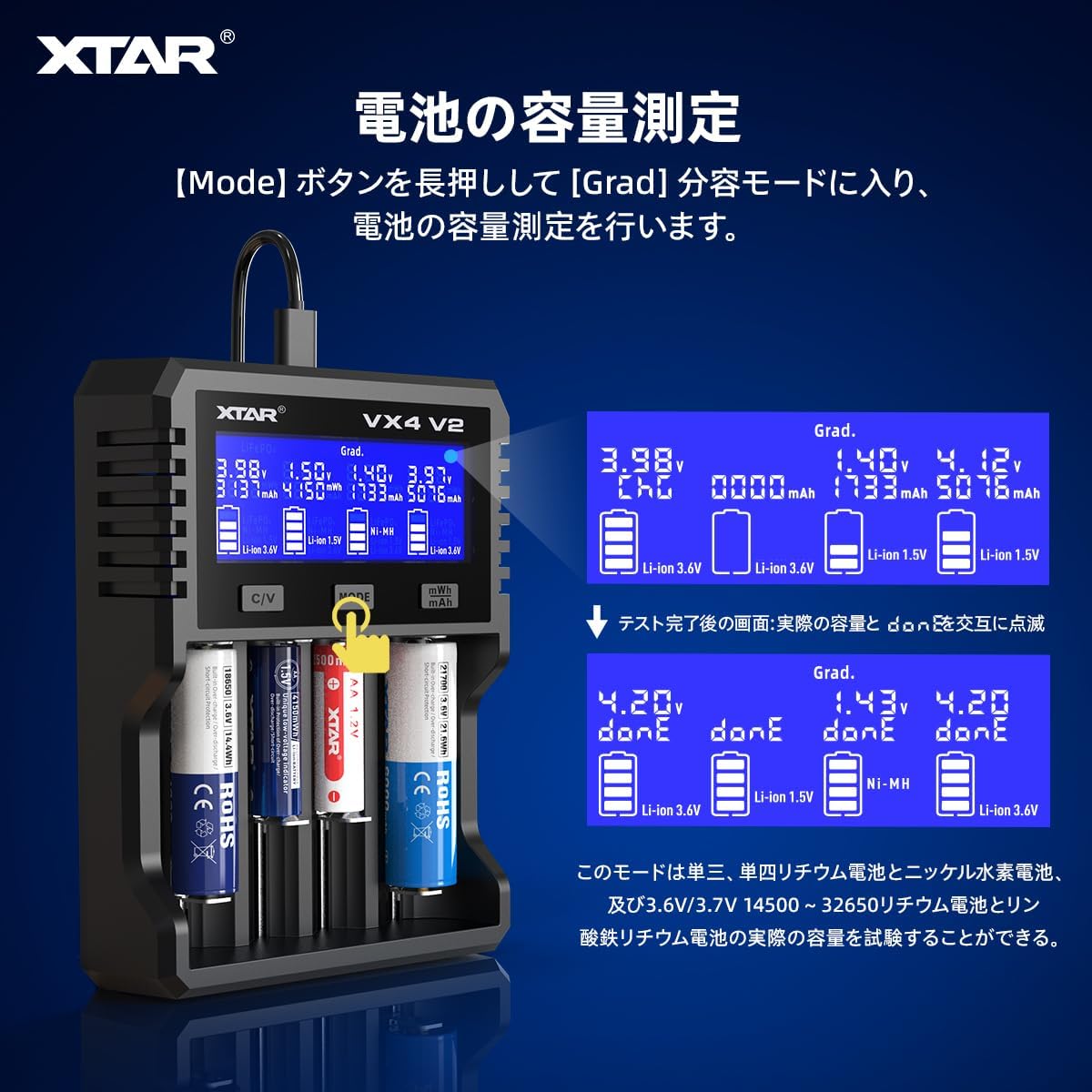
6.3. Battery Capacity Measurement (Grad Mode)
The XTAR VX4 V2 can measure the actual capacity of 1.5V Li-ion, Ni-MH, and 3.6V/3.7V Li-ion batteries.
- Ensure the charger is in Standard Charging Mode.
- Long-press the [Mode] button to enter Grad (Capacity Measurement) mode.
- The charger will proceed to discharge and then fully charge the battery to determine its actual capacity.
- Once complete, "done" and the battery capacity will be displayed alternately.
- Press the [mWh/mAh] button to view the energy (mWh) or capacity (mAh) value for 1.5V Li-ion batteries.
6.4. Adjusting Charging Current
The charger allows for manual selection of charging current based on the number of batteries and power adapter capabilities.
- 1 Battery: Up to 3A
- 2 Batteries: Up to 2A per slot
- 4 Batteries: Selectable currents of 1A, 0.5A, or 0.25A per slot.
Note: AA/AAA rechargeable batteries have a fixed charging current of 0.5A. A PD 20W power adapter is recommended for optimal performance.

6.5. Supported Battery Types and Sizes
The XTAR VX4 V2 supports a wide range of rechargeable batteries:
- 1.5V Li-ion: AAA, AA
- 1.2V Ni-MH: AAA, AA, A, SC, C, D
- 3.6V/3.7V Li-ion: 10440, 14500, 14650, 16340, 17335, 17500, 17670, 18350, 18490, 18500, 18650, 18700, 20700, 21700, 22650, 25500, 26650, 32650
- 3.2V LiFePO4: (Same sizes as 3.6V/3.7V Li-ion)
7. Safety Precautions
To ensure safe operation and prevent damage, please observe the following:
- Only charge compatible rechargeable batteries. Do not attempt to charge non-rechargeable batteries.
- Ensure correct battery polarity (+/-) when inserting batteries into the charger slots.
- Do not leave the charger unattended during operation, especially when charging for extended periods.
- Keep the charger away from water, moisture, and high temperatures.
- Do not disassemble or modify the charger. This will void the warranty and may cause hazards.
- Use only the provided power adapter or a compatible PD 20W adapter for optimal performance and safety.
- If any abnormal behavior (e.g., excessive heat, smoke, unusual odors) is observed, immediately disconnect the charger from the power source.

8. Maintenance
- Cleaning: Disconnect the charger from power before cleaning. Use a soft, dry cloth to wipe the surface. Do not use abrasive cleaners or solvents.
- Storage: Store the charger in a cool, dry place away from direct sunlight and extreme temperatures when not in use.
- Inspection: Periodically inspect the charging cable and adapter for any signs of damage. Do not use if damaged.
9. Troubleshooting
| Problem | Possible Cause | Solution |
|---|---|---|
| Charger not powering on | No power connection; faulty cable/adapter | Check power outlet, cable, and adapter connections. Try a different outlet or cable. |
| Battery not charging | Incorrect battery insertion; incompatible battery type; battery too deeply discharged | Ensure correct polarity. Verify battery compatibility. The charger has a 0V activation function for deeply discharged batteries. |
| Display shows "Error" | Short circuit; reverse polarity; damaged battery | Remove and reinsert the battery correctly. Inspect the battery for damage. If the error persists, the battery may be faulty. |
| Slow charging speed | Low power input; multiple batteries charging simultaneously | Ensure a PD 20W adapter is used. Charging current is distributed among multiple batteries. Refer to section 6.4 for DIY charging current options. |
10. Warranty and Support
10.1. Warranty Information
The XTAR VX4 V2 Battery Charger comes with a 1-year manufacturer warranty from the date of purchase. This warranty covers defects in materials and workmanship under normal use. It does not cover damage caused by misuse, accidents, unauthorized modifications, or improper maintenance.
10.2. Customer Support
For technical assistance, warranty claims, or any questions regarding your XTAR VX4 V2 charger, please contact XTAR customer support through the official XTAR website or your point of purchase. Please have your product model and purchase date available when contacting support.


