
1. Introduction
This manual provides detailed instructions for installing and operating your BrickBling Light Kit, designed specifically for the Lego Creator 3-in-1 Modern House (Lego Model 31153). This light kit enhances your Lego model by adding vibrant illumination, transforming it from a static display into a dynamic and visually engaging piece. Please read all instructions carefully before beginning installation.
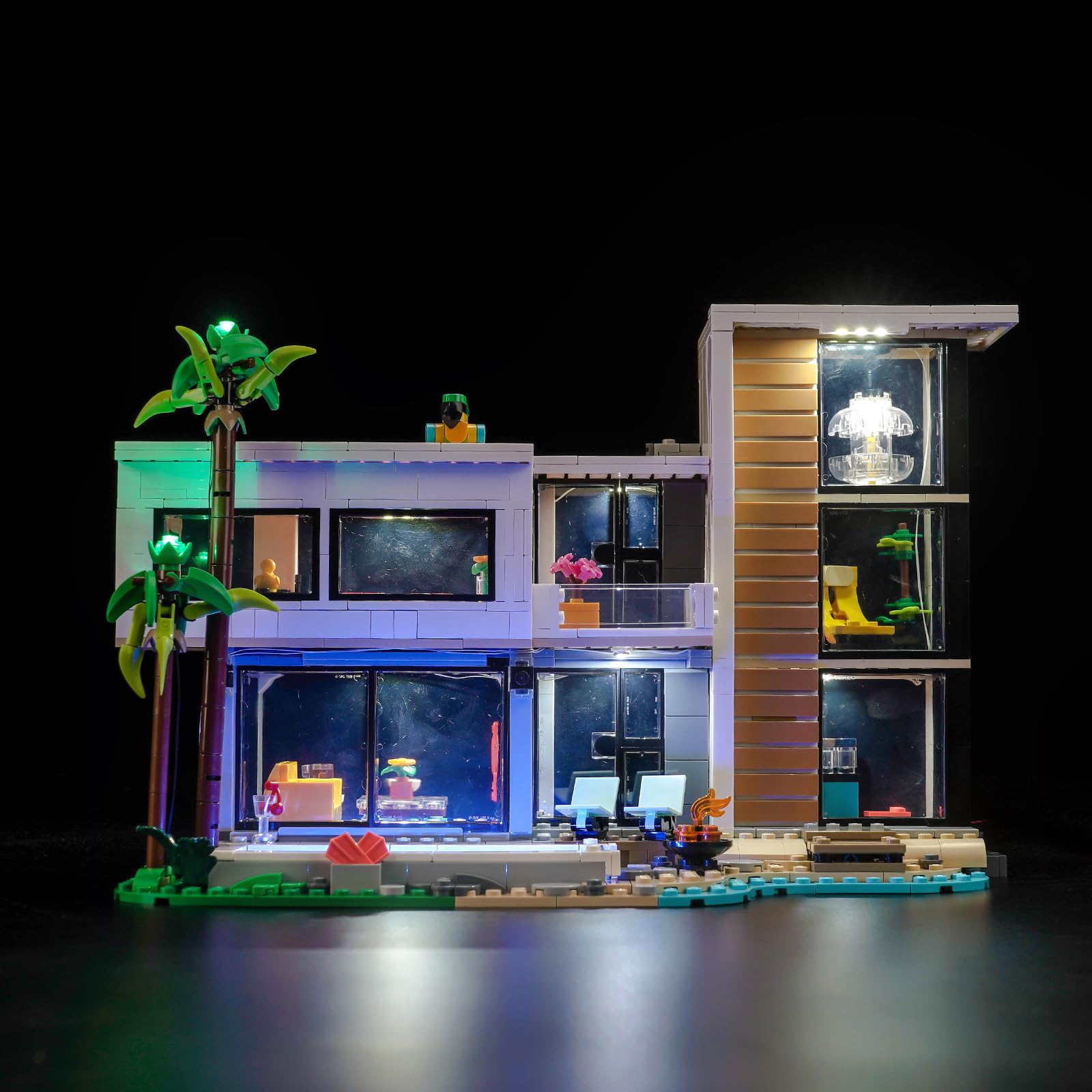
Image 1.1: The BrickBling Light Kit installed in the Lego Creator 3-in-1 Modern House, showcasing the illuminated model. Note: Lego model is not included.
2. Safety Information
WARNING: CHOKING HAZARD - Small parts. Not for children under 3 years.
- Keep all small components out of reach of young children to prevent choking.
- Ensure all electrical connections are secure to avoid short circuits.
- Use only the provided power supply or a compatible 5V USB power source.
- Do not expose the light kit to water or excessive moisture.
- Avoid bending or twisting wires excessively, as this may damage them.
3. Package Contents
Verify that all components listed below are present in your package:

Image 3.1: Overview of the BrickBling Light Kit components, including LED light strips, an expansion board, and a USB power supply cable.
- LED Light Kit components (various light strips, individual LEDs, connecting wires)
- Expansion Board
- USB Power Supply Cable
- Instruction Guide (electronic manual available)
Note: The Lego Creator 3-in-1 Modern House (Model 31153) building kit is not included with this light kit.
4. Setup and Installation
The BrickBling Light Kit features an integrated design for easier installation. An electronic manual is provided to guide you step-by-step through the process. It is recommended to follow the instructions carefully to ensure proper placement and functionality of the lights.
4.1 General Installation Steps:
- Prepare your Lego Model: Ensure your Lego Creator 3-in-1 Modern House (Model 31153) is fully assembled and stable.
- Identify Light Placement: Refer to the electronic manual for specific locations where each light component should be installed within the model.
- Connect Lights: Carefully attach the LED light strips and individual LEDs to the designated areas. The thin wires are designed to be routed through small gaps and Technic holes in your Lego model.
- Connect to Expansion Board: Plug the light components into the expansion board. Ensure connections are firm.
- Connect Power Supply: Attach the USB power supply cable to the expansion board.
- Test: Before fully securing all wires, connect the USB cable to a 5V power source and test the lights.
- Organize Wires: Neatly tuck away any excess wiring to maintain the aesthetic integrity of your Lego model. The integrated design minimizes exposed lines.

Image 4.1: Detailed view of various light installations within the Lego Modern House, including interior and exterior lighting elements.
4.2 Installation Video Guide:
For visual assistance with the installation process, please refer to the official video guide below:
Video 4.1: Official installation guide for the BrickBling Light Kit for Lego Creator 3-in-1 Modern House 31153. This video demonstrates the step-by-step process of integrating the lights into your Lego model.
5. Operating Instructions
Operating your BrickBling Light Kit is straightforward:
- Power Connection: Connect the USB power supply cable from the expansion board to any standard 5V USB power source (e.g., USB wall adapter, power bank, computer USB port).
- Power On: The lights will illuminate automatically once connected to a power source.
- Power Off: Disconnect the USB power supply from the power source to turn off the lights.
The 5V low voltage design ensures a safe experience while bringing your Lego model to life with vibrant illumination.

Image 5.1: The Lego Modern House model fully lit by the BrickBling Light Kit, demonstrating its visual impact in a low-light environment.
6. Maintenance
To ensure the longevity and optimal performance of your BrickBling Light Kit, follow these simple maintenance guidelines:
- Cleaning: Gently dust the light components and wires with a soft, dry cloth. Avoid using liquid cleaners directly on the electrical components.
- Handling: Handle the wires and LED components with care. Avoid pulling or tugging on the wires, especially at connection points.
- Storage: If disassembling or storing the light kit, ensure wires are not tangled or crimped. Store in a dry, cool place away from direct sunlight.
- Power Source: Always use a stable 5V USB power source. Fluctuations in voltage can damage the LEDs.
7. Troubleshooting
If you encounter any issues with your BrickBling Light Kit, refer to the following common problems and solutions:
| Problem | Possible Cause | Solution |
|---|---|---|
| Lights do not turn on. |
|
|
| Some lights are dim or flickering. |
|
|
| Wires are visible after installation. |
|
|
If the problem persists, please contact BrickBling customer support for further assistance.
8. Specifications
- Brand: BrickBling
- Model Compatibility: Lego Creator 3-in-1 Modern House (Model 31153)
- Power Source: USB (5V low voltage)
- Material: High-grade ABS materials and copper
- Included Components: Light Kit, Power Supply
- Safety Features: Anti-heat, anti-burning materials
- Assembly Required: Yes
- Recommended Age: Kid (Note: Manufacturer age range of 18-90 years typically refers to the compatible Lego model, not the light kit itself.)
9. Warranty and Support
9.1 Warranty Information:
Specific warranty details for your BrickBling Light Kit may vary. Please refer to the product packaging or the official BrickBling website for the most up-to-date warranty policy.
9.2 Customer Support:
For technical assistance, missing parts, or any other inquiries regarding your BrickBling Light Kit, please contact BrickBling customer support through their official channels. You can typically find contact information on the product packaging or their brand store on Amazon.
Online Resources:


