
1. Introduction
This manual provides essential instructions for the safe and effective operation, setup, and maintenance of your LONGER RAY5 5W Laser Engraver. Please read this manual thoroughly before using the device to ensure proper functionality and safety.
2. Safety Information
Operating a laser engraver involves potential risks. Adhere to all safety guidelines to prevent injury or damage.
2.1 General Safety Precautions
- Always wear appropriate laser safety glasses when the laser is active.
- Ensure adequate ventilation in the work area to dissipate fumes and smoke generated during engraving or cutting.
- Do not leave the machine unattended during operation.
- Keep a fire extinguisher nearby.
- Avoid placing flammable materials near the laser engraver.
- Do not engrave or cut unknown materials, as some may produce toxic fumes or catch fire easily.
2.2 Integrated Safety Features
- Power Button: Provides immediate power cut-off.
- Active Position Protection: Stops operation if the machine detects unexpected movement.
- Thermal Protection: Automatically shuts down if overheating is detected in the engraving area.
- Current Safety Control System: Monitors and regulates electrical current for safe operation.
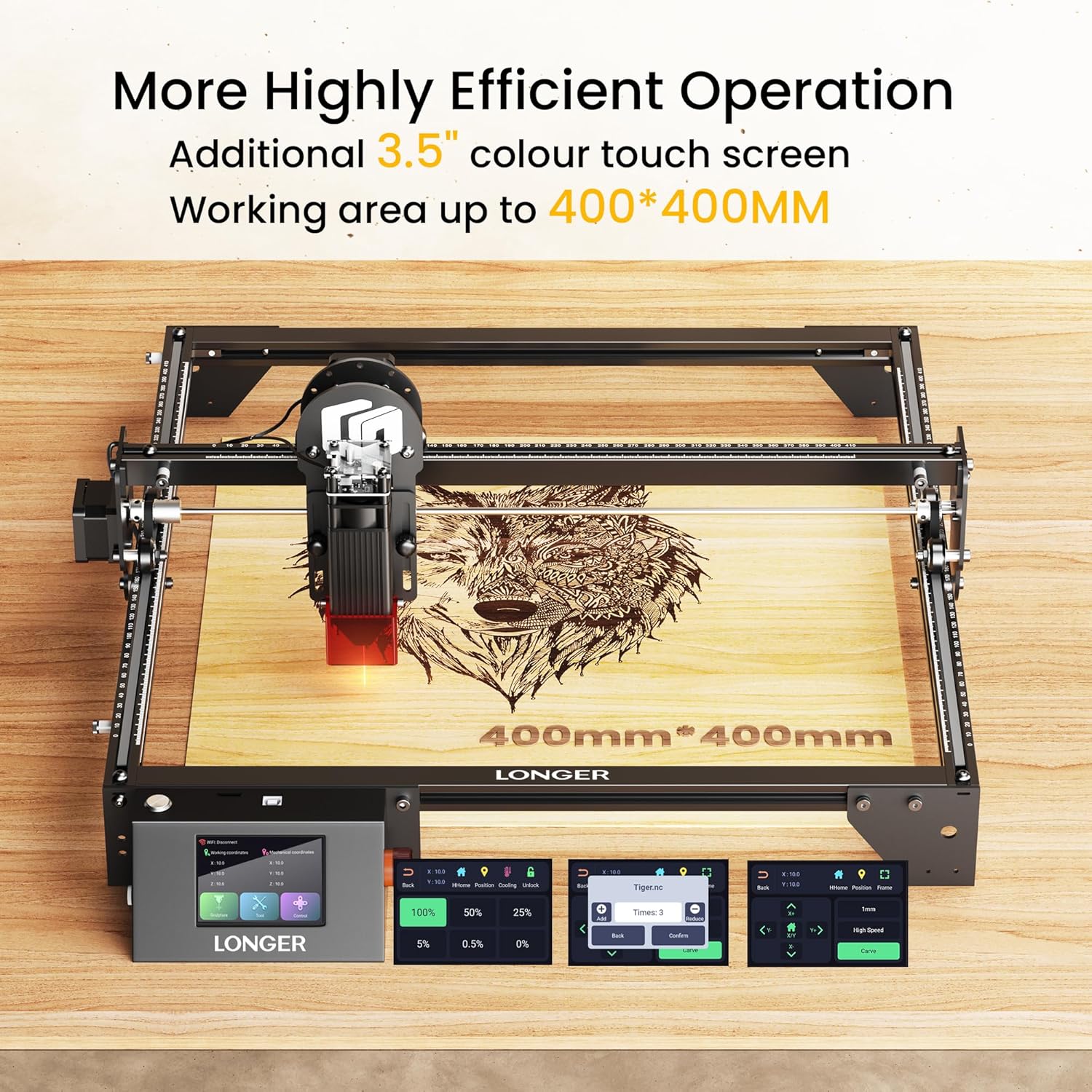
Image: Overview of the LONGER RAY5 5W Laser Engraver's safety features, including eye protection, thermal protection, movement protection, and the power button.
3. Product Overview
The LONGER RAY5 5W Laser Engraver is designed for precision engraving and cutting on various materials such as wood and metal. It features advanced technology for enhanced performance and user convenience.

Image: The LONGER RAY5 5W Laser Engraver shown with various engraved samples, demonstrating its capabilities.
3.1 Key Features
- Ultra-fine Laser Dot: Features a 0.08 x 0.08 mm compressed laser spot for high precision.
- High Engraving Speed: Capable of speeds up to 10000 mm/min.
- 3.5-inch Color Touch Screen: Provides an intuitive interface for direct control.
- Offline Engraving: Allows operation without a continuous computer connection using a TF card.
- 32-bit ESP32 Chipset: Ensures faster data processing and stable performance.
- WIFI Connectivity: Supports wireless control via web or application.
3.2 Laser Module Precision
The RAY5 5W utilizes advanced compressed laser technology to achieve a fine laser spot, resulting in higher engraving accuracy and cutting capability.

Image: A visual comparison illustrating the ultra-fine 0.08x0.08mm laser dot of the RAY5 5W compared to a larger 0.15x0.15mm dot from other models, highlighting precision.
3.3 Performance and Processing
The engraver's high-speed capabilities and robust chipset contribute to efficient and reliable operation.

Image: A graphic comparing the working speed of the RAY5 5W at 10000mm/min against other models at 6000mm/min, indicating faster processing.

Image: An illustration depicting a 32-bit chip, symbolizing the ESP32 chipset integrated into the LONGER RAY5 5W for enhanced data processing.
4. Setup Guide
This section outlines the general steps for assembling and preparing your LONGER RAY5 5W Laser Engraver for first use.
4.1 Assembly
Follow the detailed assembly instructions provided in the separate assembly guide included with your product. Ensure all components are securely fastened before proceeding.
4.2 Initial Power-On
- Connect the power adapter to the engraver and a suitable power outlet.
- Press the power button to turn on the device.
- The 3.5-inch color touch screen will illuminate, indicating the system is booting up.
- Perform initial calibration steps as prompted on the touch screen or as detailed in the assembly guide.
5. Operating Instructions
The LONGER RAY5 5W offers multiple methods for controlling engraving and cutting operations.
5.1 Using the 3.5-inch Touch Screen
The integrated touch screen allows for direct control and monitoring of engraving tasks without requiring a computer connection.

Image: A close-up view of the 3.5-inch color touch screen on the LONGER RAY5 5W, showing its user interface for direct operation.
5.2 Offline Engraving (TF Card)
To perform offline engraving:
- Prepare your engraving or cutting file using compatible software (e.g., LightBurn, LaserGRBL).
- Save the file to a TF card.
- Insert the TF card into the designated slot on the engraver.
- Select the file from the touch screen interface and initiate the engraving process.
5.3 Connectivity Options
The engraver supports various connection methods for flexibility.

Image: A diagram illustrating the multiple connection options for the LONGER RAY5 5W, including WiFi, USB, mobile app, and TF card, along with compatibility for various operating systems and software like LaserGRBL and LightBurn.
- WIFI: Connect to your local network for wireless control via a web interface or dedicated application.
- USB: Direct connection to a computer for real-time control and file transfer.
- TF Card: For offline operations as described above.
- Supported Software: Compatible with popular laser control software such as LaserGRBL and LightBurn.
6. Maintenance
Regular maintenance ensures the longevity and optimal performance of your laser engraver.
- Clean the Laser Lens: Periodically clean the laser lens with a soft, lint-free cloth and lens cleaning solution to maintain laser beam quality.
- Clear Debris: Remove any dust, debris, or material residue from the work area and machine components after each use.
- Inspect Belts and Rails: Check the tension of the drive belts and ensure the guide rails are clean and free of obstructions. Lubricate if necessary according to manufacturer recommendations.
- Firmware Updates: Check the official Longer website for any available firmware updates to ensure your machine has the latest features and improvements.
7. Troubleshooting
This section addresses common issues you might encounter and provides potential solutions.
7.1 Common Issues and Solutions
- Laser Not Firing:
- Check if the laser module is properly connected and seated.
- Verify that the power supply is adequate and connected.
- Ensure the safety switch or emergency stop button is not engaged.
- Confirm laser power settings in your software are not set to zero.
- Poor Engraving Quality:
- Adjust focus of the laser module.
- Clean the laser lens.
- Check engraving speed and power settings for the specific material.
- Ensure the material is flat and securely placed.
- Connection Problems (WIFI/USB):
- For WIFI, ensure the engraver is within range of your router and connected to the correct network.
- For USB, try a different USB port or cable. Reinstall drivers if necessary.
- Restart both the engraver and the controlling device (computer/phone).
- Machine Stops Mid-Operation:
- Check for active position protection triggering due to unexpected movement.
- Verify thermal protection has not activated due to overheating.
- Ensure the power supply is stable.
If issues persist, contact Longer technical support for assistance.
8. Specifications
- Model: RAY5 5W
- Laser Power: 5W
- Laser Spot Size: 0.08 x 0.08 mm
- Engraving Speed: Up to 10000 mm/min
- Control Board: 32-bit ESP32 Chipset
- Display: 3.5-inch Color Touch Screen
- Connectivity: WIFI, USB, TF Card
- Product Dimensions: 24 x 12.5 x 5.9 inches (60.96 x 31.75 x 14.99 cm)
- Item Weight: 9.78 pounds (4.44 kg)
- Manufacturer: LONGER
9. Warranty and Support
LONGER provides comprehensive technical support and after-sales service for its products.

Image: A visual representation of Longer's strong after-sales support, featuring a customer service representative and warehouse facilities.
9.1 Technical Support Contact
- Phone: +1 888-575-9099
- Operating Hours (Mon-Fri): 9:00 AM - 6:00 PM (EST, UTC-5)
- Operating Hours (Sun-Thu): 8:30 PM - 7:00 AM (EST, UTC-5)
Please have your product model and purchase information ready when contacting support.


