Introduction
This manual provides instructions for the safe and efficient use of your Nitecore Carbon Battery 6K. Please read this manual thoroughly before operating the device and retain it for future reference.
The Nitecore Carbon Battery 6K is a lightweight, portable power bank featuring a 6000mAh capacity, USB-C charging, and a durable carbon fiber shell. It is designed for outdoor use with an IP68 waterproof rating and can also function as a headlamp runtime extender.
Safety Instructions
- Do not expose the power bank to extreme temperatures, direct sunlight, or fire.
- Avoid dropping or subjecting the device to strong impacts.
- Do not disassemble, modify, or repair the device yourself. Contact authorized service personnel.
- Keep the power bank away from water and moisture, unless specifically designed for such conditions (this product is waterproof, but avoid intentional submersion beyond specified limits).
- Use only compatible charging cables and adapters.
- Keep out of reach of children.
- If the battery swells, leaks, or emits an unusual odor, discontinue use immediately.
Product Overview
The Nitecore Carbon Battery 6K is a compact and robust power bank. Key features include:
- USB-C Port: For both charging the power bank and charging external devices.
- Power Button: Activates power indicators and controls the red safety light.
- Power Indicators: Three red LED lights indicate the remaining battery level.
- Carbon Fiber Shell: Provides durability and keeps the device lightweight.
- Red Safety Rear Light: Integrated light for enhanced visibility.

Image: Front view of the Nitecore Carbon Battery 6K, showing its carbon fiber texture and the power button with integrated indicator lights.
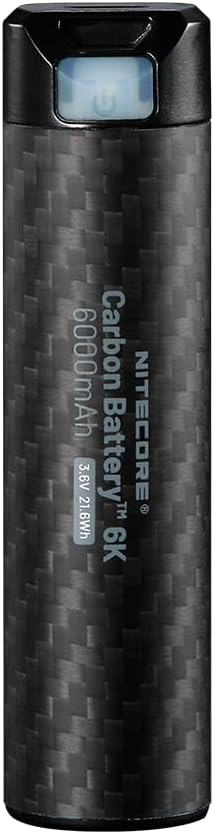
Image: Close-up of the Nitecore Carbon Battery 6K, highlighting the power button and USB-C port area.
Setup
Initial Charging
Before first use, fully charge your Nitecore Carbon Battery 6K. Connect the power bank to a USB power source (e.g., wall adapter, computer USB port) using a USB-C cable. The red power indicators will illuminate to show charging progress.

Image: The Carbon Battery 6K connected via USB-C, demonstrating its ability to charge both a smartphone and an action camera.
Operating Instructions
Checking Battery Level
To check the remaining power, short-press the Power Button. The three red power indicators will illuminate to show the current battery level:
- 3 Constant-on: Approximately 100% charge.
- 2 Constant-on: Approximately 70% charge.
- 1 Constant-on: Approximately 30% charge.
- 1 Flashing: Less than 10% charge.

Image: The Nitecore Carbon Battery 6K with its red safety light illuminated, which also serves as a power indicator.
Charging External Devices
Connect your device to the USB-C port of the Nitecore Carbon Battery 6K using a compatible USB-C cable. The power bank will automatically begin charging your device. The power indicators will show the remaining battery level of the power bank during charging.
Red Safety Rear Light
The Carbon Battery 6K features a red safety rear light for added visibility, especially useful during outdoor activities. To activate or deactivate this light, long-press the Power Button for 1 second. The red light will turn on or off accordingly.
Image: The Nitecore Carbon Battery 6K with its red safety light illuminated, demonstrating its visibility feature.
Headlamp Runtime Extender Function
The Nitecore Carbon Battery 6K can extend the runtime of compatible Nitecore headlamps, such as NU43, NU45, NU53, HC60 UHE, and HC65 HUE. Connect the power bank to the headlamp's charging port using a suitable cable to provide extended power during use.
Maintenance
- Clean the power bank with a soft, dry cloth. Do not use abrasive cleaners or solvents.
- Store the device in a cool, dry place away from direct sunlight and extreme temperatures.
- For long-term storage, charge the power bank to approximately 50% every three months to maintain battery health.
Troubleshooting
Device Not Charging
- Ensure the USB-C cable is securely connected to both the power bank and the power source/device.
- Verify that the power source is active and providing power.
- Check if the power bank itself has sufficient charge.
- Try a different USB-C cable or power adapter.
Power Indicators Not Working
- Short-press the Power Button to activate the indicators.
- If the issue persists, the battery may be fully depleted or require service.
Red Safety Light Not Activating
- Long-press the Power Button for 1 second to toggle the light.
- Ensure the power bank has sufficient charge.
Specifications
| Feature | Detail |
|---|---|
| Battery Type | Li-ion Battery |
| Capacity | 6,000mAh (3.6V, 21.6Wh) |
| Rated Energy | 3,700mAh 5V (TYP 1A) |
| Input | USB-C: 5V-2A |
| Output | USB-C: 5V-2A |
| IP Rating | IP68 |
| Dimensions | Ø22.8mm x 90.4mm (Ø0.90" x 3.56") |
| Weight | 88g / 3.10 oz |
| Special Features | Fast Charging, Flashlight (Red Safety Light), LED Indicator Lights, Lightweight, Pocket Size |

Image: Visual representation of the Nitecore Carbon Battery 6K, highlighting its 6000mAh capacity and compact size.
Warranty Information
Nitecore products are covered by a warranty. For detailed warranty terms and conditions, please refer to the official Nitecore website or contact your local distributor. Keep your purchase receipt as proof of purchase for warranty claims.
Customer Support
For technical assistance, troubleshooting, or product inquiries, please visit the official Nitecore website or contact their customer service department. Contact information can typically be found on the product packaging or the official website.


