
Dawnice DWPF-LCT5N
Dawnice 5kwh Solar Storage Lithium Battery User Manual
Model: DWPF-LCT5N
Brand: Dawnice
1. Introduction
This manual provides essential information for the safe and efficient operation of your Dawnice 5kwh Solar Storage Lithium Battery. This high-performance LiFePo4 battery is designed for home solar electric systems, offering reliable energy storage and backup power. Please read this manual thoroughly before installation and use to ensure proper functionality and longevity of the product.

Figure 1.1: Front and side view of the Dawnice 5kwh Solar Storage Lithium Battery.
2. Safety Information
Always adhere to the following safety guidelines to prevent injury or damage to the battery and connected equipment:
- Qualified Personnel: Installation and maintenance should only be performed by qualified and trained personnel.
- Electrical Safety: Ensure all power sources are disconnected before installation or servicing. Use appropriate personal protective equipment (PPE).
- Ventilation: Ensure adequate ventilation around the battery to prevent overheating.
- Avoid Short Circuits: Do not short-circuit the battery terminals. Use insulated tools.
- Temperature: Operate the battery within the specified temperature range. Avoid extreme heat or cold.
- Water Exposure: While the unit has an IP54 rating for water resistance, avoid direct exposure to heavy rain or submersion.
- Physical Damage: Do not drop, puncture, or disassemble the battery. If damaged, do not use.
- Disposal: Dispose of the battery according to local regulations for lithium-ion batteries.
3. Product Features
The Dawnice 5kwh Solar Storage Lithium Battery incorporates advanced features for optimal performance and user convenience:
- High-Capacity LiFePo4 Cells: Utilizes 51.2V 100Ah A-grade LiFePo4 battery cells, offering high safety, long cycle life (6000+ cycles at 80% DOD), and excellent charge/discharge capabilities.
- Integrated BMS: A built-in 100A Battery Management System (BMS) provides comprehensive protection against overcharging, over-discharging, over-current, overheating, and short circuits.
- Scalable Power: Designed to expand capacity, capable of powering a wide range of household appliances.
- Flexible Installation: Supports both wall-mounted and ground-mounted configurations.
- Smart LED Touchscreen: An intuitive touchscreen display allows for easy monitoring of battery status, parameters, and system information.
- Mobile Control: Connect via Bluetooth, WiFi, or a dedicated app for remote monitoring and control.
- Durable Design: Features an IP54 water-resistant enclosure, providing protection against dust and splashing water.

Figure 3.1: Key features of the Dawnice battery, including its smart LED touchscreen, removable bracket, and freewheeling casters for easy movement.

Figure 3.2: The LED touchscreen interface, displaying the Smart Battery Management System (BMS) with options for cell info, status, protocol, system, parameters, and history.

Figure 3.3: A closer look at the touchscreen, allowing users to view detailed battery information, current status, communication protocols, and system settings.

Figure 3.4: An overview of the energy storage system's benefits, including broad compatibility with inverters, OEM support, plug-and-play installation, 24/7 uninterrupted power, long lifespan, and multi-protection from the self-developed BMS.
Water Resistance Demonstration
Video 3.1: This video demonstrates the IP54 water resistance of the Dawnice battery, showing it withstands water exposure, and highlights its 10-year warranty and touchscreen functionality even when wet.
4. Setup and Installation
Proper installation is crucial for the safe and efficient operation of your battery. Consult a qualified electrician or solar installer for assistance.
4.1. Unpacking and Inspection
- Carefully remove the battery from its wooden boxing packaging.
- Inspect the battery for any signs of physical damage during transit. Report any damage to your supplier immediately.
- Verify all components listed in the packing list are present.
4.2. Mounting Options
The Dawnice battery supports both wall-mounted and ground-mounted installations. Choose a location that is:
- Dry, well-ventilated, and protected from direct sunlight and extreme temperatures.
- Accessible for maintenance and inspection.
- Structurally sound to support the battery's weight (55 kg / 121 pounds).

Figure 4.1: Example of a wall-mounted installation, demonstrating the compact design suitable for various spaces.

Figure 4.2: A different perspective of the wall-mounted setup, emphasizing the secure and space-saving design.
4.3. Electrical Connections
Connect the battery to your solar inverter and smart meter according to the system diagram. Ensure all connections are secure and correctly polarized (positive to positive, negative to negative).
- Connect solar panels to the hybrid solar inverter.
- Connect the battery to the hybrid solar inverter.
- Connect the smart meter between the inverter and your household appliances.
- Ensure proper grounding of the system.
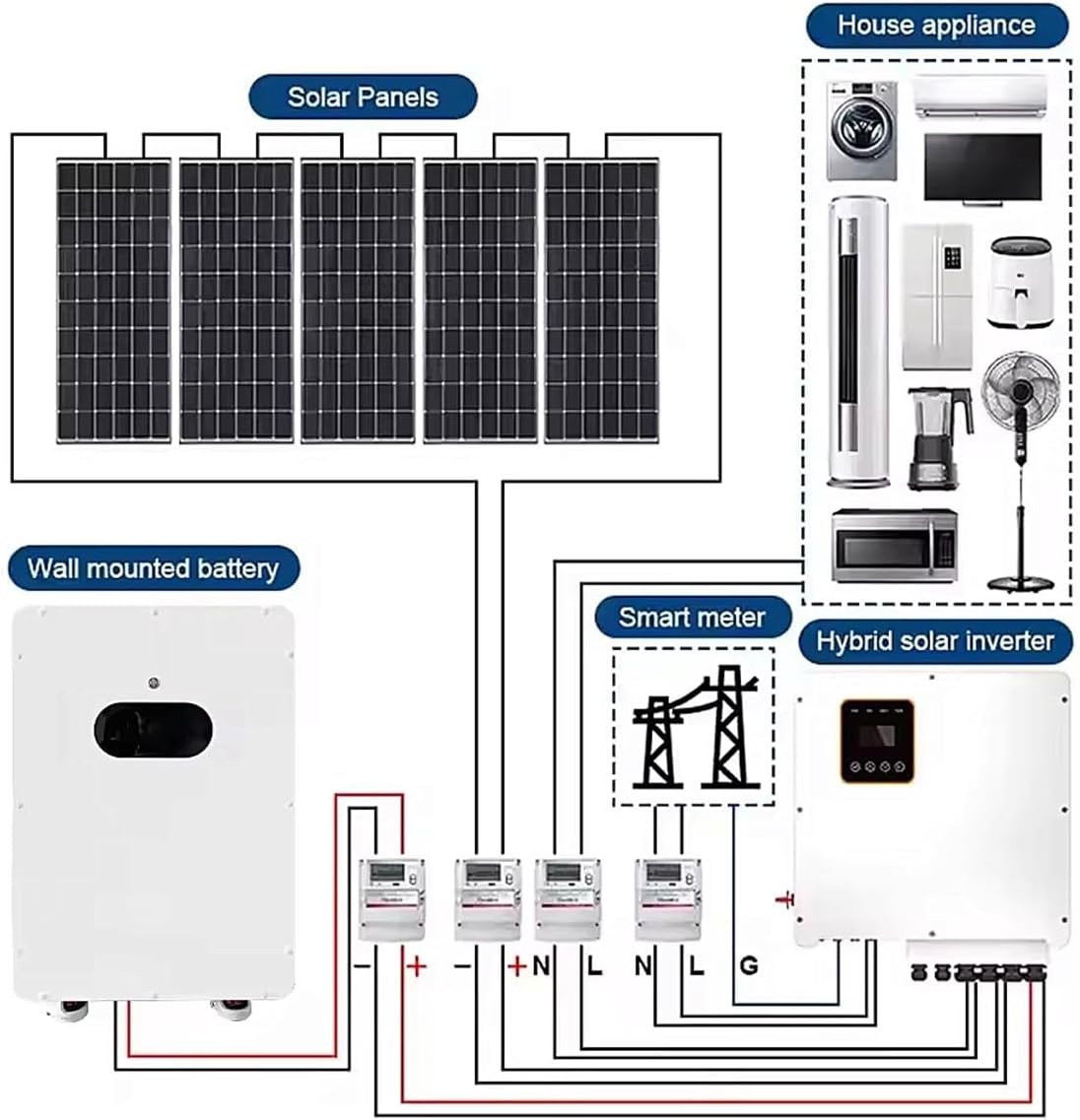
Figure 4.3: A comprehensive diagram illustrating the electrical connections for a typical home solar electric system using the Dawnice battery.

Figure 4.4: Detailed view of the battery's external components, including the battery switch, touchscreen, removable brackets, handle, Fuma wheels, and the signal communication panel with various ports (CAN, RS232, RS485) and the battery power interface (DC+ and DC-).
4.4. Initial Power-Up
- After all connections are made and verified, turn on the battery switch.
- Observe the LED indicators and the touchscreen for initial status.
- Follow the inverter's instructions for system commissioning.
5. Operating Instructions
The Dawnice battery is designed for largely automatic operation within a solar energy system. User interaction primarily involves monitoring and occasional adjustments via the touchscreen or mobile app.
5.1. Touchscreen Operation
The integrated LED touchscreen provides real-time data and control options:
- Home Screen: Displays an overview of the battery's status.
- CELLS_INFO: View individual cell voltage and temperature.
- STATUS: Check the State of Charge (SOC), voltage, current, and capacity.
- PROTOCOL: Configure communication protocols with the inverter.
- SYSTEM: Access system settings and information.
- Parameter: Adjust specific operating parameters (consult advanced manual or support).
- History: Review historical data and event logs.
5.2. Mobile App Monitoring
For convenient remote monitoring, download the dedicated mobile application (details provided with product documentation or by contacting support). The app allows you to:
- View current battery data (SOC, voltage, current).
- Monitor energy flow within your solar system.
- Receive alerts and notifications.
6. Maintenance
Regular maintenance helps ensure the long-term performance and safety of your Dawnice battery.
6.1. Routine Checks
- Visual Inspection: Periodically inspect the battery for any signs of damage, corrosion, or loose connections.
- Cleaning: Keep the battery surface clean and free of dust. Use a soft, dry cloth. Do not use abrasive cleaners or solvents.
- Ventilation: Ensure that the ventilation openings are not blocked to allow for proper airflow.
6.2. BMS Monitoring
The built-in BMS continuously monitors the battery's health. Regularly check the status on the touchscreen or mobile app for any warnings or error codes. This helps identify potential issues early.
7. Troubleshooting
If you encounter issues with your Dawnice battery, refer to the following basic troubleshooting steps. For complex problems, contact customer support.
7.1. Common Issues
- Battery Not Powering On:
- Check if the main battery switch is in the 'ON' position.
- Verify all DC connections are secure and correctly polarized.
- Check external circuit breakers or fuses in the system.
- No Output Power:
- Check the battery's State of Charge (SOC) on the touchscreen. If too low, the battery may have entered protection mode.
- Verify connections to the inverter and household loads.
- Check for any error codes displayed on the battery or inverter.
- Error Code Displayed:
- Note down the specific error code.
- Refer to the advanced manual (if provided) or contact customer support with the error code for diagnosis.
7.2. Contacting Support
If troubleshooting steps do not resolve the issue, please contact Dawnice customer support. Provide your model number (DWPF-LCT5N), a detailed description of the problem, and any error codes displayed.
8. Specifications
The following table outlines the key technical specifications for the Dawnice 5kwh Solar Storage Lithium Battery (Model DWPF-LCT5N):

Figure 8.1: Detailed performance and mechanical specifications for various Dawnice battery models, including the 5kwh variant.

Figure 8.2: Dimensional drawings for various Dawnice battery capacities, providing precise measurements for installation planning.
| Specification | Value |
|---|---|
| Model | DWPF-LCT5N |
| Battery Type | LiFePo4 |
| Nominal Voltage | 51.2 Volts |
| Capacity | 100 Ah |
| Rated Energy | 5.12 KWh |
| Maximum Power | 5.12E+3 Watts (5.12 KW) |
| Max. Charge/Discharge Current | 100 A |
| Cycle Life | ≥6000 Cycles (at 25°C, 80% DOD) |
| Design Life | ≥15 Years (at 25°C) |
| Product Dimensions (L x W x H) | 15.75" x 6.3" x 27.56" (400mm x 204mm x 700mm) |
| Item Weight | 55 Kilograms (121 pounds) |
| IP Grade | IP54 |
| Installation Mode | Wall / Ground Mounted |
| Communication | CAN / RS485 |
| Connector Type | MC4 |
9. Warranty and Support
9.1. Warranty Information
The Dawnice 5kwh Solar Storage Lithium Battery comes with a 10-year manufacturer's warranty. This warranty covers defects in materials and workmanship under normal use and service conditions.
9.2. Customer Support
For any questions regarding pre-sales, installation, operation, maintenance, or troubleshooting, please contact the Dawnice US Store. Our team is available to provide assistance and ensure your satisfaction with the product.
You can typically reach customer support through the platform where you purchased the product or via the contact information provided in your purchase documentation.
Related documentsDWPF-LCT5N


Ask a question about this manual
Ask about setup, troubleshooting, compatibility, parts, safety, or missing instructions. Manuals+ will review the question and use this page’s manual context to help answer it.