
Introduction
The Xgody S200 is a user-friendly flip phone specifically designed for seniors. It features large buttons, a clear 2.4-inch color display, and intuitive functions to simplify daily communication. This manual provides detailed instructions for setting up, operating, maintaining, and troubleshooting your S200 phone.
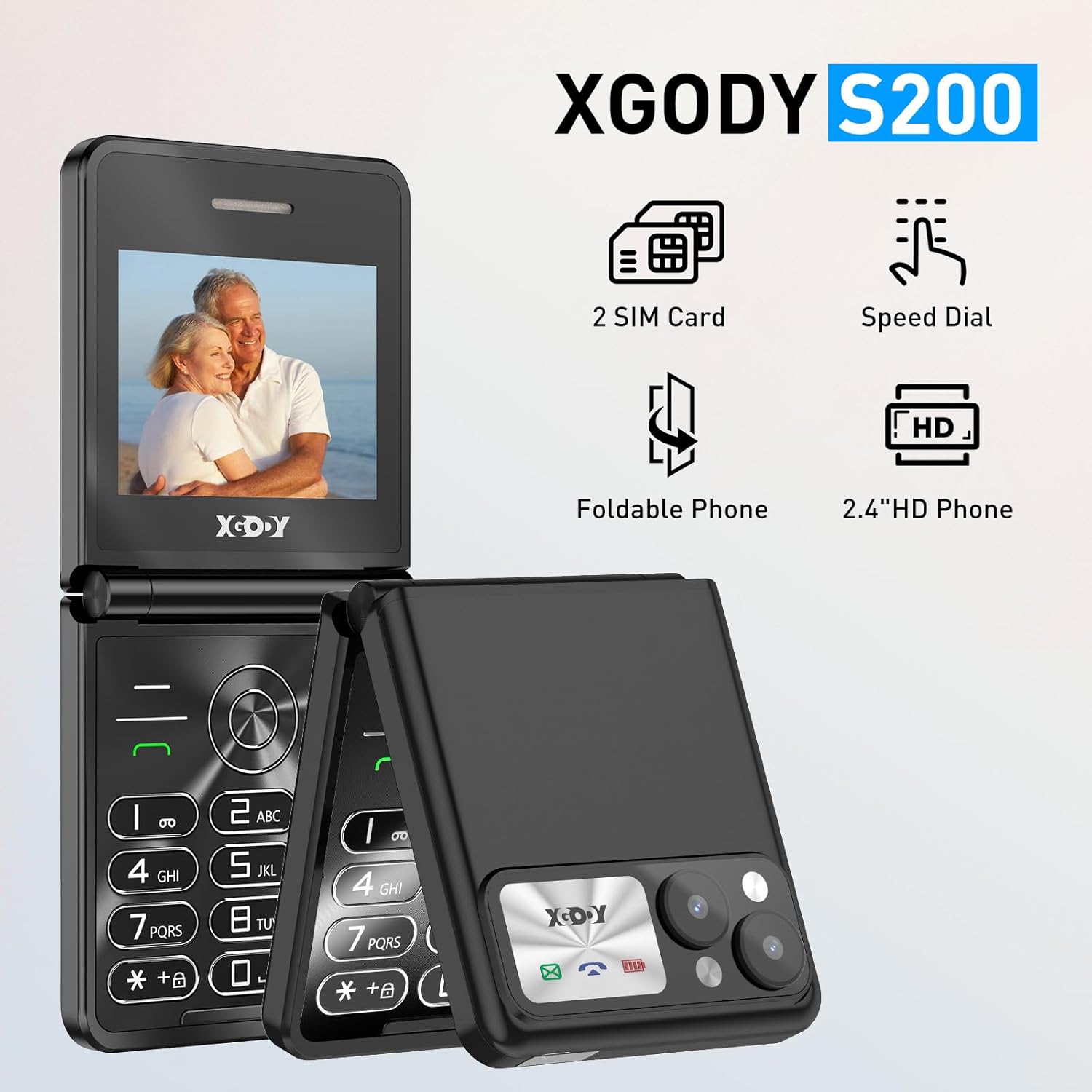
An overview of the Xgody S200 flip phone, highlighting its key features such as dual SIM support, speed dial, foldable design, and a 2.4-inch HD display.
Setup
1. Installing SIM and SD Cards
The Xgody S200 supports dual SIM cards and an SD card for expanded storage. Follow these steps to install them:
- Locate the battery cover: Gently remove the back cover of the phone.
- Remove the battery: If the battery is already installed, carefully lift it out.
- Insert SIM cards: Locate the SIM card slots. Insert your SIM cards into the designated slots, ensuring the gold contacts face downwards and the cut corner aligns correctly.
- Insert SD card (optional): If you wish to expand storage, insert a microSD card into the dedicated slot.
- Reinsert battery and cover: Place the battery back into its compartment, then reattach the back cover securely.
Note: Some users have reported that the SIM/SD card slots are located under a small section at the bottom of the phone, requiring you to slide off a clear plastic case. If you cannot find the slots under the main back cover, check for a removable bottom section.
2. Charging the Battery
Before first use, fully charge the phone's 1300mAh battery.
- Connect the charger: Plug the Type-C charging cable into the charging port at the bottom of the phone.
- Connect to power: Plug the other end of the cable into a compatible USB power adapter and then into a wall outlet.
- Charging indicator: The phone will display a charging indicator. Allow the phone to charge until the battery icon shows full.

Details of the Xgody S200's 1300mAh battery and connectivity options, including the Type-C charging port and 3.5mm headphone jack.
Operating Instructions
1. Power On/Off
- To Power On: Press and hold the Power/End Call button until the screen lights up.
- To Power Off: Press and hold the Power/End Call button, then confirm power off on the screen.
2. Making and Receiving Calls
- Making a Call:
- Open the flip phone.
- Dial the number using the large keypad.
- Press the Call button (green button) to initiate the call.
- Receiving a Call:
- When the phone rings, open the flip to answer, or press the Call button.
- To end a call, press the End Call button (red button).

A user interacting with the Xgody S200 flip phone, demonstrating the ease of use with its large buttons and clear display.
3. Sending and Receiving Text Messages
- To Send a Message:
- Navigate to the Messages menu.
- Select Write Message.
- Enter the recipient's number or select from contacts.
- Type your message using the keypad. Press the appropriate key multiple times for different letters (e.g., '2' for A, B, C).
- Press Send.
- To Read a Message:
- When a new message arrives, an icon will appear on the screen.
- Navigate to the Messages menu and select Inbox to read.
4. Using the Flashlight
The S200 includes a convenient built-in flashlight.
- To Turn On: Press and hold the dedicated flashlight button (or a designated key, refer to your phone's specific key mapping) for approximately 3 seconds.
- To Turn Off: Press and hold the same button again for 3 seconds.

The Xgody S200 flip phone's integrated flashlight in use, illustrating how to activate it by pressing a button for 3 seconds.
5. FM Radio
Enjoy FM radio without needing headphones as an antenna.
- To Access: Navigate to the FM Radio application from the main menu.
- Scan Channels: Use the navigation keys to scan for available radio stations.
- Adjust Volume: Use the side volume buttons to adjust the sound level.
6. Bluetooth Connectivity
Connect your S200 to other Bluetooth-enabled devices.
- Enable Bluetooth: Go to Settings > Bluetooth and turn it On.
- Pair Device: Select Search for devices. Choose your desired device from the list and follow the on-screen prompts to pair.
7. Emergency Contacts
Set up emergency contacts for quick access in urgent situations.
- Access Emergency Settings: Go to Settings > SOS Settings (or similar).
- Add Contacts: Add up to 5 emergency contact numbers.
- Activate SOS: In an emergency, press and hold the designated SOS button (usually on the back or side of the phone) to automatically dial and send an emergency message to your pre-set contacts.

Users making calls with the Xgody S200 flip phone, highlighting its clear sound quality and ease of use for staying connected.
Maintenance
- Cleaning: Use a soft, dry cloth to clean the phone's screen and body. Avoid using liquid cleaners or abrasive materials.
- Battery Care:
- Avoid extreme temperatures, which can reduce battery life.
- Do not leave the phone charging for excessively long periods after it's fully charged.
- If the phone will not be used for an extended period, charge it to about 50% before storing.
- Protection: The flip design protects the screen. Consider using the included protective case for added durability.
Troubleshooting
| Problem | Possible Cause | Solution |
|---|---|---|
| Phone does not power on | Low battery; battery not installed correctly. | Charge the battery for at least 30 minutes. Ensure the battery is correctly inserted. |
| Cannot make or receive calls | No SIM card; SIM card not properly inserted; no network signal. | Ensure SIM card(s) are correctly installed. Check for network signal strength. Contact your service provider if issues persist. |
| Low call volume | Volume settings too low; environmental noise. | Increase call volume using the side buttons during a call. Move to a quieter environment. |
| Battery drains quickly | Frequent use; background applications; old battery. | Reduce screen brightness. Close unnecessary applications. If battery life significantly degrades, consider replacing the battery. |
| Flashlight not working | Incorrect activation; software glitch. | Ensure you press and hold the flashlight button for 3 seconds. Restart the phone. |
Specifications
| Brand | Xgody |
| Model Name | S200 |
| Form Factor | Flip (Pieghevole) |
| Screen Size | 2.4 Inches (2,4 Pollici) |
| Screen Technology | LCD |
| Battery Capacity | 1300 mAh |
| Battery Composition | Lithium Ion (Ioni di litio) |
| Internal Memory Capacity | 32 GB (expandable via SD card) |
| Wireless Carrier | Unlocked (Sbloccato) |
| Network Technology | GSM (2G) |
| Connectivity Technology | Bluetooth |
| Additional Features | FM Radio, Flashlight, Large Buttons, SOS Function |
| Included Components | USB Cable, Phone Case, Screen Protector |
Warranty Information
Specific warranty details for the Xgody S200 are typically provided at the point of purchase or within the product packaging. Please refer to the warranty card included with your device for terms and conditions, including the warranty period and coverage. Keep your proof of purchase for any warranty claims.
Support
For technical assistance, troubleshooting beyond this manual, or inquiries regarding your Xgody S200 flip phone, please contact Xgody customer support. You can usually find contact information (phone number, email, or website) on the product packaging, the official Xgody website, or your purchase receipt.
When contacting support, please have your product model (S200) and purchase details readily available.
