
1. Introduction
Thank you for choosing the Airlonv LED Desk Lamp. This architect-style desk lamp is designed to provide versatile and eye-caring illumination for your home office, study, or workbench. With its 24W ultra-bright output, stepless dimming, stepless color temperature adjustment, and convenient remote control, it offers a customizable lighting experience. This manual provides essential information for safe and efficient operation.
2. What's in the Box
Please check the package contents to ensure all items are present:
- 1x Metal 3-Head Desk Lamp
- 1x Remote Control
- 1x Metal Clamp
- 1x Power Adapter
- 1x User Manual
3. Specifications
| Feature | Description |
|---|---|
| Brand | Airlonv |
| Model Number | YS-TL23070-B |
| Power Source | Corded Electric (24W Adapter Included) |
| Light Source Type | LED |
| Number of Light Sources | 3 |
| Color Temperature | 2700K-6500K (Stepless Adjustment) |
| Dimming | 1%-100% Stepless Dimmable |
| Control Method | Touch Control, Remote Control |
| Special Features | Memory Function, 1-Hour Timer, Optical Shadow Reduction, High Color Rendering (CRI>90), No Flicker, No Glare, Less Blue Light Hazard, 360° Horizontal Rotation |
| Mounting Type | Tabletop Clamp (up to 3.54 inches thick) |
| Product Dimensions | 17"D x 9"W x 2.24"H (Lamp head extends up to 33.3 inches) |
| Material Type | Aluminum |
| Color | Deep Black |
4. Setup and Installation
Follow these steps to set up your Airlonv LED Desk Lamp:
- Attach the Clamp: Secure the metal clamp to the edge of your desktop. Ensure the desktop thickness is within 3.54 inches for a stable fit. Tighten the screw firmly until the clamp is stable.

Detailed steps for attaching the clamp to a desk edge.
- Assemble the Lamp Arm: Insert the main lamp arm into the hole on the clamp. Tighten the screw on the clamp to secure the arm in place. The lamp features multiple strongly damped rotating joints for flexible positioning.
The main lamp arm being inserted into the clamp.
- Attach the Light Head: Connect the multi-head LED light bar to the top of the lamp arm. Ensure it snaps securely into place. The light head can be adjusted to various angles.

The multi-head LED light bar being attached to the lamp arm.
- Connect Power: Plug the provided 24W power adapter into the lamp's power port, usually located at the base of the main arm, and then into a wall outlet.
Connecting the power adapter to the lamp.
Setup Video Guide
This video demonstrates the assembly and initial setup of the Airlonv LED Desk Lamp, including attaching the clamp and connecting the power.
5. Operating Instructions
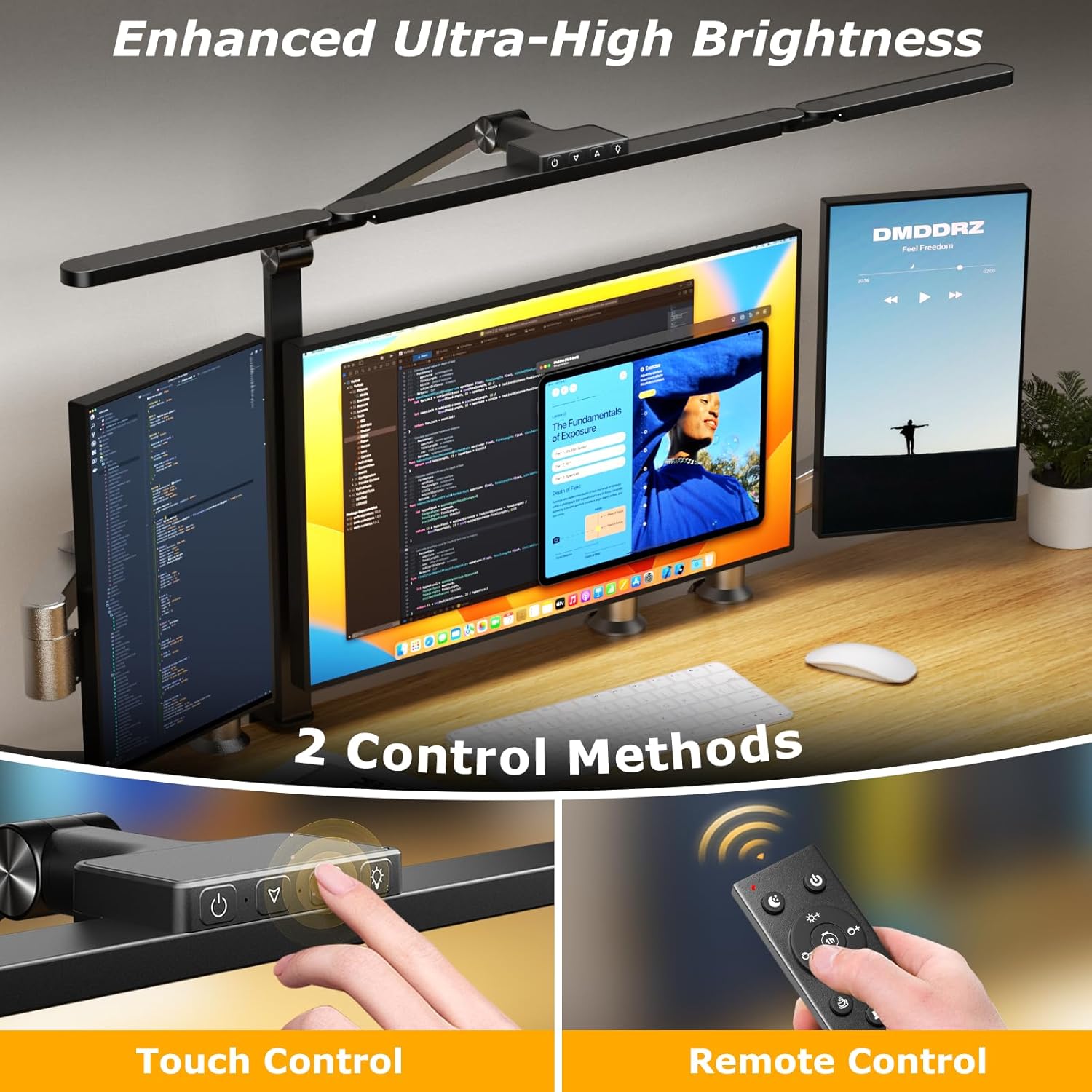
Your Airlonv LED Desk Lamp offers both touch control and remote control for convenient operation.
5.1 Touch Control
The touch-sensitive buttons are located on the top of the main light bar. These controls allow for basic adjustments:
- Power Button: Tap to turn on/off. Long press to turn off.
- Brightness Adjustment: Tap to cycle through 5 brightness levels. Long press for stepless dimming (10% to 100%).
- Color Temperature Adjustment: Tap to cycle through 5 color temperature levels. Long press for stepless temperature adjustment (2700K-6500K).
- Auxiliary Light: Tap to turn on/off the auxiliary light.

Illustration of the touch control panel with functions for power, brightness, color temperature, and auxiliary light.
5.2 Remote Control
The wireless remote control provides comprehensive control over all lamp functions from a distance.
- Power (On/Off): Turns the lamp on or off.
- Brightness +/-: Adjusts brightness levels.
- Color Temperature +/-: Adjusts color temperature.
- 1-Hour Timer: Sets the lamp to automatically turn off after 1 hour.
- Memory Function: The lamp remembers the last used brightness and color temperature settings.
- Pre-set Modes: Includes dedicated buttons for Night Mode, Leisure Mode, Reading Mode, and Working Mode, each with optimized settings.
- Control Auxiliary Lamp / Control Main Lamp: Allows independent control of different light sections.

Detailed diagram of the remote control with all its functions and pre-set modes.
5.3 Adjusting Light Direction
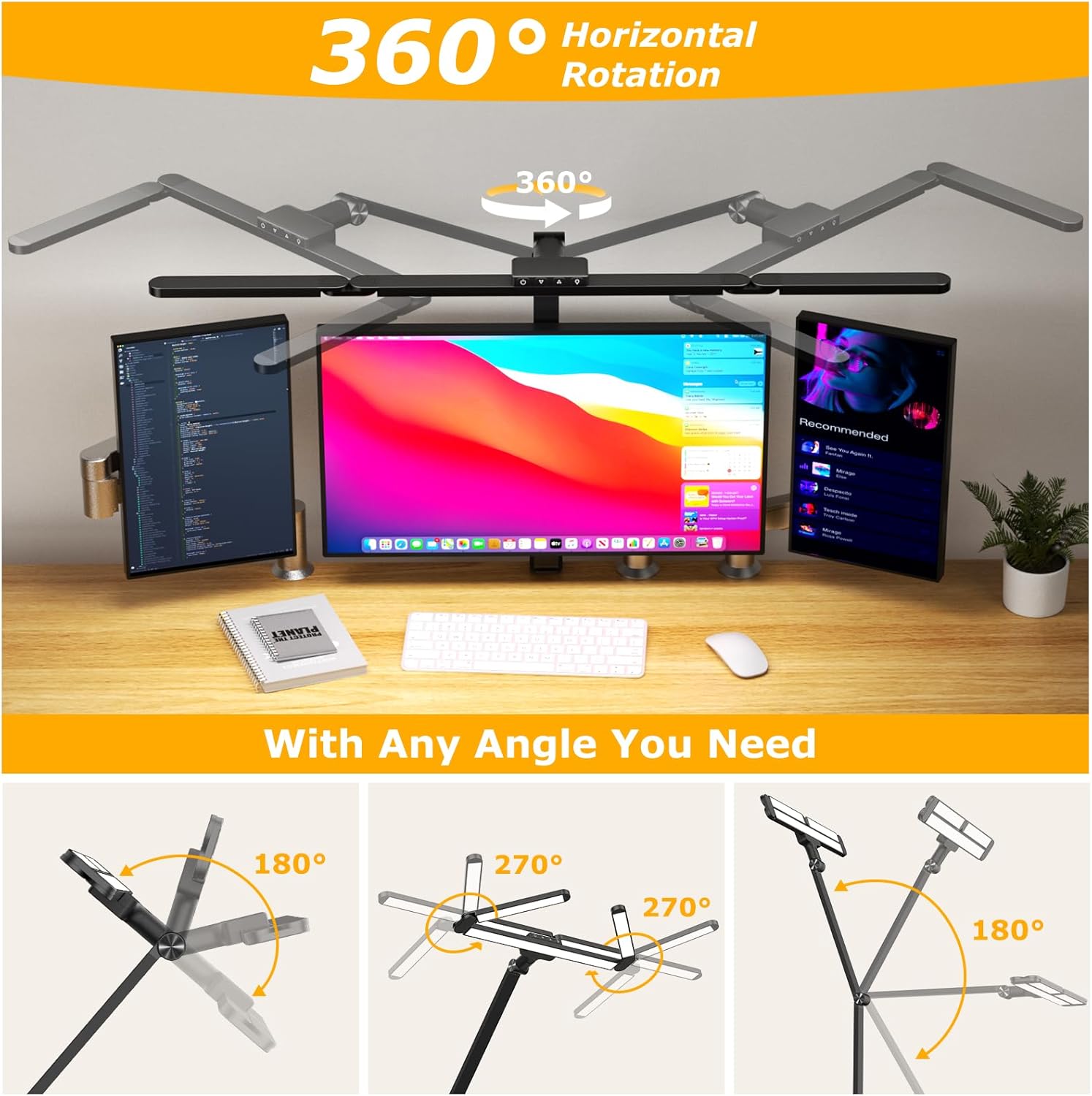
The lamp features multiple rotating joints and a 360° rotatable base, allowing you to direct light precisely where needed. The three light bars can be spread out for wide coverage or combined for focused tasks.

Visual representation of the lamp's 360° horizontal rotation and flexible light bar adjustments.
6. Key Features
- Ultra-Wide Lighting Coverage: Extends up to 33.3 inches, providing even and bright lighting for desks up to 95 inches wide. Ideal for large workspaces or dual monitors.

Diagram showing the lamp's extensive lighting range across a desk.
- Eye-Caring Technology: Features high Color Rendering Index (CRI>90) LEDs, providing soft, even lighting with no glare, flicker, or blue light hazard. This reduces eye strain during prolonged use.

Visual representation of the lamp's eye-caring, flicker-free illumination.
- Stepless Dimming & Color Temperature: Adjust brightness from 1% to 100% and color temperature from 2700K (warm) to 6500K (cool) seamlessly to suit any task or mood.

Graphical representation of the stepless brightness and color temperature adjustments.
- Memory & Timer Functions: The memory function recalls your last used settings, while the 1-hour timer automatically turns off the lamp, preventing overworking or energy waste.
7. Maintenance
To ensure the longevity and optimal performance of your Airlonv LED Desk Lamp, please follow these maintenance guidelines:
- Cleaning: Disconnect the power before cleaning. Use a soft, dry cloth to wipe the lamp. Do not use abrasive cleaners, solvents, or harsh chemicals, as these may damage the finish or electronic components.
- Handling: Handle the lamp with care. Avoid excessive force when adjusting the arms or light head to prevent damage to the joints.
- Storage: If storing the lamp for an extended period, ensure it is clean, dry, and stored in a safe place away from extreme temperatures or humidity.
8. Troubleshooting
If you encounter any issues with your lamp, please refer to the following common troubleshooting steps:
- Lamp Does Not Turn On:
- Ensure the power adapter is securely plugged into both the lamp and a working wall outlet.
- Check if the wall outlet is functional by plugging in another device.
- Verify that the power button on the lamp or remote is pressed correctly.
- Remote Control Not Responding:
- Ensure the remote control has working batteries.
- Point the remote directly at the lamp's sensor.
- Remove any obstructions between the remote and the lamp.
- Light Flickers or is Dim:
- Check the power connection for any loose contacts.
- Adjust the brightness settings using either touch or remote control.
- Ensure the lamp is not exposed to extreme temperatures.
If these steps do not resolve the issue, please contact customer support for further assistance.
9. Warranty & Support
Airlonv is committed to providing high-quality products and excellent customer service.
- Warranty: This product comes with a 24-month warranty. Please retain your proof of purchase for warranty claims.
- Lifetime Service: Airlonv offers lifetime service for this product, ensuring long-term support and assistance.
- Customer Support: For any questions, technical support, or warranty inquiries, please contact Airlonv customer service. Refer to the contact information provided in your product packaging or visit the official Airlonv website.


