
Introduction
This manual provides essential information for the safe and efficient operation of your TOPBULL 4000W Pure Sine Wave Inverter. Please read it thoroughly before installation and use. This inverter converts 12V DC power from a battery into 110V/120V AC power, suitable for various electronic devices and appliances up to 4000W continuous output, with an 8000W peak power capability.
Important Safety Instructions
Failure to follow these instructions may result in serious injury or property damage. Always exercise caution when working with electrical equipment.
- Ventilation: Ensure adequate ventilation around the inverter. Do not block cooling vents.
- Environment: Install the inverter in a dry, cool, and well-ventilated area, away from direct sunlight, heat sources, and flammable materials.
- Water Exposure: Do not expose the inverter to water, rain, or spray.
- Connections: Ensure all DC and AC connections are tight and correct. Loose connections can cause overheating and damage.
- Grounding: The inverter must be properly grounded.
- Load Capacity: Do not exceed the inverter's rated continuous power output (4000W) or peak power (8000W).
- Battery Compatibility: Use only with 12V batteries.
- Servicing: Do not attempt to service the inverter yourself. Refer all servicing to qualified personnel.
- Children: Keep the inverter out of reach of children.
- Emergency: In case of smoke, strange odors, or unusual noise, immediately disconnect the inverter from the power source and connected devices.

Image showing the TOPBULL 4000W Pure Sine Wave Inverter with icons representing various safety protections: low heat dissipation, low voltage protection, high voltage protection, overload protection, short circuit protection, overheating protection, reverse polarity protection, and leakage protection.
Package Contents
Verify that all items are present in your package:
- TOPBULL 4000W Pure Sine Wave Inverter
- Battery Cables (Red and Black)
- Remote Controller with 16.5 ft Cable
- Spare Fuses
- User Manual

Image displaying the contents of the TOPBULL 4000W Pure Sine Wave Inverter package, including the inverter unit, battery cables, remote control with cable, spare fuses, and user manual, along with dimensions of the inverter.
Product Features
The TOPBULL 4000W Pure Sine Wave Inverter is designed with advanced technology and multiple features for reliable power conversion:
- Pure Sine Wave Output: Provides clean, stable AC power, ideal for sensitive electronics.
- High Power Output: 4000W continuous power, 8000W peak power.
- Multiple Outlets: Two standard AC outlets, one USB port, and one Type-C fast charging port.
- Universal Battery Compatibility: Works with various 12V battery types including Li (Lithium), FLD (Flooded), GEL, SLD (Sealed Lead-Acid), and AGM.
- Advanced Protection: Built-in safeguards against overload, overvoltage, undervoltage, high temperature, short circuit, leakage, and reverse polarity.
- Efficient Cooling: Dual intelligent temperature-controlled cooling fans reduce heat and extend battery life.
- Remote Control & LCD Display: Wired remote control (16.5 ft) and dual LCD displays for monitoring operating status, input/output voltage, power, and battery level.
- Durable Construction: Rugged aircraft aluminum housing for drop and crash protection.
- Thickened Pure Copper Cables: Ensures optimal performance and safety by minimizing heat generation.

Diagram illustrating the internal components and features of the TOPBULL Pure Sine Wave Inverter, highlighting pure sine wave technology, 100% 4000W continuous output, high frequency transformer, high performance capacitors, dual intelligent cooling fans, high conversion efficiency, constant voltage stabilization, and very low standby power consumption.

Image showing the inverter connected to a car battery, with icons indicating compatibility with various 12V battery types: Li (Lithium), FLD (Flooded), GEL, SLD (Sealed Lead-Acid), and AGM.
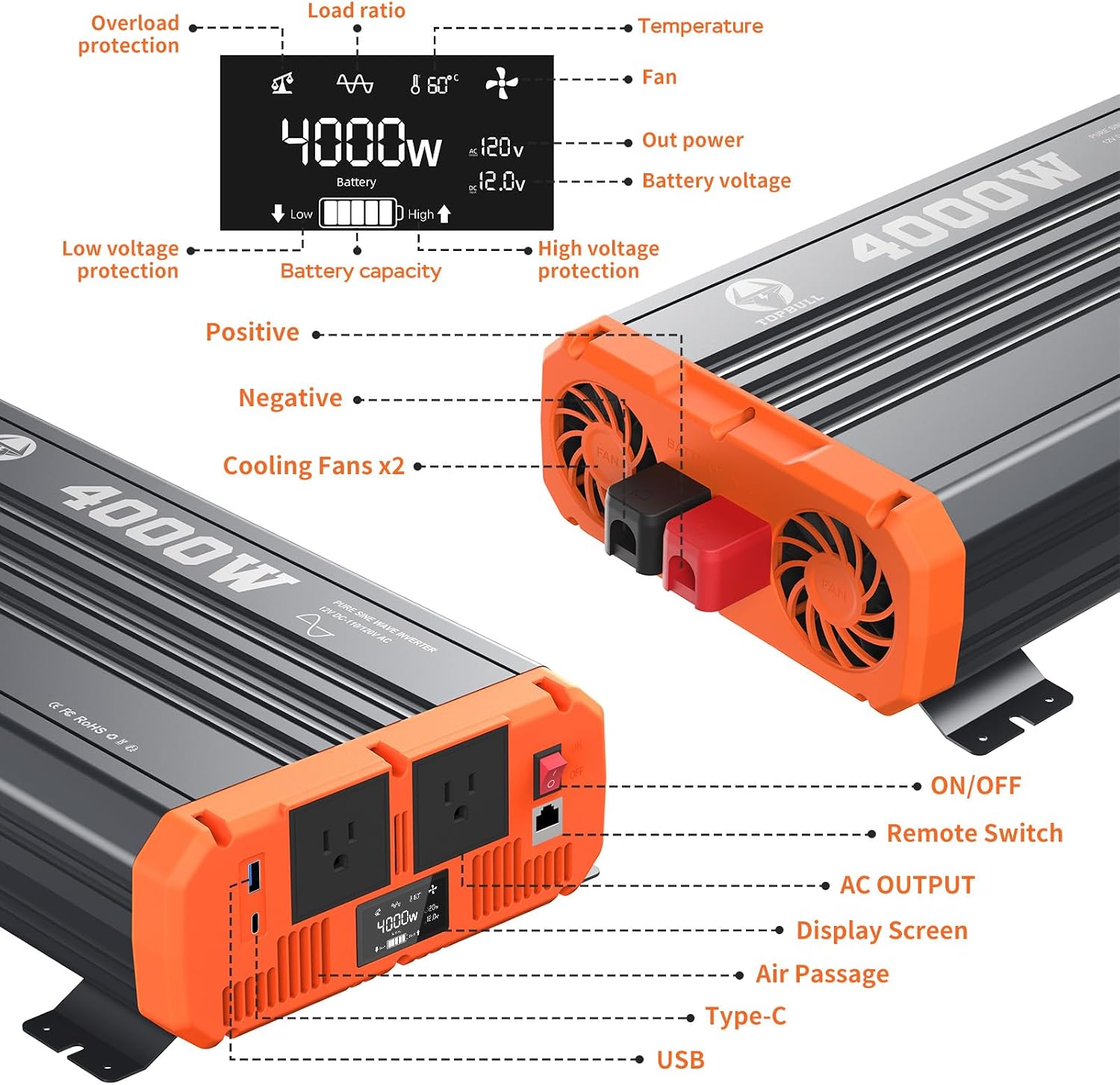
Detailed view of the TOPBULL 4000W Inverter, labeling its components including positive and negative terminals, cooling fans, ON/OFF switch, remote switch port, AC outlets, display screen, air passage, Type-C port, and USB port. The LCD display shows overload protection, low voltage protection, high voltage protection, load ratio, temperature, fan status, output power, and battery voltage/capacity.
Setup Instructions
- Choose a Location: Select a dry, cool, and well-ventilated area for the inverter. Ensure there is sufficient space around the unit for airflow.
- Prepare the Battery: Ensure your 12V battery is fully charged and in good condition.
- Connect DC Cables:
- Connect the RED positive (+) battery cable to the RED positive (+) terminal on the inverter.
- Connect the BLACK negative (-) battery cable to the BLACK negative (-) terminal on the inverter.
- Connect the other end of the RED positive (+) cable to the positive (+) terminal of your 12V battery.
- Connect the other end of the BLACK negative (-) cable to the negative (-) terminal of your 12V battery.
- Important: Ensure all connections are tight and secure to prevent arcing and overheating.
- Grounding: Connect a grounding wire from the inverter's grounding terminal to a proper earth ground (e.g., vehicle chassis, ground rod).
- Connect Remote Controller (Optional): Plug the remote controller cable into the designated port on the inverter.
- Initial Check: Before turning on, double-check all connections.
Operating Instructions
- Power On: Once all connections are secure, press the ON/OFF switch on the inverter or the remote controller to turn on the unit. The LCD display will illuminate, showing current status.
- Connect AC Devices: Plug your 110V/120V AC devices into the AC outlets on the inverter. For USB and Type-C charging, connect your devices to the respective ports.
- Monitor Display: The LCD display provides real-time information on input voltage, output voltage, output power, battery capacity, and any warning indicators.
- Power Off: To turn off the inverter, press the ON/OFF switch on the inverter or the remote controller. Disconnect AC devices before powering off.
- Load Management: Ensure the total power consumption of connected devices does not exceed the inverter's continuous power rating (4000W). For inductive loads (motors, compressors), consider their surge power requirements, which should not exceed 8000W.

Image showing the inverter in an outdoor camping setting, illustrating its powerful drive capability for various US appliances up to 4000W, with icons for electric drills, car washers, refrigerators, air conditioners, barbecues, and electronic equipment.

Image depicting the inverter and its remote controller with a dual-screen design, highlighting the convenience of controlling the inverter from a distance of up to 16.5 feet.
Maintenance
- Cleaning: Periodically clean the exterior of the inverter with a dry, soft cloth. Ensure cooling vents are free from dust and debris. Do not use liquid cleaners.
- Connections: Regularly check all DC and AC connections for tightness. Loose connections can lead to power loss or overheating.
- Battery Health: Maintain your 12V battery according to its manufacturer's instructions. A healthy battery is crucial for inverter performance.
- Storage: If storing the inverter for an extended period, disconnect it from the battery and store it in a cool, dry place.
Troubleshooting
The LCD display provides diagnostic information. Refer to the table below for common issues and solutions:
| Problem | Possible Cause | Solution |
|---|---|---|
| No output voltage / Inverter not turning on | Loose battery connections, low battery voltage, blown fuse, inverter fault. | Check battery cable connections. Recharge or replace battery. Check and replace fuses if necessary. Contact technical support if problem persists. |
| Overload warning on LCD | Connected devices exceed 4000W continuous power. | Reduce the load by disconnecting some devices. Ensure total wattage is within limits. |
| Over-temperature warning | Inverter is overheating due to poor ventilation or excessive load. | Ensure cooling fans are not blocked and have adequate airflow. Reduce load. Allow inverter to cool down. |
| Low voltage alarm/shutdown | Battery voltage is too low. | Recharge or replace the 12V battery. |
| High voltage alarm/shutdown | Input voltage from battery is too high. | Check battery charging system. Ensure battery voltage is within 12V specifications. |
| Strange humming sound from appliances | This inverter provides pure sine wave output, which should eliminate humming. If present, check appliance compatibility or for loose connections. | Ensure appliance is compatible with pure sine wave power. Check all connections. |
Specifications
| Feature | Specification |
|---|---|
| Brand | TOPBULL |
| Model Name | 4000W Pure Sine Wave Inverter |
| Continuous Output Power | 4000 Watts |
| Peak Output Power | 8000 Watts |
| Input Voltage | 12 Volts DC |
| Output Voltage | 110V/120V AC |
| Electrical Output Waveform | Pure Sine Wave |
| Frequency | 60 Hertz |
| Number of AC Outlets | 2 |
| USB Ports | 1 |
| Type-C Ports | 1 |
| Display Type | LCD |
| Remote Control Cable Length | 16.5 feet |
| Dimensions (L x W x H) | 18.7" x 9.06" x 3.94" |
| Color | Grey |
| Energy Specifications Met | UL, ETL |
Warranty and Technical Support
Warranty: The TOPBULL 4000W Pure Sine Wave Inverter comes with a 1-year free warranty service.
Technical Support: TOPBULL provides 24/7 technical support. For assistance, please refer to the contact information provided with your purchase or visit the official TOPBULL website.
Important: Always carefully check the power requirements of your electrical appliances and the installation method of the inverter before use.