
NEWYES 82MS
NEWYES 82MS Scientific Calculator User Manual
Model: NY-82MS PLUS Edition
1. Introduction
Welcome to the user manual for the NEWYES 82MS Scientific Calculator. This innovative device combines a powerful scientific calculator with an integrated LCD writing tablet, designed to enhance your learning and productivity. With 240 functions and a clear 2-line display, it is an ideal tool for students in secondary school and college.
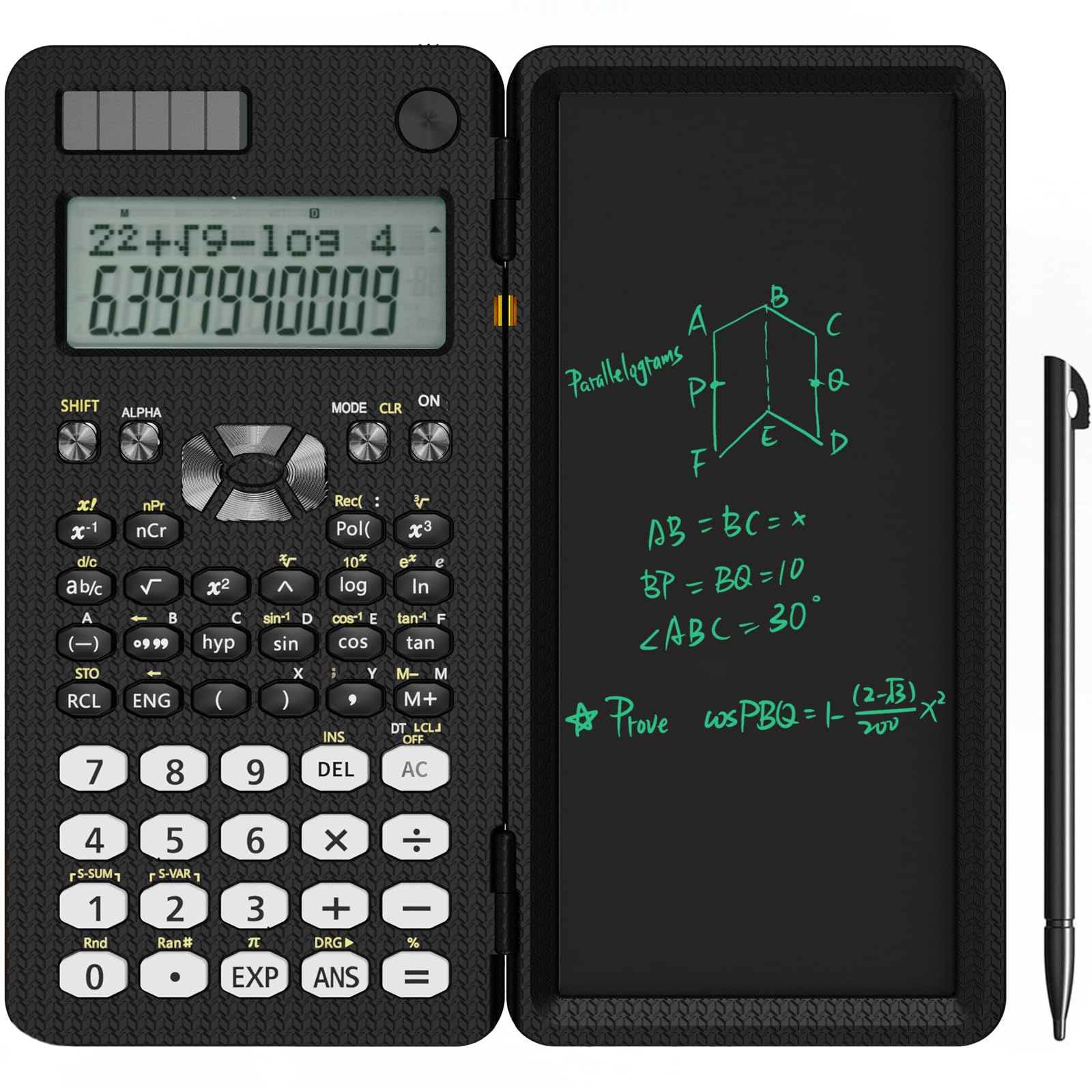
Image: The NEWYES 82MS Scientific Calculator, shown open with its writing tablet.
2. Key Features
- 240 Scientific Functions: Comprehensive functions for various mathematical and scientific calculations.
- Integrated 6.5-inch LCD Writing Tablet: Allows for note-taking, sketching, and problem-solving directly on the device.
- 2-Line Display: View both the calculation input and the result simultaneously for improved clarity.
- Dual Power Source: Operates on both solar energy and a CR2032 battery for reliable performance.
- Foldable and Portable Design: Compact and lightweight, making it easy to carry and protect.

Image: The NEWYES 82MS calculator highlighting its 240 functions, with students in the background, emphasizing its educational use.
3. Setup
3.1 Power Source
The NEWYES 82MS calculator utilizes a dual power system: solar energy and a CR2032 button cell battery. The solar panel provides power in well-lit environments, while the battery ensures operation in low-light conditions or when solar power is insufficient.
3.2 Battery Installation/Replacement
- Ensure the calculator is powered off.
- Locate the battery compartment cover on the back of the calculator.
- Use a small screwdriver to open the compartment.
- Insert a new CR2032 battery with the positive (+) side facing up.
- Replace the compartment cover and secure it.

Image: Close-up of the calculator illustrating its dual power system, featuring a CR2032 button cell battery and a solar panel.
4. Operating Instructions
4.1 Basic Calculations
To perform basic arithmetic operations, simply input the numbers and operators (+, -, ×, ÷) using the keypad. Press the = key to display the result.
4.2 Scientific Functions
The calculator offers 240 scientific functions. Many functions are accessed by pressing the SHIFT key (for yellow functions) or ALPHA key (for red functions) before pressing the desired function key. Refer to the markings above each key for specific functions.
4.3 2-Line Display
The upper line of the display shows the calculation formula or input, while the lower line displays the result. This allows for easy verification of your input and clear viewing of the output.
4.4 Using the Writing Tablet
The integrated 6.5-inch LCD writing tablet allows you to write notes, draw diagrams, or perform scratch work. Use the included stylus for writing.
- Writing: Use the stylus to write directly on the LCD screen.
- Clear: Press the One-Click Clear button located above the writing tablet to erase all content.
- Lock Key: To prevent accidental erasure, slide the Lock Key switch (usually on the side or top of the tablet) to the locked position. When locked, the clear button will not function. Remember to unlock it to clear the screen.

Image: Diagram illustrating the utility mode of the NEWYES 82MS calculator, showing the 2-line display, cursor keys, function keys, writing board, one-click clear button, lock key, and stylus storage.

Image: Visual representation of the NEWYES 82MS calculator's writing tablet features, including note-taking, one-click clear, and the lock key to prevent accidental erasure.
5. Portability and Design
The calculator's foldable design allows the writing tablet to act as a protective cover when closed. Its compact dimensions (16 cm x 8 cm x 1.5 cm when folded) and light weight (150 g) make it highly portable, fitting easily into bags or pockets.

Image: A child placing the folded NEWYES 82MS calculator into a backpack, demonstrating its portability.
6. Maintenance
6.1 Cleaning
Wipe the calculator and writing tablet surfaces with a soft, dry cloth. Do not use abrasive cleaners or solvents, as they may damage the device.
6.2 Storage
Store the calculator in a cool, dry place away from direct sunlight and extreme temperatures. Keep the writing tablet folded to protect the screen.
7. Troubleshooting
- Calculator not turning on:
- Ensure sufficient light for the solar panel.
- Check if the CR2032 battery is correctly installed and not depleted. Replace if necessary.
- Writing tablet not clearing:
- Verify that the Lock Key switch is in the unlocked position.
- Ensure the battery has sufficient power.
- Incorrect calculation results:
- Check the input values and operators.
- Ensure the calculator is in the correct mode for your calculation (e.g., DEG/RAD).
8. Specifications
| Feature | Detail |
|---|---|
| Brand | NEWYES |
| Model Name | NY-82MS PLUS Edition |
| Model Number | 82MS |
| Calculator Type | Scientific |
| Functions | 240 |
| Display Type | LCD, 2-Line |
| Screen Size | 6.5 inches (Writing Tablet) |
| Power Source | Battery (CR2032) and Solar Powered |
| Material | Acrylonitrile Butadiene Styrene (ABS) |
| Product Dimensions (Folded) | 16 cm (L) x 8 cm (W) x 1.5 cm (H) |
| Weight | Approximately 150 g |

Image: A comparison table showcasing different NEWYES calculator models, including the NY-82MS, highlighting their functions, display types, and power sources.
9. Warranty Information
This NEWYES 82MS Scientific Calculator comes with a 1-year warranty from the date of purchase. This warranty covers manufacturing defects under normal use. Please retain your proof of purchase for warranty claims.
10. Support
For further assistance, technical support, or inquiries regarding your NEWYES 82MS Scientific Calculator, please refer to the official NEWYES website or contact their customer service department. Contact details can typically be found on the product packaging or the brand's official online presence.
Related documents82MS


Ask a question about this manual
Ask about setup, troubleshooting, compatibility, parts, safety, or missing instructions. Manuals+ will review the question and use this page’s manual context to help answer it.