
PEAKMETER PM8232
PEAKMETER PM8232 Mini Digital Multimeter User Manual
Model: PM8232
Introduction
The PEAKMETER PM8232 is a compact, smart digital multimeter designed for accurate and reliable electrical measurements. It features automatic range selection, data hold, Non-Contact Voltage (NCV) detection, a work light, and a backlit display for enhanced usability in various environments. This manual provides essential information for the safe and effective operation of your multimeter.
Safety Information
Always adhere to safety precautions when using electrical testing equipment. Failure to do so may result in injury or damage to the device.
- Safety Rating: This device conforms to EN61010-1, EN61010-2-033, EN61326, CAT III 600V standards.
- Before Opening Case: To avoid electrical shock, always remove test leads from the device and any circuit before opening the case for battery replacement or maintenance.
- Voltage Limits: Do not attempt to measure voltages exceeding 600V.
- Inspection: Before each use, inspect the multimeter and test leads for any damage. Do not use if damaged.
- Proper Function Selection: Ensure the correct function is selected for the measurement being performed.

Image: Rear view of the PM8232 multimeter, highlighting the safety warning label and the battery compartment cover. The label indicates compliance with IEC61010-1, 600V CAT.III, and battery requirements (2 x AAA 1.5V).
Product Overview
What's in the Box

Image: The complete package contents for the PEAKMETER PM8232, showing the digital multimeter, a pair of red and black test leads, the user manual, the product box, and two AAA batteries.
Your PEAKMETER PM8232 package should include:
- PEAKMETER PM8232 Digital Multimeter
- Test Leads (Red and Black)
- User Manual
- AAA Batteries (2 included)
Key Features and Components
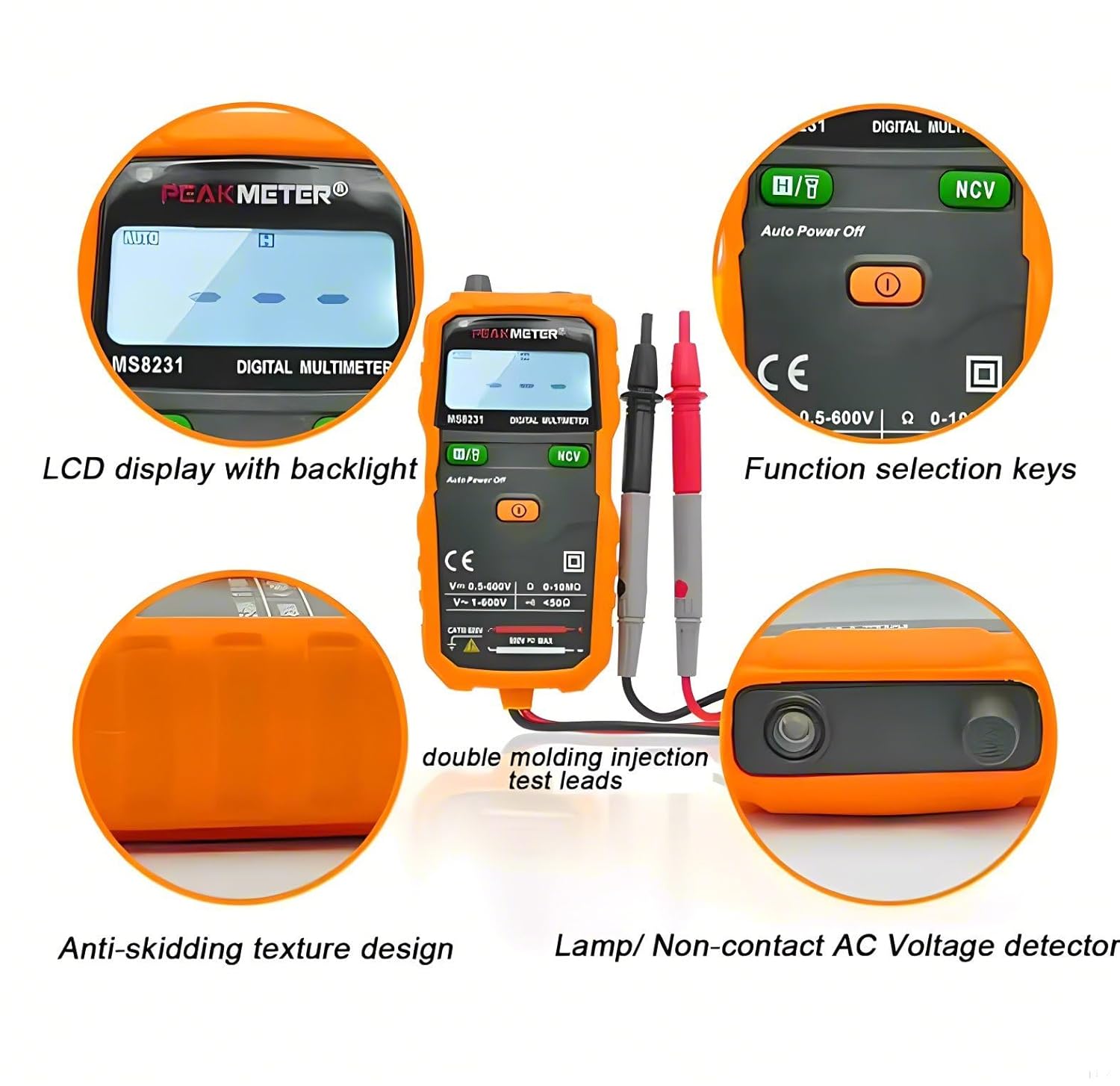
Image: A detailed diagram of the PM8232 multimeter, pointing out key features such as the LCD display with backlight, function selection keys, anti-skidding texture design on the sides, and the lamp/Non-contact AC Voltage detector at the top. It also shows the double molding injection test leads.
- LCD Display with Backlight: Clear digital readout with illumination for low-light conditions.
- Function Selection Keys: Buttons for selecting various measurement modes and features.
- Anti-skidding Texture Design: Ergonomic design for a secure grip.
- Lamp/Non-contact AC Voltage Detector (NCV): Integrated flashlight and NCV sensor for detecting live AC voltage without direct contact.
- Test Lead Ports: Input jacks for connecting the red and black test leads.
- Rotary Switch: For selecting primary measurement functions (e.g., AC/DC Voltage, Resistance, OFF).
Setup
Battery Installation
The PM8232 multimeter requires 2 x 1.5V AAA batteries (included). Follow these steps to install them:
- Ensure the multimeter is turned OFF and disconnect any test leads from the device and any circuits.
- Locate the battery compartment cover on the back of the multimeter.
- Use a screwdriver to loosen the screw securing the battery cover.
- Remove the cover.
- Insert the two AAA batteries, observing the correct polarity (+ and -) as indicated inside the compartment.
- Replace the battery cover and tighten the screw securely.
Connecting Test Leads
Connect the red test lead to the "VΩmA" input jack and the black test lead to the "COM" input jack for most measurements. Refer to specific measurement instructions for alternative connections.
Operating Instructions
Turn the rotary switch to the desired measurement function. The multimeter features auto-ranging, simplifying operation by automatically selecting the appropriate range.
Measuring AC/DC Voltage
- Turn the rotary switch to the "V~" (AC Voltage) or "V-" (DC Voltage) position.
- Connect the red test lead to the positive side of the circuit and the black test lead to the negative side (for DC) or across the points for AC.
- Read the voltage value on the LCD display.
Measuring Resistance (Ω)
- Ensure the circuit is de-energized before measuring resistance.
- Turn the rotary switch to the "Ω" (Resistance) position.
- Connect the test leads across the component or circuit where resistance is to be measured.
- Read the resistance value on the LCD display.
Non-Contact Voltage (NCV) Detection
The NCV function allows for quick detection of live AC voltage without direct contact with wires.

Image: The PM8232 multimeter demonstrating its Non-Contact Voltage (NCV) feature. The top of the multimeter is held near an electrical outlet, and the display shows the NCV indicator, signifying the detection of AC voltage. Instructions on the image indicate to press and hold the NCV button to use this function.
- Turn the rotary switch to any function or leave it in the OFF position.
- Press and hold the "NCV" button.
- Move the top of the multimeter (where the NCV sensor is located) close to the suspected live wire or outlet.
- The multimeter will emit an audible beep and the NCV indicator on the display will illuminate if AC voltage is detected.
Work Light and Backlight
The PM8232 includes a work light and display backlight for use in dimly lit environments.

Image: The PM8232 multimeter in a dark setting, showcasing its integrated flashlight illuminating the work area and its clear LCD display with activated backlight, making readings visible in low-light conditions.
- Work Light: Press the dedicated "Lamp" or "Flashlight" button (if available, otherwise it might be integrated with another button or auto-activated).
- Backlight: The display backlight typically activates automatically when the device is turned on or can be toggled with a specific button (e.g., "FUNC" or "HOLD" depending on model).
Data Hold Function
To freeze the current reading on the display, press the "HOLD" button. Press it again to release the hold function and resume live readings.
Maintenance
Cleaning
Wipe the multimeter's casing with a damp cloth and mild detergent. Do not use abrasive cleaners or solvents. Ensure the device is completely dry before use.
Battery Replacement
When the low battery indicator appears on the display, replace the batteries as described in the "Battery Installation" section. Always use new batteries of the specified type (2 x 1.5V AAA).
Storage
If the multimeter will not be used for an extended period, remove the batteries to prevent leakage and store the device in a cool, dry place away from direct sunlight.
Troubleshooting
| Problem | Possible Cause | Solution |
|---|---|---|
| No display or dim display | Low or dead batteries; Incorrect battery installation. | Replace batteries; Check battery polarity. |
| "OL" (Overload) displayed | Input value exceeds the selected range; Open circuit (for resistance/continuity). | Ensure correct function/range is selected (auto-ranging should handle this); Check for open circuit. |
| Inaccurate readings | Poor test lead connection; Damaged test leads; External interference. | Ensure leads are firmly connected; Inspect and replace damaged leads; Move away from strong electromagnetic fields. |
| NCV not detecting | Not holding NCV button; Weak signal; Shielded wires. | Press and hold the NCV button; Ensure close proximity to the AC source; NCV may not detect through thick shielding. |
Specifications
Below are the detailed technical specifications for the PEAKMETER PM8232 and related models.
PM8231 & PM8232 Specifications

Image: A comprehensive table detailing the specifications for both the PEAKMETER PM8231 and PM8232 models. It covers measurement ranges and accuracy for DC Voltage, AC Voltage, DC Current, AC Current, and Resistance. Additionally, it lists features such as Display (2000 Counts), Data Hold, Diode Test, Continuity, NCV, and Work Light. General specifications like Power Supply (2 x 1.5V AAA Batteries), Weight (Approx. 150g), Size (132mm×61mm×26mm), and Safety Standard/Rating (EN61010-1, EN61010-2-033, EN61326, CAT.III 600V) are also provided.
PM8232A Specifications

Image: A detailed table outlining the specifications for the PEAKMETER PM8232A model. It includes measurement ranges and accuracy for DC Voltage, AC Voltage, Resistance, and Battery Measurement (1.5V, 9V, 12V). Features such as Display (2000 counts), Auto Range, Data Hold, Back Light, Work Light, NCV Detection, Diode Test, Continuity Test, and Auto Power Off are listed. General specifications like Power Supply (2*1.5V AAA Batteries), Size (128mm*61mm*25mm), Weight (Approx. 150g), and Safety Rating (EN61010-1, EN61010-2-033, EN61326, CAT III 600V) are also provided.
Physical Dimensions

Image: A diagram illustrating the physical dimensions of the PEAKMETER PM8231 (similar to PM8232), indicating a length of 130mm, a width of 62mm, and a thickness of 27mm.
- Product Dimensions: 5.91 x 3.94 x 7.09 inches (15.0 x 10.0 x 18.0 cm)
- Item Weight: 2.2 Pounds (1 Kilogram)
Warranty and Support
For warranty information or technical support, please refer to the contact details provided by your retailer or visit the official PEAKMETER website. Keep your purchase receipt as proof of purchase for warranty claims.
Related documentsPM8232

Ask a question about this manual
Ask about setup, troubleshooting, compatibility, parts, safety, or missing instructions. Manuals+ will review the question and use this page’s manual context to help answer it.