
PEAKMETER PM8231
PEAKMETER PM8231 Digital Multimeter User Manual
Model: PM8231
1. Introduction
The PEAKMETER PM8231 is a compact, portable digital multimeter designed for various electrical measurements. It features automatic range selection, ensuring ease of use and preventing damage from incorrect settings. This instrument is ideal for both professional and home use, offering stable performance, high precision, and low power consumption.
It can measure DC voltage, AC voltage, and resistance, and includes a continuity test function. A key safety feature is the Non-Contact Voltage (NCV) detection, which alerts the user to the presence of AC voltage without direct contact, enhancing operational safety.
Safety Information: Before using the instrument, please read this manual carefully, paying close attention to all warnings and precautions. Ensure test leads are removed before opening the case for any maintenance. This device conforms to safety standards EN61010-1, EN61010-2-033, EN61326, and is rated CAT. III 600V.
2. Key Features
- Smart Auto-Ranging: Automatically selects the correct measurement range, simplifying operation.
- AC/DC Voltage Measurement: Capable of measuring both alternating and direct current voltages.
- Resistance Measurement: Measures electrical resistance in Ohms.
- Non-Contact Voltage (NCV) Detection: Safely detects the presence of AC voltage without physical contact.
- Continuity Test: Checks for electrical continuity in circuits with an audible indicator.
- Data Hold: Freezes the displayed measurement for easy reading.
- Work Light & Backlight: Integrated flashlight for working in low-light conditions and a backlit display for improved visibility.
- Display: 2000 counts digital display.
- Compact Design: Mini size for portability and ease of handling.
3. Product Overview and Components

Figure 1: Front view of the PEAKMETER PM8231 Digital Multimeter, showing the display, function buttons, and connected test leads (red and black). The display shows "1.8.8.8" and various measurement units.
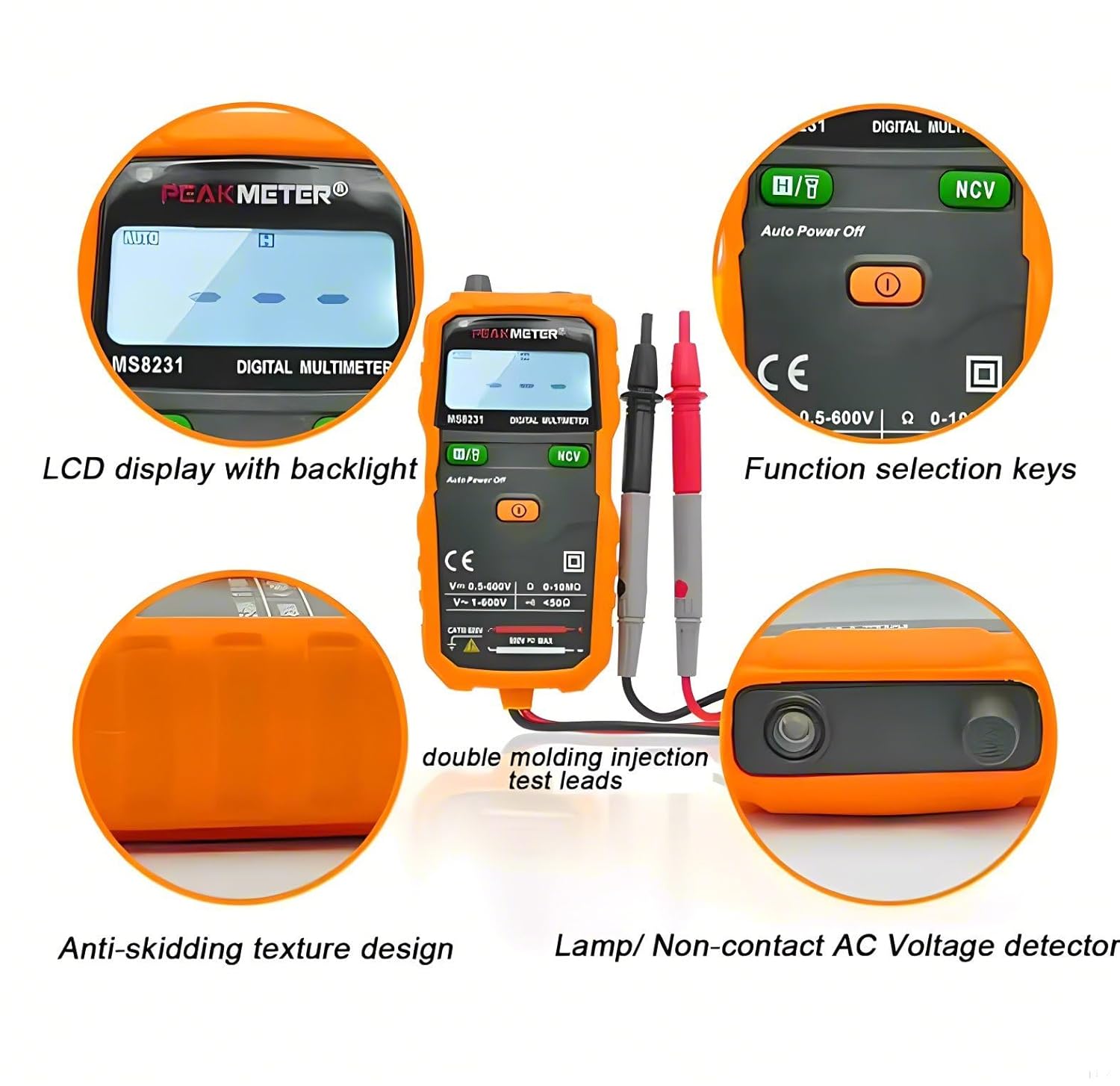
Figure 2: Detailed view highlighting key features: LCD display with backlight, function selection keys, double molding injection test leads, anti-skidding texture design, and the lamp/non-contact AC voltage detector.

Figure 3: Rear view of the PEAKMETER PM8231, displaying the battery compartment cover with a warning to remove test leads before opening, and safety compliance markings (CE, IEC61010-1, CAT. III 600V).

Figure 4: Illustration of the Non-Contact Voltage (NCV) detection feature. The multimeter is shown near an electrical outlet, indicating the detection of voltage with a red light and wavy lines.

Figure 5: The PEAKMETER PM8231 in use, demonstrating its integrated flashlight illuminating a dark area and the clear, backlit LCD display for easy reading in low-light conditions.

Figure 6: Diagram illustrating the physical dimensions of the PEAKMETER PM8231, showing its length (130mm) and width (62mm), providing a clear understanding of its compact size.
4. Setup
4.1 Battery Installation
The PEAKMETER PM8231 requires 2 x 1.5V AAA batteries for operation. The battery compartment is located on the back of the device.
- Ensure the multimeter is turned off and disconnect all test leads from the device and any circuits.
- Locate the battery compartment cover on the rear of the multimeter (refer to Figure 3).
- Use a screwdriver to open the battery compartment cover.
- Insert two 1.5V AAA batteries, observing the correct polarity (+/-) as indicated inside the compartment.
- Replace the battery compartment cover and secure it with the screw.
4.2 Connecting Test Leads
Connect the red test lead to the "VΩ" input jack and the black test lead to the "COM" (common) input jack. Ensure a secure connection before performing any measurements.
5. Operating Instructions
The PM8231 is a full automatic portable multi-meter. When powered on, it can directly measure, avoiding complexity and gear shifting errors.
5.1 Power On/Off
Press the power button (usually marked with a circle and a vertical line) to turn the multimeter on. The device features an "Auto Power Off" function to conserve battery life.
5.2 DC Voltage Measurement
- Turn on the multimeter. The device will automatically enter auto-ranging mode.
- Connect the red test lead to the positive (+) side of the DC voltage source and the black test lead to the negative (-) side.
- Read the DC voltage value displayed on the screen.
5.3 AC Voltage Measurement
- Turn on the multimeter.
- Connect the test leads across the AC voltage source. Polarity is not critical for AC measurements.
- Read the AC voltage value displayed on the screen.
5.4 Resistance Measurement
- Ensure the circuit or component to be measured is de-energized.
- Connect the test leads across the component whose resistance you wish to measure.
- Read the resistance value displayed on the screen in Ohms (Ω), kilo-Ohms (kΩ), or Mega-Ohms (MΩ).
5.5 Continuity Test
- Ensure the circuit or component is de-energized.
- Connect the test leads across the circuit or component.
- If the resistance is below approximately 50Ω, the multimeter will emit an audible beep, indicating continuity.
5.6 Non-Contact Voltage (NCV) Detection
The NCV function allows for safe detection of AC voltage without direct contact with live wires.
- Press and hold the "NCV" button (refer to Figure 4).
- Move the top end of the multimeter (where the NCV sensor is located) close to the suspected AC voltage source (e.g., a wall outlet or insulated wire).
- The multimeter will indicate the presence of AC voltage through visual (LED light) and/or audible (beeping) signals. The intensity of the signal may vary with voltage strength and proximity.
5.7 Data Hold Function
Press the "HOLD" button to freeze the current reading on the display. Press it again to release the hold and resume live measurements.
5.8 Work Light and Backlight
The multimeter includes a work light (flashlight) for illuminating the measurement area and a display backlight for improved visibility in dim conditions (refer to Figure 5). These functions are typically activated via dedicated buttons or by holding certain function keys.
6. Maintenance
6.1 Cleaning
To clean the multimeter, wipe the case with a damp cloth and a mild detergent. Do not use abrasives or solvents. Ensure the device is completely dry before use.
6.2 Battery Replacement
Replace batteries when the low battery indicator appears on the display. Refer to section 4.1 for battery installation instructions. Always use new 1.5V AAA batteries.
6.3 Storage
If the multimeter is not to be used for an extended period, remove the batteries to prevent leakage and damage to the device. Store the multimeter in a cool, dry place, away from direct sunlight and extreme temperatures.
7. Troubleshooting
| Problem | Possible Cause | Solution |
|---|---|---|
| No display or dim display | Low or dead batteries; incorrect battery installation. | Replace batteries; ensure correct polarity. |
| Incorrect readings | Poor test lead connection; measuring outside specified range; external interference. | Ensure leads are securely connected; verify measurement range (though auto-ranging helps); move away from strong electromagnetic fields. |
| Continuity test not beeping | Circuit not continuous; resistance too high. | Check the circuit for breaks; ensure resistance is below 50Ω for an audible beep. |
| NCV not detecting voltage | Not close enough to source; source not live; NCV function not activated. | Ensure sensor is very close to the source; verify the source is live; press and hold the NCV button. |
8. Specifications
| Parameter | Range | Accuracy |
|---|---|---|
| DC Voltage | 2V/20V/200V | ±(0.5%+3) |
| 600V | ±(0.8%+5) | |
| AC Voltage | 2V/20V/200V | ±(0.8%+3) |
| 600V | ±(1.0%+5) | |
| Resistance | 2kΩ/20kΩ/200kΩ/2MΩ | ±(1.0%+3) |
| 10MΩ | ±(1.2%+15) |
- Display: 2000 counts
- Power Supply: 2 * 1.5V AAA batteries
- Net Weight: 158g (including batteries)
- Gross Weight: 189g
- Dimensions: 132mm * 61mm * 26mm (approx. 15 x 10 x 18 cm product dimensions from spec)
- Safety Rating: EN61010-1, EN61010-2-033, EN61326, CAT. III 600V
- Operating Temperature: Up to 60 Degrees Celsius
- Country of Origin: China
9. Warranty and Support
For warranty information and technical support, please refer to the official PEAKMETER website or contact your local distributor. The product is designed for reliability and comes with standard manufacturer support.
EU Spare Part Availability Duration: 1 Years.
For further assistance, please contact the seller or manufacturer directly. Keep your purchase receipt for warranty claims.
Related documentsPM8231


Ask a question about this manual
Ask about setup, troubleshooting, compatibility, parts, safety, or missing instructions. Manuals+ will review the question and use this page’s manual context to help answer it.