
PEAKMETER EC-PM6811A
PEAKMETER PM6811/PM6811A Digital Moisture Meter User Manual
Model: PM6811, PM6811A (EC-PM6811A)
1. Introduction
The PEAKMETER PM6811/PM6811A is a portable, high-precision, pin-type digital moisture meter designed for accurately measuring moisture content in various materials. It is ideal for use with wood, cardboard, and building walls. This instrument utilizes a high-performance microcontroller for fast response, high accuracy, and low power consumption. It features multiple measurement modes, a large LCD display with a three-color backlight for intuitive humidity indication, and automatic power-off for energy conservation.
2. Safety Information
- Always handle the meter with care. The measurement pins are sharp and can cause injury.
- Do not attempt to measure live electrical circuits. This device is not designed for electrical measurements.
- Keep the device dry. Avoid exposure to water or high humidity environments to prevent damage.
- Do not use the meter if it appears damaged or is not functioning properly.
- Store the meter in a safe place, out of reach of children.
- Remove batteries if the device will not be used for an extended period to prevent battery leakage.
3. Product Overview
3.1 Components and Display
The PEAKMETER PM6811/PM6811A features a compact design with a clear LCD display and intuitive controls.

Figure 3.1: Front view of the PEAKMETER PM6811A Digital Moisture Meter, showing the LCD screen, measurement pins, and control buttons.

Figure 3.2: Side view of the moisture meter, highlighting the two sharp measurement pins at the top, used for penetrating materials to measure moisture content.

Figure 3.3: Close-up view of the large LCD display, designed for easy and intuitive reading of measurement data.

Figure 3.4: Illustration of the three backlight colors (green for low humidity, yellow for medium humidity, red for high humidity) providing a visual indication of moisture levels.
4. Setup
4.1 Battery Installation
The PM6811/PM6811A requires two 1.5V AAA batteries for operation.
- Locate the battery compartment cover on the back of the device.
- Slide or unclip the cover to open the compartment.
- Insert two 1.5V AAA batteries, ensuring correct polarity (+/-) as indicated inside the compartment.
- Close the battery compartment cover securely.
A low battery indicator will appear on the screen when the battery level is low, prompting replacement.
5. Operating Instructions
5.1 Power On/Off
- To power on the device, press the HOLD button (red button in the center).
- The device will automatically power off after approximately 5 minutes of inactivity to conserve battery life.
- There is no manual power-off button; the device relies on the auto-off function.
5.2 Mode Selection
The meter supports different measurement modes for various materials.
- Press the MODE button (orange button on the right) to cycle through the available modes:
- WOOD: For measuring moisture content in various types of wood.
- PAPER: For measuring moisture content in paper and cardboard.
- WALL: For measuring moisture content in building walls.
- When in WOOD mode, you can further select one of four tree species categories (1, 2, 3, 4) by pressing the MODE button repeatedly until the desired category is displayed. Refer to the specifications section for the moisture ranges corresponding to each tree species category.
5.3 Taking Measurements
- Select the appropriate measurement mode (WOOD, PAPER, or WALL) using the MODE button.
- For WOOD mode, select the correct tree species group if known.
- Carefully push the two measurement pins into the material you wish to test. Ensure the pins penetrate sufficiently to get an accurate reading.
- Read the moisture content percentage displayed on the LCD screen.
- Observe the backlight color for an immediate visual indication of humidity level:
- Green: Low humidity.
- Yellow: Medium humidity.
- Red: High humidity.
- Remove the pins from the material after taking the reading.
5.4 Data Hold Function
To hold the current measurement on the display:
- Press the HOLD button (red button) briefly while a measurement is displayed. The "HOLD" icon will appear on the screen.
- Press the HOLD button again to release the data hold and return to live measurement.
5.5 MAX/MIN Function
To view the maximum or minimum recorded moisture content:
- Press the MAX/MIN button (orange button on the left).
- The display will show the maximum recorded value ("MAX" icon).
- Press the MAX/MIN button again to show the minimum recorded value ("MIN" icon).
- Press the MAX/MIN button a third time to exit MAX/MIN mode and return to live measurement.
5.6 Backlight Control
The backlight automatically changes color based on humidity levels (green, yellow, red). You can manually turn off the backlight if desired.
- To manually turn off the backlight, press and hold the MODE button for approximately 2 seconds.
- The backlight will reactivate automatically when a new measurement is taken or a button is pressed.

Figure 5.1: The meter features an automatic shut-down function after 5 minutes of inactivity to conserve battery power.
6. Maintenance
6.1 Cleaning
- Wipe the meter's body with a soft, dry cloth.
- Do not use abrasive cleaners, solvents, or immerse the device in water.
- Ensure the measurement pins are clean and free of debris after each use.
6.2 Storage
- Store the meter in a cool, dry place, away from direct sunlight and extreme temperatures.
- Always replace the protective cap over the measurement pins when not in use to prevent damage and injury.
- If storing for an extended period, remove the batteries to prevent leakage.
6.3 Battery Replacement
When the low battery indicator appears on the display, replace the batteries as described in Section 4.1.
7. Troubleshooting
| Problem | Possible Cause | Solution |
|---|---|---|
| Meter does not power on. | Dead or incorrectly installed batteries. | Check battery polarity. Replace with new 1.5V AAA batteries. |
| "Low Battery" indicator displayed. | Batteries are low. | Replace both 1.5V AAA batteries. |
| Inaccurate readings. | Incorrect mode selected; pins not fully inserted; pins dirty or damaged; material too wet/dry for range. | Ensure correct mode (WOOD/PAPER/WALL) and tree species group is selected. Push pins deeper. Clean pins. Ensure material is within meter's measurement range. |
| Backlight not working. | Backlight manually turned off; low battery. | Press and hold MODE button to reactivate. Replace batteries if low. |
| Meter shuts off unexpectedly. | Auto power-off activated; low battery. | This is normal behavior after 5 minutes of inactivity. Press HOLD to restart. Replace batteries if low. |
8. Specifications
The following table provides detailed technical specifications for the PEAKMETER PM6811/PM6811A Digital Moisture Meter.
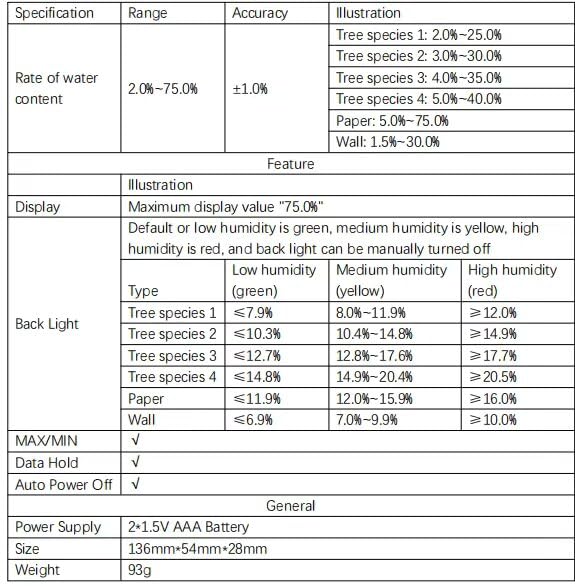
Figure 8.1: Detailed technical specifications including measurement ranges, accuracy, display features, and general information.
| Specification | Detail |
|---|---|
| Model | PM6811A (EC-PM6811A) |
| Measurement Principle | Resistance Type |
| Rate of Water Content Range | 2.0% - 75.0% |
| Accuracy | ±1.0% |
| Wood Species 1 Range | 2.0% - 25.0% |
| Wood Species 2 Range | 3.0% - 30.0% |
| Wood Species 3 Range | 4.0% - 35.0% |
| Wood Species 4 Range | 5.0% - 40.0% |
| Paper Range | 5.0% - 75.0% |
| Wall Range | 1.5% - 30.0% |
| Display | Large LCD, Max value "75.0%" |
| Backlight | Green (Low), Yellow (Medium), Red (High); Manual Off |
| Functions | Data Hold, Mode Selection, Backlight, MAX/MIN, Auto Power Off, Low Voltage Indication |
| Auto Power Off | Yes (approx. 5 minutes) |
| Power Supply | 2 x 1.5V AAA Battery |
| Dimensions (L x W x H) | 136mm x 54mm x 28mm (approx. 15 x 10 x 18 cm product dimensions) |
| Weight | 93g (approx. 1 Kilogrammes product weight, likely packaging included) |
| Certifications | CE, UL, RoHS |
9. Warranty and Support
9.1 Warranty Information
The PEAKMETER PM6811/PM6811A Digital Moisture Meter typically comes with a 1-year warranty from the date of purchase, covering manufacturing defects. Please retain your proof of purchase for warranty claims.
9.2 Customer Support
For technical assistance, troubleshooting beyond this manual, or warranty inquiries, please contact the seller or PEAKMETER customer support. Refer to the product packaging or the seller's website for contact details.
Ask a question about this manual
Ask about setup, troubleshooting, compatibility, parts, safety, or missing instructions. Manuals+ will review the question and use this page’s manual context to help answer it.