
TEMOLA TN10 Tire Inflator
TEMOLA Tire Inflator Portable Air Compressor User Manual
Model: TN10 Tire Inflator
Introduction
Thank you for choosing the TEMOLA TN10 Portable Tire Inflator. This device is designed for convenient and efficient inflation of various items, including car tires, motorcycle tires, bicycle tires, and sports balls. Its compact size, cordless operation, and multiple power options make it an essential tool for roadside emergencies and everyday use. Please read this manual thoroughly before operation to ensure safe and proper use.

Image: The TEMOLA TN10 Tire Inflator is versatile, capable of inflating car, motorcycle, and bicycle tires, as well as sports balls.
Safety Information
- Do not leave the inflator unattended during operation.
- Keep out of reach of children.
- Do not operate in wet conditions or near flammable liquids/gases.
- Ensure the correct pressure setting for the item being inflated to prevent over-inflation.
- Allow the device to cool down after prolonged use to prevent overheating.
- Do not disassemble or modify the device.
- Use only the provided charging cables and accessories.
Package Contents
Verify that all items are present in the package:
- 1 x TEMOLA Tire Inflator Body
- 1 x Air Tube
- 1 x USB Charging Cable
- 1 x 12V Car Power Supply Cable
- 1 x Presta to Schrader Adapter
- Various Air Nozzles (e.g., needle for balls, cone nozzles)
- 1 x Storage Bag
- 1 x User Manual (this document)
- 1 x Safety Hammer (if included in specific package variant)

Image: All components included in the TEMOLA TN10 Tire Inflator package, laid out for clear identification.
Product Overview
Familiarize yourself with the main components and controls of your TEMOLA TN10 Tire Inflator:

Image: Detailed view of the TEMOLA TN10 Tire Inflator's display and control panel, highlighting each button and indicator.
- Digital Display: Shows real-time pressure, preset pressure, battery level, and selected mode.
- Power Button: Turns the device on/off and starts/stops inflation.
- Mode Button: Cycles through preset inflation modes (Bike, Motorcycle, Car, Ball).
- '+' / '-' Buttons: Adjusts the preset pressure value.
- LED/SOS Button: Activates the built-in LED light or SOS flashing mode.
- Air Hose Port: Connects the air tube.
- USB-C Charging Port: For charging the device.
- USB-A Output Port: For using the device as a power bank.
- 12V DC Input Port: For connecting to a car cigarette lighter for power.
Setup
Charging the Device
Before first use, fully charge the TEMOLA TN10. The device can be charged via the included USB-C cable using a standard USB wall adapter (not included) or a computer USB port. The battery level indicator on the display will show charging progress.
- Connect the USB-C end of the charging cable to the inflator's USB-C port.
- Connect the USB-A end to a power source.
- Charging time may vary depending on the power source.
Connecting to a 12V Car Power Source
For extended use or when the internal battery is low, you can power the inflator directly from your vehicle's 12V cigarette lighter socket.
- Connect the 12V car power supply cable to the inflator's 12V DC input port.
- Insert the other end into your vehicle's 12V cigarette lighter socket.
Operating Instructions
Basic Inflation Steps
- Connect the Air Tube: Screw the air tube securely into the air hose port on the top of the inflator.
- Attach to Item: Connect the other end of the air tube to the valve stem of the item you wish to inflate. Use the appropriate nozzle adapter if necessary (e.g., Presta adapter for bicycle tires, needle for balls). Ensure a tight seal to prevent air leakage.
- Power On: Press the Power Button to turn on the inflator. The display will light up, showing the current pressure and default preset mode.
- Select Mode: Press the Mode Button to cycle through the preset inflation modes: Bike, Motorcycle, Car, and Ball. Each mode has a default pressure value.
- Adjust Preset Pressure: Use the '+' and '-' buttons to adjust the desired target pressure. The display will show the real-time pressure at the top and the preset target pressure at the bottom.
- Start Inflation: Press the Power Button again to start the inflation process. The inflator will automatically stop once the preset pressure is reached.
- Disconnect: Once inflation is complete, quickly disconnect the air tube from the valve stem. A small amount of air may escape, which is normal.

Image: Step-by-step visual instructions for operating the TEMOLA TN10 Tire Inflator.
Preset Modes
The TEMOLA TN10 offers four preset modes for common inflation needs:
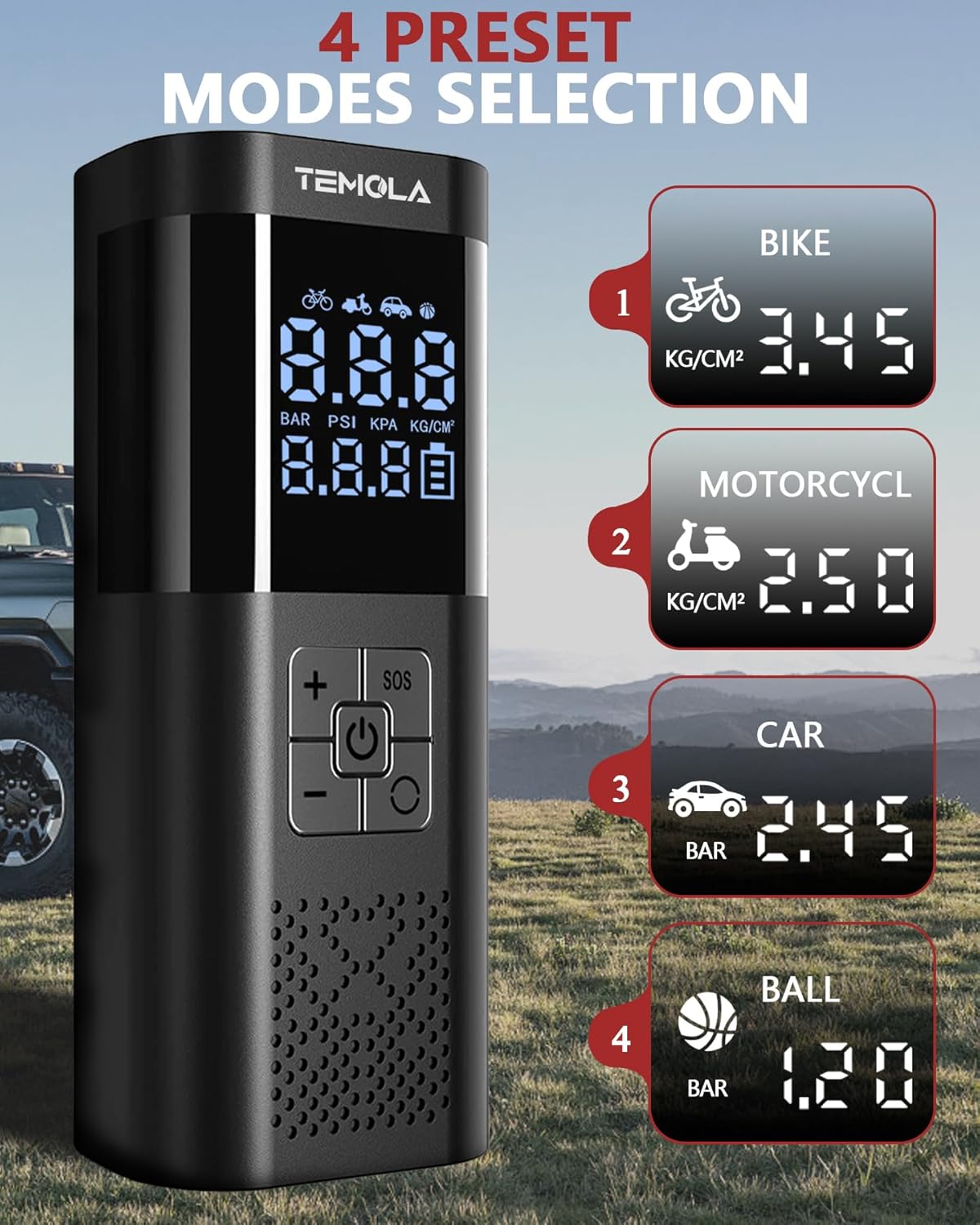
Image: The four preset inflation modes available on the TEMOLA TN10 Tire Inflator, each with a recommended default pressure.
- Bike Mode: Default pressure suitable for bicycle tires.
- Motorcycle Mode: Default pressure suitable for motorcycle tires.
- Car Mode: Default pressure suitable for standard car tires.
- Ball Mode: Default pressure suitable for sports balls.
You can always adjust the preset pressure using the '+' and '-' buttons to match the specific requirements of your item.
Additional Features
LED Light / SOS Function
The built-in LED light can be used for illumination in low-light conditions or as an SOS signal.
- Press the LED/SOS Button once to turn on the steady LED light.
- Press again to switch to SOS flashing mode.
- Press a third time to turn off the light.
Power Bank Function
The TEMOLA TN10 can also serve as a portable power bank to charge your mobile devices.
- Connect your device's charging cable to the USB-A output port on the inflator.
- The inflator will begin charging your device.

Image: The TEMOLA TN10 Tire Inflator functioning as a flashlight and a power bank for charging a smartphone.
Maintenance
- Cleaning: Wipe the exterior of the inflator with a soft, damp cloth. Do not use harsh chemicals or abrasive cleaners. Ensure no water enters the ports.
- Storage: Store the inflator and its accessories in the provided storage bag in a cool, dry place, away from direct sunlight and extreme temperatures.
- Battery Care: For optimal battery life, charge the device at least once every three months if not used regularly. Avoid completely draining the battery frequently.
- Air Tube: Inspect the air tube for any cracks or damage before each use. Replace if necessary.
Troubleshooting
| Problem | Possible Cause | Solution |
|---|---|---|
| Inflator does not turn on. | Battery is depleted. | Charge the inflator using the USB-C cable or connect to 12V car power. |
| Inflator does not start inflating. | Air tube not securely connected; Preset pressure not set; Power button not pressed after setting pressure. | Ensure air tube is tightly screwed in. Set desired pressure. Press the Power button again to start. |
| Air leakage during inflation. | Loose connection at valve stem or inflator; Damaged air tube. | Ensure all connections are tight. Check air tube for damage and replace if necessary. |
| Inflator stops prematurely. | Preset pressure reached; Overheating protection activated; Low battery. | This is normal if target pressure is met. Allow device to cool down. Recharge battery. |
| Inaccurate pressure reading. | Loose connection; Sensor issue. | Ensure connection is secure. If problem persists, contact customer support. |
Specifications
| Feature | Detail |
|---|---|
| Model | TN10 Tire Inflator |
| Maximum Pressure | 150 PSI |
| Input Voltage | DC 5V (USB-C), DC 12V (Car Charger) |
| Battery Type | Lithium Ion (included) |
| Product Dimensions | 14 x 7.5 x 20.5 cm (approximate) |
| Item Weight | 650 g (approximate) |
| Special Features | Portable, LED Light, Lightweight, Cordless, Automatic Shut-Off, Power Bank Function |
| Material | Plastic |
Warranty and Support
TEMOLA products come with a standard manufacturer's warranty. For specific warranty terms and conditions, please refer to the warranty card included in your package or visit the official TEMOLA website.
If you encounter any issues or have questions regarding your TEMOLA TN10 Tire Inflator, please contact our customer support team:
- Email: [Insert Customer Support Email Here, if available]
- Website: Visit the TEMOLA Store on Amazon
- Please have your product model number (TN10 Tire Inflator) and purchase details ready when contacting support.
Related documentsTN10 Tire Inflator

Ask a question about this manual
Ask about setup, troubleshooting, compatibility, parts, safety, or missing instructions. Manuals+ will review the question and use this page’s manual context to help answer it.