
PYY Electronic Cash Register
PYY Electronic Cash Register User Manual
Model: Electronic Cash Register
Brand: PYY
1. Introduction
Thank you for choosing the PYY Electronic Cash Register. This manual provides detailed instructions for setting up, operating, and maintaining your new cash register. Please read this manual thoroughly before use to ensure proper functionality and to maximize the lifespan of your device. This system is designed to streamline transactions, manage inventory, and provide valuable sales insights for various commercial environments.
2. Safety Information
To ensure safe operation and prevent damage, please observe the following safety guidelines:
- Always connect the cash register to a grounded power outlet with the correct voltage (AC 100-240V/50-60Hz).
- Do not expose the device to excessive moisture or liquids. While the ABS casing is waterproof and oil-resistant, direct exposure to large amounts of liquid should be avoided.
- Ensure adequate ventilation around the unit to prevent overheating.
- Do not attempt to disassemble or repair the unit yourself. Refer all servicing to qualified personnel.
- Keep all keys and small parts out of reach of children.
- This product has passed RoHS and FCC certifications, ensuring compliance with environmental and safety standards.
3. Package Contents
Please verify that all items listed below are included in your package:
- PYY Electronic Cash Register Unit
- Power Cord
- USB Cable
- 6 x Cash Drawer Keys
- 10 x 2 1/4" Thermal Paper Rolls
- User Manual (this document)

Image: The PYY Cash Register unit displayed with its accessories, including cash drawer keys, thermal paper rolls, USB cable, and power cord.
4. Product Overview and Components
The PYY Electronic Cash Register integrates several key components for efficient operation:
- Cashier Display: A 2.8-inch TFT LCD for the cashier, providing clear transaction details and system menus.
- Customer Display: An 8-digit LED display for customers to view prices and totals.
- Integrated Thermal Printer: Built-in printer with a speed of up to 90mm/s for fast receipt printing. Uses 58mm thermal paper.
- Cash Drawer: Secure drawer with 4 bill compartments and 5 coin compartments, designed to pop open automatically during transactions. Includes 6 keys for dual security.
- Keyboard: Features 48 keys with dust-proof caps for durable and reliable input.
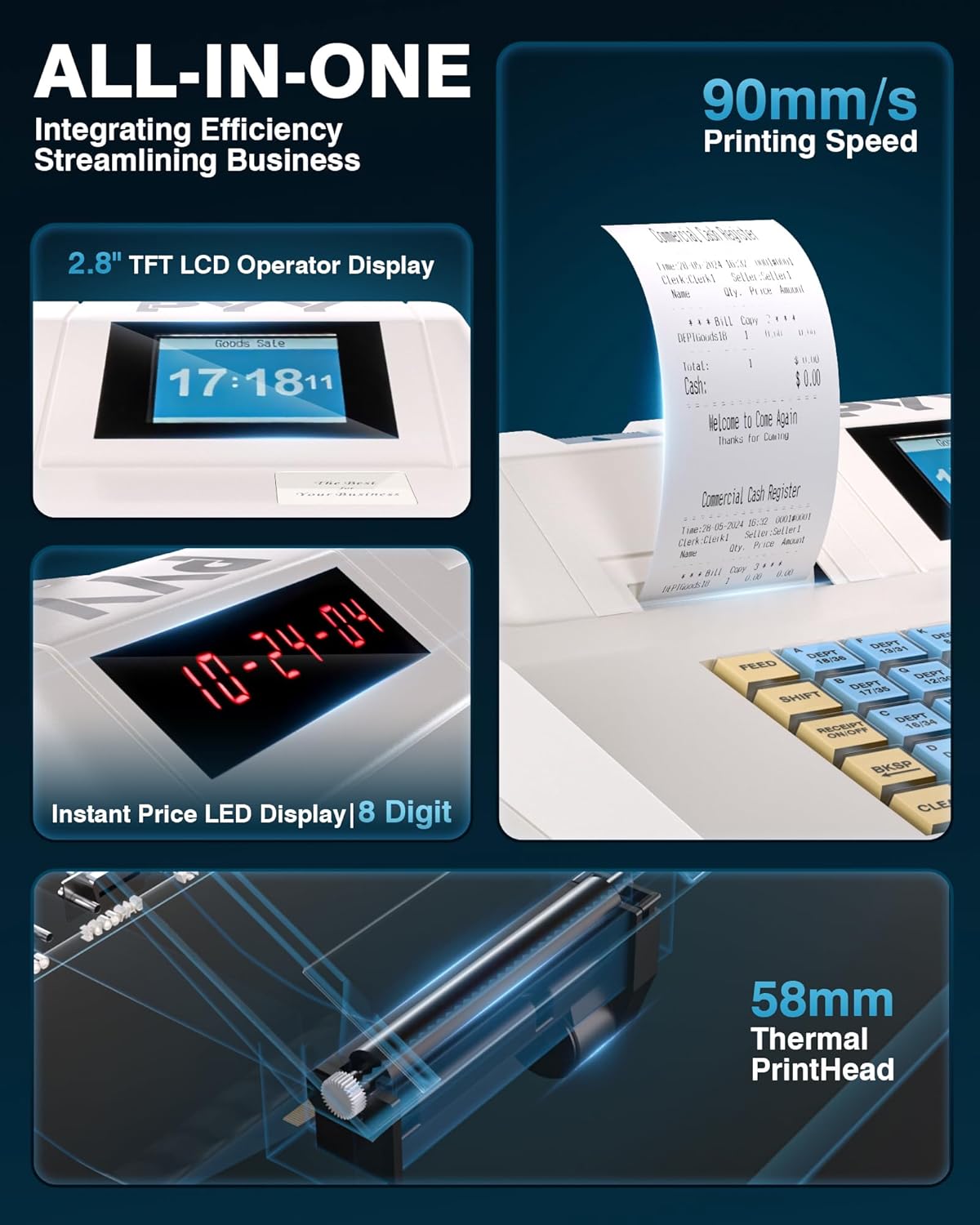
Image: Detailed view of the cash register's 2.8-inch TFT LCD operator display, 8-digit LED customer display, and the integrated 58mm thermal printhead.

Image: An X-ray view illustrating the internal structure of the cash register, highlighting the 48-key keyboard with dust-proof caps and the cash drawer with its 4 bill and 5 coin compartments.
5. Setup
Follow these steps for initial setup:
- Unpacking: Carefully remove the cash register and all accessories from the packaging.
- Power Connection: Connect the power cord to the cash register's power input port and then plug it into a suitable electrical outlet.
- Loading Thermal Paper: Open the printer cover, insert a roll of 2 1/4" (58mm) thermal paper, ensuring the paper feeds correctly from the bottom. Close the cover securely.
- Cash Drawer Keys: Insert one of the provided keys into the cash drawer lock. The drawer can be opened manually with the key or electronically during transactions.
- Initial Power On: Press the power button to turn on the cash register. The displays should illuminate.
6. Operating Instructions
The PYY cash register offers various modes and functions for daily operations:
6.1 Sales Mode and Transactions
Once in sales mode, the system allows for quick and efficient transactions. After item recognition (either by manual input or scanner), a one-click checkout process is available. The integrated thermal printer will automatically print receipts.
6.2 Programming Departments and Items
The system supports configuration for:
- Up to 200 departments
- Up to 10,000 items (PLUs)
- Up to 1,000 members
- Up to 200 sessions
- 9 tax rate settings
Refer to the detailed programming guide (usually a separate section or manual) for specific steps on how to set up departments, items, and tax rates.
6.3 Reporting Functions
The cash register provides comprehensive sales data reports, including:
- Hourly sales reports
- Cashier-specific sales reports
- Item-specific sales reports
- Departmental sales reports
- Refunds tracking
- Cash drawer opening logs
These reports are crucial for business analysis and inventory management.
6.4 Cashier Management
The system supports up to 50 cashiers, each with individual passwords for secure access and accountability.

Image: The cash register displaying its main menu, highlighting features such as cashier capacity (50), keyboard keys (48), product capacity (10,000), and department capacity (200).
7. Connectivity
The PYY cash register is equipped with multiple ports for connecting external devices, enhancing its versatility:
- 2 x RS232 Ports: For connecting peripherals such as barcode scanners, external scales, or additional printers.
- 1 x USB Port: For connecting the cash register to a computer for data transfer or programming.
- 1 x PS2 Port: For connecting an external keyboard, which can be useful for faster data entry or programming.

Image: The rear view of the cash register, clearly labeling the two RS232 ports for scanners/printers, the USB port for computer connection, and the PS2 port for keyboard connection.
8. Maintenance
Regular maintenance ensures the longevity and optimal performance of your cash register:
- Cleaning: Use a soft, damp cloth to clean the exterior of the unit. The ABS material casing is designed to be waterproof and oil-resistant, making it easy to wipe down. Avoid abrasive cleaners or solvents.
- Thermal Paper Replacement: When the paper roll is low or empty, replace it promptly to avoid interruptions in service. Always use 2 1/4" (58mm) thermal paper.
- Dust Prevention: The 48 keys are equipped with dust-proof caps. Periodically wipe down the keyboard surface to prevent dust accumulation.
9. Troubleshooting
If you encounter issues with your cash register, refer to the following common problems and solutions:
- Device Not Powering On: Ensure the power cord is securely connected to both the cash register and a working power outlet. Check the power switch.
- Printer Not Printing: Verify that thermal paper is loaded correctly and that the printer cover is closed. Check for any paper jams. Ensure the printer head is clean.
- Cash Drawer Not Opening: Ensure the unit is powered on and a transaction is being completed. Check if the key is fully inserted and turned if attempting manual opening.
- Display Issues: If the display is blank or showing errors, try restarting the unit. Ensure cables are securely connected if using external displays.
- Tax Settings Not Working: This often requires specific programming steps. Refer to the detailed programming section of your manual or contact technical support for assistance with tax rate configuration.
- Connectivity Problems (Scanner/PC/Keyboard): Ensure the correct port is being used and the external device is properly connected and powered on. Check device drivers if connecting to a computer.
For issues not covered here, or if problems persist, please contact PYY customer support.
10. Specifications
| Model | Electronic Cash Register |
| Dimensions (L x W x H) | 41.5 x 38 x 26 cm (16.3" x 15" x 10.2") |
| Weight | 6.4 kg |
| Power | 36W |
| Voltage | AC 100-240V / 50-60Hz; DC 12V/3A |
| Cashier Display | 2.8-inch TFT LCD |
| Customer Display | 8-digit LED |
| Printer Type | Built-in Thermal Printer |
| Printer Speed | Up to 90mm/s |
| Paper Size | 2 1/4" (58mm) Thermal Paper |
| Cash Drawer | 4 Bill Compartments, 5 Coin Compartments |
| Keyboard | 48 Keys with Dust-Proof Cap |
| Connectivity Ports | 2 x RS232, 1 x USB, 1 x PS2 |
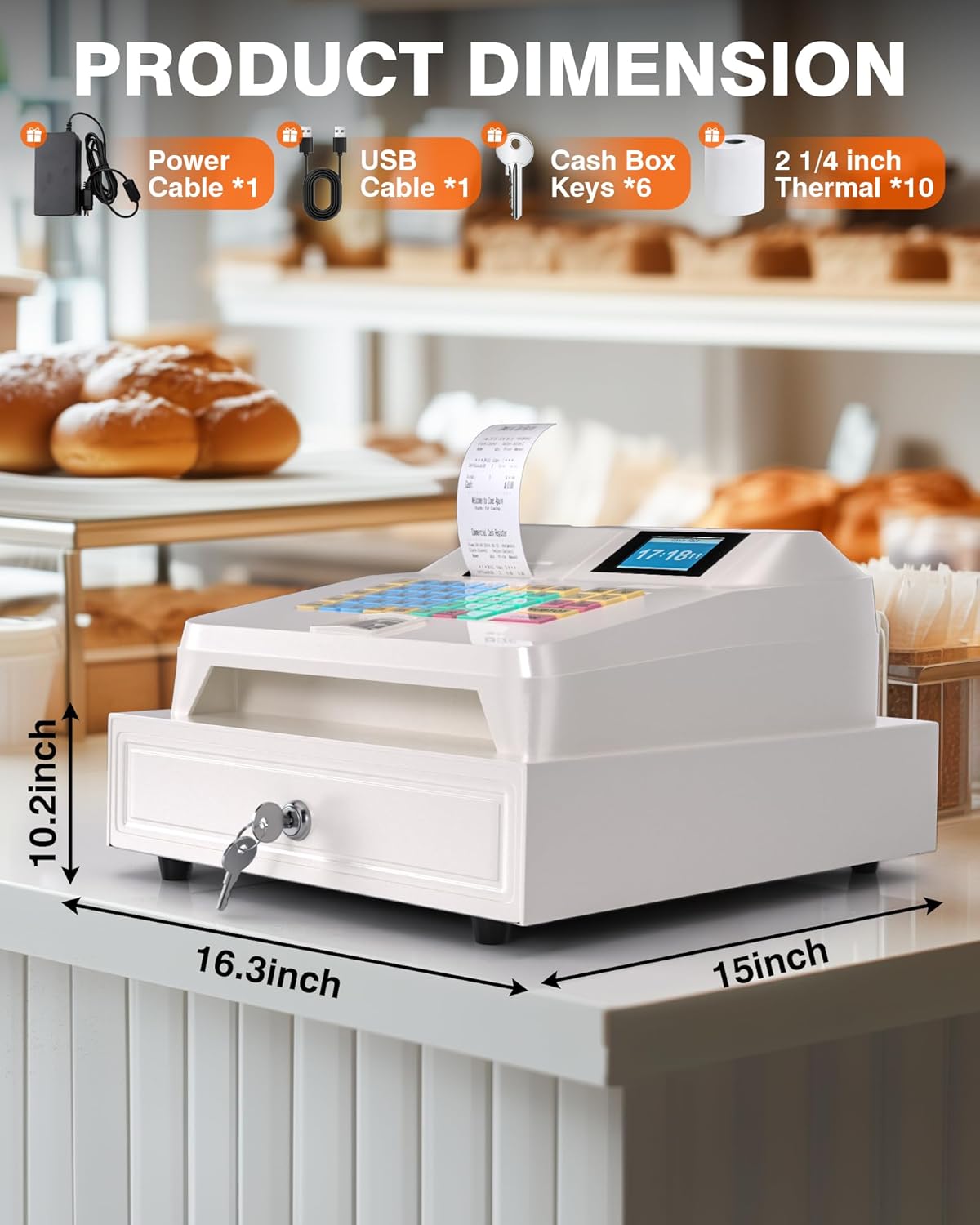
Image: The cash register shown with its key dimensions: 16.3 inches (length), 15 inches (width), and 10.2 inches (height).
11. Warranty and Support
PYY stands behind the quality of its products. Your PYY Electronic Cash Register comes with a one-year coverage from the date of purchase.
For any technical issues, questions, or professional one-on-one technical support, please reach out to PYY customer service. Contact information can typically be found on the product packaging or the official PYY website.
Ask a question about this manual
Ask about setup, troubleshooting, compatibility, parts, safety, or missing instructions. Manuals+ will review the question and use this page’s manual context to help answer it.