
Techmade TM-URI01
Techmade Universal 3-in-1 Remote Control (Model TM-URI01) Instruction Manual
Introduction
This manual provides comprehensive instructions for the setup, operation, and maintenance of your Techmade Universal 3-in-1 Remote Control, Model TM-URI01. This remote is designed to consolidate control of up to three infrared devices, including televisions, set-top boxes (digital terrestrial and satellite), and DVD players, offering broad compatibility with brands such as Samsung, LG, and Sony.
1. Setup
1.1 Battery Installation
The remote control requires two AAA batteries (not included). Follow these steps to install them:
- Locate the battery compartment cover on the back of the remote control.
- Press down on the tab and slide the cover off.
- Insert two AAA batteries, ensuring the positive (+) and negative (-) terminals align correctly with the markings inside the compartment.
- Slide the battery compartment cover back into place until it clicks securely.
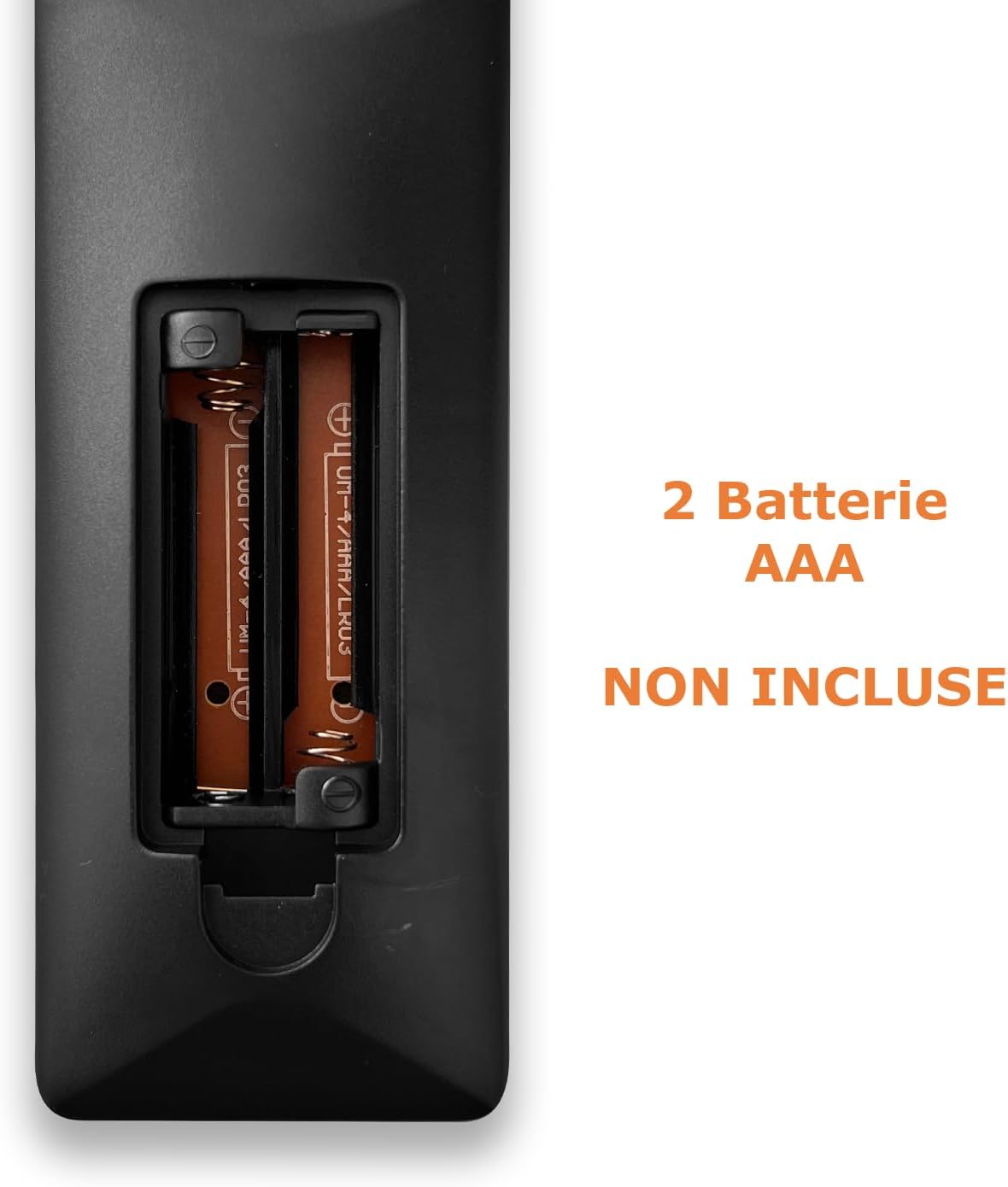
Image: Back of the remote control with the battery compartment open, indicating where to insert two AAA batteries.
1.2 Programming the Remote Control
The Techmade TM-URI01 remote control can be programmed to operate up to three different devices (TV, SAT/DVB-T, DVD). The remote retains its settings even when batteries are removed, thanks to its permanent memory.
Method 1: Direct Code Entry (Recommended)
- Turn on the device you wish to control (e.g., TV, Set-top box, DVD player).
- Press and hold the corresponding device button on the remote (e.g., TV, SAT, DVD) for approximately 3 seconds until the indicator light (usually the power button LED) illuminates and stays on.
- Enter the 4-digit code for your device's brand. A list of common codes is typically provided in a separate code booklet (not included in this manual). For example, for Samsung TVs, try codes like 0001, 0002, etc.
- If the indicator light turns off, the code has been accepted. Test the remote by pressing the Power button. If the device turns off, the programming was successful.
- If the device does not respond, repeat the process with the next code for your brand.
Method 2: Auto Code Search
- Turn on the device you wish to control.
- Press and hold the corresponding device button (e.g., TV, SAT, DVD) for approximately 3 seconds until the indicator light illuminates and stays on.
- Press the Power button once. The indicator light will start flashing, indicating the remote is searching for a code.
- Point the remote at your device. When the device turns off, immediately press the device button (e.g., TV) again to save the code.
- Test the remote's functions. If not all functions work, repeat the auto-search process to find a more compatible code.

Image: The remote control's button layout, highlighting device selection and power buttons for programming.
2. Operating the Remote Control
Once programmed, your Techmade TM-URI01 remote control functions similarly to your original device remotes. Here are the basic operations:

Image: Front view of the Techmade TM-URI01 remote control, showing its complete 48-button layout.
- Device Selection: Press the TV, SAT, or DVD button to select the device you wish to control. The remote will then send commands to that specific device.
- Power: The Power button (usually red) turns the selected device on or off.
- Volume Control: Use the VOL+ and VOL- buttons to adjust the volume.
- Channel Control: Use the CH+ and CH- buttons to change channels.
- Numeric Keypad: Use the number buttons (0-9) to directly input channel numbers or other numerical selections.
- Navigation: The directional arrow buttons (UP, DOWN, LEFT, RIGHT) and OK button are used for menu navigation and selection.
- Menu/Guide: Buttons like MENU and GUIDE access the respective functions on your device.
- Playback Controls: Buttons such as Play, Pause, Stop, Fast Forward, and Rewind are available for DVD or media player control.
Refer to your device's original manual for specific functions that may be mapped to the universal remote's buttons.
3. Maintenance
To ensure the longevity and optimal performance of your remote control, follow these maintenance guidelines:
- Cleaning: Wipe the remote control regularly with a soft, dry cloth. For stubborn dirt, slightly dampen the cloth with water or a mild cleaning solution, then wipe dry immediately. Avoid using abrasive cleaners or solvents.
- Battery Replacement: Replace batteries when the remote's response becomes sluggish or the indicator light fails to illuminate. Always replace both batteries at the same time with new AAA batteries. Do not mix old and new batteries, or different types of batteries.
- Storage: Store the remote in a cool, dry place away from direct sunlight and extreme temperatures. If the remote will not be used for an extended period, it is advisable to remove the batteries to prevent leakage.
- Avoid Drops: Protect the remote from drops and impacts, as this can damage internal components.
4. Troubleshooting
If you experience issues with your Techmade TM-URI01 remote control, consult the following troubleshooting tips:
- Remote Not Working:
- Ensure the batteries are correctly installed with the correct polarity (+/-).
- Replace old batteries with new AAA batteries.
- Make sure you have selected the correct device (TV, SAT, DVD) using the device selection buttons.
- Point the remote directly at the device's infrared receiver, ensuring no obstructions are in the way.
- Verify that the remote is within the effective operating range (up to 10 meters).
- Device Not Responding After Programming:
- The code entered may be incorrect or not fully compatible. Try another code from the code list for your device's brand.
- Perform the auto code search method again.
- Ensure the device was turned on before starting the programming process.
- Some Functions Not Working:
- Not all functions of your original remote may be available or mapped to the universal remote.
- Try programming the remote with a different code for your device, as some codes offer better compatibility for specific functions.
- Indicator Light Not Illuminating:
- Check battery installation and replace batteries if necessary.
- If the issue persists after replacing batteries, the remote may be faulty.
5. Specifications
| Feature | Detail |
|---|---|
| Brand | Techmade |
| Model Number | TM-URI01 |
| Connectivity Technology | Infrared |
| Number of Supported Devices | Up to 3 (TV, SAT/DVB-T, DVD) |
| Compatible Devices | TVs (Samsung, LG, Sony, and others), Set-top boxes, DVD/Blu-ray players |
| Number of Buttons | 48 |
| Maximum Range | 10 Meters |
| Battery Type | 2 x AAA Alkaline (not included) |
| Weight | 200 Grams |
| Special Feature | Lightweight, Permanent Memory (retains settings without batteries) |
| Color | Black |
6. Warranty Information
Specific warranty details for the Techmade Universal 3-in-1 Remote Control (Model TM-URI01) are not provided within this instruction manual. Please refer to the retailer's purchase terms or the official Techmade website for warranty coverage and terms.
7. Customer Support
For further assistance, technical support, or inquiries regarding your Techmade Universal 3-in-1 Remote Control, please visit the official Techmade website or contact your retailer. Contact information is not provided directly in this manual.
Ask a question about this manual
Ask about setup, troubleshooting, compatibility, parts, safety, or missing instructions. Manuals+ will review the question and use this page’s manual context to help answer it.