
Introduction
This manual provides detailed instructions for the YXYKODM LX-10 Touch Screen Wireless Earbuds. Please read this manual thoroughly before using the product to ensure proper operation and to maximize your listening experience. The LX-10 earbuds feature active noise cancellation, a smart touch screen charging case, and a comfortable in-ear design.
What's in the Box
- YXYKODM LX-10 Wireless Earbuds (1 pair)
- Touch Screen Charging Case (1)
- USB-C Charging Cable (1)
- Ear Caps (various sizes)
- User Manual (this document)

Image: The package contents including the earbuds, charging case, charging cable, and ear tips.
Product Overview
The YXYKODM LX-10 earbuds are designed for comfort and high-quality audio. The charging case features an intuitive touch screen for easy control and status monitoring.
Earbud Components
- Earbud Tip: Provides a secure and comfortable fit.
- Microphone: For calls and voice assistant.
- Charging Contacts: For charging within the case.
Charging Case Components
- Touch Screen Display: For controlling functions and viewing status.
- USB-C Charging Port: For charging the case.

Image: The YXYKODM LX-10 wireless earbuds and their touch screen charging case.

Image: A detailed view showing the dimensions of the earbuds and the charging case.
Setup
1. Charging the Device
- Place both earbuds into the charging case.
- Connect the USB-C charging cable to the charging port on the case and to a power source.
- The LED display on the charging case will indicate the charging status and battery level.
- A full charge for the case takes approximately 1.5 hours. The earbuds will charge automatically when placed in the case.

Image: The touch screen display on the charging case showing battery levels and charging status.
2. Bluetooth Pairing
- Ensure the earbuds are charged.
- Open the charging case. The earbuds will automatically enter pairing mode.
- On your device (smartphone, tablet, etc.), enable Bluetooth.
- Search for available Bluetooth devices and select "YXYKODM LX-10" (or similar name) from the list.
- Once connected, the earbuds will indicate successful pairing, and the device will show "Connected".
The earbuds support Bluetooth 4.0 and are compatible with both iPhone and Android devices.
Operating Instructions
Touch Screen Controls
The charging case features a full-color touch screen for managing various functions without needing your connected device.

Image: The touch screen interface on the charging case showing various control options.
- Music Playback: Play, pause, skip tracks directly from the screen.
- Volume Adjustment: Control audio volume.
- Call Management: Answer or end incoming calls.
- Mode Switching: Select between different audio modes (Music, Game, Movie).
- Noise Control: Toggle Active Noise Cancellation (ANC) or Environmental Noise Cancellation (ENC).
- Equalizer Settings: Adjust sound preferences with 7 sound modes (pop, rock, classical, jazz, vocals, electronic music, dance music).
Audio Modes
The LX-10 offers three optimized scene modes for different audio experiences:
- Music Mode: Enhances human voice, providing a bright and clear tone.
- Game Mode: Features ultra-low latency (0.06 seconds) for synchronized audio during gaming.
- Movie Mode: Enhances sound effects for an immersive cinematic experience.

Image: Visual representation of the three scene modes: Music, Game, and Movie, and their descriptions.
Noise Control
- Active Noise Cancellation (ANC): Reduces external noise by up to 35dB (99.44% blocking) for an undisturbed listening experience.
- Environmental Noise Cancellation (ENC): Utilizes dual microphones to suppress reverse environmental noise during calls, ensuring clear communication in noisy environments.

Image: A person using the earbuds with ANC active, illustrating the noise reduction capability.

Image: A person making a call with the earbuds, highlighting the ENC feature for clear communication.
Personalized Screensavers
The charging case display offers five high-quality dynamic screensavers that can be switched at any time for personalization.
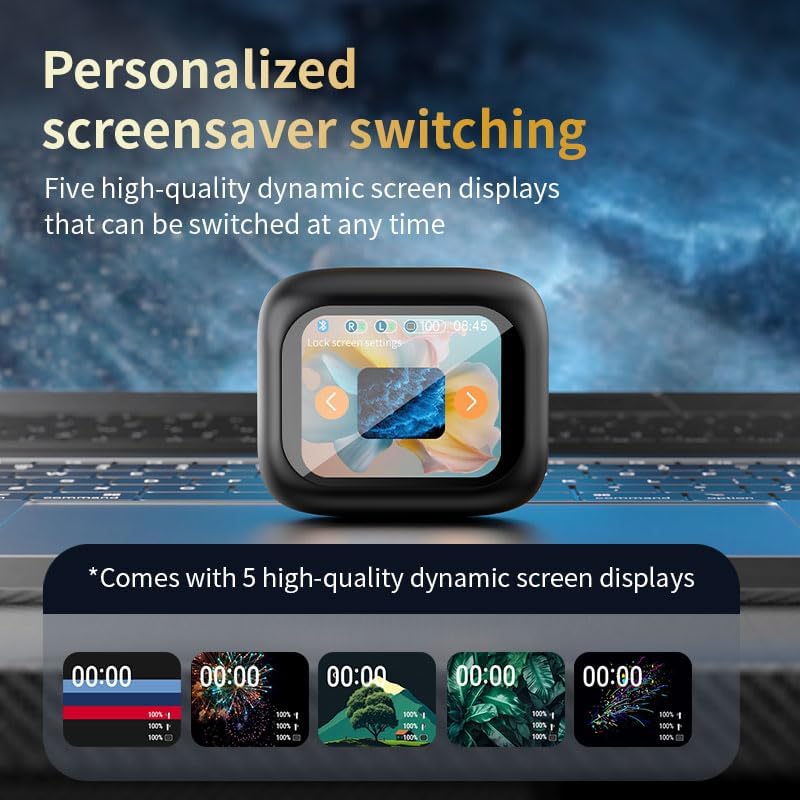
Image: The touch screen displaying various screensaver options.
Maintenance
Cleaning
- Regularly clean the earbuds and charging case with a soft, dry, lint-free cloth.
- Do not use abrasive cleaners, alcohol, or chemical solvents.
- Ensure charging contacts on both earbuds and case are clean and free of debris to maintain proper charging.
- Remove ear tips and clean them with mild soap and water if necessary, ensuring they are completely dry before reattaching.
Storage
- When not in use, store the earbuds in their charging case to protect them and keep them charged.
- Store the device in a cool, dry place, away from extreme temperatures and direct sunlight.
Troubleshooting
Earbuds Not Pairing
- Ensure both earbuds are fully charged.
- Make sure Bluetooth is enabled on your device.
- Place the earbuds back into the charging case, close the lid, then open it again to re-enter pairing mode.
- Forget the device from your phone's Bluetooth settings and try pairing again.
- Try pairing with a different device to rule out device-specific issues.
No Sound or Low Volume
- Check the volume levels on both your connected device and the earbud charging case.
- Ensure the earbuds are properly seated in your ears.
- Clean any debris from the earbud speakers and charging contacts.
- Reconnect the earbuds to your device.
Charging Issues
- Verify the charging cable is securely connected to both the case and the power source.
- Ensure the charging contacts on the earbuds and inside the case are clean.
- Try using a different USB-C cable or power adapter.
- Confirm the power source is active.
Specifications
| Feature | Detail |
|---|---|
| Model Name | Touch screen earbuds Wireless Earbuds |
| Item Model Number | LX-10 |
| Brand | YXYKODM |
| Connectivity Technology | Bluetooth |
| Bluetooth Version | 4.0 |
| Control Method | Touch |
| Noise Control | Active Noise Cancellation |
| Ear Placement | In Ear |
| Form Factor | In Ear |
| Battery Life (Earbuds) | Approximately 4-5 Hours |
| Charging Time (Case) | Approximately 1.5 Hours |
| Earphone Battery Capacity | 40mAh |
| Charging Compartment Battery Capacity | 320mAh |
| Frequency Range | 20 Hz - 20,000 Hz |
| Water Resistance Level | Waterproof |
| Compatible Devices | Cellphones (iPhone and Android) |
| Item Weight | 4.6 ounces |
| Package Dimensions | 4.69 x 4.17 x 1.65 inches |

Image: A visual summary of the product parameters and specifications.
Warranty and Support
For warranty information and technical support, please refer to the documentation included with your purchase or visit the official YXYKODM website. Keep your proof of purchase for any warranty claims.
If you encounter issues not covered in the troubleshooting section, please contact YXYKODM customer service for assistance.