
1. Introduction
Thank you for choosing the SEDETA Farmhouse 69" Executive L Shaped Desk. This manual provides detailed instructions for the assembly, operation, and maintenance of your new desk. Please read all instructions carefully before beginning assembly and retain this manual for future reference.

Image 1.1: The SEDETA Farmhouse 69" Executive L Shaped Desk, showcasing its L-shape design, storage, and integrated power outlet.
2. Safety Information
- Always assemble the desk according to the provided instructions.
- Ensure all screws and fasteners are tightened securely, especially at the tabletop joints, to maintain stability and prevent accidents.
- Do not overload the desk or its storage compartments. The desk has a load capacity of 300 lbs.
- Keep small parts and hardware away from children during assembly to prevent choking hazards.
- Use caution when moving the assembled desk. It is heavy and may require two people to lift and position safely.
- Avoid placing hot items directly on the desk surface without protective padding.
3. Package Contents
Your SEDETA L Shaped Desk is shipped in two separate packages. Please verify that all components and hardware are present before beginning assembly. If any parts are missing or damaged, contact customer support.

Image 3.1: Overview of desk dimensions, load capacity, and packaging.
Typical Components Include:
- Desktop Panels (L-shaped sections)
- Drawer Units (pre-drilled for assembly)
- Cabinet Unit (with adjustable shelf components)
- Support Panels and Legs
- Hardware Pack (screws, dowels, cam locks, drawer slides, handles)
- Integrated Power Outlet Unit (with AC outlets and USB ports)
- Assembly Instructions Manual
4. Setup and Assembly
Assembly of this desk requires careful attention to detail and can be time-consuming. It is highly recommended to have two people for assembly. An electric screwdriver with appropriate Phillips and hex heads will significantly reduce effort. Ensure you assemble the desk in the room where it will be used, as it is heavy and not designed for frequent disassembly and reassembly.
General Assembly Steps:
- Unpack and Identify Parts: Lay out all components and hardware. Match each part to the numbered diagrams in the included assembly guide.
- Assemble Drawer Units: Follow the specific instructions for constructing the drawer boxes and attaching the drawer slides. Ensure slides are correctly oriented for smooth operation.
- Assemble Cabinet Unit: Construct the cabinet frame and install the adjustable shelf supports.
- Attach Side Panels: Secure the side panels to the drawer and cabinet units as per the diagrams.
- Connect Desktop Sections: Carefully align and attach the L-shaped desktop sections to the assembled base units. Ensure all connecting hardware is firmly tightened.
- Install Power Outlet: Integrate the power outlet unit into the designated cutout on the desktop. Secure it in place.
- Attach Handles: Install the handles on all drawers and the cabinet door.
- Final Inspection: Double-check all connections for tightness and stability. Ensure drawers and cabinet door open and close smoothly.
Important Note: The cabinet on the left and the drawers on the right are not reversible. The pre-drilled holes only allow for the configuration shown in the product images.
5. Operating Instructions
5.1 Storage Drawers
The desk features four drawers for organized storage. Three utility drawers are suitable for general office supplies, while one file drawer is designed to hold letter, A4, or legal-sized hanging files.
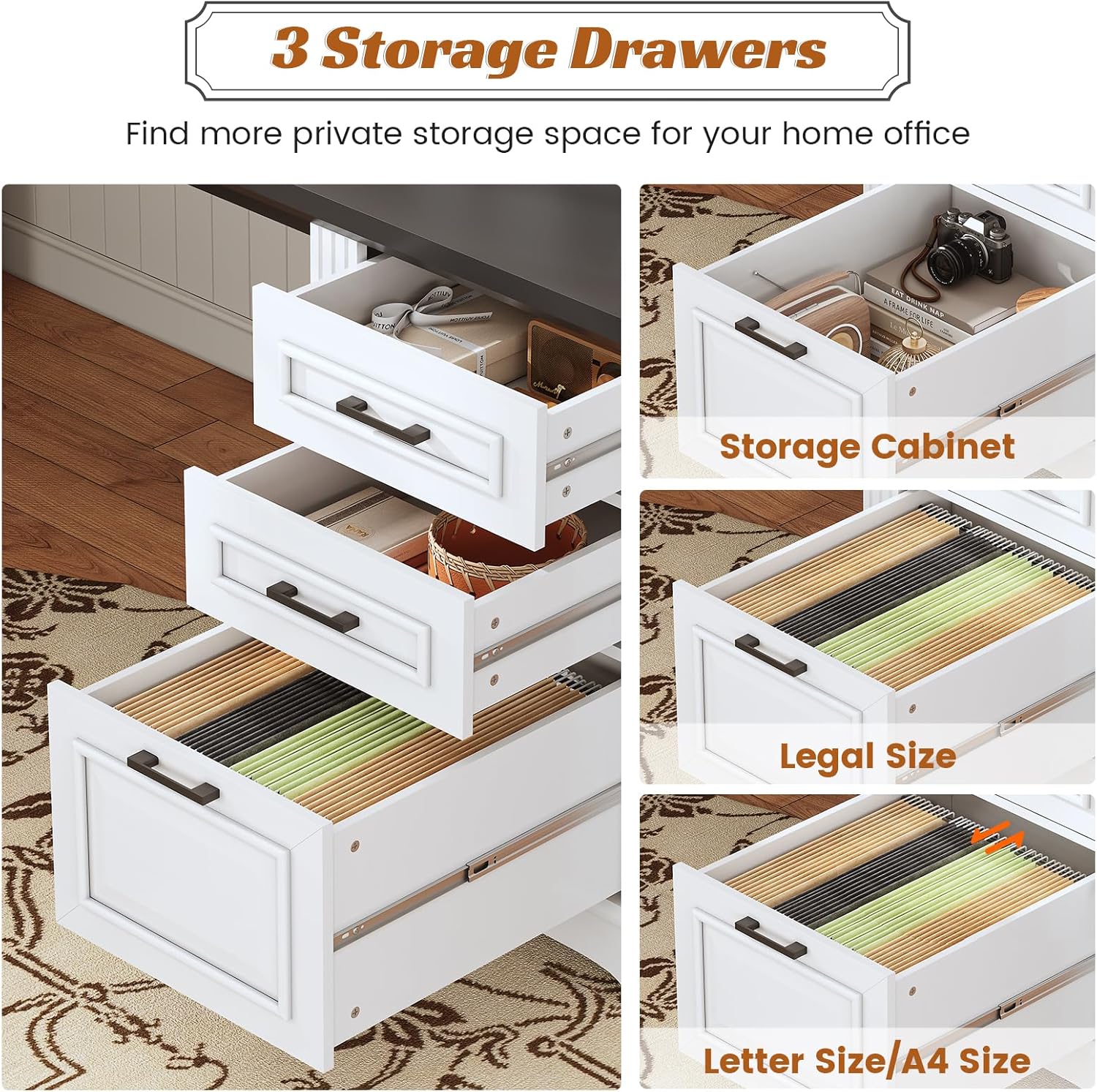
Image 5.1: Detailed view of the three storage drawers, including file drawer capabilities.
5.2 Storage Cabinet
The integrated storage cabinet includes an adjustable shelf, allowing you to customize the storage space for various items such as books, speakers, or other office essentials.

Image 5.2: The adjustable storage cabinet with an interior shelf.
5.3 Integrated Power Outlet
The desk is equipped with a recessed power strip featuring 4 AC outlets (125V/12A) and 2 USB charging ports (5V/2A). A power switch allows for convenient and safe control of connected devices.

Image 5.3: The integrated power outlet for convenient device charging.
- To Power On: Flip the red power switch to the 'ON' position.
- To Power Off: Flip the red power switch to the 'OFF' position. This cuts power to all connected devices without needing to unplug them.
- Ensure the desk's power cord is securely plugged into a functional wall outlet.
6. Maintenance
- Cleaning: Wipe the desk surfaces with a soft, damp cloth. Avoid harsh chemicals or abrasive cleaners, which can damage the finish.
- Spills: Clean up spills immediately to prevent staining or damage to the engineered wood.
- Hardware Check: Periodically check all screws and fasteners to ensure they remain tight. Re-tighten as necessary to maintain desk stability.
- Drawer Slides: If drawers become stiff, a small amount of silicone lubricant can be applied to the drawer slides.
7. Troubleshooting
| Problem | Possible Cause | Solution |
|---|---|---|
| Desk is wobbly or unstable. | Loose fasteners; uneven floor. | Check and tighten all screws and cam locks. Use furniture glides or shims under legs if the floor is uneven. |
| Drawers do not slide smoothly or are difficult to close. | Incorrectly installed drawer slides; obstruction; misaligned drawer box. | Verify drawer slides are installed correctly and are free of debris. Ensure the drawer box is assembled squarely. Re-align if necessary. |
| Power outlets or USB ports are not working. | Power switch is off; desk not plugged in; circuit overload. | Ensure the power switch on the desk is 'ON'. Verify the desk's main power cord is plugged into a live wall outlet. Reduce the number of devices connected if overloaded. |
| Missing or damaged parts upon arrival. | Shipping damage or packaging error. | Contact SEDETA customer service immediately for free replacement parts or a partial refund. |
8. Specifications
- Brand: SEDETA
- Model: Farmhouse L Shaped Desk
- Product Dimensions: 21.7"D x 69"W x 30"H
- Color: White
- Style: Farmhouse
- Base Material: Engineered Wood
- Top Material Type: Engineered Wood
- Finish Type: Powder Coated
- Item Weight: 145 Pounds
- Load Capacity: 300 lbs
- Special Feature: Built-In USB Outlet (4 AC outlets, 2 USB ports)
- Number of Drawers: 4 (including 1 file drawer)
- Number of Cabinets: 1 (with adjustable shelf)
- Required Assembly: Yes
- Includes All Assembly Tools: Yes

Image 8.1: Overview of the desk's large workspace with key dimensions.
9. Warranty and Support
The SEDETA Farmhouse L Shaped Desk comes with a limited warranty. For specific warranty details, please refer to the documentation included with your purchase or contact SEDETA customer service.
If your item arrives damaged, scratched, or with missing parts, please contact SEDETA customer service directly. They will assist you with free replacement parts or offer a partial refund as applicable.
For further assistance or inquiries, please visit the official SEDETA store or contact their support channels.
SEDETA Store: Visit the SEDETA Store on Amazon
