
1. Important Safety Information
Please read all instructions carefully before installing and using the replacement head. Keep this manual for future reference.
- Water Safety: Keep the electric shaver and its components away from water when plugged in or charging. Ensure the shaver is unplugged before cleaning with water.
- Damage Inspection: Regularly inspect the replacement head for any damage. Do not use if the blades or foils are bent, broken, or show signs of wear, as this may cause injury.
- Children: Keep the product out of reach of children.
- Intended Use: This replacement head is designed exclusively for the specified DOAO electric shaver model. Do not attempt to use it with other devices.
2. Product Overview
The DOAO A3 Replacement Head is designed to restore the optimal shaving performance of your DOAO electric shaver. It features three rotary cutting elements for a close and comfortable shave.
Components
- DOAO A3 Electric Shaver Replacement Head (1 unit)
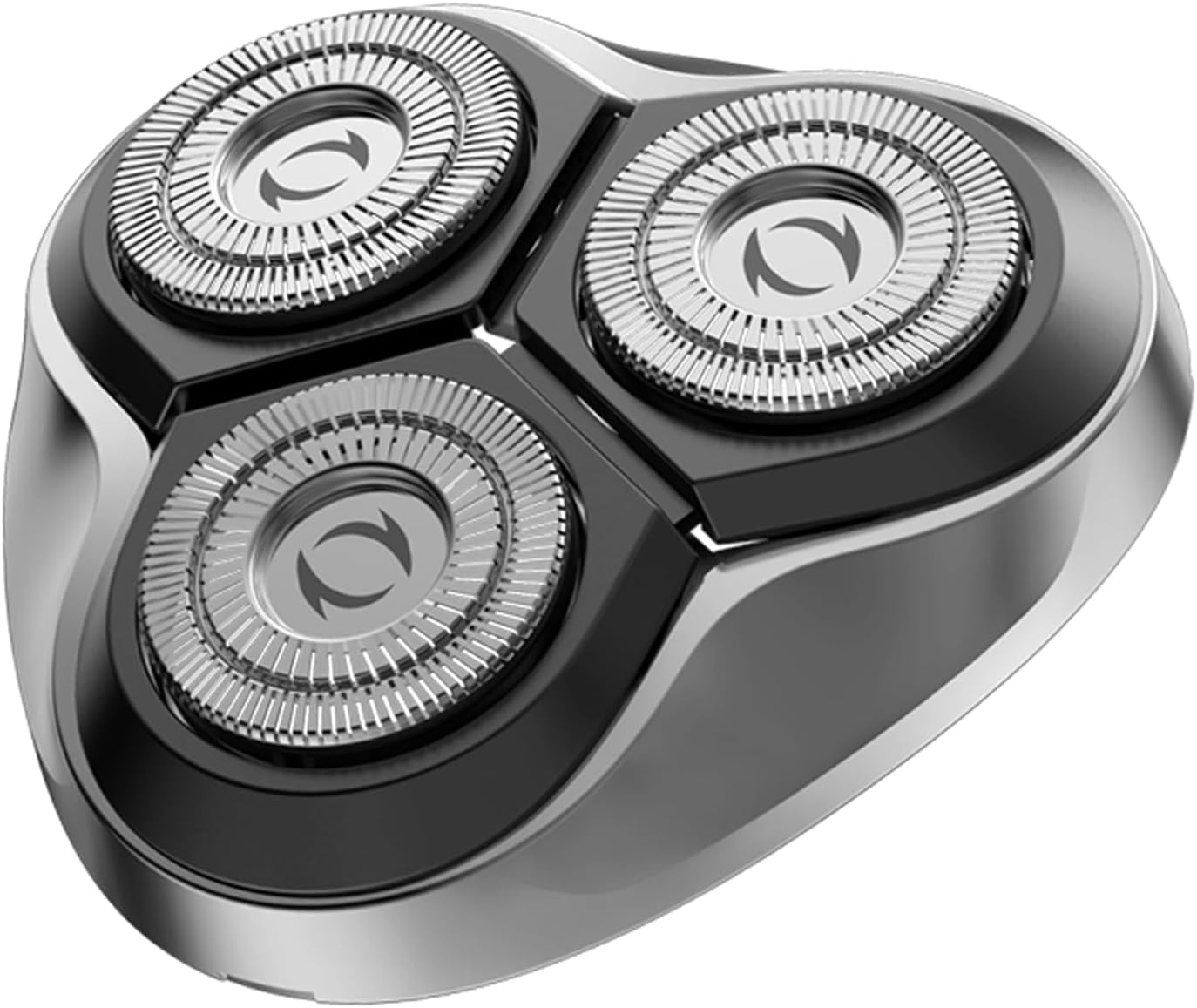
Image: The DOAO A3 Electric Shaver Replacement Head, featuring three circular rotary cutting elements designed for efficient shaving.
3. Installation
Replacing the Shaver Head
Follow these steps to safely replace the shaver head:
- Power Off: Ensure your DOAO electric shaver is turned off and unplugged from any power source.
- Remove Old Head: Gently twist or unclip the existing shaver head from the shaver body. Refer to your shaver's original manual for specific removal instructions if needed.
- Clean Shaver Body: Clean any hair residue or debris from the shaver body and the area where the head attaches.
- Install New Head: Align the new DOAO A3 Replacement Head with the shaver body. Press down or twist until it securely clicks into place. Ensure it is firmly attached.
- Test: Turn on the shaver briefly to ensure the new head is functioning correctly and securely attached.
4. Operating Instructions
Using Your Shaver with the New Head
Once the new replacement head is installed, your shaver is ready for use. For optimal results:
- Preparation: For dry shaving, ensure your skin is clean and dry. For wet shaving, apply shaving foam or gel.
- Shaving Technique: Hold the shaver at a right angle to your skin. Move the shaver in small, circular motions against the direction of hair growth.
- Gentle Pressure: Apply gentle pressure. Excessive pressure can cause irritation and reduce the lifespan of the blades.
- Rinse (Wet Shaving): If wet shaving, rinse the shaver head under warm running water during and after shaving to remove hair and foam.
5. Maintenance
Cleaning the Replacement Head
Regular cleaning ensures optimal performance and hygiene:
- Power Off and Unplug: Always ensure the shaver is turned off and unplugged before cleaning.
- Remove Head: Detach the replacement head from the shaver body.
- Rinse: Rinse the detached head thoroughly under warm running water to remove all hair clippings and debris. You may use a mild soap if necessary, then rinse thoroughly.
- Air Dry: Shake off excess water and allow the head to air dry completely before reattaching it to the shaver body or storing it. Do not wipe the cutting elements with a towel, as this can damage them.
- Brush (Optional): For stubborn debris, use a small cleaning brush (often included with shavers) to gently remove hair from the cutting elements.
Storage
Store the replacement head in a clean, dry place, away from direct sunlight and extreme temperatures. If storing separately from the shaver, use a protective cap if available.
6. Troubleshooting
| Issue | Possible Cause | Solution |
|---|---|---|
| Poor shaving performance / pulling hair | Hair residue buildup; blades are dull or damaged. | Clean the shaver head thoroughly. If performance does not improve, the head may need replacement. |
| Skin irritation after shaving | Excessive pressure; dirty head; sensitive skin. | Use lighter pressure. Ensure the head is clean. Consider using a pre-shave lotion or aftershave balm. |
| Head does not attach securely | Incorrect alignment; debris blocking connection. | Ensure the head is correctly aligned with the shaver body. Check for any obstructions and remove them. |
7. Specifications
- Brand: DOAO
- Model Number: A3 (A3-Cabezal / A3-Ersatzkopf)
- Dimensions (L x W x H): 8 x 8 x 5 cm
- Weight: 20 grams
- Blade Material: Stainless steel or titanium
- Head Type: Rotary (Note: Product specifications mention 'Foil', but the design and category indicate a rotary head.)
- Recommended Uses: Beard, Moustache
- Components Included: Replacement Head (A3)
8. Warranty and Support
Specific warranty information for the DOAO A3 Electric Shaver Replacement Head is not provided in the product details. Please refer to the original product packaging or the manufacturer's official website for warranty terms and customer support contact information.
For any issues or questions not covered in this manual, please contact DOAO customer service.

