
1. Product Overview
The ELECTOP Car Solar Power Simulated Dummy Alarm is designed to act as a visual deterrent against potential vehicle theft. It simulates the presence of a car alarm system with a flashing LED light, making your vehicle appear less appealing to thieves. This device is powered by solar energy and includes a USB charging port for backup, ensuring continuous operation.

Image 1.1: Overview of the ELECTOP Simulated Dummy Alarm units.

Image 1.2: The dummy alarm light installed, effectively deterring with its flashing light.
2. Key Features
- Visual Deterrent: Designed to deter malicious intentions by simulating an active car alarm.
- Solar-Powered: Automatically charges in sunlight, allowing for all-night operation after sufficient daytime charging.
- Dual Charging: Features a convenient USB charging port for backup power during overcast or rainy days.
- Built-in Light Sensor: Intelligently senses light intensity, blinking every 5 seconds when the switch is on and light is dim.
- Easy Installation: Equipped with strong double-sided tape for effortless mounting on various surfaces.
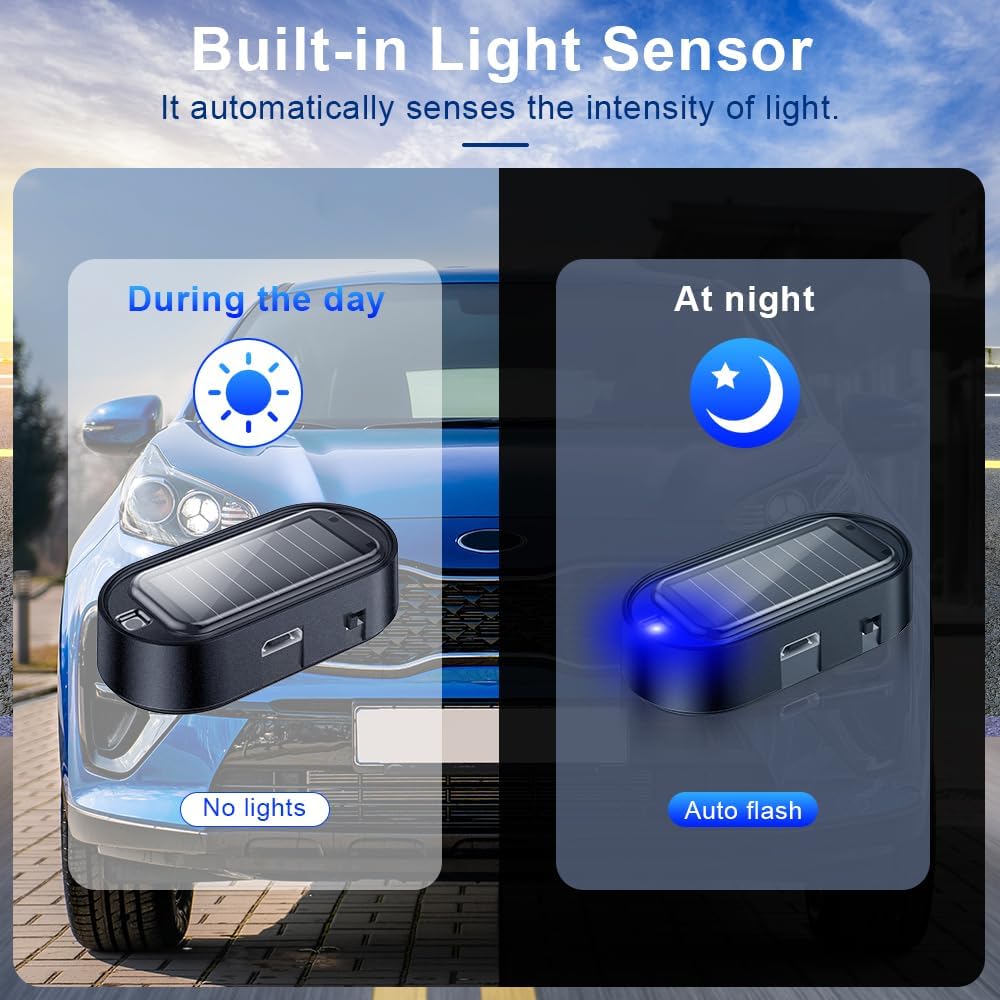
Image 2.1: Built-in light sensor functionality, showing day and night operation.

Image 2.2: Component breakdown and dimensions of the dummy alarm light.
3. Package Contents
Each package contains the following items:
- 4 x ELECTOP Car Solar Power Simulated Dummy Alarm units (Blue Light)
4. Setup and Installation
The ELECTOP dummy alarm light is designed for simple and quick installation. Follow these steps for optimal adhesion and performance:
- Choose a Location: Select a suitable surface in your car such as the rearview mirror, center console, car door, or rear window.
- Clean the Surface: Ensure the chosen surface is clean, dry, and free from dust or grease. Use an alcohol wipe if necessary and allow it to dry completely.
- Peel Adhesive: Carefully peel off the protective film from the strong double-sided tape on the bottom of the dummy alarm unit.
- Mount the Unit: Firmly press the unit onto the cleaned surface for several seconds to ensure strong adhesion.

Image 4.1: Examples of easy installation locations within a vehicle.
5. Operating Instructions
The dummy alarm light operates automatically based on light conditions and its charge level.
- Automatic Operation: Once installed and the switch is turned on, the built-in light sensor will detect ambient light.
- Daytime Behavior: The LED will not blink when there is sufficient light (e.g., during the day) to conserve power.
- Nighttime Behavior: When the light is dim (e.g., at night or in a dark garage), the LED will automatically begin to blink every 5 seconds.
- Manual Control: To stop the device from working, simply turn off the switch located on the unit.
- Solar Charging: The unit will automatically charge its internal battery when exposed to sunlight. Ensure the solar panel faces an area that receives adequate light.
- USB Charging: For situations with prolonged low light or if additional charging is needed, connect a standard Micro USB cable to the charging port.

Image 5.1: Solar charging in action on a car dashboard.
6. Maintenance
To ensure the longevity and optimal performance of your ELECTOP Car Solar Power Simulated Dummy Alarm, follow these simple maintenance guidelines:
- Keep Solar Panel Clean: Regularly wipe the solar panel with a soft, damp cloth to remove dust, dirt, or debris that may obstruct sunlight absorption.
- Avoid Harsh Chemicals: Do not use abrasive cleaners or solvents on the unit, as they may damage the surface or internal components.
- Check Adhesion: Periodically check the double-sided tape for secure adhesion, especially after extreme temperature changes. Reapply if necessary.
- Charge as Needed: If the unit does not blink consistently at night, it may require a full charge via the USB port, particularly during extended periods of cloudy weather.
7. Troubleshooting
If you encounter any issues with your ELECTOP dummy alarm light, refer to the following table for common problems and their solutions:
| Problem | Possible Cause | Solution |
|---|---|---|
| LED does not blink at night. | Insufficient charge; Switch is off; Too much ambient light. | Ensure solar panel receives direct sunlight during the day or charge via USB. Turn the switch to the 'on' position. Move to a darker location or partially cover the light sensor if blinking is desired in dim light. |
| LED blinks during the day. | Light sensor is covered or in a dark area. | Relocate the unit to an area with sufficient light or ensure the light sensor is not obstructed. |
| Unit falls off after installation. | Surface was not clean/dry; Tape adhesion weakened. | Clean the surface thoroughly before reapplication. Use new double-sided tape if the original adhesive is no longer strong. |
8. Specifications
| Specification | Detail |
|---|---|
| Brand | ELECTOP |
| Model | Simulated Dummy Alarm |
| Light Color | Blue |
| Power Source | Solar, USB Charging |
| Dimensions (approx.) | 2.16 x 0.98 x 0.59 inches |
| Item Weight | 2.08 ounces (per unit) |
| Material | ABS |
| Country of Origin | China |
9. Warranty and Support
The ELECTOP Car Solar Power Simulated Dummy Alarm comes with a 1 Year Manufacturer Warranty.
For any questions, assistance, or warranty claims, please contact ELECTOP customer service through the platform where the product was purchased. Please have your order number and product details ready when contacting support.