
1. Introduction
This manual provides detailed instructions for the Fanvace EU-M36 MP3 Player. It covers setup, operation, maintenance, and troubleshooting to ensure you get the most out of your device. This device combines a portable music player with smart features, including Wi-Fi, Bluetooth, and an Android 13 operating system.
2. Package Contents
- Fanvace EU-M36 MP3 Player
- USB Charging Cable
- User Manual
3. Device Overview
The Fanvace EU-M36 features a compact design with a 4-inch full touch screen for intuitive navigation. It includes an integrated speaker for direct audio playback and a 13-megapixel HD camera for capturing photos and videos.
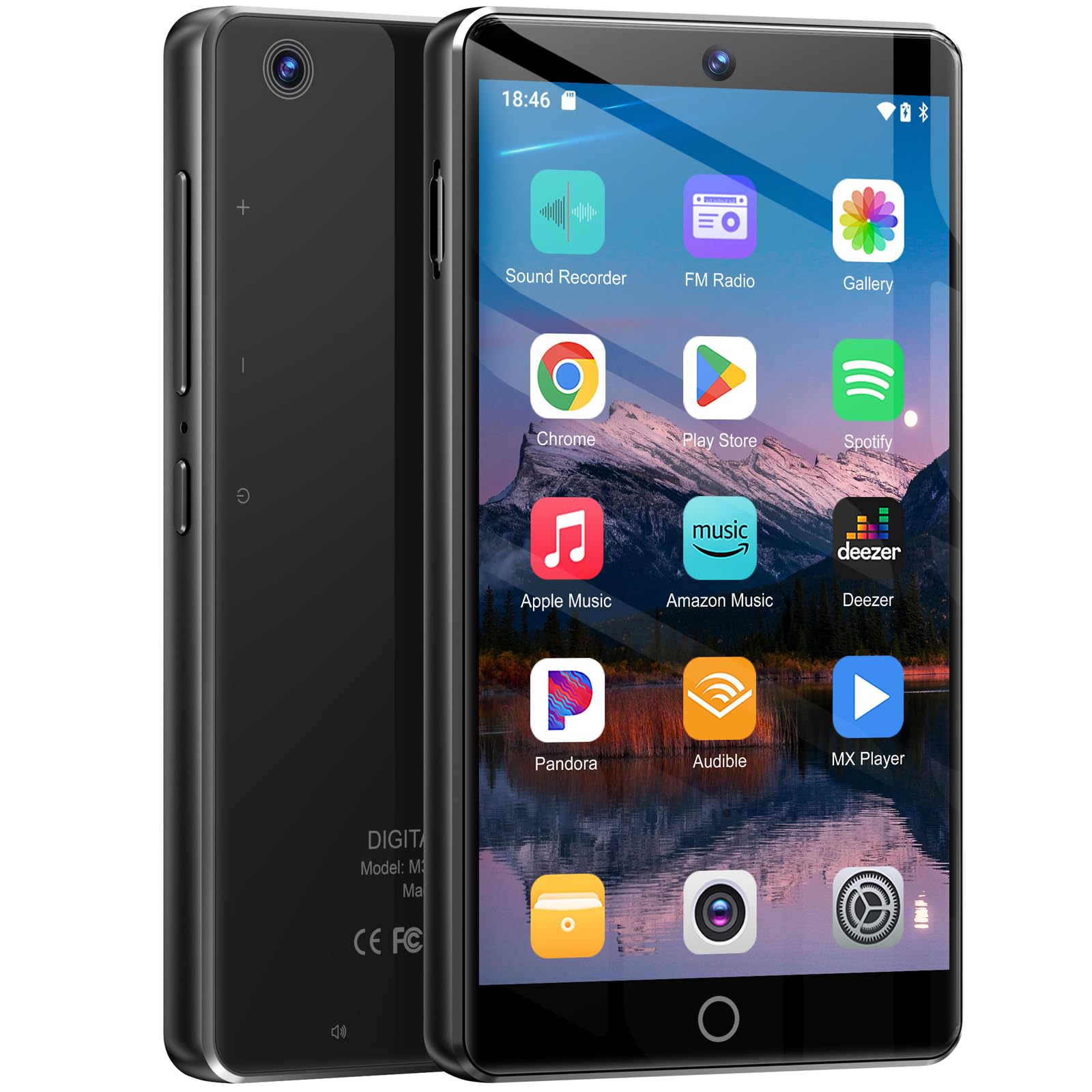
Image 3.1: Front view of the Fanvace EU-M36 MP3 Player, highlighting the 4-inch touchscreen.
Physical Controls and Ports (Typical Layout)
- Power Button: Located on the side, used to turn the device on/off and lock/unlock the screen.
- Volume Buttons: Located on the side, used to adjust audio volume.
- USB-C Port: Located at the bottom, for charging and data transfer.
- 3.5mm Audio Jack: Located at the bottom, for connecting wired headphones.
- MicroSD Card Slot: Located on the side, for expanding storage.
4. Setup
4.1 Charging the Device
The device comes with an integrated 2000 mAh lithium-ion battery. Before first use, fully charge the device. Connect the provided USB charging cable to the device's USB-C port and plug the other end into a compatible USB power adapter or computer USB port. The screen will indicate charging status. A full charge provides approximately 50 hours of music playback or 8 hours of video playback.
4.2 Power On/Off
- To Power On: Press and hold the Power button until the screen lights up and the Fanvace logo appears.
- To Power Off: Press and hold the Power button until a power-off menu appears. Select 'Power Off' and confirm.
- To Lock/Unlock Screen: Briefly press the Power button.
4.3 Initial Configuration
Upon powering on for the first time, you will be guided through an initial setup process. This typically includes:
- Selecting your preferred language.
- Connecting to a Wi-Fi network.
- Setting up your Google account (optional, but recommended for app downloads).
- Reviewing and accepting terms and conditions.
5. Operating Instructions
5.1 Music Playback
The device supports a wide range of audio formats including MP3, WAV, FLAC, APE, OGG, M4A, AAC, and WMA. You can play music using pre-installed applications or by transferring your own music files to the device's internal storage or an inserted MicroSD card.
- Using Pre-installed Apps: Access apps like Spotify, Apple Music, Deezer, or Amazon Music via Wi-Fi.
- Local Files: Use the default music player app to browse and play audio files stored on the device.
5.2 Video Playback
Enjoy videos directly on the 4-inch screen. The player supports formats such as RM, RMVB, FLV, MP4, DAT, MKV, MPG, MOV, and TS without requiring conversion. Use the pre-installed video player or download a preferred player from the Play Store.
5.3 Bluetooth Connectivity
The device features stable and fast two-way Bluetooth technology, supporting stereo and dual-channel audio. This allows for seamless connection to Bluetooth headphones, speakers, or other compatible playback devices.
- Go to Settings > Connected devices > Bluetooth.
- Toggle Bluetooth On.
- Select Pair new device and choose your desired accessory from the list.
- Confirm pairing on both devices if prompted.
5.4 Wi-Fi Connectivity
Connect to wireless networks to access online content, download applications, stream music and videos, and browse the internet.
- Go to Settings > Network & internet > Wi-Fi.
- Toggle Wi-Fi On.
- Select your desired network from the list and enter the password if required.
5.5 Camera Function
Utilize the built-in 13-megapixel HD camera to capture clear and detailed photos and videos. Open the Camera application from the home screen or app drawer to begin.
- Tap the shutter button to take a photo.
- Switch to video mode to record videos.
- Access captured media in the Gallery application.
5.6 App Installation
Running on Android 13 OS, the device allows you to install a wide range of applications from the Google Play Store. This includes additional music streaming services, utility apps, and more.
- Ensure you are connected to Wi-Fi and logged into your Google account.
- Open the Play Store application.
- Search for the desired app and tap Install.
6. Storage Management
The Fanvace EU-M36 comes with 80 GB of internal memory (16 GB ROM + 64 GB TF card). This can be expanded further by inserting a MicroSD card, supporting up to 1 TB of external storage.
- Internal Storage: Used for the operating system, pre-installed apps, and user data.
- MicroSD Card: Insert a MicroSD card into the designated slot to expand storage for music, videos, photos, and other files.
- File Manager: Use the pre-installed File Manager app to browse, organize, and transfer files between internal and external storage.
7. Maintenance
7.1 Cleaning
To clean the device, gently wipe the screen and body with a soft, dry, lint-free cloth. Avoid using liquid cleaners, aerosols, or abrasive materials, as these can damage the device's finish or internal components.
7.2 Battery Care
To prolong battery life:
- Avoid exposing the device to extreme temperatures (hot or cold).
- Charge the device regularly and avoid letting the battery fully deplete for extended periods.
- Use only the provided charging cable or a certified compatible cable.
8. Troubleshooting
8.1 Device Not Turning On
- Ensure the battery is sufficiently charged. Connect the device to a power source for at least 30 minutes.
- Press and hold the Power button for 10-15 seconds to attempt a forced restart.
8.2 Applications Crashing or Lagging
- Close any unnecessary background applications to free up RAM.
- Restart the device.
- Check for system updates in Settings > System > System update.
- Clear the cache of the problematic app in Settings > Apps > [App Name] > Storage & cache > Clear cache.
8.3 Bluetooth/Wi-Fi Connection Issues
- Ensure Bluetooth/Wi-Fi is enabled in the device settings.
- Verify that the accessory or network you are trying to connect to is discoverable and within range.
- Restart both the MP3 player and the connected accessory/router.
- Forget the network/device and attempt to reconnect.
9. Specifications
| Brand | Fanvace |
| Model | EU-M36 |
| Screen Size | 4 Inches |
| Operating System | Android 13 |
| Processor | MTK 8-core chip |
| Internal Storage | 80 GB (16 GB ROM + 64 GB TF card) |
| Expandable Storage | Up to 1 TB (Micro SD) |
| RAM | 3 GB |
| Connectivity | Bluetooth (Two-way), Wi-Fi |
| Camera | 13 Megapixels HD |
| Battery | 2000 mAh Lithium-ion |
| Audio Formats | MP3, WAV, FLAC, APE, OGG, M4A, AAC, WMA |
| Video Formats | RM, RMVB, FLV, MP4, DAT, MKV, MPG, MOV, TS |
| Color | Black |
10. Warranty and Support
Fanvace offers 12-hour customer service for our MP3 music players. If you encounter any problems during use, please contact us, and we will resolve them within 12 hours.
For support, please refer to the contact information provided with your purchase or visit the official Fanvace website.


