
GoolRC 144016
GoolRC WLtoys 144016 RC Car User Manual
Model: 144016
Brand: GoolRC
1. Introduction
This manual provides essential information for the safe operation, setup, maintenance, and troubleshooting of your GoolRC WLtoys 144016 1/14 Scale 4WD High-Speed RC Racing Car. Please read this manual thoroughly before operating the vehicle to ensure proper function and longevity of the product.
2. Safety Precautions
To prevent injury or damage to the product, observe the following safety guidelines:
- Do not operate the RC car in busy or crowded areas to avoid accidental injury.
- Ensure there are no obstacles around the operating area to prevent collisions or other hazards.
- The RC car is designed for use on flat and dry terrain. Avoid operation on damp, wet, or rough terrain.
- Maintain focus during operation and avoid distractions or excessive play that may lead to accidents.
- Keep fingers, hair, and loose clothing away from moving parts.
- Do not touch the motor immediately after use, as it may be hot.
- Adult supervision is recommended for users under 16 years of age.
3. Package Contents
Verify that all items are present in the package:
- GoolRC WLtoys 144016 RC Car
- 2.4GHz Remote Control Transmitter
- 7.4V 1500mAh Lithium Battery (x2)
- USB Charging Cable
- Screwdriver
- Hex Wrench
- User Manual (this document)

Image: The complete package contents of the GoolRC WLtoys 144016 RC Car, showing the car, remote control, two batteries, USB charging cable, and small tools.
4. Components Overview
4.1 RC Car Components
- 390 Carbon Brush Motor: Provides high-speed performance up to 35km/h.
- Oil Pressure Shock Absorbers: Independent suspension system for stable performance and shock absorption on various terrains.
- Four-Wheel Drive (4WD): Enhances handling and passability across different surfaces.
- All-Terrain Rubber Tires: Designed for strong ground adhesion and friction resistance.
- Lithium Battery (7.4V 1500mAh): Provides power for operation.
- Zinc Alloy Gear: Improves gear durability and service life.
- Central Driving Shaft: Alloy gear with iron central drive shaft for strong and durable power transmission.

Image: A detailed view of the RC car's hardware oil shock absorbers, highlighting the independent suspension system designed to reduce vibration and impact.

Image: A dynamic side view of the RC car in motion, illustrating its strong power output and ability to reach speeds of 35km/h.
4.2 Remote Control Transmitter Components

Image: A diagram illustrating the components of the 2.4GHz remote control, including the Power LED, Power Switch, ST.TRIM, TH D/R, Trigger (Forward/Backward), Steering Regulation Wheel (Turn Left/Turn Right), and Remote Control Battery Cover.
- Power LED: Indicates power status.
- Power Switch: Turns the remote control on/off.
- ST.TRIM: Steering trim adjustment.
- TH D/R: Throttle dual rate adjustment.
- Trigger: Controls forward and backward movement.
- Steering Regulation Wheel: Controls left and right steering.
- Remote Control Battery Cover: Access for battery installation.
5. Setup
5.1 Charging the RC Car Battery
- Connect the 7.4V 1500mAh Lithium Battery to the USB charging cable.
- Plug the USB charging cable into a compatible USB power source (e.g., computer USB port, USB wall adapter).
- The indicator light on the USB charger will show the charging status. Refer to the charger's instructions for specific light indications (usually red for charging, green for fully charged).
- Charging typically takes approximately 3-4 hours. Do not overcharge the battery.
- Disconnect the battery once fully charged.
5.2 Installing Batteries in the Remote Control
- Locate the battery compartment on the back of the remote control.
- Slide open the battery cover.
- Insert 3 "AA" batteries (not included) into the compartment, ensuring correct polarity (+/-).
- Close the battery cover securely.
5.3 Installing the Battery in the RC Car
- Remove the car body shell by detaching the body clips.
- Place the charged 7.4V 1500mAh Lithium Battery into the battery compartment of the RC car.
- Connect the battery connector to the car's power connector. Ensure a secure connection.
- Replace the body shell and secure it with the body clips.
5.4 Pairing the Remote Control
- Turn on the RC car by pressing its power switch. The car's indicator light will flash.
- Turn on the remote control by pressing its power switch. The remote's power LED will flash.
- Wait for a few seconds. The indicator lights on both the car and the remote control should become solid, indicating a successful pairing.
- If pairing fails, turn off both devices and repeat the steps.
6. Operating Instructions
6.1 Basic Controls
- Forward/Backward: Pull the trigger towards you to move forward. Push the trigger away from you to move backward (and brake).
- Left/Right Steering: Turn the steering regulation wheel clockwise to turn right, and counter-clockwise to turn left.
- Trim Adjustments: Use the ST.TRIM and TH D/R knobs to fine-tune steering and throttle response if the car is not driving straight or responding as expected.
6.2 Driving Tips
- Start slowly to get a feel for the controls before attempting high speeds.
- Practice in an open area free from obstacles and people.
- Avoid driving into walls or hard objects at high speeds to prevent damage.
- The 2.4GHz radio system allows multiple cars to operate simultaneously without interference.
6.3 Terrain Suitability
The GoolRC WLtoys 144016 is designed to conquer various terrains due to its 4WD system and robust construction. Suitable terrains include:
- Sandy Road
- Muddy Road (light mud only, avoid deep water)
- Off-road trails
- Rock Road (small rocks, not rock crawling)
- Grass
- Snow (light snow only, avoid wet conditions)

Image: The RC car is depicted on different types of terrain, illustrating its capability to handle sandy, muddy, off-road, and rocky surfaces.
7. Maintenance
7.1 Cleaning
- After each use, especially on dirty or dusty terrain, clean the car to remove dirt, dust, and debris.
- Use a soft brush or compressed air to clean hard-to-reach areas.
- Wipe the body with a damp cloth. Do not use harsh chemicals or solvents.
7.2 Storage
- Store the RC car and remote control in a cool, dry place away from direct sunlight and extreme temperatures.
- Remove batteries from both the car and the remote control if storing for extended periods to prevent leakage.
7.3 Battery Care
- Always use the provided charging cable or a compatible charger.
- Do not leave batteries charging unattended.
- Allow batteries to cool down before recharging after use.
- Do not puncture, short-circuit, or disassemble batteries.
- Dispose of depleted batteries according to local regulations.
8. Troubleshooting
| Problem | Possible Cause | Solution |
|---|---|---|
| Car does not respond to remote. | Batteries low/dead; Not paired; Power switch off. | Charge/replace batteries; Re-pair car and remote; Turn on power switches. |
| Short operating time. | Battery not fully charged; Battery aging. | Ensure full charge; Consider replacing battery if old. |
| Car runs slowly or lacks power. | Low battery; Obstruction in drivetrain; Motor issue. | Charge battery; Check for debris in wheels/gears; Contact support if motor issue suspected. |
| Interference during operation. | Other 2.4GHz devices nearby. | Move to an area with less interference. |
9. Specifications
| Feature | Detail |
|---|---|
| Model Number | 144016 |
| Scale | 1:14 |
| Drive System | 4WD (Four-Wheel Drive) |
| Motor Type | 390 Strong Magnetic Carbon Brush Motor |
| Max Speed | Up to 35 KM/H |
| Remote Control Frequency | 2.4 GHz |
| Control Distance | Up to 80 meters |
| Car Battery | 7.4V 1500mAh Lithium Battery |
| Remote Control Battery | 3 x "AA" Batteries (not included) |
| Dimensions (Car) | Approx. 29 x 21 x 11.5 cm |
| Weight (Car) | Approx. 3.96 pounds (including battery) |
| Recommended Age | 16 years and up |
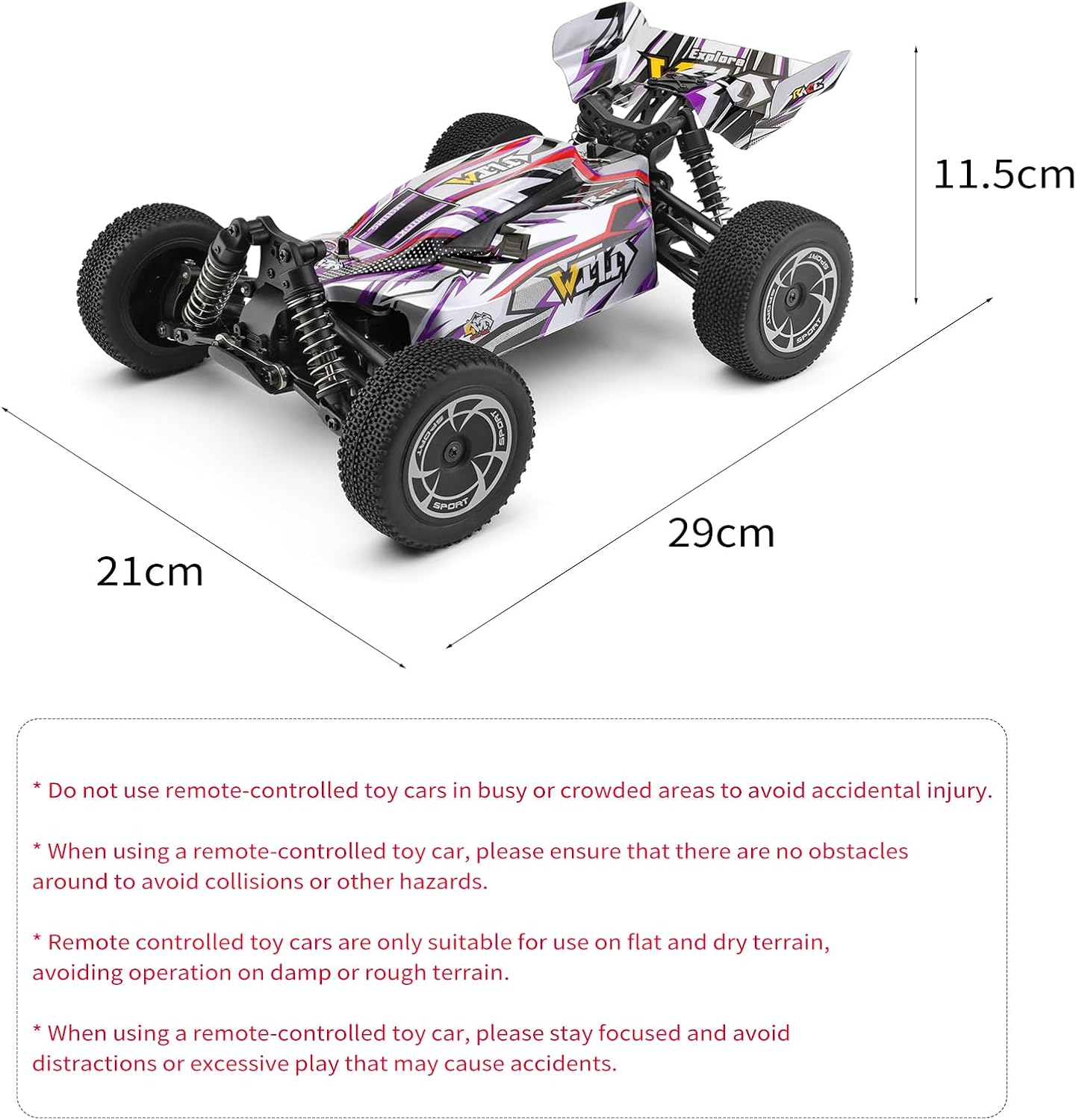
Image: A visual representation of the RC car's dimensions (29cm length, 21cm width, 11.5cm height) and key product information, including model number, battery type, and motor.
10. Warranty and Support
GoolRC products are manufactured to high-quality standards. For warranty information, technical support, or replacement parts, please contact the retailer or visit the official GoolRC website. Keep your purchase receipt as proof of purchase for warranty claims.
For further assistance, please refer to the contact information provided with your purchase or visit the GoolRC store online: GoolRC Official Store.
Related documents144016


Ask a question about this manual
Ask about setup, troubleshooting, compatibility, parts, safety, or missing instructions. Manuals+ will review the question and use this page’s manual context to help answer it.