
ALONEFIRE X88
ALONEFIRE X88 LED Mini Flashlight User Manual
Model: X88
Introduction
Thank you for choosing the ALONEFIRE X88 LED Mini Flashlight. This compact and versatile flashlight is designed for everyday carry (EDC) and emergency use, featuring both a powerful LED main light and a wide-range COB side light. With its magnetic tail, clip, and USB-C rechargeable battery, it offers convenience and reliability for various lighting needs.
Key Features
- Super Bright LED and COB Lights: Features 8 high-powered LEDs for a concentrated beam and a COB light for wide-area illumination.
- 6 Light Modes: Main LED offers Low, High, Strobe, and Super Bright modes. Side COB light offers Strong and Strobe modes.
- Compact and Lightweight: Weighs only 49 grams, made from durable ABS plastic, ideal for portability.
- USB-C Rechargeable: Convenient USB-C charging port for quick and easy recharging in approximately 3-3.5 hours.
- Strong Tail Magnet: Allows the flashlight to attach firmly to iron-containing surfaces for hands-free operation.
- Pocket Clip: The integrated clip enables secure attachment to pockets, belts, hat brims, or backpack straps.
- Soft Light Lampshade: Included accessory to diffuse light, transforming the flashlight into a camping or work light.
Package Contents
Upon opening your ALONEFIRE X88 package, please ensure all the following items are present:
- ALONEFIRE X88 LED Mini Flashlight
- USB-C Charging Cable
- Soft Light Lampshade
- Built-in Rechargeable Battery (pre-installed)

Image: Contents of the ALONEFIRE X88 package, showing the flashlight, USB-C charging cable, and the soft light lampshade.
Setup
Initial Charging
Before first use, it is recommended to fully charge your ALONEFIRE X88 flashlight. The built-in rechargeable battery ensures convenience.
- Locate the USB-C charging port on the flashlight.
- Connect the provided USB-C cable to the flashlight's charging port.
- Plug the other end of the USB-C cable into a compatible USB power source (e.g., wall adapter, computer USB port, power bank).
- The charging indicator light will illuminate (color may vary, refer to product for specific indication) to show charging is in progress.
- Charging typically takes approximately 3 to 3.5 hours for a full charge. The indicator light will change or turn off when charging is complete.

Image: The ALONEFIRE X88 flashlight connected to a USB-C charging cable, illustrating the charging process.
Operating Instructions
Power On/Off and Mode Switching
The ALONEFIRE X88 features a single button for easy operation of both the main LED and side COB lights.
- To Turn On: Press the power button once. The flashlight will turn on in the last used mode (if applicable) or a default mode.
- To Switch Main LED Modes: While the main LED is on, press the power button repeatedly to cycle through Low, High, Strobe, and Super Bright modes.
- To Activate COB Light: From any main LED mode, or when off, press and hold the power button for approximately 2 seconds to switch to the COB light.
- To Switch COB Light Modes: While the COB light is on, press the power button repeatedly to cycle through Strong and Strobe modes.
- To Turn Off: Press the power button once when the desired mode is active for a few seconds, or press and hold the button from any mode to turn off.

Image: Visual representation of the six lighting modes: Main LED (High, Low, Strobe, Super) and COB Light (Strong, Strobe).
Using the Tail Magnet and Pocket Clip
- Tail Magnet: The strong magnet at the tail end allows you to attach the flashlight to metallic surfaces, providing hands-free illumination for tasks like car repairs or working in a workshop.
- Pocket Clip: The integrated clip enables secure attachment to pockets, belts, hat brims, or backpack straps, making it convenient for everyday carry or outdoor activities.

Image: The ALONEFIRE X88 flashlight showcasing its strong tail magnet attached to a metal surface and its side metal pen clip attached to fabric.
Attaching the Lampshade
The included lampshade can be attached to the flashlight to diffuse the light, transforming it into a soft, ambient light source suitable for camping or as a work light.
- Ensure the flashlight is turned off.
- Gently slide the lampshade over the head of the flashlight until it is securely in place.
- Turn on the flashlight to enjoy a wider, softer illumination.
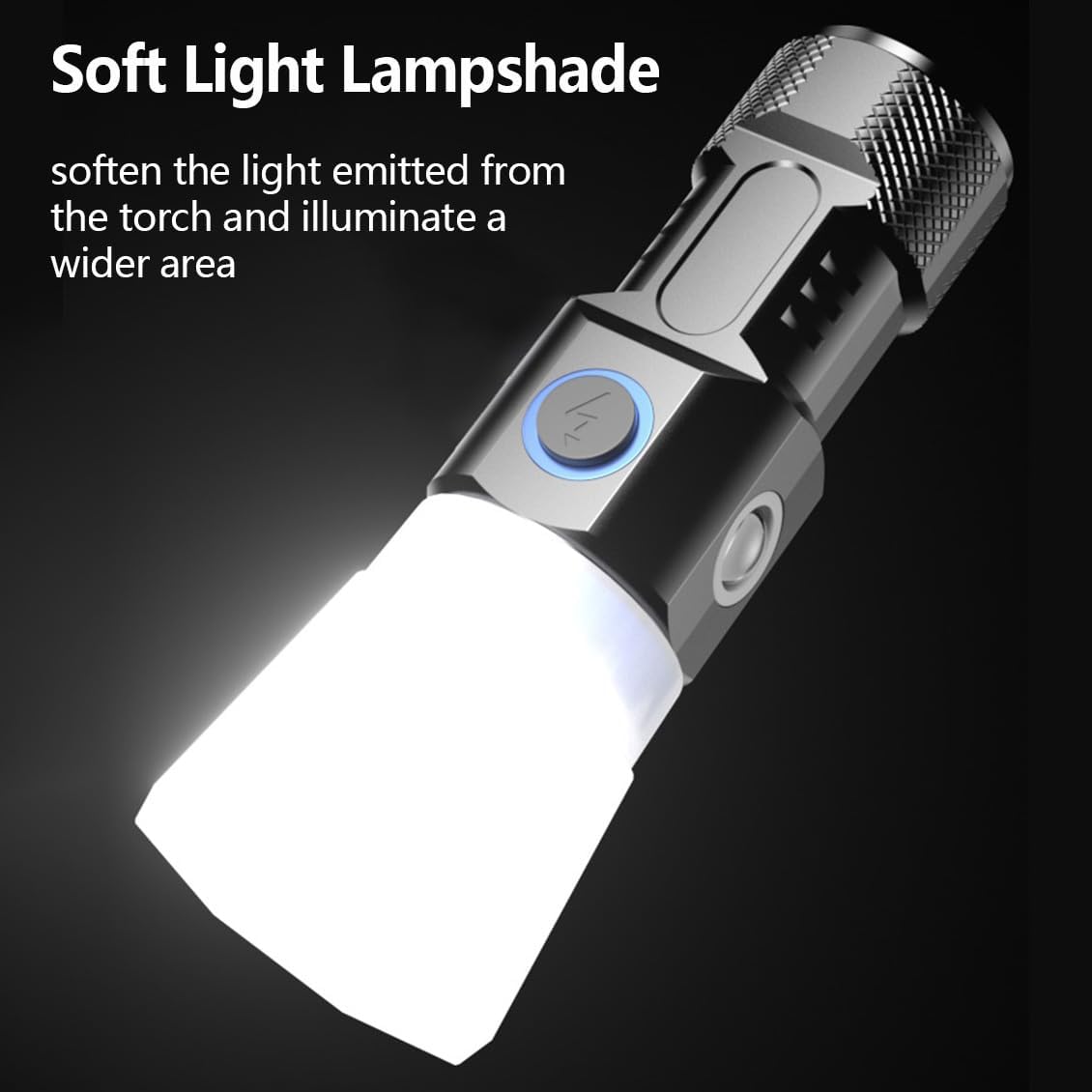
Image: The ALONEFIRE X88 flashlight with the soft light lampshade attached, demonstrating its use as a diffused light source.
Maintenance
- Cleaning: Wipe the flashlight with a soft, damp cloth. Do not use abrasive cleaners or solvents.
- Storage: Store the flashlight in a cool, dry place away from direct sunlight and extreme temperatures. For long-term storage, charge the battery every 3-6 months to maintain its health.
- Water Resistance: The flashlight is water-resistant, but it is not designed for submersion. Avoid exposing it to heavy rain or prolonged water contact.
- Battery Care: The built-in battery is not user-replaceable. Do not attempt to open the flashlight or replace the battery yourself.
Troubleshooting
| Problem | Possible Cause | Solution |
|---|---|---|
| Flashlight does not turn on. | Battery is depleted. | Charge the flashlight using the provided USB-C cable. |
| Light output is dim. | Low battery level. | Recharge the flashlight. |
| Cannot switch modes. | Incorrect button press sequence. | Refer to the "Operating Instructions" section for correct mode switching. Ensure the flashlight is on. |
| Charging indicator not working. | Cable or power source issue; flashlight already fully charged. | Try a different USB-C cable or power source. Confirm if the flashlight is already fully charged. |
If you encounter issues not listed here or if the suggested solutions do not resolve the problem, please contact ALONEFIRE customer support for assistance.
Specifications
| Model Number | X88 |
| Brand | ALONEFIRE |
| Light Source Type | LED (Main) & COB (Side) |
| Brightness | 500 Lumens (White Brightness) |
| Power Source | Battery Powered (Built-in Rechargeable Lithium Ion) |
| Charging Port | USB-C |
| Material | ABS Plastic |
| Item Weight | 49 Grams (1.73 ounces) |
| Dimensions | Approximately 6.22 x 2.24 x 1.73 inches (Package Dimensions) |
| Water Resistance Level | Water Resistant |

Image: The ALONEFIRE X88 flashlight with key dimensions indicated, showing its compact size.
Warranty and Support
For warranty information or technical support regarding your ALONEFIRE X88 LED Mini Flashlight, please refer to the official ALONEFIRE website or contact their customer service directly. Keep your purchase receipt as proof of purchase for any warranty claims.
You can visit the ALONEFIRE Store for more information: ALONEFIRE Official Store
Related documentsX88


Ask a question about this manual
Ask about setup, troubleshooting, compatibility, parts, safety, or missing instructions. Manuals+ will review the question and use this page’s manual context to help answer it.