
SEUNKWANG V97
EWEADN V97 Wireless Gaming Keyboard User Manual
Model: V97 | Brand: SEUNKWANG
Introduction
This manual provides detailed instructions for the setup, operation, and maintenance of your EWEADN V97 Wireless Gaming Keyboard. Designed for versatility, this keyboard offers dual-mode connectivity (Bluetooth 5.0 and 2.4GHz), vibrant RGB backlighting, and an ergonomic design for comfortable use across various platforms.
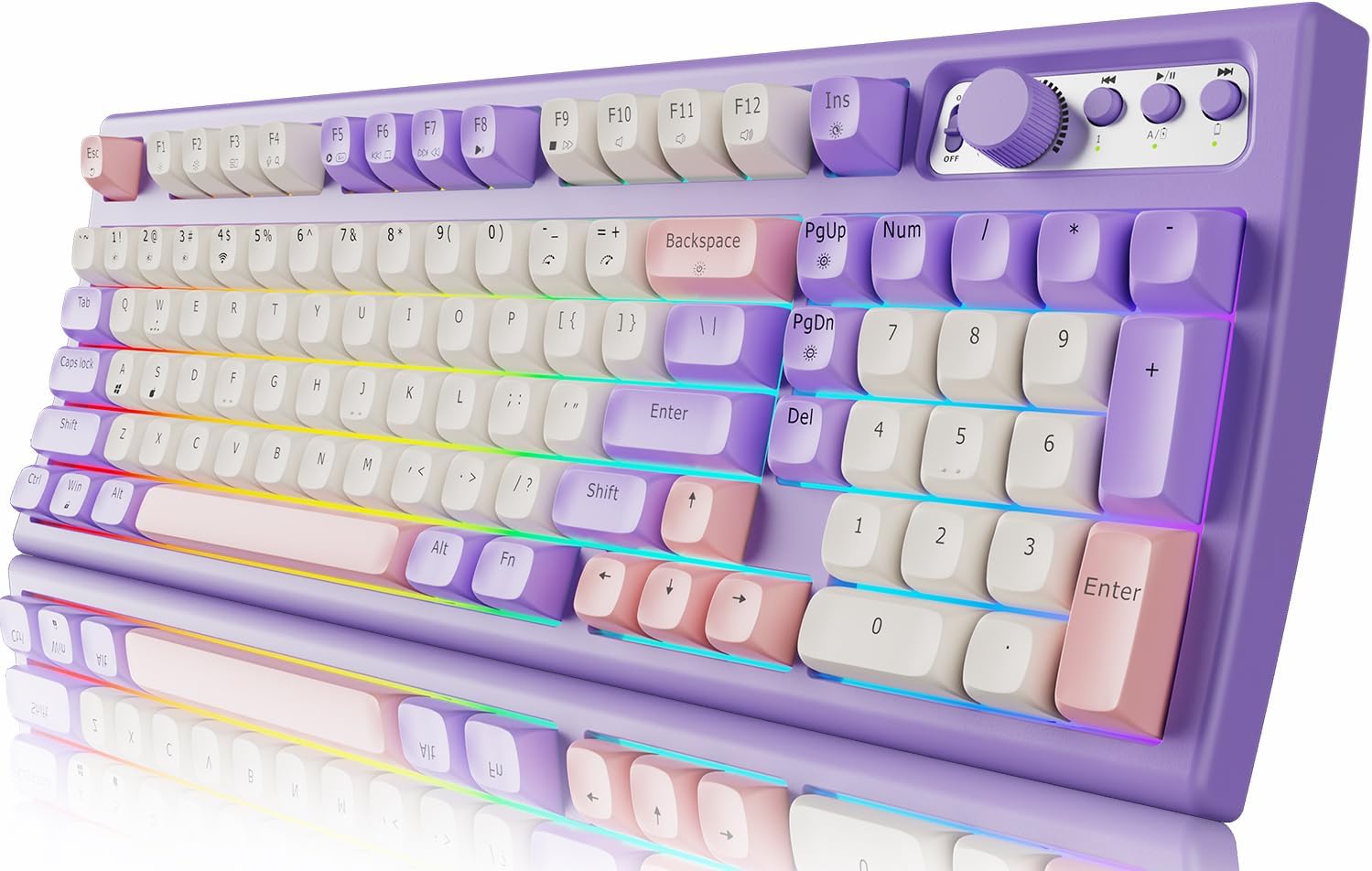
Image: The EWEADN V97 keyboard showcasing its purple, white, and pink keycaps and RGB backlighting.
Safety Information
- Keep the keyboard away from liquids and excessive moisture.
- Avoid extreme temperatures and direct sunlight.
- Do not attempt to disassemble or modify the keyboard. This may void the warranty and cause damage.
- Use only the provided Type-C cable for charging.
- Keep out of reach of children.
Package Contents
- EWEADN V97 Wireless Gaming Keyboard
- USB Type-C Charging Cable
- User Manual (this document)
Setup
Initial Charging
Before first use, fully charge the keyboard using the provided USB Type-C cable. Connect the cable to the keyboard's Type-C port and a compatible USB power source. The power display light will indicate charging status: always on during charging, and off when fully charged. A flashing light indicates low battery.

Image: The EWEADN V97 keyboard highlighting its 2000mAh rechargeable battery, with estimated battery life of 200 hours with backlight off and 30 hours with backlight on.
Connecting Your Keyboard
The EWEADN V97 keyboard supports two connection modes: Bluetooth 5.0 and 2.4GHz wireless.

Image: The keyboard connected to various devices including a PC, laptop, tablet, smartphone, Nintendo Switch, Xbox, and PlayStation, illustrating its broad compatibility.
Bluetooth Connection (BT1/BT2/BT3)
- Ensure the keyboard is powered on.
- Press and hold Fn + 1, Fn + 2, or Fn + 3 to select a Bluetooth channel. The indicator light for the selected channel will blink, indicating pairing mode.
- On your device (PC, Mac, tablet, smartphone), enable Bluetooth and search for "EWEADN V97".
- Select "EWEADN V97" to connect. The indicator light will become solid when connected.
- You can connect up to three Bluetooth devices simultaneously and switch between them using Fn + 1/2/3.
2.4GHz Wireless Connection
- Locate the 2.4G USB dongle, which is magnetically stored in the keyboard's body.
- Plug the USB dongle into an available USB port on your computer.
- Press and hold Fn + 4 on the keyboard. The indicator light for the 2.4G mode will blink, then become solid when connected.

Image: The keyboard highlighting its ergonomic 7-degree tilt angle and the magnetic storage for the 2.4G USB dongle.
System Compatibility
The keyboard is compatible with both Windows and Mac operating systems.
- To enter Windows system mode: Press and hold Fn + A.
- To enter Mac system mode: Press and hold Fn + S.
Operating Instructions
RGB Backlight Control
The V97 keyboard features vibrant RGB backlighting with multiple effects and adjustable brightness/speed.
- Switch Lighting Effect: Press Fn + INS to cycle through 11 pre-set lighting effects.
- Adjust Brightness: Rotate the 2-in-1 knob (in RGB mode) or press Fn + PgUp (increase) / Fn + PgDn (decrease). There are 9 levels of brightness.
- Adjust Speed: Press Fn + -_ (decrease) / Fn + =+ (increase).
- Turn Backlight Off: If desired, the backlight can be turned off completely.

Image: The keyboard illustrating the FN key combinations for controlling RGB lighting effects, brightness, and speed.
Volume & Light 2-in-1 Knob
The multifunctional knob allows for quick adjustments of both volume and lighting.
- Switch Modes: Press the knob for approximately 5 seconds to switch between Multimedia Mode (volume control) and RGB Mode (lighting control).
- Multimedia Mode:
- Rotate the knob to adjust volume (+/-).
- Press the knob to mute/unmute.
- RGB Mode:
- Rotate the knob to adjust brightness (+/-).
- Press the knob to switch lighting effects.

Image: Close-up of the 2-in-1 knob, detailing its functions for multimedia control (mute/unmute, volume +/-) and RGB lighting control (switch effect, brightness +/-).
Maintenance
- Cleaning: Use a soft, dry cloth to wipe the keyboard surface. For deeper cleaning, gently remove keycaps (if applicable and designed for removal) and use compressed air to clear debris. Avoid using harsh chemicals or abrasive materials.
- Battery Care: To prolong battery life, avoid fully discharging the keyboard frequently. Charge it when the low battery indicator flashes. Store the keyboard in a cool, dry place when not in use for extended periods.
- Keycap Durability: The keyboard features durable PBT keycaps designed to resist wear and fading.

Image: The keyboard showcasing its high-quality PBT keycaps, noting their fine matte texture and resistance to wear and fading.
Troubleshooting
| Issue | Possible Cause | Solution |
|---|---|---|
| Keyboard not connecting via Bluetooth/2.4GHz | Low battery; incorrect pairing mode; device Bluetooth/USB issue. | Ensure keyboard is charged. Verify correct pairing mode (Fn + 1/2/3/4). Restart device's Bluetooth or try a different USB port for the dongle. |
| Keys are unresponsive or sticky | Debris under keycap; mechanical issue. | Clean under the keycap with compressed air. If issue persists, contact customer support. |
| Backlight not working or inconsistent | Backlight turned off; low battery; software glitch. | Ensure backlight is on and brightness is adjusted. Charge the keyboard. Restart the keyboard. |
| Short battery life | Frequent use of RGB backlight; aging battery. | Reduce backlight brightness or turn it off when not needed. Ensure full charge cycles. |
Specifications
| Feature | Detail |
|---|---|
| Model Number | V97 |
| Connectivity Technology | Bluetooth 5.0, 2.4GHz Wireless |
| Keyboard Description | Gaming, Office, Home Use, Membrane, Wireless |
| Number of Keys | 97 |
| Backlighting | RGB (16.8 Million Colors) |
| Battery | 2000mAh Lithium Ion (included) |
| Battery Life (Backlight OFF) | Approx. 200 hours |
| Battery Life (Backlight ON) | Approx. 30 hours |
| Keycap Material | PBT |
| Ergonomics | Curved Body, 7-degree Tilt Angle, Stepped Keycap Layout |
| Product Dimensions | 15.94 x 5.71 x 1.58 inches |
| Item Weight | 1.81 pounds |
| Manufacturer | EWEADN |
| First Available Date | July 1, 2024 |

Image: The 97% layout of the keyboard, showing its dimensions (407mm length, 146mm width, 47mm height) and weight (1003g).
Warranty and Support
The EWEADN V97 keyboard comes with a 24-month brand support. For any technical assistance, troubleshooting, or warranty claims, please contact SEUNKWANG customer support through the retailer's platform or the official brand channels.
Related documentsV97

Ask a question about this manual
Ask about setup, troubleshooting, compatibility, parts, safety, or missing instructions. Manuals+ will review the question and use this page’s manual context to help answer it.