
1. Introduction
This manual provides comprehensive instructions for the SYNCWIRE MagSafe Car Mount, Model SW2010. Please read this guide thoroughly before installation and use to ensure optimal performance and safety. This device is designed to securely hold your smartphone in various vehicle environments.
What's in the Box
- MagSafe Car Mount x 1
- Metal Ring x 2 (White & Black)
- Positioner for Metal Ring x 1
- User Guide x 1
- Warranty Card x 1
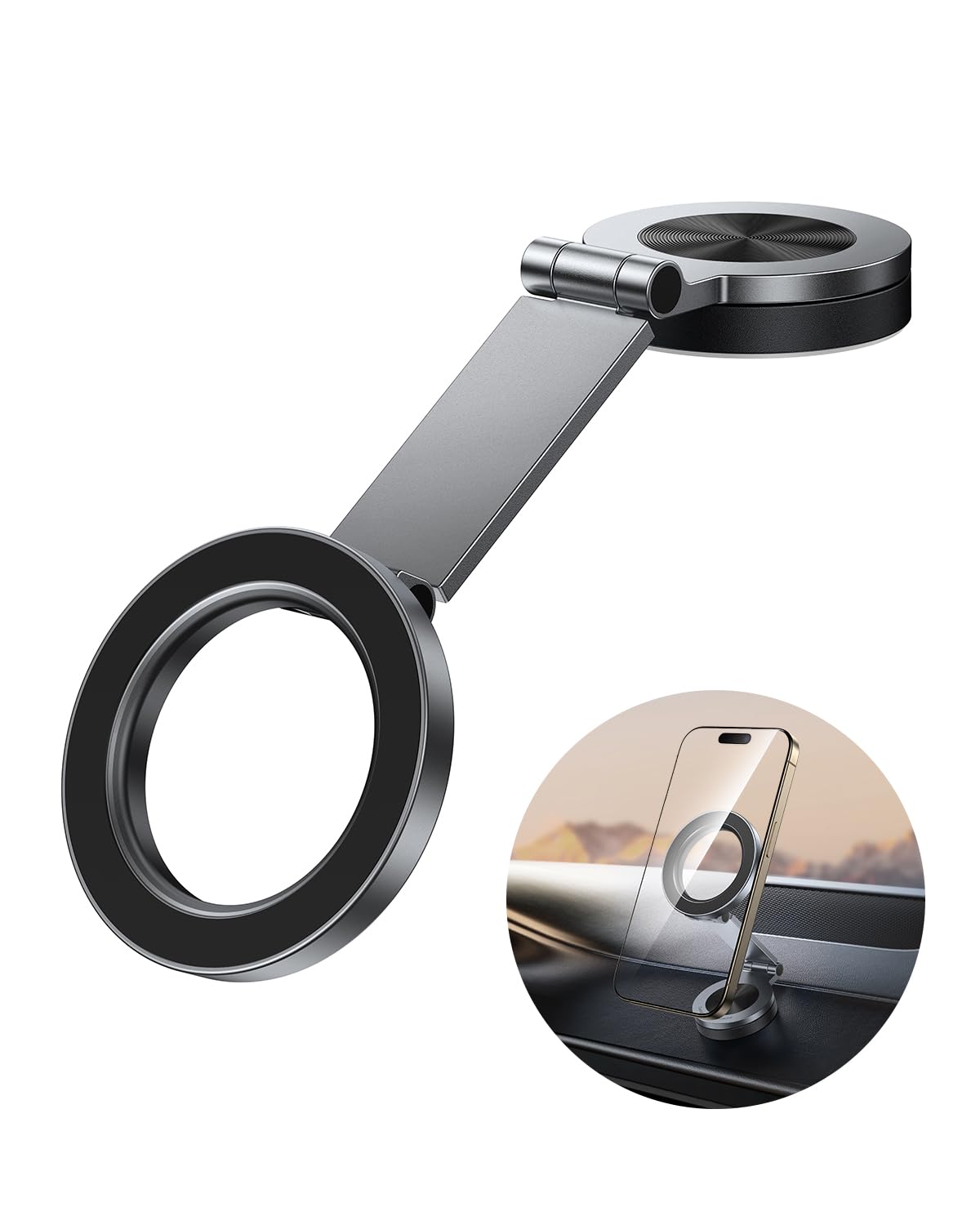
Figure 1: SYNCWIRE MagSafe Car Mount (Model SW2010)
2. Safety Information
- Do not obstruct your view of the road or vehicle controls when installing the mount.
- Ensure the mount is securely attached before placing your device.
- Avoid adjusting the mount or your phone while driving to prevent distractions.
- Keep out of reach of children.
- Do not expose the adhesive to extreme temperatures outside the specified range (-40°F to +300°F) during installation.
3. Product Features
- 360° Rotation & Two-Axis Foldable Design: The mount features a 360° rotatable base and a two-axis adjustable aluminum alloy arm, allowing for flexible angle adjustments. It can be fixed on various surfaces such as car dashboards, windshields, Tesla screens, and desktops. The foldable design allows for discreet storage when not in use.
- Seamless Magnetic Connection: Designed for quick, one-handed operation, providing a convenient and compact solution for securing your device.
- High-quality Metal Craftsmanship: The swivel arm is constructed from high-hardness aluminum alloy, precision CNC processed for durability and resistance to deformation. The anodized surface provides a delicate metal texture.
- Optimal Magnetic Balance: Utilizes powerful N52 neodymium magnets with precisely adjustable magnetic force to ensure a secure connection for your phone.
- Ring Ventilation Design: Features a ring vent design to help dissipate heat from the phone by guiding cool air. Compatible with Pop Grips with MagSafe functionality without needing to remove the magnetic ring.
- Genuine 3M Adhesive: Equipped with genuine 3M GPH-160 adhesive for enhanced stability, maintaining adhesion in temperatures from -40°F to +300°F. Spare adhesive pads are included for replacement.
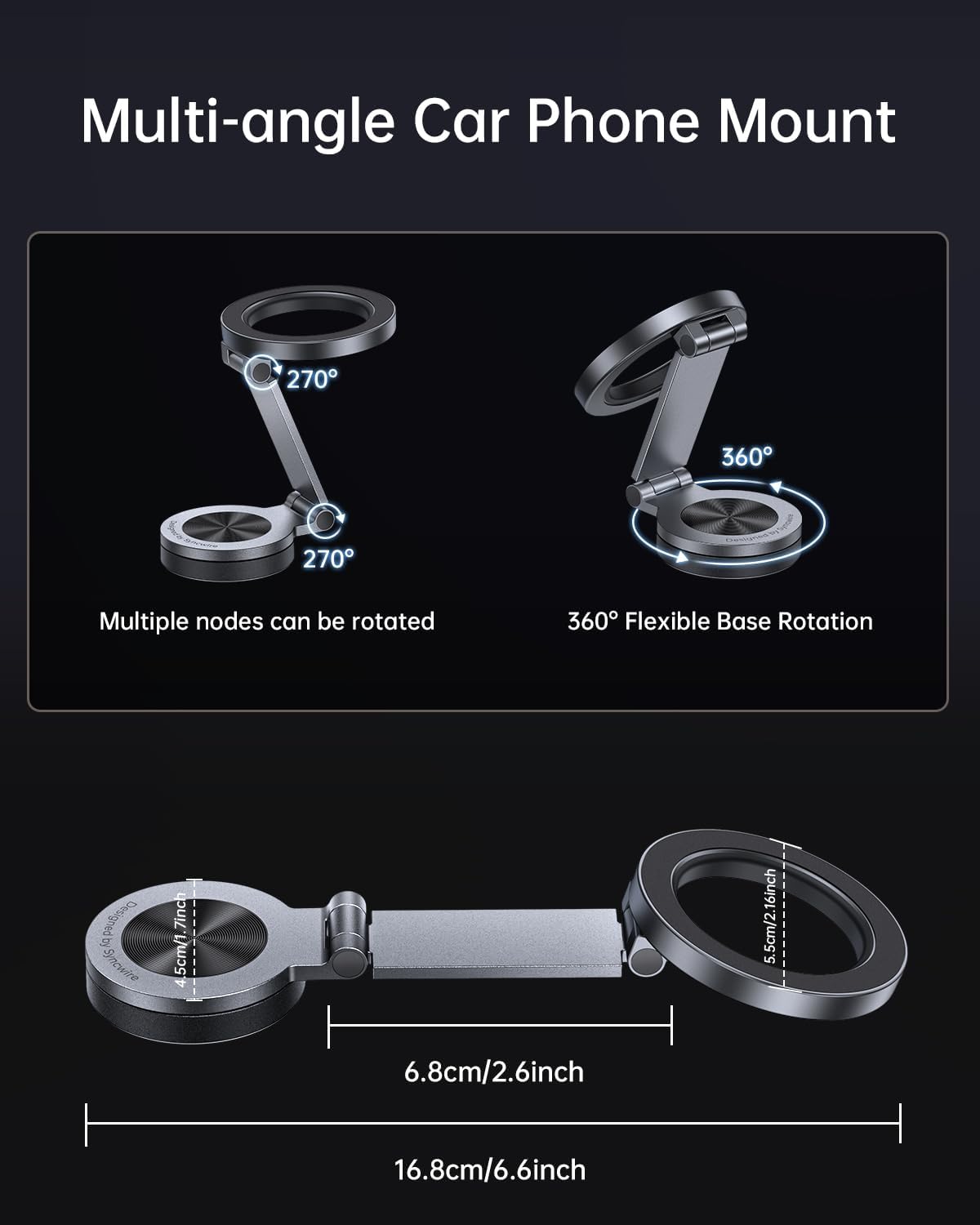
Figure 2: Multi-Angle and Rotational Capabilities

Figure 3: Upgraded Axle Anti-loosening Mechanism

Figure 4: Component Breakdown
Video 1: Demonstrates the 360° rotation and dual-axis foldable design of the MagSafe car mount, showing its flexibility in various car settings.
Video 2: Highlights the premium metal craftsmanship of the car mount, emphasizing its beautiful and durable construction.
Video 3: Shows the car mount's compatibility with PopSockets, maintaining full magnetic performance.
Video 4: Illustrates the super strong magnetic attraction of the MagSafe car holder, ensuring secure phone attachment.
4. Setup and Installation
Proper installation is crucial for the stability and longevity of your car mount. Follow these steps carefully:
- Clean the Surface: Identify a smooth, flat area on your dashboard or windshield for installation. Use wet wipes to clean the target area thoroughly, rubbing vigorously and repeatedly at least 10 times.
- Allow to Dry: Wait for approximately 15 seconds after wiping to ensure the surface is completely dry and free of moisture.
- Apply Adhesive: Remove the white film from the 3M adhesive pad on the base of the mount. Press the mount firmly onto the cleaned surface for 10 seconds.
- Curing Time: Allow the adhesive to set for a minimum of 5 hours before placing any weight on the mount or using it. This ensures maximum adhesion.
Important Notes for Adhesive Application:
- The included adhesive is genuine 3M GPH-160, designed for strong, long-lasting adhesion in various temperatures.
- Ensure the surface is clean and dry before application.
- Pressing firmly for 10 seconds and allowing 5 hours for curing are critical steps for optimal adhesion.
- Spare adhesive pads are provided for future re-installation if needed.

Figure 5: Easy Installation Steps

Figure 6: Important Adhesive Notes
Video 5: Provides a general overview of the SYNCWIRE MagSafe Car Mount, including aspects of its installation and use.
5. Operating Instructions
Using your SYNCWIRE MagSafe Car Mount is simple and intuitive:
- Attaching Your Phone: Align your MagSafe-compatible phone or phone case with the magnetic ring on the mount. The powerful N52 magnets will securely snap your phone into place.
- Adjusting the Angle: Utilize the two-axis adjustable aluminum alloy arm and the 360° rotatable base to position your phone at the desired viewing angle (portrait or landscape). The anti-loosening axle ensures the chosen angle remains stable.
- Detaching Your Phone: Gently pull your phone away from the magnetic ring to detach it. The one-handed operation allows for quick removal.
- Folding for Storage: When not in use, the mount can be folded flat to create a neater environment and minimize obstruction.

Figure 7: Seamless Magnetic Connection

Figure 8: Upward View on Dashboard

Figure 9: Versatile Placement Options
6. Compatibility
The SYNCWIRE MagSafe Car Mount is designed for broad compatibility:
- MagSafe Compatible Devices: Works with iPhone 12, 12 Pro, 12 Pro Max, 12 Mini, iPhone 13, 13 Pro, 13 Pro Max, 13 Mini, iPhone 14, 14 Pro, 14 Pro Max, 14 Plus, iPhone 15, 15 Pro, 15 Pro Max, 15 Plus, iPhone 16, 16 Pro, 16 Pro Max, 16 Plus, iPhone 17, 17 Pro, 17 Pro Max, 17 Air, and any MagSafe or MagSoft cases.
- Non-MagSafe Devices: For Android phones (Samsung, HTC, Google, etc.) and older iPhone models (iPhone 11 and earlier) or non-MagSafe cases, use the included metal rings. Affix a metal ring to the back of your phone case to enable magnetic attachment.

Figure 10: Device Compatibility

Figure 11: Optimizing Magnetic Force
7. Maintenance
To maintain the appearance and functionality of your car mount:
- Wipe the mount regularly with a soft, damp cloth to remove dust and grime.
- Avoid using harsh chemicals or abrasive cleaners, as these can damage the finish.
- Ensure the magnetic surface is clean for optimal phone grip.
8. Troubleshooting
If you encounter any issues with your SYNCWIRE MagSafe Car Mount, refer to the following:
| Problem | Possible Cause | Solution |
|---|---|---|
| Mount not adhering securely to the dashboard. | Improper surface preparation; insufficient curing time; unsuitable surface material (e.g., soft leather, suede, highly textured). | Ensure the surface is clean, dry, and flat before application. Press firmly for 10 seconds and wait at least 5 hours before use. Use on recommended surfaces (plastic, glass, wood, metal). Utilize a spare adhesive pad if necessary. |
| Phone detaches easily from the mount. | Phone/case not MagSafe compatible; metal ring improperly placed; magnetic surface is dirty. | Ensure your phone or case is MagSafe compatible. If not, use the included metal ring and position it correctly on the outside of your phone case. Clean the magnetic surface of both the mount and your phone/ring. |
| Adjustable arm is too stiff or difficult to move. | Designed for stability, the arm may feel stiff initially. | The arm's stiffness is intentional to maintain position. Apply gentle, consistent force to adjust. Avoid excessive force that could dislodge the mount if not fully cured. |
9. Specifications
| Feature | Detail |
|---|---|
| Model Number | SW2010 |
| Package Dimensions | 7.99 x 7.87 x 0.83 inches |
| Item Weight | 4.2 ounces |
| Special Features | Adjustable, Foldable, Lightweight, One-Hand Operation, Rotatable |
| Mounting Type | Dashboard |
| Adhesive Type | Genuine 3M GPH-160 |
| Temperature Resistance | -40°F to +300°F |
| Magnetic Strength | N52 Neodymium Magnets |
| Color | Space Gray |
10. Warranty and Support
SYNCWIRE products are manufactured to high-quality standards. This product comes with a limited warranty against defects in materials and workmanship. Please refer to the included Warranty Card for specific terms and conditions, including warranty period and how to obtain service.
For technical support, product inquiries, or warranty claims, please contact SYNCWIRE customer service through the contact information provided on the Warranty Card or visit our official website.