
1. Introduction
This manual provides detailed instructions for the installation, operation, and maintenance of your Eureka Forbes Smart Air Purifier 500. Please read this manual thoroughly before using the appliance to ensure safe and efficient operation.
The Eureka Forbes Smart Air Purifier 500 is designed to improve indoor air quality by removing various airborne pollutants. It features WiFi connectivity for smart control, a 360° air intake system, and a 4-stage advanced purification process including True HEPA H13 and Activated Carbon filters.
2. Safety Information
Important Safety Instructions:
- Read all instructions before using the appliance.
- Do not operate the air purifier with a damaged cord or plug.
- Keep the air purifier away from water or other liquids.
- Ensure proper ventilation around the unit.
- Unplug the appliance before cleaning or performing any maintenance.
- This appliance is for indoor use only.
- Do not block air inlets or outlets.
- Keep out of reach of children.
3. Package Contents
Verify that all items are present in the package:
- 1 x Eureka Forbes Smart Air Purifier 500 Unit
- 1 x Power Cable
- 1 x Integrated Filter (Pre-installed or separate)
- 1 x User Manual (This document)
4. Product Features
The Eureka Forbes Smart Air Purifier 500 incorporates several advanced features for effective air purification:
- WiFi Enabled Smart Control: Manage the air purifier remotely via a dedicated smartphone application.
- Surround 360° Air Intake Technology: Draws air from all directions for comprehensive purification.
- Real-time PM 2.5 Digital Display & VOC Indicators: Provides immediate air quality insights.
- 4-Stage Advanced Purification System: Includes Pre-filter, Activated Carbon Filter, True H13 HEPA Filter, and Plasma Filtration.
- True HEPA H13 Filter: Captures 99.97% of particles as small as 0.1 µm, including pollen, mold spores, and microbes.
- Activated Carbon Filter: Absorbs odors, VOCs, and smoke.
- Plasma Filtration: Helps eliminate harmful microbes.
- Rapid Air Purification: Cleans 90% of air in a standard room in approximately 10 minutes.
- Child Lock & Sleep Mode: Ensures safety and quiet operation.
- Customizable Fan Speeds & Timer: 12 fan speed levels and 1-12 hour timer settings.
5. Setup Guide
5.1 Unpacking and Placement
- Carefully remove the air purifier from its packaging.
- Place the unit on a firm, level surface. Ensure there is at least 20 cm (8 inches) of clear space around all sides for optimal air intake and circulation.
- Keep the unit away from direct sunlight, heat sources, and moisture.
5.2 Filter Installation (if not pre-installed)
The integrated filter system is crucial for the air purifier's performance. If the filter is not pre-installed or needs to be replaced, follow these steps:
- Unplug the air purifier from the power outlet.
- Locate the filter compartment cover, usually at the bottom or back of the unit. Refer to the diagram below for typical filter access.
- Remove the cover and carefully insert the integrated filter, ensuring it is seated correctly. The filter typically has a specific orientation; follow any arrows or markings on the filter or unit.
- Replace the filter compartment cover securely.

Image 1: Exploded view of the 4-stage advanced purification system, showing the Pre-filter, Activated Carbon Filter, True H13 HEPA Filter, and Plasma Filtration components.
5.3 Power Connection
- Connect the power cable to the air purifier's power inlet.
- Plug the other end of the power cable into a suitable electrical outlet.
5.4 App Setup and WiFi Connectivity
To utilize the smart control features, download the Eureka Forbes Smart app on your smartphone and connect the air purifier to your home WiFi network.
- Download the "Eureka Forbes Smart" app from your device's app store.
- Open the app and follow the on-screen instructions to create an account or log in.
- Add your new air purifier device within the app. The app will guide you through the WiFi connection process, which typically involves putting the air purifier into pairing mode (refer to the unit's display or app instructions for specific steps).
- Once connected, you can control the air purifier remotely and monitor air quality.

Image 2: The Eureka Forbes Smart app interface on a smartphone, showing real-time indoor air quality (PM2.5) and control options for power, mode, timer, and settings.
6. Operating Instructions
6.1 Control Panel Overview
The air purifier features a touch control panel with a digital display for easy operation. The display shows real-time PM 2.5 levels and VOC color indicators.
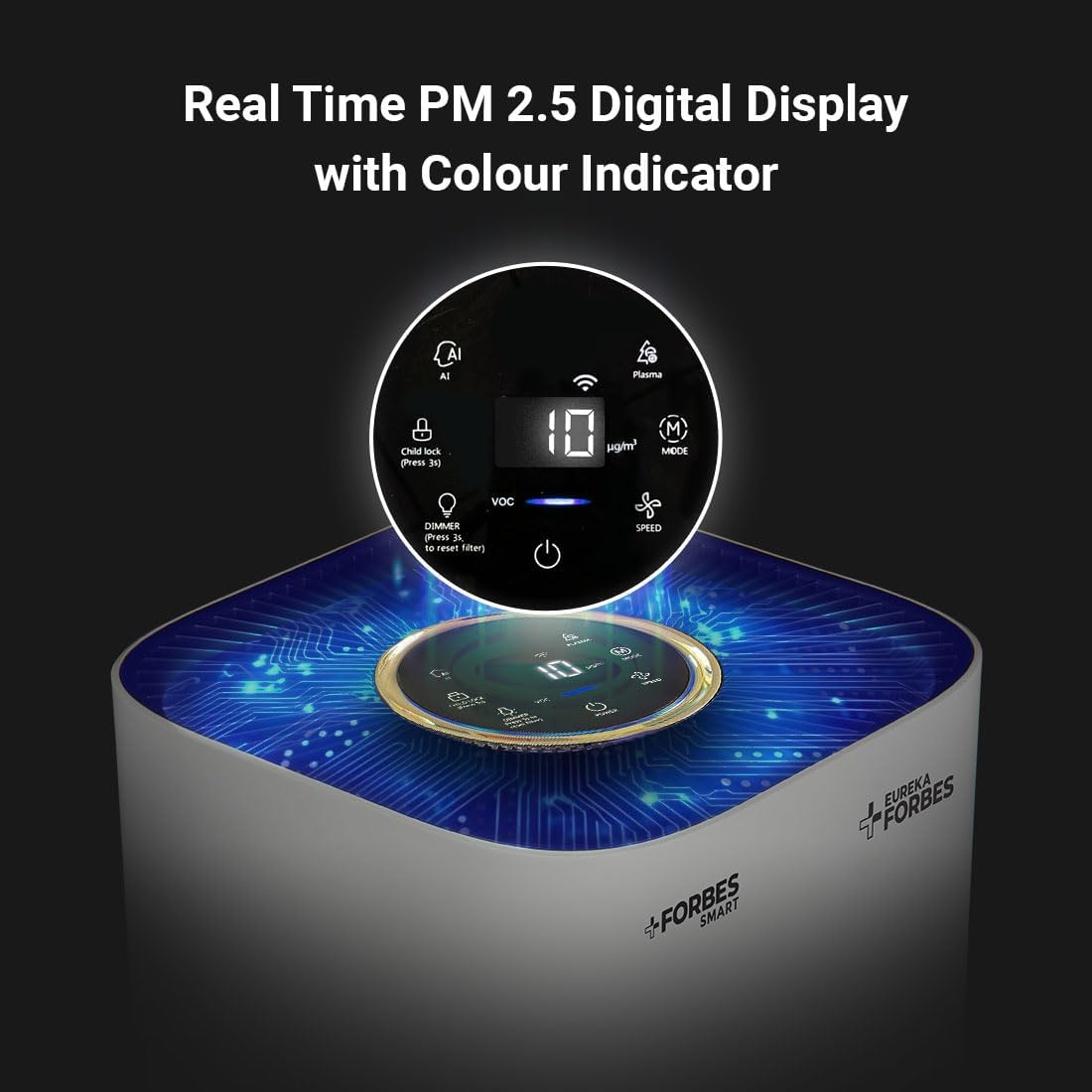
Image 3: The top control panel of the air purifier, featuring a digital PM 2.5 display, VOC indicator, and touch controls for various functions like AI mode, Plasma, Child Lock, Filter Reset, Power, Mode, and Fan Speed.
6.2 Power On/Off
Press the Power button on the control panel or in the app to turn the unit on or off.
6.3 Mode Selection
The air purifier offers three operating modes:
- AI Mode: Automatically adjusts fan speed based on detected air quality.
- Sleep Mode: Operates at the lowest fan speed with reduced display brightness for quiet operation during rest.
- Manual Mode: Allows you to manually select the desired fan speed.
Press the Mode button on the control panel or select the mode in the app to cycle through these options.
6.4 Fan Speed Adjustment
In Manual Mode, you can adjust the fan speed. The unit offers 12 fan speed levels.
Press the Speed button on the control panel or use the fan speed slider in the app to increase or decrease the fan speed.
6.5 Timer Settings
Set the air purifier to operate for a specific duration (1 to 12 hours).
Press the Timer button on the control panel or select the timer option in the app to set the desired operating time. The unit will automatically turn off once the set time expires.
6.6 Child Lock Function
To prevent unintended adjustments, activate the Child Lock.
Press and hold the Child Lock button (usually indicated by a lock icon) on the control panel for a few seconds until the indicator lights up. Repeat the action to deactivate.
6.7 Real-time Air Quality Display
The digital display shows the current PM 2.5 concentration in µg/m³. The VOC indicator changes color to reflect the level of volatile organic compounds in the air:
- Green: Good air quality
- Yellow: Moderate air quality
- Red: Poor air quality
7. Maintenance
Regular maintenance ensures optimal performance and extends the lifespan of your air purifier.
7.1 Filter Replacement
The integrated filter has a limited lifespan and needs periodic replacement. The app or the unit's display will indicate when a filter change is required (e.g., "Filter Reset" indicator).
- Unplug the air purifier from the power outlet.
- Remove the filter compartment cover.
- Carefully remove the old filter and dispose of it according to local regulations.
- Unpack the new integrated filter and insert it into the compartment, ensuring correct orientation.
- Replace the filter compartment cover securely.
- Plug in the air purifier. Press and hold the Filter Reset button on the control panel for a few seconds to reset the filter life indicator.
For purchasing genuine replacement filters, please visit the official Eureka Forbes website or authorized service centers.
7.2 Cleaning the Unit
- Unplug the air purifier before cleaning.
- Wipe the exterior of the unit with a soft, dry cloth. Do not use abrasive cleaners or solvents.
- Gently vacuum the air intake and outlet grilles to remove dust accumulation.
- Do not immerse the unit in water or spray liquids directly onto it.
8. Troubleshooting
If you encounter issues with your air purifier, refer to the following common problems and solutions:
| Problem | Possible Cause | Solution |
|---|---|---|
| Unit does not power on. | No power supply; Power cable not connected; Power outlet faulty. | Check if the power cable is securely plugged in. Ensure the power outlet is functional. Try a different outlet. |
| Poor air purification performance. | Filter is dirty or expired; Air inlets/outlets blocked; Room size exceeds coverage area. | Check and replace the filter if necessary. Ensure no obstructions around the unit. Verify the unit is suitable for your room size (up to 670 sq ft). |
| WiFi connection issues. | Incorrect WiFi password; Router too far; App not configured correctly. | Ensure correct WiFi password. Move the unit closer to the router. Reconfigure WiFi settings in the app. Ensure your router is on a 2.4GHz network. |
| Unusual noise during operation. | Filter not installed correctly; Foreign object inside; Unit on an uneven surface. | Check filter installation. Unplug and inspect for foreign objects. Place the unit on a stable, level surface. |
| Filter reset indicator remains on after replacement. | Filter reset button not pressed or held long enough. | After replacing the filter, press and hold the Filter Reset button for several seconds until the indicator turns off. |
If the problem persists, contact customer support for assistance.
9. Specifications
Detailed technical specifications for the Eureka Forbes Smart Air Purifier 500:
| Feature | Detail |
|---|---|
| Brand | Eureka Forbes |
| Model Number | GAPDF500F1SM00 |
| Filter Type | True HEPA (H13), Activated Carbon, Pre-filter |
| Purification Stages | 4-Stage (Pre-filter, Activated Carbon, True H13 HEPA, Plasma Filtration) |
| Coverage Area | Up to 670 Sq Ft. |
| Control Method | Mobile Application, Touch Control |
| Connectivity | WiFi Enabled |
| Noise Level | 66 Decibels (Max) |
| Number of Power Levels | 12 Fan Speeds |
| Timer Settings | 1 to 12 Hours |
| Display Type | Digital (PM 2.5), VOC Color Indicator |
| Color | White |
| Item Weight | 6 kg 300 g |
| Item Dimensions (LxWxH) | 28 x 28 x 63 Centimeters |
| Country of Origin | China |

Image 4: The Eureka Forbes Smart Air Purifier 500 with its dimensions indicated: 28 cm width, 28 cm depth, and 63 cm height.
10. Warranty and Support
10.1 Warranty Information
Your Eureka Forbes Smart Air Purifier 500 comes with a 1-year comprehensive warranty from the date of purchase. This warranty covers manufacturing defects and malfunctions under normal use. Consumables like filters are not covered under this warranty.
For detailed warranty terms and conditions, please refer to the warranty card included with your product or visit the official Eureka Forbes website.
10.2 Customer Support
For any queries, technical assistance, or service requests, please contact Eureka Forbes customer support:
- Customer Support Hours: 8 AM to 8 PM (12 hours)
- Contact Number: Refer to the official Eureka Forbes website or product packaging for the most current contact details.
- Service Network: Eureka Forbes maintains a wide service network across 700+ cities and 17,000+ pincodes.

Image 5: A Eureka Forbes service representative highlighting the 1-year comprehensive warranty, 12-hour customer support, and extensive service network across India.


