
1. Introduction
The ALPHAGEAR Zulu Smartwatch is designed to integrate style with comprehensive wellness and communication features. This manual provides detailed instructions to help you set up, operate, and maintain your smartwatch, ensuring you get the most out of its capabilities.
2. What's in the Box
- ALPHAGEAR Zulu Smartwatch
- USB Charging Cable
- Extra Black Watch Band
- 2x Screen Protectors
- 2x Screwdrivers (for band replacement)
3. Product Overview
Familiarize yourself with the components of your ALPHAGEAR Zulu Smartwatch.

Figure 3.1: Front view of the ALPHAGEAR Zulu Smartwatch, displaying time, date, and activity metrics on its 1.19-inch AMOLED screen.
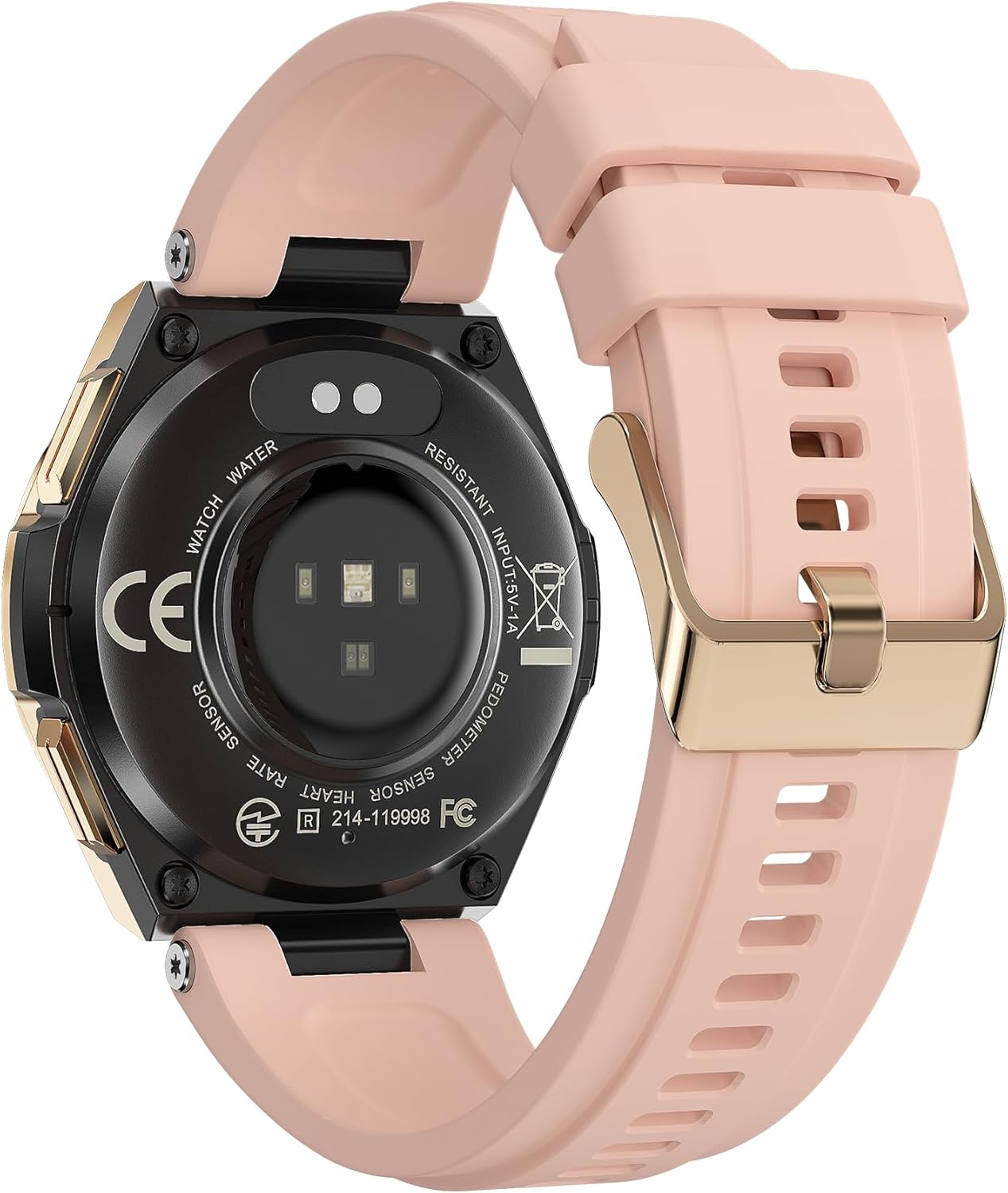
Figure 3.2: Rear view of the ALPHAGEAR Zulu Smartwatch, highlighting the optical sensors for heart rate and blood oxygen monitoring, along with charging contacts.
4. Setup
4.1 Charging the Smartwatch
Before initial use, fully charge your smartwatch. Connect the provided USB charging cable to the charging contacts on the back of the watch and to a USB power source. A full charge typically takes 2 hours and provides up to 10 days of usage.

Figure 4.1: The smartwatch display indicating a full charge and highlighting its extended battery life.
4.2 App Installation and Pairing
- Download the App: Search for the official ALPHAGEAR companion app on the Apple App Store (for iOS devices) or Google Play Store (for Android devices).
- Create Account: Open the app and follow the on-screen instructions to create an account or log in.
- Pair Device: Enable Bluetooth on your smartphone. In the app, navigate to 'Add Device' or 'Pair Smartwatch' and select 'ALPHAGEAR Zulu' from the list of available devices. Confirm the pairing request on both your phone and the smartwatch.

Figure 4.2: The smartwatch seamlessly integrates with popular health and fitness applications.
4.3 Band Installation/Replacement
The ALPHAGEAR Zulu Smartwatch comes with an extra band and screwdrivers for replacement. To change the band, use the provided screwdrivers to carefully remove the screws securing the current band. Attach the new band and secure it with the screws.
5. Operating the Smartwatch
5.1 Basic Navigation
- Touchscreen: Swipe left/right, up/down to navigate through menus and features. Tap to select.
- Side Buttons: Use the physical buttons on the side for quick access to specific functions or to return to the home screen. Refer to the on-screen prompts for specific button functionalities.
5.2 Call and Notification Features
Once paired with your smartphone, the Zulu Smartwatch allows you to make and receive calls directly from your wrist. It also displays notifications from various apps (e.g., Facebook, WhatsApp, Twitter).
- Making Calls: Access the dialer or contact list on the smartwatch to initiate a call. Ensure your watch's audio Bluetooth is successfully connected.
- Receiving Calls: The watch will vibrate and display caller ID for incoming calls. You can answer or reject calls directly from the watch.
- Notifications: Incoming messages and app alerts will appear on the screen and cause the watch to vibrate.
5.3 Customizing Watch Faces
The ALPHAGEAR Zulu Smartwatch offers over 50 customizable watch faces. You can change them directly on the watch or through the companion app to match your style or display preferred information.

Figure 5.1: A selection of customizable watch faces available for the ALPHAGEAR Zulu Smartwatch.
6. Wellness Tracking
The Zulu Smartwatch provides comprehensive health monitoring features to help you track your wellness. Note: These features are for informational purposes only and cannot be compared with hospital equipment; they are not medical devices.
- 24-Hour Heart Rate Monitoring: Continuously tracks your heart rate, providing insights into your body's response to activity and rest.
- Blood Pressure Monitoring: Provides estimated blood pressure readings.
- Blood Oxygen (SpO2) Monitoring: Measures your blood oxygen saturation levels.
- Sleep Quality Monitoring: Tracks your sleep stages (light, deep, REM) and provides a sleep quality score.
- Menstrual Cycle Tracker: Helps women track their menstrual cycles.

Figure 6.1: The smartwatch displaying sleep tracking data, including total sleep duration and quality metrics.

Figure 6.2: The smartwatch interface showing continuous heart rate tracking with a graphical representation of heart rate over time.
7. Sports Modes and Fitness Tracking
The Zulu Smartwatch supports over 50 sports modes to accurately track your physical activities and fitness progress.
- Supported Modes: Walking, weightlifting, running, basketball, football, cycling, rope skipping, mountain climbing, and many more.
- Fitness Metrics: Tracks step counts, calories burned, distance, and active minutes.
All your fitness data can be viewed in detail through the companion app, which can also integrate with Apple Health, Google Fit, and Samsung Health.
8. Other Features
The ALPHAGEAR Zulu Smartwatch includes additional useful functions:
- Weather Forecasts: Get real-time weather updates.
- Alarm Clocks: Set alarms directly from your wrist.
- Camera Controller: Remotely control your smartphone's camera.
- Music Control: Manage music playback on your smartphone.
- Sedentary Reminders: Receive alerts to encourage movement after periods of inactivity.
9. Maintenance
9.1 Cleaning
Regularly clean your smartwatch and band to ensure optimal performance and hygiene. Use a soft, damp cloth to wipe the screen and watch body. For the silicone band, mild soap and water can be used. Ensure the watch is dry before wearing or charging.
9.2 Water Resistance
The ALPHAGEAR Zulu Smartwatch is designed to withstand daily water exposure such as hand washing and jogging in the rain. It is not suitable for swimming for extended periods (more than 15-30 minutes), diving, or use in steam baths.
10. Troubleshooting
If you encounter issues with your ALPHAGEAR Zulu Smartwatch, refer to the following common solutions:
- Watch not turning on: Ensure the watch is fully charged. Connect it to the charging cable and a power source.
- Unable to pair with phone:
- Ensure Bluetooth is enabled on your phone and the watch.
- Restart both your phone and the smartwatch.
- Make sure the smartwatch is within Bluetooth range of your phone.
- Check if the app has necessary permissions on your phone.
- Notifications not appearing:
- Verify that the watch is successfully paired and connected to your phone.
- Check notification settings within the companion app and your phone's system settings.
- Inaccurate health data: Ensure the watch is worn snugly on your wrist, not too tight or too loose. Clean the sensors regularly. Remember, the data is for reference and not for medical diagnosis.
11. Specifications
| Brand | ALPHAGEAR |
| Model Number | ZULU |
| Screen Size | 1.19 Inches AMOLED |
| Battery Capacity | 170 mAh Lithium Polymer |
| Battery Life | Up to 10 days (typical usage) |
| Charging Time | Approximately 2 hours |
| Connectivity | Bluetooth |
| Operating System Compatibility | Android, iOS |
| Special Features | Messages Notifications, Blood Pressure, 24/7 Heart-Rate Tracking, Blood Oxygen, Reply and Make calls, Alarm, Sleep Stages & Sleep Score, +50 Sport Modes, +50 watch faces (customizable), Calories, Weather Reports, Wrist Preference, Step Counts, Text & Apps Control |
| Item Weight | 7.4 ounces (0.21 Kilograms) |
| Package Dimensions | 7.72 x 3.07 x 1.65 inches |
12. Warranty and Support
For warranty information and customer support, please contact ALPHAGEAR directly. You can visit the official ALPHAGEAR store on Amazon for more details and contact options: ALPHAGEAR Store.