
1. Introduction
The VGR V-921 Professional Cordless Hair Clipper is designed for precise and efficient hair and beard grooming. This device features a digital display, a powerful 7000RPM motor with a turbo function, and a durable T-blade for close cutting. Its portable and rechargeable design ensures convenience for both home and travel use. This manual provides essential information for the safe and effective operation, maintenance, and care of your VGR V-921 clipper.
2. Product Overview and Components
Familiarize yourself with the components included in your VGR V-921 grooming kit:
- VGR V-921 Hair Clipper
- 4 Guide Combs (1mm, 3mm, 5mm, 7mm)
- USB Type-C Charging Cable
- Cleaning Brush
- Lubricating Oil
- Protective Cover

Image 1: VGR V-921 Hair Clipper highlighting key features such as the ON/OFF button with Turbo function, USB charging capability, extended work time, and the informative LED display.

Image 2: The VGR V-921 Hair Clipper displayed with its complete set of accessories, including various guide combs, the USB-C charging cable, a cleaning brush, and lubricating oil.
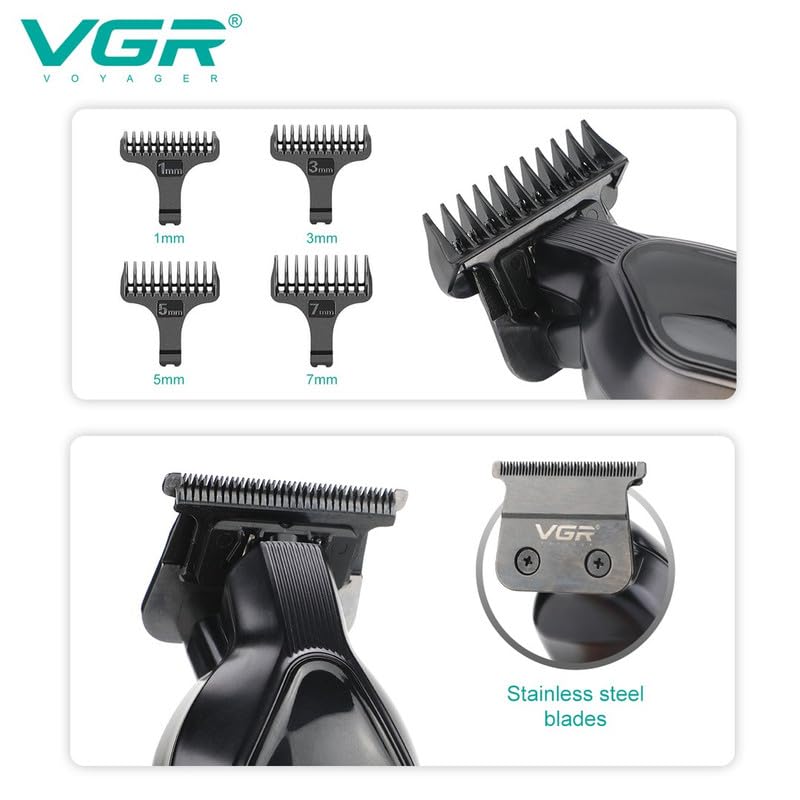
Image 3: A detailed view of the VGR V-921 Hair Clipper's T-blade and the four included guide combs, indicating their respective lengths (1mm, 3mm, 5mm, 7mm).
3. Setup
3.1 Charging the Clipper
- Ensure the clipper is turned off before charging.
- Connect the USB Type-C charging cable to the charging port at the bottom of the clipper.
- Plug the other end of the USB cable into a compatible USB power source (e.g., computer, wall adapter).
- The LED digital display will show the charging status and battery percentage. A full charge typically takes 2 hours and provides up to 200 minutes of runtime.
3.2 Attaching Guide Combs
- Select the desired guide comb (1mm, 3mm, 5mm, or 7mm) based on your preferred hair length.
- Align the comb with the clipper blade and push it firmly until it clicks into place.
- To remove, gently pull the comb away from the blade.
4. Operating Instructions
4.1 Powering On/Off
Press the ON/OFF button located on the front of the clipper to turn the device on or off. The LED display will illuminate when the clipper is active.
4.2 Using the Turbo Function
The VGR V-921 features a turbo function for enhanced power when needed. While the clipper is on, press the ON/OFF button again to activate the turbo mode. The LED display will indicate when the turbo function is active, providing a 7000RPM motor speed for thicker hair or faster cutting.
4.3 Trimming Hair and Beard
- Ensure hair is clean and dry before trimming.
- For general hair cutting, attach the appropriate guide comb.
- For close cutting or detailing (0mm bald head clipper), remove the guide comb.
- Hold the clipper against the hair, moving it slowly and steadily against the direction of hair growth.
- Use the T-blade for precise lines, edging, and intricate designs. The T-shaped round blade is designed for gentle contact with the skin to prevent accidental damage.
5. Maintenance
5.1 Cleaning the Blades
- After each use, turn off the clipper and remove any attached guide comb.
- Use the provided cleaning brush to remove loose hairs from the blades and the clipper body.
- Do not rinse the clipper under water unless specified as waterproof (this model is not specified as fully waterproof).
5.2 Lubricating the Blades
Regular lubrication ensures optimal performance and extends the life of your clipper. Apply a few drops of the provided lubricating oil to the blades after every few uses or when you notice reduced cutting efficiency. Turn the clipper on for a few seconds to distribute the oil evenly.
5.3 Storage
Store the clipper in a cool, dry place, away from direct sunlight and moisture. Use the protective cover to shield the blades from damage when not in use.
6. Troubleshooting
- Clipper not turning on: Ensure the battery is charged. Connect the clipper to the charger and check the LED display for charging indication.
- Reduced cutting performance: Clean the blades thoroughly to remove any trapped hair. Apply lubricating oil to the blades. If the issue persists, the blades may need professional sharpening or replacement.
- Unusual noise or vibration: Turn off the clipper immediately. Check for any foreign objects lodged in the blades. If none are found and the issue continues, contact customer support.
7. Specifications
| Feature | Detail |
|---|---|
| Model Number | V-921 |
| Power Source | Battery Powered |
| Battery Type | 1200 mAh Lithium Ion |
| Charging Time | 2 hours |
| Runtime | Up to 200 minutes |
| Motor Speed | 7000 RPM (with Turbo function) |
| Blade Material | Stainless Steel |
| Item Weight | 440 g |
| Dimensions (LxWxH) | 20 x 9.7 x 6.6 Centimeters |
8. Warranty and Support
Manufacturer Warranty: VGR offers a 12-month quality warranty against defects in materials and workmanship from the date of original purchase (invoice required). This warranty does not cover intentional or unintentional damage by the user.
Initiating a Warranty Claim: To initiate a warranty claim, contact VGR INDIA at WARRANTY@VGRINDIA.CO.IN. Provide a clear description of the problem, associated pictures, and a copy of your original invoice. Upon verification, the company will, at its discretion, either repair or exchange the product. Customers are responsible for the cost of transporting the product to VGR INDIA, while VGR INDIA will cover the return transport cost if a repair or exchange is necessary.
Importer Contact Information: VGR INDIA MUMBAI - 401104 INDIA


