1. Introduction
Thank you for choosing the VEVOR 10-inch 15-Amp Table Saw with Stand. This manual provides essential information for the safe operation, assembly, maintenance, and troubleshooting of your new table saw. Please read this manual thoroughly before use to ensure proper function and to prevent injury.
Safety Information
Always prioritize safety when operating power tools. Wear appropriate personal protective equipment (PPE) including safety glasses, hearing protection, and gloves. Ensure the work area is clean, well-lit, and free from obstructions. Disconnect power before performing any adjustments or maintenance.
2. Product Overview
The VEVOR Table Saw is a versatile tool designed for various cutting tasks in woodworking. It features a powerful motor, a durable blade, and a robust stand for stability.

Figure 2.1: VEVOR 10-inch 15-Amp Table Saw with Stand.
Key Components and Features:
- Powerful 15 Amp Motor: Delivers up to 5000 RPM for efficient cutting.
- 40-Tooth Blade: Designed for improved cutting efficiency across various materials.
- Adjustable Rip Capacity: Max 25-inch rip capacity for handling large workpieces.
- Sliding Miter Gauge: Allows for precise angle cuts from -60° to 60°.
- Adjustable Parallel Fence: Ensures reliable and smooth rip-cutting.
- Security Shield & Blade Guard: Enhances user safety by preventing sawdust and blade fragments.
- Overload Protection: Automatically activates to protect the motor from overheating.
- Compact & Foldable Stand: Easy to transport and store, ideal for jobsite use.
- Dust Port: Connects to a vacuum system for a cleaner workspace.

Figure 2.2: Package contents and overall dimensions of the VEVOR Table Saw.
The package includes: 1 x Folding Stand with Wheels, 1 x Black Vacuum Hose, 1 x Miter Gauge, 1 x Monocular Shield, 1 x Table Saw.
3. Setup
Before operating the table saw, proper assembly and setup are crucial for safety and performance. Follow these steps carefully.
3.1 Assembling the Stand
The foldable stand provides a stable base for the table saw. Assemble the stand components as shown in the diagrams, ensuring all bolts and nuts are securely tightened. The wheels should be attached to the designated legs for easy portability.

Figure 3.1: The compact design allows for easy transport and the dust port helps maintain a clean workspace.
3.2 Mounting the Table Saw
Once the stand is assembled, carefully place the table saw unit onto the stand. Secure it using the provided fasteners. Ensure the saw is level and stable on the stand before proceeding.
3.3 Attaching Safety Components
Install the monocular shield and blade guard. These components are vital for preventing sawdust and blade fragments from causing injury during operation. Connect the black vacuum hose to the dust port for effective dust collection.
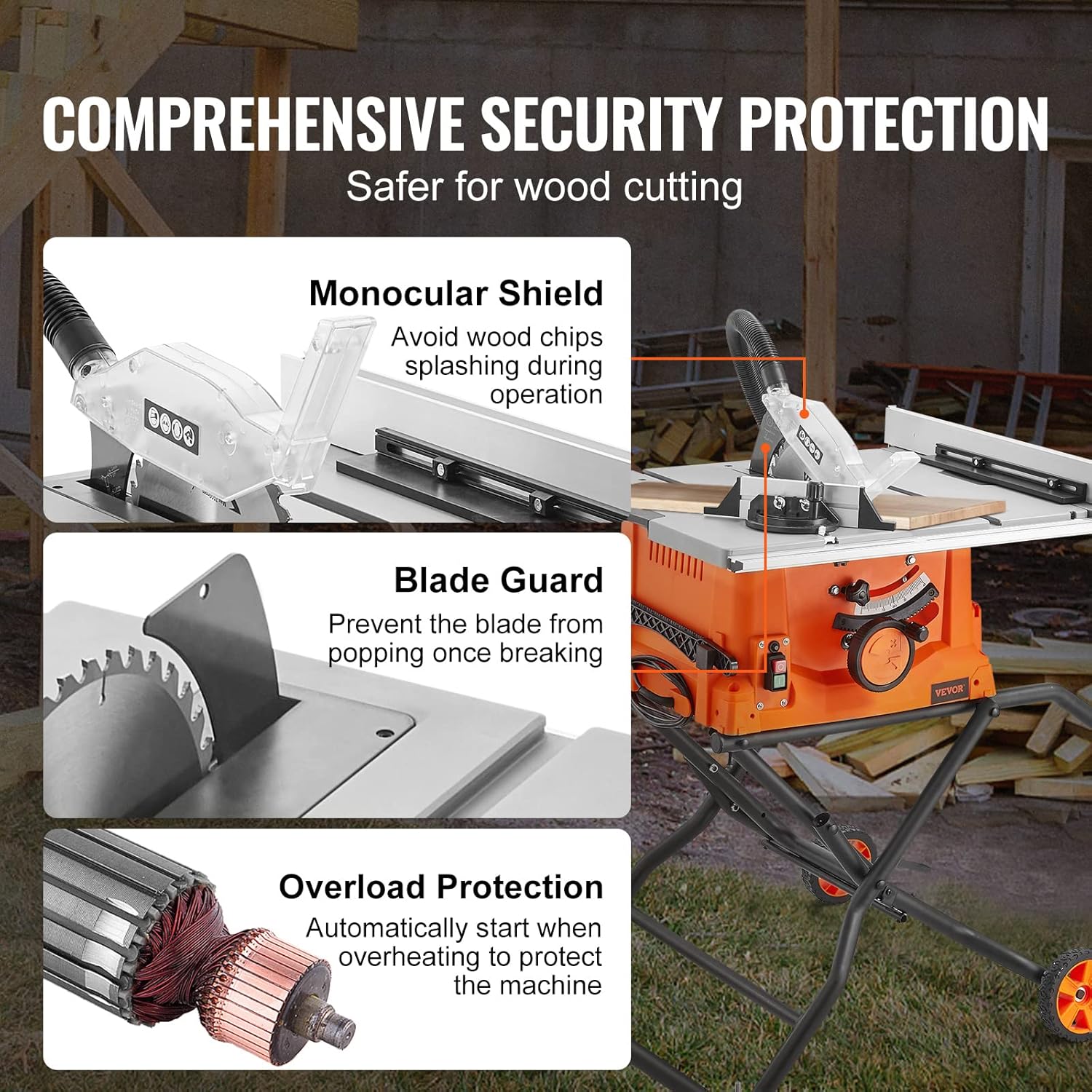
Figure 3.2: Comprehensive security protection features of the table saw.
4. Operating
This section outlines the basic operating procedures for the VEVOR Table Saw. Always ensure all safety precautions are followed before starting any cutting operation.
4.1 Powering On/Off
Connect the table saw to a suitable power outlet (240 Volts, 15 Amps). Use the ON/OFF switch located on the saw to power the unit. Allow the blade to reach full speed before beginning a cut.
4.2 Adjusting Cutting Depth and Angle
The cutting depth can be adjusted to suit the thickness of your material. The blade can also be tilted to achieve bevel cuts at angles between -60° and 60°. Use the adjustment knobs and levers to set the desired depth and angle, then secure them firmly.

Figure 4.1: Precise cutting capabilities for rip and bevel cuts.
4.3 Using the Rip Fence and Miter Gauge
For rip cuts, adjust the parallel fence to the desired width using the measuring guide rail. Ensure the fence is locked securely in place. For cross-cuts or angled cuts, use the sliding miter gauge. Always ensure the workpiece is firmly against the fence or miter gauge before cutting.

Figure 4.2: The 5000 RPM speed ensures excellent cutting performance.
4.4 Cutting Various Materials
The table saw is suitable for cutting various materials including wood, plastics, aluminum, and mild steel. Always use the appropriate blade for the material being cut and ensure the material is properly supported.

Figure 4.3: The table saw is capable of cutting a variety of materials.
5. Maintenance
Regular maintenance ensures the longevity and safe operation of your table saw.
5.1 Cleaning
After each use, disconnect the power and clean the saw. Remove sawdust and debris from the table, fence, and blade area. Use a brush or compressed air. Ensure the dust port is clear.
5.2 Blade Care
Inspect the blade regularly for sharpness and damage. A dull or damaged blade can cause kickback and poor cuts. Replace blades as needed. When changing blades, ensure the saw is unplugged and use appropriate tools.
5.3 General Inspection
Periodically check all fasteners for tightness. Inspect the power cord for any damage. Ensure all safety guards are in place and functioning correctly.
6. Troubleshooting
This section addresses common issues you might encounter with your table saw.
| Problem | Possible Cause | Solution |
|---|---|---|
| Saw does not power on | No power supply; tripped circuit breaker; faulty switch. | Check power connection; reset circuit breaker; contact customer support if switch is faulty. |
| Blade not cutting cleanly or burning wood | Dull or dirty blade; incorrect blade for material; improper feed rate. | Clean or replace blade; use appropriate blade; adjust feed rate. |
| Excessive vibration or noise | Loose blade; damaged blade; loose components; unstable stand. | Tighten blade; replace damaged blade; check and tighten all fasteners; ensure stand is correctly assembled and stable. |
| Rip fence not aligning properly or interfering with workpiece | Fence not locked securely; debris on table or fence rail; misaligned fence. | Ensure fence is fully locked; clean table and fence rail; adjust fence alignment as per manual instructions. |
| Blade off track or misaligned | Improper blade installation; internal alignment issue. | Reinstall blade correctly; if issue persists, contact customer support for alignment guidance. |
7. Specifications
| Specification | Value |
|---|---|
| Brand | VEVOR |
| Model Number | Table Saw with Stand |
| Power Source | Corded Electric |
| Voltage | 240 Volts |
| Current Rating | 15 Amps |
| Wattage | 1800 watts |
| Speed | 5000 RPM |
| Blade Length | 10 Inches |
| Number of Teeth | 40 |
| Max Rip Capacity | 25 inches |
| Cutting Angle | 90 Degrees (Adjustable -60° to 60°) |
| Item Weight | 59.4 Pounds |
| Product Dimensions | 50.8"L x 22.7"W x 41.3"H |
| Blade Material | High Speed Steel |
| Material | Alloy Steel |
| Color | Orange & Black |
8. Warranty and Support
This product is backed by VEVOR's commitment to quality. For specific warranty details, please refer to the documentation included with your purchase or visit the official VEVOR website.
Customer Support
For any questions, technical assistance, or service requests, please contact VEVOR customer support. You may also refer to the seller's return policy for details on returns and exchanges. This product typically includes a 30-day easy return policy.
For further assistance, please visit the VEVOR Store on Amazon.


